Happy Kids Timer Chores
- 1.51K
- 4.2
- Installs
- 1.00M
- Price
- Free

Screenshots

Analysis by Reviewed
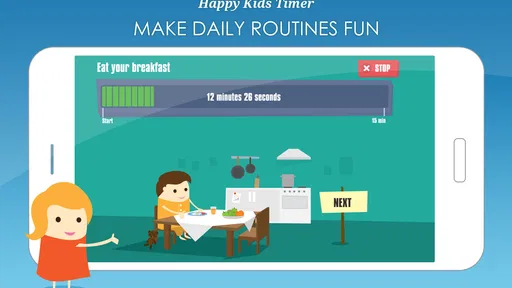
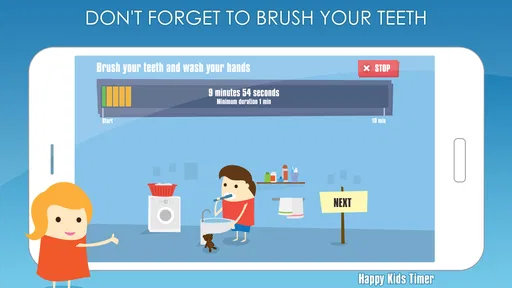
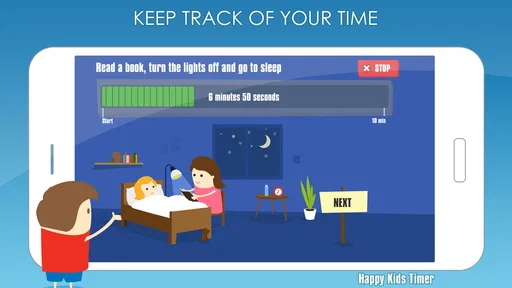
I see Happy Kids Timer Chores as a useful routine aid for families who want fewer repeated reminders, not a shortcut that makes children instantly love chores. Its central idea is to make time visible: a child can see that a task has a beginning and an end instead of hearing an adult say “hurry up” again. That can make familiar steps feel easier to understand, especially when the morning is busy. The approach works best when a parent uses it as a prompt and stays flexible, rather than treating the countdown as a strict deadline.
What a visual countdown can change
Many young children have trouble translating “get ready” into a sequence of actions. A timer can make the expectation more concrete, but the real value is not simply moving faster. It gives a parent and child a shared reference point: this is the task we are doing now, and this is when we will move on. For a child who responds well to visual structure, that can reduce the need for an adult to narrate every step.
I would begin with one routine the child already understands, such as getting dressed or brushing teeth. Keep the steps familiar and manageable, and stay close enough to answer questions. A countdown is less helpful when a child is still learning what a task involves; in that situation, teaching the task matters more than finishing it within a set time. That distinction is important if the goal is building independence rather than simply speeding through a morning.
A routine tool, not a parenting substitute
It helps to think of the app as a visual cue rather than a babysitter or a guarantee of cooperation. Parents still decide which tasks are appropriate, what “finished” means, and when a child needs help. If a child is tired, distracted, or upset, pausing the routine and responding to the reason may be more useful than insisting that the timer be completed. I would not use a countdown to rush meals, emotional conversations, or tasks where a child needs careful supervision.
That also makes the app easier to use without turning every household expectation into a timed challenge. Save it for recurring transitions that tend to cause friction, and leave room for days when the usual order does not fit. A tool that is meant to make routines calmer should not become a new source of pressure.
Transforming Chore Time into Fun Time
Okay, let's get real for a moment. Convincing kids to do chores is like negotiating a peace treaty some days. But with the Happy Kids Timer Chores, it's like having a little helper in your pocket. The app turns mundane tasks into a fun and engaging activity for your kids. Imagine this: a timer that not only tracks but also motivates your kids to complete their chores on time. It’s like a mini-race against time, and trust me, kids love it!
How It Works
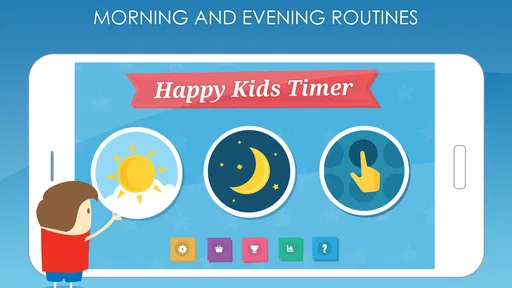
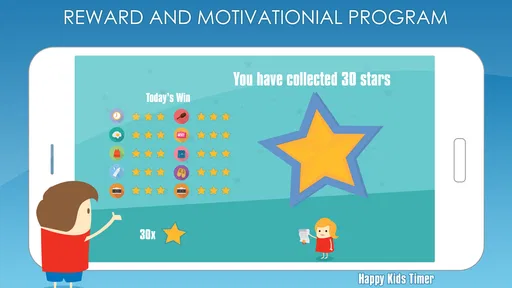
The app is designed with a simple yet effective interface that even the youngest users can navigate. You set up tasks and chores that need to be done, and your child races against the clock to complete them. The app features a series of animations and rewards that keep the kids hooked and eager to finish their assignments. Plus, the sense of accomplishment they get when they see their progress is priceless.
More From Our News Desk

 Remini - AI Photo Enhancer
Remini Is Our App of the Week for Bringing Old Photos Back to Life
A quick AI restoration tool earns its place by making faded portraits and soft, older photos feel vivid again—provided you know where its polish ends.

 PayPal - Pay, Send, Save
PayPal Reviewed: Who Benefits from Its Reach, and Who Should Skip It
PayPal is most useful when its reach and familiar checkout solve a real payment problem. These reader-by-reader recommendations show where it earns a place—and where friction wins.

 Millionaire 2026 Quiz & Trivia
 Makes Every Answer Count
A familiar quiz-show format succeeds or falters on tiny design decisions: how clearly the game guides a first answer, handles hesitation, and invites one more round.

 Decor Life - Home Design Game
Decor Life Turns Short Breaks Into Bite-Sized Decorating Jobs
A room-by-room decorating game built for quick sessions gains from modern phone habits, but its gentle pace still depends on patience, repetition, and a steady stream of design jobs.

 Sniper 3D:Gun Shooting Games
Sniper 3D’s Quick-Shot Appeal Faces the Upgrade Treadmill
The appeal is immediate: line up a target, steady your aim, and fire. The harder question is whether Sniper 3D can keep players returning after the first rush.

 Blockudoku®: Block Puzzle Game
Blockudoku vs. the Puzzle Pack: A Quick Puzzle With a Repetitive Edge
Blockudoku turns a clean grid into a quiet test of foresight. Against match-three polish and head-to-head simplicity, its lasting appeal is also its biggest limitation.
Latest News



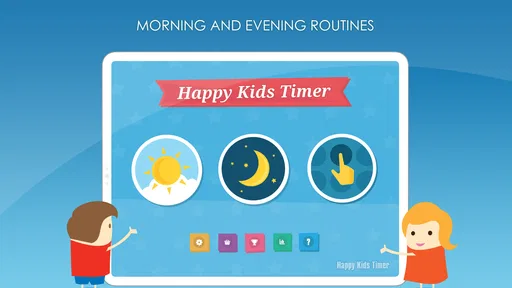
In practice, I’d use the countdown for a short sequence the child already knows, rather than turn every part of the day into a timed challenge. For example, a parent could set up getting dressed, brushing teeth, and putting shoes on as a morning routine, then stay nearby to help when a task is unfamiliar. That keeps the timer a prompt, not a substitute for supervision. It also avoids the trap of making a child feel that every ordinary activity is a race.
Making the routine workable at home
A practical setup should reflect the way your family actually moves through the morning, rather than an idealized schedule. If your child often gets stuck choosing clothes, for instance, it may help to settle that choice before starting the timed routine. The timer is better suited to prompting a known action than resolving a separate decision or conflict. This small bit of preparation can prevent the app from being blamed for a delay it cannot solve.
Another useful approach is to agree in advance on what counts as completing each task. “Put on shoes” is easier to understand than “be ready,” and a clear finish avoids arguments over whether the child has done enough. If the routine includes several steps, try not to add extra chores just because there is room for them. A short sequence that the child can complete confidently is a better test of whether visual timing helps than an ambitious list that feels like a demand.
Parents may also want to distinguish between tasks the child can do independently and tasks that still need help. A timer can encourage a child to start, but it cannot judge whether teeth have been brushed properly or whether clothing is suitable for the weather. Keep those checks in the adult’s hands. That balance lets the child take ownership of the routine without confusing speed with quality.
Why You'll Love It
What I really appreciate about this app is its ability to instill a sense of responsibility in children. It's not just about getting chores done; it’s about teaching kids the importance of time management and accountability. The app also provides a structured routine, which is super helpful for both kids and parents. Trust me, anything that makes our lives a tad bit easier is a win in my book.
Moreover, the app’s customization features are top-notch. You can tailor the tasks to fit your child’s age and capability, making it suitable for a wide age range. Whether it's making the bed, brushing teeth, or tidying up toys, the app covers it all. And the best part? It’s available on both Android and iOS, so you can get started no matter what device you’re using.
The most useful adjustment is to make each timed step small enough to feel achievable. “Get ready” can sound vague to a young child, while one clear task at a time is easier to act on. I’d also treat the routine as a shared plan: decide together what counts as finished, and change the order if a particular morning is unusually busy. The timer can add structure, but a child still needs a reasonable pace and encouragement, especially when learning a new task.
Small choices that affect whether it helps
One trade-off with a timer is that it can shift a child’s attention from the task to the clock. Some children find that motivating; others may focus on whether they are “winning” rather than on doing the job carefully. Watch what your child responds to during the first few tries. If the countdown brings excitement without distress, it may be a good fit. If it leads to rushing, repeated checking, or frustration, shorten the routine or stop using timing for that activity.
I would also avoid making the app the only way a child knows what to do. A routine should remain understandable when the device is elsewhere, out of battery, or simply not part of the moment. After a child has learned the order, you can sometimes invite them to say what comes next before starting the timer. That turns the app into temporary scaffolding for memory instead of a permanent prompt they must depend on.
For a household with more than one child, it is worth considering whether the same timing feels fair to everyone. Children of different ages or abilities may need different expectations, and a shared countdown can make one child feel hurried while another has plenty of time. Use separate, realistic expectations where needed, and do not compare siblings’ completion times. The useful outcome is a smoother routine, not a contest between children.
Where It Fits—and Where It Doesn’t
Happy Kids Timer is a parenting app from Kids Smart Zone, built around visual timing for children’s routines. It is free to download, rated for Everyone, and has a 4.3 average from around 22,000 ratings; it has also passed over a million installs. The current version is 2.16.0, and optional in-app purchases range from $1.28 to $2.99 per item. Those purchases are worth keeping in mind if you want to use it without spending beyond the free option.
I’d recommend trying it with children who respond well to visual cues and enjoy seeing a task reach a clear finish. It may be less suitable for a child who finds countdowns stressful, or for routines that need flexibility rather than a fixed pace. In those cases, a simple picture checklist or a calm verbal reminder may work better. Compared with a general chore chart, the timer adds a sense of pace; compared with a parent simply calling out each step, it can make the sequence more visible to the child. Neither alternative is wrong—what matters is whether the approach lowers friction in your home.
A realistic use is a school morning when one parent is packing lunch while a child gets dressed and brushes their teeth. Set a short, familiar routine, then let the child move through it while the adult handles nearby tasks. If the child gets stuck, pause the race and help rather than treating the countdown as a deadline. That small distinction matters: the app should support cooperation, not become another source of pressure or a reason to argue over seconds.
Who should try it, and who may prefer another approach
This app is most promising for a family with a repeatable routine and a child who enjoys visual prompts, animated feedback, or a clear finish line. It can be especially useful when a parent is tired of repeating the same sequence and wants the child to take a more active role. It is not a strong match for every household, though. If your child is already anxious about being late, struggles with timed tasks, or needs frequent adult guidance, a picture checklist or an unhurried verbal routine may create less pressure.
It is also worth thinking about what kind of problem you are trying to solve. If the main issue is forgetting the next step, a visual routine can help. If the difficulty comes from a child objecting to a particular chore, a countdown alone is unlikely to address the reason. A conversation, a choice between two acceptable tasks, or doing the first step together may work better. I would use the timer to support a routine that is basically agreed upon, not as leverage to make a reluctant child comply.
Compared with a paper chore chart, the app’s distinctive appeal is the timed, animated experience; a chart is quieter and can stay visible without a device. Compared with ordinary phone alarms, it is more child-oriented in its presentation, while an alarm may be enough for older children who already know the routine. The better choice depends on whether your child needs an engaging visual cue or simply a reminder. There is no benefit in adding an app if a low-tech solution already works reliably.
Questions to consider before building it into the day
A common practical question is whether the timer should be used for every chore. I would not start that way. Choose one short, predictable routine and see how your child reacts; if it helps, extend it selectively. Another question is what to do when time runs out. Treat that as a cue to check in, not as proof that the child has failed. Help them finish or adjust the plan, then decide whether the task was too large or the timing was not a good fit.
Parents may also wonder whether the app can replace supervision. I would say no: it can make expectations easier to see, but adults still need to set appropriate tasks and check work when safety or quality matters. Nor would I assume every child will find a countdown fun. Let the child’s response guide you, and stop if the tool increases tension. A routine aid succeeds when it makes cooperation easier, not when it keeps a child occupied at any cost.
The app is free to download, but optional purchases are available, so families who want to avoid spending should check the purchase choices before handing the device over. Its Everyone age rating makes the general audience clear, but it does not mean every feature or interaction will suit every child. I would explore the setup together first and explain how the timer will be used, rather than introducing it in the middle of a stressful morning.
Final Thoughts
In a world where screen time is often seen as the enemy, Happy Kids Timer Chores flips the script by using technology to teach valuable life skills. It’s a brilliant way to encourage kids to take on responsibilities while making it a fun experience. If you’re looking to turn chore time into a joyful and productive part of the day, this app is definitely worth checking out.
So, there you have it! Give it a whirl and watch your kids transform into little chore champions. Who knew chores could be this much fun?
My verdict is that this is best treated as a practical routine aid, not a magic fix for resistance or a replacement for parenting. Start with one predictable part of the day, keep the tasks age-appropriate, and see whether your child enjoys the visual countdown before building it into more routines. If the clock creates tension, switch back to a checklist or a gentler reminder. Used with that flexibility, it can make everyday expectations easier to follow without turning family life into a competition.
Happy Kids Timer Chores Frequently Asked Questions
Does Happy Kids Timer Chores help children follow routines without constant reminders?
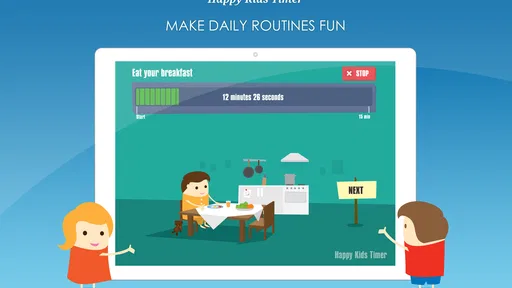
The app uses a visual countdown timer to help children learn their morning routine, giving them a prompt to follow as they move through everyday tasks. It can make the sequence more visible and engaging, but it is best understood as support for a parent-led routine rather than a substitute for adult guidance. Families can decide whether this style of reminder works for their child.
Is Happy Kids Timer Chores intended for parents or children to use?
Happy Kids Timer Chores is a parenting app designed around children’s routines, so it can be useful for parents setting up or supporting a routine and for children following its visual prompts. Parents remain involved in deciding which tasks make sense for their household. The app’s Everyone content rating may also help families assess its general suitability, alongside their own child’s needs and preferences.
Can I use Happy Kids Timer Chores for routines other than mornings?
Its stated focus is helping children learn their morning routine with a visual countdown timer. The app’s chore and routine approach may also be relevant to families organizing other everyday tasks, but the central experience is built around helping a child follow a sequence. Consider whether that focus matches the routine you want to support before downloading.
Does Happy Kids Timer Chores require an internet connection to use its timer?
A visual countdown timer is the app’s central idea, but whether particular functions require an internet connection can depend on the feature and device. Before relying on the app for a time-sensitive routine, try it on your device and check how the functions you plan to use behave. This is especially sensible if you expect to use it somewhere with limited connectivity.
Is Happy Kids Timer Chores free, and should I check for optional purchases?
Happy Kids Timer Chores is available to download for free, and it also offers optional in-app purchases. Those purchases are listed from $1.28 to $2.99 per item, so parents may wish to review the purchase options and their device’s purchase controls before handing it to a child. You can begin by seeing whether the free experience suits your family’s routine.
Pros
- Engaging interface for kids.
- Customizable chore list.
- Encourages time management.
- Positive reinforcement.
- Easy to use for parents.
Cons
- Limited free features.
- Ads can be distracting.
- Requires parental guidance.
- Limited chore variety.
- No offline mode.