Hailuo AI: AI Video Generator
- 530.00
- 4.2
- Installs
- 5.00M
- Price
- Free

Screenshots
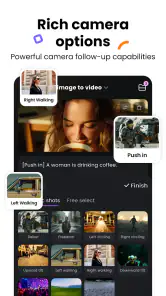
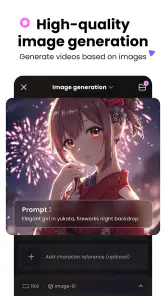
Analysis by Reviewed
I judge an AI video app by what happens when the first attempt is not quite right. With Hailuo AI: AI Video Generator, the appeal is the short path from an idea to a moving visual, but getting a useful result still takes a little thought. Hailuo AI is a free photography app from MiniMax AI, rated for Everyone, and its current version is 1.34.2. It has a 4.2 average from around 48,000 ratings and more than 5 million installs, so it has clearly found an audience; optional in-app purchases range from $5 to $767.99 per item.
Getting past the first prompt
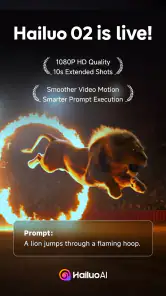
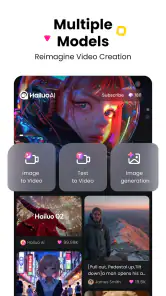
The first time I fired up the app, I was skeptical. "Can it really be that easy?" I wondered. But let me tell you, it is as simple as it gets. You start by entering a text prompt - it could be anything from a product pitch to a story idea. Then, the magic happens. The AI processes your input and generates a video that matches your concept. It's like having a personal video editor in your pocket!
Where people can get stuck is often not the button-pressing but the wording. A request that bundles several actions, settings, and moods together can leave the intended focus unclear. I get better results by describing one central subject and one clear action, then adding a visual mood or setting only if it matters. Treat the first result as a draft to assess, rather than assuming a prompt will translate into an exact shot.
Make the setup serve the idea
One of the standout features of Hailuo AI is its user-friendly interface. Navigating through the app feels intuitive. You don't have to be a tech wizard to get things done here. The app guides you through every step, ensuring you get the best results possible. Plus, the customization options are pretty extensive. From choosing the video style to adding background music, you can tweak the output to perfectly match your vision.
Before starting, I would settle on the intended use: a quick social post, a concept sketch, or a visual to discuss with a client. That decision helps keep the prompt focused and makes it easier to judge whether the result works. If the output misses the point, change one part of the description at a time; rewriting everything at once makes it harder to tell which instruction helped. The app is free to install, though in-app purchases are available, so I would check the purchase details in the app before committing to paid use.
A useful setup habit is to write the prompt as a small shot brief rather than as a story outline. Name the subject, describe what it does, and state the visual quality you care about most. For example, if the goal is a calm product teaser, I would prioritize the object and the mood instead of adding a long backstory. This makes the result easier to evaluate and gives me a clear next edit if the first version misses.
I would also decide in advance what counts as success. For an idea board, a recognizable mood may be enough; for a public post, the clip needs to communicate its point quickly and look appropriate beside the rest of the account’s content. That distinction prevents me from spending time chasing polish when the underlying concept is wrong. It also helps answer a practical question: should I keep refining the prompt, or move the idea into a conventional editor?
More From Our News Desk

Weather by Xiaomi Review: Clear at a Glance, Less Clear Up Close

X Under Pressure: Can It Recover When Posting Goes Wrong?

Clash of Clans Is Won Between the Battles

Android Auto Makes the Case for Quieter Car Software

MobiOffice: Transforming Mobile Productivity with Seamless Integration

EA SPORTS FC™ Mobile Soccer: Redefining Mobile Sports Gaming
Recover the workflow, not just the clip
Another cool aspect is the variety of templates available. Whether you're making a promo video, a tutorial, or just something fun to share on social media, there's a template for every occasion. And the best part? The quality of the videos is top-notch. You'd think a professional studio put them together!
For an everyday example, imagine I want a short visual for a weekend café post. I would first decide what the viewer should notice, then make the prompt revolve around that single subject. If the generated scene feels off, I would adjust the description and try again rather than spending time polishing a concept that never matched the post. Keeping the prompt and the intended audience together also helps avoid a clip that looks appealing but communicates the wrong thing.
For a small business or a solo creator, I would use that café clip as a draft for a planning conversation, not assume it can stand in for footage of the real venue. A generated visual can help the owner choose a tone, compare a few creative directions, or explain an idea to someone handling the final edit. If the post needs to show an actual menu item, location, staff member, or promotion accurately, I would use real footage for those details and treat generated material as an optional creative layer.
There is a useful trade-off in how I would iterate: each attempt should test one question. If I am unsure whether the subject or the atmosphere is causing the mismatch, I would keep one steady and change the other. That makes prompt experiments more informative than repeatedly replacing the whole description. I would keep a short note of the wording that produced the closest result, too; it is an easy way to avoid losing a promising direction while exploring alternatives.
When a clip is close but not ready, I would separate creative revision from finishing work. I can ask the generator for a different concept or mood, but exact trimming, sequencing, captions, and sound alignment belong more naturally in a standard editor. This division of labor is especially helpful when a project has a deadline: use Hailuo to explore or create a visual, then finish the deliverable in a tool designed for direct control over existing footage.
When a hiccup may be outside the app
If a generation appears to stall or the result does not show as expected, I would first check the basics: confirm the app is responsive, make sure the device has a stable connection, and give the current action time to finish before repeating it. Repeatedly submitting the same request can make it difficult to know which attempt produced which result. If the problem persists, reopening the app and trying a simpler prompt is a sensible way to narrow down whether the issue is with the request or the current session.
Not every disappointing result is an app failure. Text-to-video generation involves interpretation, so a prompt can be understood differently from how I pictured it. Likewise, a clip that looks fine in the app may not suit a particular platform, brand, or precise edit. I would review the output before sharing and use a conventional video editor when exact timing, frame-by-frame control, or carefully synchronized sound matters more than speed.
It is also worth distinguishing a technical problem from an expectation mismatch. If the app is responding but the scene keeps drifting away from the idea, I would simplify the request before troubleshooting the device. If the whole session is unresponsive, I would stop repeating the generation, check the connection, and reopen the app. Those are modest checks, but they prevent wasted effort and make it easier to describe the actual issue if I need help later.
For users wondering whether they need a powerful editing background, I would say no for basic prompt-led experiments: the appeal is that the starting point is a written idea, not a prepared timeline. But comfort with editing becomes useful once the generated clip needs to fit a larger project. Someone who only wants to trim phone footage, add subtitles, or arrange clips may find a familiar editor more direct, while a creator without footage who wants to visualize a concept may find this app’s approach more useful.
Useful for ideas, less so for exact edits
If you're a content creator, you'll appreciate how Hailuo AI saves you time and effort. No more hours spent on editing or figuring out complex software. With this app, you can churn out video content quickly, allowing you to focus more on your creative process. It's like having a creative partner who does the heavy lifting for you.
That makes it most useful for people who need a visual starting point: social creators testing concepts, small teams preparing rough campaign ideas, or anyone who wants to turn a written thought into something easier to react to. It is less suited to editors who need precise shot selection and timeline control. Compared with a standard mobile editor, the strength here is generating a scene from a prompt; the editor is the better choice when you already have footage and want exact cuts, captions, or sound placement. I would also avoid treating an AI-generated clip as a finished factual demonstration when accuracy is important.
Compared with shooting everything yourself, prompt-based creation can lower the effort needed to explore an image or mood, but it does not provide the evidence or personal detail that real footage carries. Compared with design tools that focus on arranging supplied images and text, this app is more compelling when the missing ingredient is a moving scene. I would choose among them based on the starting material: use Hailuo for an imagined visual, a camera for real-world proof, and an editor or design app when the assets already exist and need careful assembly.
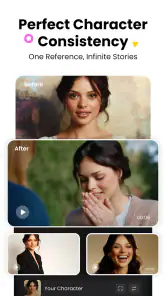
It suits people who enjoy testing visual ideas and can accept that a generated result may need another attempt. It is a weaker fit for anyone who needs the same character, object, or brand detail to remain exact across a tightly planned sequence. In that situation, the time spent steering generations may outweigh the speed of the first draft. I would build the central message around what the app can help visualize, then rely on controlled footage and editing wherever consistency is non-negotiable.
One practical question is whether a generated clip is ready to publish. I would not assume so. I would watch it from beginning to end, check that the visual communicates the intended message, and consider whether it could be mistaken for a real event or product demonstration. For casual creative posts, that review may be quick; for a client, business, or informational piece, I would be more careful and use authentic material for claims that need to be dependable.
Moreover, the app supports multiple languages, which is a huge plus if you're catering to a global audience. This inclusivity ensures that your content reaches a wider audience without additional hassle.
For a reader deciding whether to install it, the practical case is strongest if you want to experiment with a concept before committing to a shoot or an edit. The app is free to install, and its Everyone age rating makes it broadly accessible, but the presence of in-app purchases means I would check the terms shown in the app before relying on paid options. The Android minimum is version 7.0, so I would check the device’s system version if installation is unavailable.
A practical verdict for curious creators
In a world where visual content is king, Hailuo AI: AI Video Generator stands out as a must-have tool for anyone looking to make their mark. It's easy to use, packed with features, and delivers professional-quality videos in a fraction of the time it would typically take. So if you're looking to step up your content game, give this app a whirl. You might just find it to be the creative ally you've been searching for.
My recommendation is more specific: try it when speed and idea exploration matter more than exact control. Keep prompts focused, assess each result before sharing, and switch to a traditional editor when the job depends on precise finishing. The app was released on January 23, 2025, and lists Android 7.0 as its minimum operating system, making that a useful compatibility check before installing. With those expectations, it is a handy creative experiment rather than a replacement for every part of a video workflow.
I would skip it if my main goal were to edit existing recordings with exact cuts, build a carefully synchronized sequence, or document something that must be visibly true to life. I would also avoid planning a time-sensitive deliverable around repeated generations without leaving room to review and revise the result. In those cases, a camera and a conventional editor give me more predictable control.
For everyone else, the best way to approach it is as a sketchbook that happens to work in motion. Start with a clear subject and action, judge the output against the purpose rather than against an imagined perfect result, and move to another tool when precision becomes the priority. That balance is what makes Hailuo useful: it can turn a written idea into something people can react to, while leaving the final creative decisions in your hands.
Hailuo AI: AI Video Generator Frequently Asked Questions
Is Hailuo AI: AI Video Generator free to download, and are there paid options?
Hailuo AI is free to download, with in-app purchases available for users who want to explore paid options. Those purchases range from five dollars to 767 dollars and 99 cents per item, so it is worth reviewing purchase details in the app before committing. The free download makes it possible to try the app before deciding whether any paid option suits your needs.
Who is Hailuo AI: AI Video Generator designed for?
Hailuo AI is aimed at people who want to turn ideas into videos with the help of artificial intelligence. It may appeal to social media creators, marketers, and anyone who wants to experiment with video creation without relying on a traditional editing workflow. The app is listed in the Photography category, and its central pitch is an AI-powered video creator where ideas meet cinema.
What should I know about the app’s age rating before downloading it?
Hailuo AI carries an Everyone content rating, which makes it broadly suitable for general audiences. However, parents may still want to supervise younger users, particularly when they are creating or uploading personal media and considering in-app purchases. The app is a video creation tool, so it is also sensible to discuss what content children should make and share.
Does Hailuo AI: AI Video Generator work on my device?
Hailuo AI is an app for Android, and its listed minimum operating-system requirement is version 7.0. Before downloading, check your device’s software version and available storage so the installation and video creation process can run comfortably. The app is developed by MiniMax AI and is presented as an AI-powered video creator where ideas meet cinema.
What is Hailuo AI: AI Video Generator and what does it do?
Hailuo AI: AI Video Generator is an innovative application designed to create engaging videos using artificial intelligence. It allows users to generate high-quality videos by simply inputting text or selecting templates. This tool is particularly useful for content creators, marketers, and anyone looking to produce professional-grade videos without extensive editing skills.
Pros
- User-friendly interface for video creation
- High-quality AI-generated videos
- Supports various video formats
- Quick processing and rendering
- Regular updates and improvements
Cons
- Limited free features
- Requires stable internet connection
- Occasional glitches in video rendering
- High subscription cost
- Complex editing tools for beginners
- Category
- Photography
- Version
- 1.34.2











