GPS Speedometer & Odometer
- 851.00
- 4.5
- Installs
- 1.00M
- Price
- Free

Screenshots
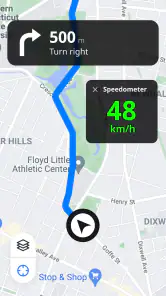
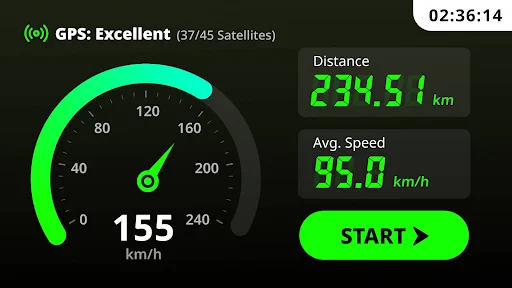
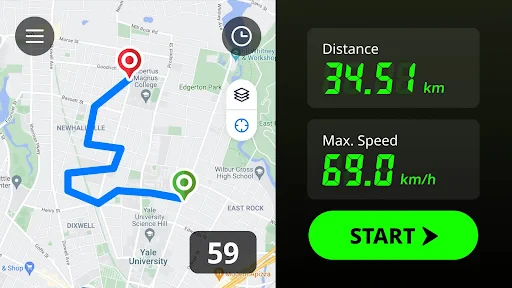
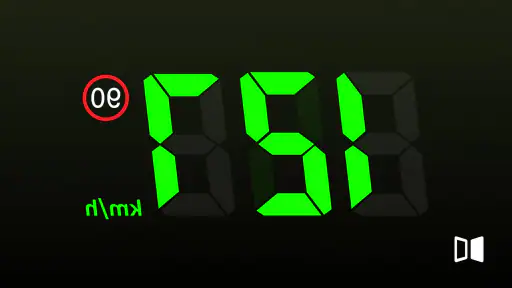
Analysis by Reviewed
I like the idea behind GPS Speedometer & Odometer: it gives your phone a focused job, showing travel speed and distance without asking you to learn a full navigation system. That makes it useful when I want a quick second view during a drive or a simple way to follow a ride. I’d treat it as a handy companion rather than a replacement for the vehicle’s instruments, though, because phone-based GPS readings depend on reception and are best checked safely, not watched while moving.
A simple tool with a clear purpose
This is a free Maps & Navigation app from QR & Barcode Scanner, and its appeal is the directness of the task: open it, let GPS establish a reading, and use the display to follow speed or distance. It has a 4.5 average from around 18,000 ratings, with over a million installs. Those figures suggest broad interest, but what matters in practice is whether this narrow tool fits your routine. For someone who already uses a map app for directions, the separate speed display can be useful precisely because it keeps the trip’s basic numbers in focus.
What's the Buzz About?
So, here's the lowdown. The GPS Speedometer & Odometer is like that reliable friend who always has your back. It's an app that turns your smartphone into a fully functional speedometer, using GPS to track your speed and distance. Whether you're in a car, on a bike, or just jogging, this app's got you covered.
Getting Started
First things first, let's talk about the setup. It's as easy as pie. You download the app, fire it up, and you're good to go. The interface is clean and straightforward, which means you won't be fumbling around trying to figure out how it works. Just tap, and you're in speed-tracking heaven.
Features to Keep You Hooked
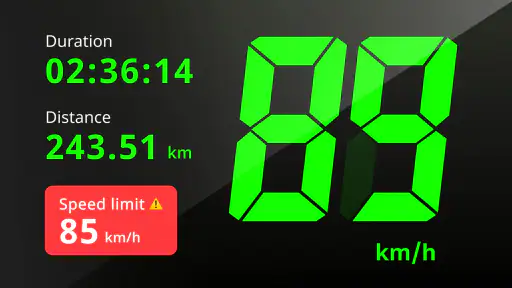
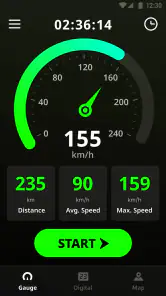
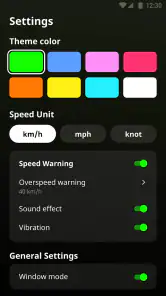
Now, let me tell you about the features that make this app a must-have. For starters, it gives you real-time speed updates. The speedometer display is clear and easy to read, even when you're zipping down the highway. And, if you're all about customization, you'll love the fact that you can switch between different units of measurement. Whether you're a kilometers-per-hour kind of person or you prefer miles-per-hour, this app caters to your needs.
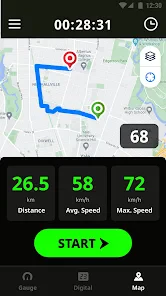
But wait, there's more! The odometer feature records your total distance traveled. It's perfect for keeping track of your journey, whether it's a long road trip or just a casual bike ride. Plus, if you like to keep things stylish, the app offers different themes to match your mood or vehicle.
Making a reading useful in everyday life
A realistic use for the distance counter is checking whether a familiar cycling loop is roughly the same length when I take a different street or add a short detour. I’d start tracking at a clear point, let the phone settle, and make a note at the end rather than trying to watch every change. That turns a live number into a practical comparison without pretending it is a surveyed route measurement.
More From Our News Desk

Weather by Xiaomi Review: Clear at a Glance, Less Clear Up Close

X Under Pressure: Can It Recover When Posting Goes Wrong?

Clash of Clans Is Won Between the Battles

Android Auto Makes the Case for Quieter Car Software

MobiOffice: Transforming Mobile Productivity with Seamless Integration

EA SPORTS FC™ Mobile Soccer: Redefining Mobile Sports Gaming
For a driver, a low-effort routine is to mount the phone before leaving and ask a passenger to glance at the speed display on an open stretch, then compare it with the car’s reading. It can help identify a consistent difference, but it cannot tell me why the readings differ or certify which one is exact. If the phone is the only display available, I’d still prioritize the vehicle’s road-ready equipment and local rules over a phone readout.
Jogging is a different case. A speedometer-style display can answer a narrow question—how far or how fast a run seems to be progressing—but it is not the same as a training app built around workout history, coaching, or exercise plans. I’d choose it for an occasional distance check, not if reviewing pace trends is central to my routine.
Where the Readout Helps—and Where It Doesn't
The most useful way I’d use a GPS readout is as a cross-check, not a command. On a quiet stretch, a passenger can compare the phone’s speed with the dashboard and notice whether the two differ consistently. That can be reassuring in an older car, but it is not a reason to adjust driving based on a glance at a phone. Set it up before setting off, place the device where it cannot obstruct your view, and let the driver focus on the road.
For a bicycle ride, the distance counter can help me compare routes or keep a simple record of how far I went without opening a full mapping app. A practical tip is to begin tracking only after the phone has a stable GPS reading and to keep the phone in the same place during a ride; moving it between a pocket and a bag can make the display harder to consult and may change how convenient it is to check. If the route passes through tunnels, dense buildings, or other places where GPS reception is interrupted, I would expect the live reading to be less dependable than on an open road.
How It Fits Beside Navigation Apps
Compared with a typical navigation app, this one has a narrower job. A map app is the better choice when I need turn-by-turn directions, route choices, or a map view; a dedicated speed display is more direct when I only want to see speed and distance. The trade-off is that the focused screen does not replace the wider context of a route planner. I would decide before a trip which task matters most, rather than trying to operate both while driving.
It can also complement a bicycle computer or a vehicle’s built-in display, but it is not automatically a substitute for either. A dedicated device may be easier to mount and glance at, while a phone offers a quick option if it is already with you. For jogging, I’d consider whether I want only distance and speed or a broader workout record; this app’s appeal is the former, not a full training log. The best fit is someone who values a simple readout and accepts the limits of GPS-based tracking.
Small choices that improve the experience
One useful habit is to decide what you want to learn before starting: a quick speed cross-check, a single trip’s distance, or a rough comparison between two routes. Keeping the goal narrow makes it easier to judge whether the result is helpful. If you start and stop tracking at different points each time, small differences in the chosen endpoints can make route comparisons less meaningful than they seem.
Unit selection is worth setting before a journey, especially if you switch between places or vehicles where your usual measurement differs. A clear, familiar unit reduces the chance of misreading a number at a glance. Themes may make the screen feel more personal, but I’d put legibility and a safe mounting position ahead of appearance; customization is not worth distraction.
There is also a practical phone trade-off: using it as a display means keeping it accessible and sufficiently charged for the rest of the trip. I would not make it the only plan for a long journey, and I would avoid moving or handling it while underway. A passenger can manage a check more safely, while a cyclist should stop before changing settings or trying to interpret a confusing reading.
What to Expect Before You Rely on It
GPS readings are not the same as a calibrated instrument. A changing signal can make a number fluctuate, so I would use the app to get a general sense of speed rather than treat every momentary change as exact. If the displayed speed looks odd, pause somewhere safe and give the phone time to settle instead of troubleshooting while moving. For legal speed compliance, the vehicle’s equipment and attentive driving remain the sensible reference points.
Distance tracking is most helpful when I use it consistently: start at the same point in a trip, avoid stopping and restarting casually if I want one continuous journey, and note the result when I reach the destination. That simple routine makes comparisons between familiar routes more meaningful. It is less suited to someone who needs detailed route history, turn guidance, or a dependable instrument for professional measurement.
Why You Might Want It
So, why should you consider downloading this app? Well, for starters, it's super handy for those who love knowing exactly how fast they're going. It's also great for keeping track of distances during workouts or road trips. And let's be real, it's just fun to have a speedometer right on your phone!
Moreover, it's a fantastic tool for drivers with older vehicles that might not have the most accurate speedometers. You can rely on this app for a second opinion, and trust me, it won't let you down.
Who gets the most from a focused speed display
I see the strongest fit for someone who wants an occasional, straightforward check without adding another full navigation setup to a phone. A driver with an older vehicle may appreciate a second reference, a cyclist may want a rough distance for a casual ride, and a person planning a road trip may like seeing how far a leg has taken them. In each case, the value is convenience, not instrument-grade certainty.
It is less compelling if your usual map app already shows the information you need, or if your main goal is to save detailed routes and review them later. Likewise, people who depend on turn instructions should keep using navigation software rather than expecting a speed-focused screen to guide a journey. The app’s simplicity is a strength only when that simple task is the one you actually need.
Who Should Skip It
I’d skip it if what you really want is navigation, a route diary, or a guaranteed precise measurement for work. It is also a poor fit if you expect a phone to be as easy to read as a properly mounted vehicle display, or if you plan to handle the screen while cycling or driving. Before installing, it is worth checking that your device runs Android 7.0 or later; the app is rated for Everyone. It is currently version 1.1.9, and while the download is free, in-app purchases are offered, with listed item prices ranging from $4.49 to $39.99. I’d try the basic experience first and only consider a purchase if it clearly suits a routine you already have.
Final Thoughts
In a nutshell, the GPS Speedometer & Odometer is a nifty little app that packs a punch. It's easy to use, offers a bunch of cool features, and can be a lifesaver when you need to track your speed or distance accurately. So, if you're on the hunt for a reliable speed-tracking app, give this one a whirl. You won't regret it!
My recommendation is narrower than that enthusiastic sign-off: I’d keep it in mind as a convenient second screen for occasional drives, rides, and distance checks, not as an essential travel tool. If you want a dedicated speed-and-distance display and understand that GPS has limits, it is an easy app to consider. If you need reliable navigation or a device you can read without distraction, choose the tool designed for that job instead.
GPS Speedometer & Odometer Frequently Asked Questions
What does GPS Speedometer & Odometer measure, and could it be useful for my trip?
GPS Speedometer & Odometer is a Maps & Navigation app focused on speed and distance. It can show your current speed while traveling and help you keep track of how far you have gone, with additional trip tools such as average speed and trip history. It is intended as a companion for journeys, rather than a replacement for paying attention to the road and your surroundings.
Does the app check speed limits, and can I set alerts?
The app’s store summary highlights speed-limit checking, and its feature set includes the option to set speed limits with alerts. This can help you keep an eye on your speed during a drive, but it should be treated as a helpful reminder rather than a substitute for road signs or local traffic rules. Keep the phone positioned so it does not distract you while driving.
Can I use the speed display as a head-up display while driving?
Yes. The app includes a HUD mode that is designed to make speed information easier to view while driving. As with any phone-based display, set it up before you start moving and make sure it does not obstruct your view or distract you. A clear, secure phone position and attention to the road should remain your priority throughout the trip.
Who makes GPS Speedometer & Odometer, and what kind of app is it?
GPS Speedometer & Odometer is a Maps & Navigation app developed by QR & Barcode Scanner. Its focus is practical travel information, including speed and distance readings, rather than turn-by-turn navigation as its main purpose. If you are looking for a simple way to monitor a journey, its features may suit that use; you can also consider whether you need a separate navigation app.
Is GPS Speedometer & Odometer free to download, and are there in-app purchases?
GPS Speedometer & Odometer is free to download, so you can try its speed and distance tools without paying upfront. The app also offers in-app purchases, with items ranging from around $4 to $40. If you plan to use it regularly, check the purchase options in your app store before buying so you know which features or extras are included.
Pros
- Accurate speed tracking with minimal error.
- Easy-to-read user interface for drivers.
- Customizable speed alerts enhance safety.
- Works offline without internet connection.
- Supports multiple units for global use.
Cons
- Consumes battery quickly during use.
- Interface can be cluttered with ads.
- Lacks advanced navigation features.
- No integration with other travel apps.
- Requires location access
- raising privacy concerns.
- Category
- Maps & Navigation
- Version
- 1.1.9












