GPS Location Tracker Phone App
- 55.00
- 4.6
- Installs
- 1.00M
- Price
- Free

Screenshots
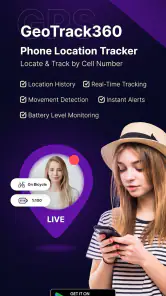
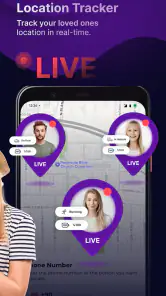
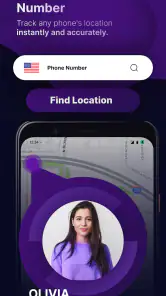
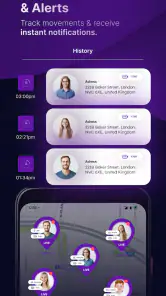
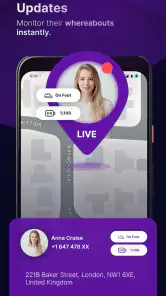
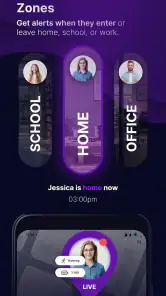
Analysis by Reviewed
I find the most useful way to judge GPS Location Tracker Phone App is to focus on its central promise: seeing a phone’s location on a map. That can turn a vague “Are you there yet?” into a quick check, which is handy for family coordination. But location sharing works best as an agreed routine, not as a substitute for asking someone directly or as a way to monitor them without their knowledge.
A map check is useful, but it is only one part of the picture
The app is a free parenting app from GPS Tracker & Location Tracker & Phone Tracker LAB. Its listing describes real-time GPS tracking, and the short name, GPS Tracker, makes the basic purpose clear. I would think of it as a practical location tool rather than a full family-organizing system: its value depends on having the right people involved and on everyone understanding when location is being shared.
One detail worth considering before relying on a map is what you need the location check to answer. If the question is simply whether a family member has reached a familiar destination, a glance may be enough. If you need to coordinate a pickup, the map can help you decide when to head out, but a quick message is still the better way to settle a precise meeting point or a change of plan.
That distinction also helps set realistic expectations. The map is most useful for broad coordination—“has the trip progressed?”—rather than fine-grained decisions about which entrance someone is standing beside. I would treat it as one source of context, then use a call or message whenever timing, safety, or a changed plan depends on an exact answer.
Make location checks part of a clear routine
For a realistic school-day example, a parent could check whether a child’s phone appears near school after the morning trip, rather than calling during class. Before depending on that routine, I’d explain the purpose to the child and agree on when the check is reasonable. That keeps the feature focused on reassurance and safety instead of making every movement feel scrutinized.
I’d also treat the map as a prompt, not proof. A displayed position can be less useful in places where a person is moving between buildings or has limited connectivity, so I would avoid making a rushed decision from one location check. If something looks unexpected, contacting the person directly is a more sensible next step than assuming the map tells the whole story.
A useful habit is to agree on what counts as a normal check before the first busy morning. For example, a household might decide that a parent checks arrival around the usual school commute, but does not keep refreshing the map throughout the day. That turns the app into a small part of an established routine and makes it easier to notice when a check is genuinely unusual.
More From Our News Desk

Weather by Xiaomi Review: Clear at a Glance, Less Clear Up Close

X Under Pressure: Can It Recover When Posting Goes Wrong?

Clash of Clans Is Won Between the Battles

Android Auto Makes the Case for Quieter Car Software

MobiOffice: Transforming Mobile Productivity with Seamless Integration

EA SPORTS FC™ Mobile Soccer: Redefining Mobile Sports Gaming
It is also worth deciding how the family will handle a phone that is switched off, left behind, or simply not reporting a helpful position. A map cannot replace a backup plan. If a child is late, the next step should already be clear—call, send a message, or contact the person responsible for the pickup—rather than waiting for the screen to resolve uncertainty on its own.
How it fits beside other location options
Compared with asking someone to send a one-off location through a messaging app, a dedicated tracker is aimed at repeated family checks rather than a single meetup. That can suit households that want a familiar place to look, while a message may be simpler for friends who only need to find each other once. I would choose based on the relationship and the task, not just on which option puts a dot on a map.
It is also worth deciding whose phone should be tracked and who should be able to see it before setting anything up. A family locator is most appropriate when participants know what is shared and are comfortable with the arrangement. If your goal is only to recover your own misplaced phone, a built-in device-finding service may be a more direct fit than a family-oriented tracker.
There is a practical trade-off between a standing family routine and temporary sharing. A dedicated tracker makes more sense when the same people need to coordinate repeatedly; a temporary location share is less commitment for a visitor, a friend meeting you downtown, or a relative who only needs to help with one trip. I would not ask everyone in a group chat to adopt a family tracker just to solve a one-time rendezvous.
For parents comparing options, the important question is not only which app can show a location. It is whether the people involved can understand and agree to its use, and whether the app fits the family’s existing phones and habits. If your household already has a trusted built-in location-sharing feature that everyone uses comfortably, switching just for another map may add friction without solving a real problem.
What to check before making it a daily tool
Location apps rely on a phone being available to report its position, so I would not use this as the only plan for a time-sensitive emergency. Agree on a backup, such as calling or texting, and make sure everyone knows what to do if the phone is unavailable. This small bit of preparation matters more than repeatedly checking a map.
The app is rated for Everyone and is free to install, with in-app purchases listed from $5.99 to $49.99 per item. I’d check the purchase screen carefully before choosing anything paid, especially if I only need occasional location checks. Its average rating is 4.6 from around 93,000 ratings, and it has over a million installs; those figures suggest broad interest, but they do not tell me whether its particular approach suits my household.
It was released on June 14, 2024, and version 2.9 supports Android 7.0 and later. That makes the minimum system requirement useful to check before installing on an older phone. For a family considering it, I’d also agree on expectations first: who will share, when location checks are appropriate, and how to handle a confusing map result.
Before paying for anything, I would first try to establish whether the free setup actually answers the household’s everyday question. If the need is occasional reassurance, a paid option may not be worthwhile; if you are considering a purchase, read its terms on the purchase screen and decide whether the benefit matches how often you expect to use it. The listed range is broad enough that I would never assume every paid item offers the same value.
One small but useful test is to check the routine on an ordinary day, when there is no pressure. Have the family member travel to a familiar place, then compare what the map suggests with what they report afterward. This does not prove that every future location will be equally clear, but it can show whether the app and the household’s phones are practical for the specific job you have in mind.
Initial Impressions
When I first downloaded the GPS Location Tracker Phone App, I was immediately impressed by its clean and intuitive interface. It’s really easy to navigate, making it perfect for tech newbies and seasoned pros alike. I mean, who has the time to fuss around with complicated menus when you just want to find your way?
That straightforward feel matters most when the app is being used for a quick family check rather than for exploring menus. In a rushed moment, the value is being able to get to the map without turning a simple question into a setup task. I would still spend a few calm minutes learning the app before relying on it during a pickup or commute, especially if another family member will be the one opening it.
Features That Stand Out
The app packs in some seriously handy features. For starters, it offers real-time location tracking. Whether you're keeping tabs on your kids to make sure they got to school safely or checking in on your partner during their evening jog, this feature is a lifesaver. And let me tell you, the peace of mind it provides is priceless.
Another cool aspect is the location history. Imagine being able to see where your phone has been for the last 30 days. It’s like having a personal diary of your travel adventures. This feature not only helps in remembering those random coffee shops you stumbled upon but also comes in handy when retracing steps.
For a family, the most thoughtful use of a location record is a narrow one: checking a route or trying to remember whether a person made a stop on the way home. I would not treat a history view as a complete account of someone’s day or use it to challenge them over small deviations. A location trace can give context, but a conversation is still the fair way to understand why plans changed.
Real-time checking is also more useful when paired with a clear purpose. Before opening the app, I would ask myself what decision the map could help me make: whether to leave for pickup now, whether to send a message, or whether to wait a few minutes. If there is no decision to make, repeated checks can easily become a habit that creates more worry than reassurance.
User Experience
The user experience with this app is top-notch. I love how it seamlessly integrates with other apps and services. For instance, you can easily share your location through messaging apps, which is super helpful when you’re trying to meet up with friends in a crowded area.
Plus, setting up alerts is a breeze. You can configure it to notify you when someone arrives at or leaves a particular location. It’s like having a virtual assistant who keeps you in the loop without being intrusive.
For a parent doing a school pickup, an arrival notification can reduce the need to keep opening the map while waiting. I would set expectations carefully, though: an alert is a convenience, not a guarantee that a person is standing at the exact spot where the pickup will happen. If the entrance or meeting point matters, a short message remains clearer than relying on a boundary or map marker.
Notifications can also become noisy if they are attached to too many places or used for every routine movement. I would start with only the one location that solves a real coordination problem, then see whether it helps before adding more. This keeps the app from becoming a stream of alerts that people learn to ignore, which defeats the purpose of receiving a useful prompt.
Security and Privacy
Now, I know what some of you might be thinking: What about privacy? Well, the GPS Location Tracker Phone App has got you covered. It offers strong encryption to keep your data safe and gives you full control over who can see your location. You can choose to share your whereabouts with only trusted contacts, ensuring your information doesn’t end up in the wrong hands.
In a world where privacy is often compromised, this app takes the extra step to make sure you're in control at all times. And honestly, that’s something I really appreciate in a tracker app.
Even with privacy controls, I would make consent an everyday part of using a family locator. A child should know why a parent is checking, and adults sharing with one another should be able to discuss when the arrangement is useful and when it feels excessive. A location tool can support trust when expectations are clear; secret or constant monitoring can damage it, regardless of which app is used.
I would also review who has access whenever the household changes—for example, when a phone is replaced or a family arrangement changes. The practical aim is to keep sharing limited to people who still need it. That is a better privacy habit than assuming that an old setup will remain appropriate indefinitely.
Who gets the most from it
In my view, this app is best for a household that has a recurring coordination need and wants a map check to be part of a mutually understood routine. Parents checking that a child’s commute is progressing, or family members arranging a pickup, are more likely to benefit than people who only need to find one another once. Its parenting focus makes that use case feel natural, but it should not be the sole safety plan for anyone.
I would skip it if the person whose phone would be tracked is not comfortable sharing, if the family only needs an occasional meetup location, or if the main problem is finding one’s own lost device. A messaging app’s temporary share or a built-in phone-finding service may be simpler in those cases. The best choice is the least complicated one that addresses the actual need without creating unwanted monitoring.
So, if you’re in the market for a reliable and user-friendly tracking solution, give this app a shot. It’s a must-have tool for anyone looking to keep tabs on their loved ones or just make sure they never lose track of where they’ve been.
Overall, the GPS Location Tracker Phone App is a solid choice for anyone seeking a dependable way to manage location tracking with ease and peace of mind.
GPS Location Tracker Phone App Frequently Asked Questions
What should I know about sharing my location with family members?
Location sharing works best when everyone involved understands what is being shared and why. Since this app is intended as a family locator and phone-tracking tool, talk through who will be able to view a phone’s location and when you expect it to be used. Agreeing on clear boundaries before setting it up can help make tracking a practical coordination tool rather than a source of concern.
What devices can install the GPS Location Tracker Phone App?
The app’s minimum operating-system requirement is version 7.0. Before downloading, check your device’s current software version and make sure it meets that requirement. The app is described as a GPS tracker and family locator, so it may suit people looking for map-based location tools, but checking compatibility on your particular device is a sensible first step.
Is the GPS Location Tracker Phone App free to download, and are there optional purchases?
The app is free to download and is listed in the Parenting category. It also offers in-app purchases, so you can try the basic app before deciding whether any paid options suit your needs. Its age rating is Everyone, making it broadly accessible, though families should still review the app together and decide how they want to use location sharing.
Who is the GPS Location Tracker Phone App intended for?
The GPS Location Tracker Phone App is a family locator and phone-tracking app designed for people who want to view a phone’s location on a map. Its parenting focus makes it relevant to families coordinating everyday routines, as well as users who want a location-sharing tool. Before relying on it, make sure the people whose locations are involved understand and agree to the arrangement.
What features does the GPS Location Tracker Phone App offer?
The GPS Location Tracker Phone App provides real-time location tracking, allowing users to monitor the whereabouts of their friends or family members. It also includes features such as location history, geofencing alerts, and precise GPS navigation, ensuring you have the tools to keep track of your loved ones securely and efficiently.
Pros
- Accurate real-time location tracking.
- User-friendly interface for easy navigation.
- Low battery consumption.
- Supports location sharing with contacts.
- Customizable alerts for geofencing.
Cons
- Requires active internet connection.
- Potential privacy concerns.
- Limited features in free version.
- Occasional GPS signal loss.
- May drain battery over extended use.
- Category
- Parenting
- Version
- 2.9











