GPS Tracker: Location Tracking
- 644.00
- 4.5
- Installs
- 5.00M
- Price
- Free

Screenshots
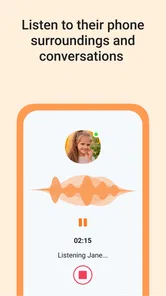
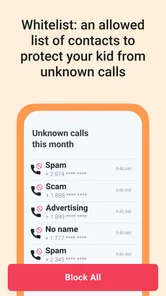
Analysis by Reviewed
I approach GPS Tracker: Geolocation App as a practical family-safety tool, not a substitute for talking with your child or agreeing on when location sharing is appropriate. Its focus is easy to understand: help a parent check a child’s position on a map. That can be reassuring during an ordinary school pickup, but the value depends on setting it up together and treating it as a shared safety measure rather than secret surveillance.
What to expect from the current app
This is a free parenting app from ANKO Solutions LLC, with optional in-app purchases ranging from $0.49 to $349.99 per item. It is rated for Everyone, has an average rating of 4.5 from around 102,000 ratings, and has been installed over a million times. Those figures suggest that location tracking is a familiar need for many families, though they cannot tell you whether the app will suit your household’s routines. It runs on Android 8.0 or later, and I would check that the parent’s and child’s phones are compatible before planning to rely on it.
The current version is 2.9.26-google, and the app was released on July 12, 2023. Those are useful reference points when checking compatibility or deciding whether to revisit the app after an update. They do not, on their own, show what has changed between releases, so I would avoid assuming that a particular feature or behavior is new. What matters most in day-to-day use is whether the location shown is clear enough for the decision you need to make, and whether the family can use the setup comfortably.
Who is likely to find it useful
I can see this fitting a family with a child who already carries a phone and follows a fairly predictable route: school, a nearby activity, then home. It may also help when one parent handles pickup while another is at work, since both can agree on how location checks fit into the plan rather than relying on a stream of calls. The key is that the child understands the arrangement and can still speak up when plans change.
It is less compelling for a household that only needs to coordinate a one-off meeting or that already uses a basic location-sharing tool successfully. A shared map built into a phone may be enough if all you want is an occasional check. I would also skip this approach for a child who does not carry a phone, for families uncomfortable with routine location sharing, or where the phone is often left behind or switched off. In those cases, a clear pickup plan and a direct check-in are more dependable than adding another app.
Where it can fit into family life
A realistic use is a child walking home from school or going to a nearby activity while a parent is at work. Instead of repeatedly calling, a parent can check the map first, then contact the child if something seems off. That small change can reduce unnecessary interruptions, but a map should be treated as a helpful indication, not proof that everything is fine. I would still make sure the child knows how to reach a trusted adult and what to do if plans change.
Before depending on location sharing, I would talk through who can see the location, when it is useful, and how the child can ask for help. This conversation matters especially with older children, who may reasonably want more privacy and independence. A tracker is most useful when everyone understands its purpose; if it becomes a way to monitor every ordinary movement, it can undermine trust rather than build safety.
More From Our News Desk

 Remini - AI Photo Enhancer
Remini Is Our App of the Week for Bringing Old Photos Back to Life
A quick AI restoration tool earns its place by making faded portraits and soft, older photos feel vivid again—provided you know where its polish ends.

 PayPal - Pay, Send, Save
PayPal Reviewed: Who Benefits from Its Reach, and Who Should Skip It
PayPal is most useful when its reach and familiar checkout solve a real payment problem. These reader-by-reader recommendations show where it earns a place—and where friction wins.

 Millionaire 2026 Quiz & Trivia
 Makes Every Answer Count
A familiar quiz-show format succeeds or falters on tiny design decisions: how clearly the game guides a first answer, handles hesitation, and invites one more round.

 Decor Life - Home Design Game
Decor Life Turns Short Breaks Into Bite-Sized Decorating Jobs
A room-by-room decorating game built for quick sessions gains from modern phone habits, but its gentle pace still depends on patience, repetition, and a steady stream of design jobs.

 Sniper 3D:Gun Shooting Games
Sniper 3D’s Quick-Shot Appeal Faces the Upgrade Treadmill
The appeal is immediate: line up a target, steady your aim, and fire. The harder question is whether Sniper 3D can keep players returning after the first rush.

 Blockudoku®: Block Puzzle Game
Blockudoku vs. the Puzzle Pack: A Quick Puzzle With a Repetitive Edge
Blockudoku turns a clean grid into a quiet test of foresight. Against match-three polish and head-to-head simplicity, its lasting appeal is also its biggest limitation.
Latest News



Why This App Stands Out
First off, the GPS Location Tracker For Kids is incredibly user-friendly. I mean, even if you're not tech-savvy, the app's intuitive interface makes it a breeze to navigate. The setup process is super simple, and you'll have it up and running in no time. Just install, register, and you're ready to go.
Real-time Tracking at Your Fingertips
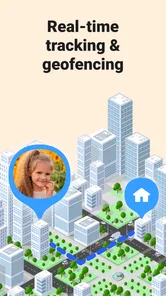
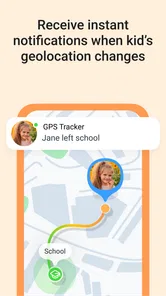
The real magic of this app lies in its real-time tracking capability. You can literally see your child’s location on the map, and it's updated continuously. I remember the first time I used it, I felt like I had superpowers, being able to know exactly where my kid was without having to call or text him incessantly.
Plus, you can set up geofences. Imagine drawing a virtual boundary around your neighborhood or school, and getting notified whenever your kid enters or exits this area. It’s like having a personal alert system that gives you peace of mind.
Safety and Communication in One
Another feature that I love is the SOS button. It’s a lifesaver (literally). If your kid is in trouble, all they need to do is tap the button, and you’ll receive an instant alert with their exact location. It’s comforting to know that help is just a tap away for them.
Moreover, the app allows for seamless communication. There’s an option for sending quick voice messages, which is perfect for those moments when typing just isn't feasible. I find this particularly useful when my kid is at a noisy playground or when their hands are full.
Making the map actionable
One useful way to combine these tools is to treat a geofence as a prompt to check in, not as a verdict. If an arrival alert comes through while your child is expected at an activity, you can wait for the agreed time and then send a short message if needed. That avoids turning every boundary crossing into an alarm. For a child who takes a different route occasionally, talk through what to do before the first trip so an ordinary detour does not become a source of panic.
The SOS option is also worth discussing when everyone is calm. I would explain what pressing it is intended to communicate, and make sure the child knows that a call to a trusted adult or emergency services may still be the right step depending on the situation. A button can make asking for help easier, but it cannot assess danger or replace a family’s plan. Practicing the steps once can make the feature less intimidating and reduce uncertainty in a stressful moment.
Battery and Data Efficiency
Now, I know what you're thinking. All this tracking must be a battery drainer, right? Surprisingly, the app is optimized to be battery-friendly. It cleverly balances between providing accurate location updates and conserving the phone's battery life. Trust me, you won’t find yourself charging the phone more often than usual.
Also, the data usage is minimal, so you don't have to worry about it eating up your data plan. It’s designed to be efficient, providing essential features without any unnecessary drain on resources.
Making location checks useful, not constant
One practical habit is to agree on a simple check-in routine before the child leaves: where they are going, when they expect to arrive, and what they will do if plans change. That gives the map a clear purpose. If a location appears delayed or unexpected, I would first try a calm call or message rather than jump to conclusions; location tools can help narrow down a question, but they do not explain why someone is in a particular place.
Geofences are best kept focused on places that matter to your routine, such as home or school, rather than creating a long list of boundaries. Too many alerts can become background noise, and then the one notification worth noticing is easier to miss. I would also explain the boundaries to the child so an arrival or departure alert feels like an agreed check-in, not a hidden test.
How it compares with simpler options
Compared with occasional calls or texts, a location app can answer “where are you?” without requiring the child to stop and type. That is useful on a walk or during a busy activity, especially when a quick voice message is easier than a written reply. Compared with relying only on a phone’s built-in location sharing, this app’s appeal is its parenting-oriented framing and the safety and communication tools described here. Families already satisfied with a basic shared map may not need another app; those who want a more child-focused routine may find the extra structure worthwhile.
There are trade-offs. Location checks depend on the child having a phone and being able to use it, so this is not a solution for every age or situation. A child who does not carry a phone, or a family that prefers not to share location continuously, may be better served by agreed pickup times and direct check-ins. I would also avoid treating a location display as an emergency service: if there is immediate danger, contact local emergency help rather than waiting for an app notification.
Questions worth settling before relying on it
Will it still help if a phone is left at home? No: the map can only support a plan when the child has their device with them and can use it. I would agree on a backup, such as a known meeting point or a trusted adult to contact, instead of assuming the app will cover every trip. This is especially important for younger children or activities where carrying a phone is not practical.
Does seeing a location mean a child is safe? Not by itself. A map can help you decide whether to check in, but it cannot show what is happening around the child or explain a change in plans. Treat the location as one clue within a wider routine of communication, and avoid making a serious decision based only on a dot on a screen.
What if the app does not match the family’s privacy expectations? Then I would not force it. A less frequent check-in, a planned arrival message, or the phone’s simpler sharing option may suit you better. Families should also revisit the agreement as children grow; a setup that feels reasonable for a younger child may feel too intrusive later. The useful measure is whether the arrangement still feels proportionate to the child’s independence and the actual journey.
Choosing it with clear expectations
Parents often wonder whether they need to pay to try it. The app is free to install, while in-app purchases are available; because purchases can vary widely in cost, I would review each option inside the app before confirming anything and decide whether it addresses a real need. If your main goal is simply to check a child’s location, start with that basic use and avoid buying extras until you understand the family’s routine.
I would also make a quick setup checklist: confirm both phones meet the Android requirement, test that the family can see the map as expected, and agree on what the SOS option is for. A calm practice run helps a child know what to do without making the feature feel frightening. If the app does not fit your family’s privacy preferences or the child finds it intrusive, it is reasonable to stop using it and choose a less frequent check-in method.
What the version history can and cannot tell you
The release date and current version give me a way to identify the build I am considering, but they are not a feature-by-feature account of the app’s evolution. For an existing user, the sensible habit is to read the change notes shown when an update is offered and then test the family’s essential routine afterward: can the parent still find the map, do agreed alerts behave as expected, and can the child reach the intended communication option? That practical check is more useful than assuming an update must have changed a particular tool.
I would also keep the family’s routine independent of any single screen layout. If a child knows the meeting point, the expected arrival time, and whom to contact, those habits still work even if an app update changes where a control appears. The version number is useful for troubleshooting conversations and compatibility checks, while expectations about future improvements should remain just that—expectations until a release actually explains them.
My take for families
With its current version in place, this app offers a straightforward way to bring map-based location checks into a family’s routine, with geofences and communication options adding more than a bare map. I would recommend it most to parents of children who already carry a compatible phone and who can agree on sensible boundaries together. It is less suitable for families seeking a covert tracker, a guaranteed emergency response, or a way to replace trust and conversation.
For me, the best test is whether it makes a specific routine calmer without making the child feel watched all day. If it helps you avoid unnecessary calls during a familiar trip and gives your child a clear way to ask for help, it has a useful place. Keep expectations realistic, review any paid choices carefully, and let the family agreement—not the map—guide how you use it.
In conclusion, the GPS Location Tracker For Kids is a game-changer for parents. Whether you're a tech enthusiast or a newbie, this app offers a straightforward and effective solution to keep tabs on your little ones. The peace of mind it provides is invaluable, and I can’t recommend it enough. Give it a try, and you'll wonder how you ever managed without it!
GPS Tracker: Location Tracking Frequently Asked Questions
Can GPS Tracker: Geolocation App help me locate a family member’s phone on a map?
Yes. GPS Tracker: Geolocation App is described as a GPS phone tracker for finding kids on a map, with location tracking and parental control. It is aimed at parents who want a phone-based way to check a child’s location. Before downloading, consider whether this family-focused purpose fits your needs and whether the app will be available on the devices involved.
Is GPS Tracker: Geolocation App free to download, and are there optional purchases?
GPS Tracker: Geolocation App is free to download, so you can install it without an upfront purchase. It also offers in-app purchases, with prices ranging from under a dollar to several hundred dollars per item. Check the purchase options in the app before committing, especially if you intend to use it regularly. The app is listed for everyone and is designed for parenting and family location tracking.
What devices and operating systems can run GPS Tracker: Geolocation App?
The app supports Android devices running version 8.0 or later. Before downloading, check your device’s operating system in its settings to make sure it meets that requirement. GPS Tracker: Geolocation App is a parenting app focused on finding children on a map, so its usefulness depends on having the app available on the devices involved in location tracking.
What are the main features of the GPS Location Tracker For Kids?
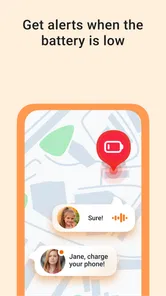
The GPS Location Tracker For Kids offers real-time tracking, allowing parents to monitor their child's location at any moment. It provides location history, geofencing alerts, and emergency SOS features. The app also includes a battery life indicator for the child's device and a secure platform to ensure user privacy. These features make it a comprehensive tool for child safety.
How accurate is the location tracking feature in the app?
The GPS Location Tracker For Kids uses advanced GPS technology combined with Wi-Fi and cellular networks to provide highly accurate location data. While it generally offers precise tracking, the accuracy can vary depending on environmental factors such as tall buildings or dense forests. However, in most urban and suburban areas, the app delivers reliable location updates.
Pros
- Real-time location tracking
- User-friendly interface
- SOS alerts for emergencies
- Geofencing capabilities
- Battery usage optimization
Cons
- Requires constant internet
- Limited free features
- Potential privacy concerns
- Dependent on device GPS
- May drain battery quickly