Google Arts & Culture
- 3.72K
- 4.2
- Installs
- 10.00M
- Price
- Free

Screenshots


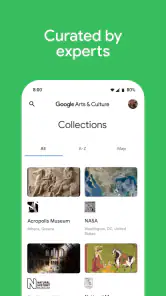
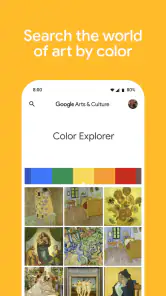
Analysis by Reviewed
Before I browse, I try to decide what kind of discovery I’m in the mood for: a close look at an artwork, a short cultural story, or a virtual visit. That small choice makes the first session feel purposeful without turning it into homework. Google Arts & Culture is best approached as a visual starting point, not a course with a required order, and that distinction helps set expectations from the beginning.
Who will get the most from it
I think it suits people who like learning through images and enjoy following their curiosity. You do not need to know art history already: a familiar painting, an unfamiliar object, or a tradition you have heard about can all be a way in. It is also useful for someone planning a gallery visit, a parent looking for a low-pressure topic to explore together, or a traveler who wants cultural context before or after a trip.
The trade-off is that open-ended discovery asks you to supply some direction yourself. If you are preparing for an exam, need a step-by-step syllabus, or want a short answer without browsing, a textbook, a structured course, or a focused reference may be more efficient. I would also choose another option if the main goal is to experience art at full scale: a screen can help me inspect an image, but it cannot reproduce the physical setting of a gallery.
A simple way to make a browse stick
When I find a story that interests me, I try to leave with one question rather than a long list of facts. For instance, I might wonder why an object was made or what a detail in a painting means. That question gives my next search a useful direction and makes it easier to tell whether I am learning something or simply moving from one attractive screen to another.
For a family browse, I would let each person choose one detail before reading the accompanying material. That gives children and adults a reason to look closely, instead of treating the app as a stream of content to consume. It also works well in a short break: one person picks an image, everyone notices something different, and the story becomes a conversation rather than a lecture.
When I first opened Google Arts & Culture, I expected a quick browse and ended up following one story into another. That is the app’s best quality: it gives a curious person an easy way to spend a few spare minutes with art, history, and cultural traditions, without needing a research plan. It is free, made by Google LLC, and sits in the education category. I’d recommend it to anyone who enjoys learning by looking, though it works best when you treat it as a doorway into a subject rather than a replacement for a museum visit or a carefully structured course.
What to expect when you open it
The experience is less like a conventional lesson app and more like a browsable collection of visual stories and cultural material. Some paths lead through artworks or historical subjects; others are lighter and more playful. That variety is useful when I have only a short break, but it also means the app does not always tell me what to study next. If you want a fixed curriculum, progress tracking, or a single topic explained from start to finish, a course-based learning app or a focused reference source may suit you better.
More From Our News Desk

Weather by Xiaomi Review: Clear at a Glance, Less Clear Up Close

X Under Pressure: Can It Recover When Posting Goes Wrong?

Clash of Clans Is Won Between the Battles

Android Auto Makes the Case for Quieter Car Software

MobiOffice: Transforming Mobile Productivity with Seamless Integration

EA SPORTS FC™ Mobile Soccer: Redefining Mobile Sports Gaming
For a first visit, I’d keep the goal small: choose one artwork, place, or tradition that already interests you, then follow the related material for a few minutes. This is more satisfying than trying to “see everything.” The app has an average rating of 4.2 from around 56,000 ratings, and more than 10 million installs. It is free and rated for everyone, so it is easy to try with family members, although the amount of information and the open-ended browsing style will suit some ages and attention spans better than others.
Getting from install to a first discovery
The first useful action does not need to be complicated. Open the app, browse until a subject catches your eye, and give one story your attention rather than hopping between every visible option. If you are visiting a gallery, the camera-based artwork identification described in the app can make a painting you have noticed a starting point for learning. I find that approach more memorable than searching for a famous name at random: the object in front of you gives the information a reason to matter.
A practical routine is to save your curiosity for moments when it naturally appears. On a commute, I might read about a historical object; before a museum visit, I could use a short browse to get familiar with a period or artist; afterward, I can look up something I saw and could not stop thinking about. The app is especially appealing to visual learners, casual history readers, families looking for a low-pressure shared activity, and anyone who enjoys discovering connections without committing to a long course.
Where the experience can be confusing
Because the material is varied, browsing can feel less orderly than using a textbook or a search engine with a narrow question. I try to make my own stopping point: one exhibit or story, then a quick note about what I want to explore next. That small habit helps prevent the pleasant but unproductive loop of opening one more item and forgetting what caught my attention in the first place.
It is also worth separating a vivid digital presentation from being physically present with an artwork. Images and virtual views can help me notice details and understand context, but they do not reproduce the scale, atmosphere, or experience of standing in a gallery. If I need a concise fact for a school assignment or a reliably structured explanation, I would cross-check with a focused reference or course rather than treating a casual browse as my only source. Google Arts & Culture was released on November 30, 2015, and its current version is 11.8.33-819241873.7-release; it requires Android 8.0 or later.
Discover the World from Your Couch
One of the coolest features about Google Arts & Culture is the ability to explore museums and exhibits from the comfort of your own home. I was able to take a virtual tour of the Louvre in Paris without having to deal with the pesky travel expenses or the jetlag. The high-definition images and 360-degree views make you feel like you're actually standing right there in the gallery, admiring the timeless pieces of art.
An Encyclopedia in Your Pocket
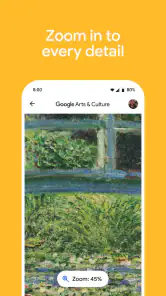
Remember those days when you had to flip through hefty encyclopedias to find information? Well, this app is like having a mini encyclopedia right in your pocket. Whether it's learning about the intricate details of Van Gogh's brush strokes or diving into the history of ancient civilizations, the app offers a wealth of information at your fingertips. And it's not just text-based; there are videos, stories, and even interactive features that make learning super engaging.
What really caught my attention was the feature that allows you to use your camera to identify artworks. I was at a local art gallery and whipped out my phone to learn more about a painting that caught my eye. In seconds, I had all the information I needed, right there on my screen. It's like having a personal art historian with you at all times!
Fun and Educational
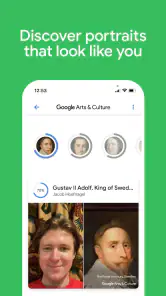
Let's not forget the fun aspect of the app. There's this quirky feature where you can find your portrait doppelgänger from art history. I had a blast trying to find my look-alike among the countless portraits. Spoiler alert: I found a 17th-century nobleman who could pass off as my twin!
For those who are curious about the different cultures around the world, the app offers a plethora of cultural stories and traditions. It's fascinating to learn about the diverse ways people celebrate, create, and live. It's like a cultural exchange program, minus the travel, where you just sit back and soak in the richness of global traditions.
Making the most of a first visit
For a first-time user, I’d choose one simple route: browse at home, pick a story that sparks a question, then use that question to guide the next visit. For example, if a virtual gallery makes me curious about how a particular painting was made, I can focus on its details rather than treating the tour as a checklist. This turns passive scrolling into a small act of learning, and it is easier to remember what I saw.
The app is also handy for a shared screen moment. I can imagine opening a cultural story with a child or a friend and asking what detail stands out before reading more. That works better than expecting the app to entertain everyone automatically; its value comes from the conversation and curiosity it can prompt. If someone mainly wants fast answers, a search engine is quicker. If they want a guided, sequential lesson, a course app is more suitable. This is strongest when discovery itself is the point.
Small trade-offs worth knowing
One useful habit is to pause before opening another feature and name what you want to find out. That keeps the broad collection from feeling like an endless feed. I’d also use the camera identification as a starting point, not the final word: it can help connect a real-world artwork to more context, while close looking and a gallery label still matter. The balance between visual access and physical presence is the central trade-off; a screen can bring a collection within reach, but it cannot replace the room around the work.
Its playful elements, including the portrait look-alike experience, make it approachable, but they are not the same as a study tool. I would skip it if I needed a tightly organized syllabus, formal assessment, or a quick answer with no browsing. For everyone else, especially the culturally curious, it offers an inviting way to turn an idle moment into a small discovery. Google Arts & Culture has an average rating of 4.2 from around 56,000 ratings, and its broad appeal is reflected in more than 10 million installs.
Choosing what to do next
After one first story, I would use the subject itself to decide the next step: follow a related artwork, switch to a cultural tradition, or pause and return later with a more specific question. This is a better fit for an unhurried evening or a spare moment than for a task with a strict deadline. The app can spark a useful line of inquiry, but for schoolwork I would verify key details with a suitable reference and cite that source as required.
If you are wondering whether it is worth installing just to try one feature, I think it is, especially if you already enjoy museums or visual history. The free access lowers the barrier to experimenting, while the Everyone age rating makes it approachable for a broad audience. Still, younger users may get more out of it when an adult helps choose a topic and turns browsing into a conversation, rather than expecting a screen full of cultural material to hold attention by itself.
Final Thoughts
In a world where our phones often distract us from the beauty around us, Google Arts & Culture is a refreshing change. It transforms your screen into a window to the world, opening up endless possibilities for exploration and learning. Whether you're an art enthusiast, a history buff, or just someone looking to expand their horizons, this app is a must-have.
So, if you haven't already, go ahead and download the app. Trust me, your future self will thank you for it. Just remember to keep that charging cable handy; once you start exploring, it's hard to stop!
Google Arts & Culture Frequently Asked Questions
Who develops Google Arts & Culture, and what is the app’s main focus?
Google Arts & Culture is an education app developed by Google LLC. Its focus is captured in its summary: stories from around the world for the culturally curious. It is designed for people who want to explore art, history, and cultural topics through an app, whether they are browsing casually or looking for an educational starting point. This focus may appeal to students, families, and anyone interested in learning about culture.
How much storage or mobile data should I expect Google Arts & Culture to use?
The amount of storage and mobile data you use can depend on how you explore the app. Browsing image-rich collections, videos, and virtual tours may use more data than reading text, so consider using Wi-Fi if you want to limit mobile usage. It is also sensible to check your device’s available storage before installing, particularly if space is already limited or you plan to save content for later.
Does Google Arts & Culture work on older Android devices?
Google Arts & Culture supports Android devices running version 8.0 or later, so it may suit an older phone or tablet if it meets that requirement. The app is an education experience from Google LLC, with stories and cultural material to explore. Before downloading, check your device’s Android version and available storage to make sure installation is possible.
Is Google Arts & Culture suitable for children and families?
The app is rated Everyone, making its stated age rating suitable for a broad audience, including families exploring art and culture together. Its educational focus can make it a useful starting point for discovering artworks, museum collections, and historical stories. As with any app, parents may want to explore the content alongside younger children and decide what best fits their interests.
What is Google Arts & Culture and what can I do with it?
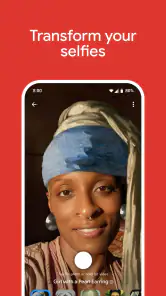
Google Arts & Culture is an app that provides access to a vast collection of artworks, cultural artifacts, and historical exhibits from around the world. Users can explore high-resolution images of famous paintings, take virtual tours of museums, and discover stories behind various art pieces. With features like Art Transfer and Art Selfie, you can transform your photos into artwork or find doppelgangers in famous paintings, making it a versatile tool for art lovers and curious minds alike.
Pros
- Vast collection of artworks and cultural artifacts.
- Virtual tours of famous museums available.
- Educational features for learning about art history.
- Supports various languages for global access.
- User-friendly interface with easy navigation.
Cons
- Requires stable internet for optimal experience.
- Some features need high-end device capabilities.
- Limited offline access to content.
- Lack of personalized recommendations.
- Occasional app crashes reported by users.
- Category
- Education
- Version
- 11.8.33-819241873.7-release













