FlashGet Kids:parental control
- 638.00
- 4.6
- Installs
- 10.00M
- Price
- Free

Screenshots

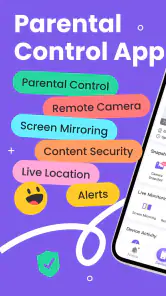
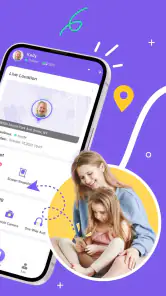
Analysis by Reviewed
When I first tried FlashGet Kids: parental control, I wanted a practical way to help my family manage device use without turning every evening into an argument about screens. It is a parenting app with several kinds of oversight in one place, so the first thing I’d keep in mind is that it can do more than set a timer. That breadth is useful, but it also makes a calm, deliberate setup more important than switching on every control at once.
What to Expect From a Broader Parental-Control App
FlashGet Kids is built around managing parts of a child’s digital life: app access, screen habits, location, and remote viewing tools. Compared with relying only on the standard controls already built into a phone, a dedicated parenting app can bring more of these decisions into one parent-facing routine. The trade-off is that both you and your child need to understand what is being monitored and why. If you simply need a basic downtime limit, your phone’s built-in settings may be easier; if you want several controls together, this app is worth considering.
I would decide on the purpose before installing anything. Is the immediate concern a distracting game, a child travelling home independently, or a lack of clarity about app habits? Naming one problem helps you choose a first control that feels proportionate. It also makes it easier to explain the change to your child without framing the app as a secret way to catch them doing something wrong.
Make the First Setup Session Manageable
To get started, install the app on your device and your child’s device, then follow the setup prompts. I’d set aside a little time when neither of you is rushing out the door. Have the child’s phone available, agree on what you are trying to improve, and make a short list of the controls you actually want to use. A focused setup is less confusing than trying to configure every option in one sitting.
Before changing app access, ask your child which apps matter for school, communication, hobbies, or downtime. That simple check can prevent an avoidable clash, such as blocking an app they use for a legitimate routine. I’d also make sure the child understands what the location and remote-viewing tools are for. Being open about monitoring is not just a courtesy; it helps keep a safety tool from damaging trust.
Compatibility is another early check worth doing. The Android version needs to be 7.0 or later, so confirm that on the child’s phone before spending time on setup. The app is free to install, but it includes in-app purchases, so I’d review the options in the app before relying on a paid feature as part of a family routine.
Get One Useful Result Before Adding More Rules
For a first success, I’d start with one concrete issue and check whether the app helps resolve it. If a child’s gaming is pushing homework later, look at the usage information, discuss a reasonable boundary, and then try a targeted app restriction if needed. You can see whether the change fits the household before adding location checks or more involved monitoring. That makes the first week a test of a family agreement, not a contest over who can impose the most controls.
More From Our News Desk

Clash of Clans Is Won Between the Battles

Android Auto Makes the Case for Quieter Car Software

MobiOffice: Transforming Mobile Productivity with Seamless Integration

EA SPORTS FC™ Mobile Soccer: Redefining Mobile Sports Gaming

How Microsoft OneDrive Became a Mobile Productivity Giant

How Google Translate Breaks Language Barriers Effortlessly
For example, imagine a child gets home from school, opens a game, and then struggles to move on to homework or dinner. A parent could use app-use information as a starting point for a conversation about when gaming works best, then agree on a boundary around that transition. If the child also travels independently, location tools may support check-ins on the journey. They should not replace agreed plans, a call when plans change, or basic lessons about what to do if the child feels unsafe.
A useful, less obvious habit is to review a report alongside the child rather than looking at it as a private scorecard. Ask what they were doing during a period of heavier use: it might have been a game, a chat with friends, or something else that matters to them. The app can show patterns in device activity, but context comes from the person using the device. Treating the report as a prompt for discussion usually gives you a more useful next step than reacting to a number alone.
Setting Up the Digital Boundaries
First things first, setting up FlashGet Kids: parental control is a breeze. All you need is to install the app on both your device and your child’s device. The app guides you through the initial setup with a user-friendly interface that even the least tech-savvy parents can navigate. Once installed, you can easily monitor and control the apps your kids are using. It’s like having a digital nanny who doesn’t need a coffee break!
Features that Make Life Easier
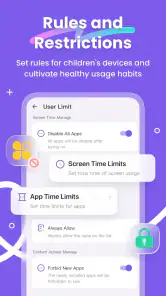
What I absolutely love about this app is its comprehensive feature set. You can set daily screen time limits, which is perfect if you want to ensure your kids don’t spend all their waking hours glued to their screens. There’s also the app blocking feature, which lets you block certain apps that you feel might not be suitable for your child. This gives me peace of mind knowing that my kids aren’t accessing anything inappropriate.
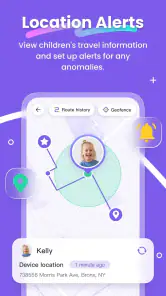
Another cool feature is the location tracking. Yep, you heard me right! You can keep tabs on your child’s whereabouts, which is especially handy if they are out playing with friends or on their way back from school. It’s like having an extra set of eyes on them without being overbearing.
Encouraging Healthy Digital Habits
One of the standout features for me is the ability to set tasks and rewards. I can assign tasks for my kids to complete, and once they do, they earn extra screen time or other rewards. This not only encourages them to use their devices responsibly but also promotes healthy digital habits. It’s a win-win situation!
I’ve also found the usage reports to be incredibly insightful. The app provides detailed reports on how much time your kids spend on each app, giving you a clear picture of their digital habits. This way, you can make informed decisions about any adjustments needed to their screen time or app usage.
A Practical First-Day Routine
For a calmer start, I’d begin with one small goal rather than switching on every control at once. For example, check which apps take up the most attention, then agree on a screen-time boundary together and try blocking only the one app that is causing a real problem. That gives your child a clear reason for the change and gives you a chance to see whether the rule works before adding more.
A useful everyday scenario is the after-school transition. If your child tends to open games as soon as they get home, app controls and usage reports can help you talk about when those games fit around homework or dinner. Location tools may also help when a child is travelling independently, but I’d treat them as a way to support check-ins, not as a substitute for communicating plans or teaching safe habits.
Where the Extra Tools Need Care
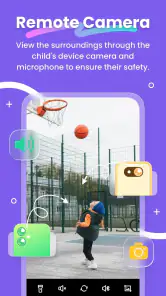
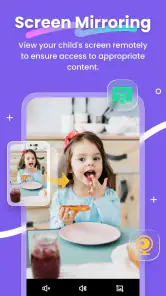
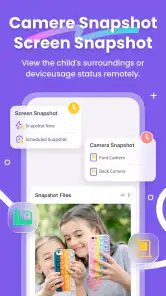
The remote camera and screen-mirroring functions make this more involved than a basic screen-time timer. They may appeal to parents who need a closer view of a child’s device activity, but they also raise a trust question: monitoring can feel intrusive if it is hidden or used without discussion. I’d explain what you plan to check and why, and keep the arrangement age-appropriate. For an older teen who expects more privacy, a simple family agreement or a less intensive built-in control may be a better fit.
It also helps to separate a useful alert or report from a complete picture of a child’s day. App activity can show patterns, but it cannot tell you why a child chose an app or whether a particular use was meaningful. I’d use the information to start a conversation rather than treating a report as a verdict. That approach makes the controls feel more like shared boundaries than a quiet surveillance system.
Choosing the Right Level of Control
Compared with the basic parental controls already available on many phones, FlashGet Kids brings location, app management, and remote viewing tools into a more parent-focused setup. That can be convenient if you want several kinds of oversight in one place. The trade-off is that a dedicated system asks you and your child to learn another app and agree on how it will be used. If your only goal is setting a bedtime limit, the built-in option may be simpler; if you need a broader set of controls across everyday routines, this app is more compelling.
FlashGet Kids is a parenting app from HONGKONG FLASHGET NETWORK TECHNOLOGY. It is free to install, rated for Everyone, and has an average rating of 4.6 from around 88,000 ratings, with over 10 million installs. The current version is 1.3.5.0, and in-app purchases range from $8.99 to $99.96 per item. I’d check the available purchase options before building a routine around a feature, especially if you want to keep the setup free.
When I’d Choose a Different Approach
I’d skip a dedicated monitoring app if the household is looking for a completely hands-off approach, if the child is old enough that this level of oversight would undermine a healthy privacy agreement, or if the only need is a simple daily limit. Built-in device controls can be a better match for that last situation because they avoid adding another service to learn and manage. On the other hand, families juggling app restrictions and location check-ins may find the wider toolkit more convenient, provided everyone understands the boundaries.
One practical trade-off is that a broad tool can tempt a parent to use every available option simply because it is there. I’d resist that. A location check may make sense for a child who travels without an adult, while remote viewing may be unnecessary for a child who uses a device in a shared space and talks openly about online activity. Match each control to a real need, then remove or relax it when that need changes.
Parents may also wonder whether a usage report should lead directly to a restriction. In my view, not usually. First ask whether the pattern is actually causing a problem, and whether a conversation or a schedule adjustment could solve it. Blocking is most useful when it addresses a clear concern; applied too broadly, it can disrupt normal routines and make children less willing to discuss their online lives.
Wrapping It Up
All in all, FlashGet Kids: parental control is a fantastic app for parents who want to ensure their kids are using their devices safely and responsibly. It’s packed with features that help manage screen time, block unwanted apps, and even track your child’s location. Plus, with the ability to set tasks and rewards, it encourages kids to develop healthy digital habits. If you’re a parent looking for a reliable way to manage your child’s digital life, I’d definitely recommend giving this app a shot. It’s been a lifesaver for me, and I’m sure it will be for you too!
Who I’d Recommend It To
I’d consider it most useful for parents who want more than a timer: families balancing app access, screen routines, and location check-ins may appreciate having those controls together. It is less suited to a household that wants no monitoring at all, or to a parent who needs only a quick bedtime schedule and would rather avoid installing and managing an additional service. A clear conversation with your child is part of making any parental-control tool work well.
My practical advice is to begin with one shared rule, review how it feels after a few days, and adjust together instead of piling on restrictions. FlashGet Kids is available for Android devices running version 7.0 or later. That compatibility detail is worth checking on the child’s phone before you start, so your first setup session is spent agreeing on boundaries rather than troubleshooting an unsupported device.
FlashGet Kids:parental control Frequently Asked Questions
What does the Everyone age rating mean for FlashGet Kids?
FlashGet Kids has an Everyone content rating, and it is a parenting app intended to help adults manage a child’s device use. The rating describes the app’s age classification, not a replacement for a parent deciding which controls are appropriate for their family. Parents can review the app’s tools and talk with children about how location, app blocking, and other supervision features will be used.
What should I know before setting up FlashGet Kids on a child’s device?
FlashGet Kids is designed to work with a child’s device as part of the setup, alongside the parent app. Before getting started, consider which device controls you want to use and explain them to your child in a way that fits your family’s rules. The app’s listed tools include location features, remote camera, screen mirroring, and app blocking, so setup may involve permissions relevant to the features you choose.
Who develops FlashGet Kids, and what does it cost to download?
FlashGet Kids is a free parenting app developed by HONGKONG FLASHGET NETWORK TECHNOLOGY. It is rated for Everyone and has an average rating of 4.6 from 88K ratings. The app also offers in-app purchases, with items priced from $8.99 to $99.96. You can start with the free app and consider purchases based on the features and plan that suit your family.
Which devices can run FlashGet Kids?
FlashGet Kids is available for Android and iOS, so parents can use it on either mobile platform. The Android version requires Android 7.0 or later. Before downloading, check that your device meets the operating-system requirement and that you are choosing the parent app intended for your own device. Its child monitoring features are designed to work with a child’s device as part of the setup.
What is FlashGet Kids: Parental Control?
FlashGet Kids: Parental Control is a comprehensive application designed to help parents monitor and manage their children's online activities. The app provides tools for setting screen time limits, filtering inappropriate content, and tracking online behavior, ensuring a safe digital environment for kids. It is available on both Android and iOS platforms. Its listed tools also include location features, remote camera, screen mirroring, and app blocking, giving parents several ways to supervise device use.
Pros
- User-friendly interface for parents.
- Customizable screen time limits.
- Real-time location tracking.
- Safe web browsing features.
- Easy app blocking capabilities.
Cons
- Requires constant internet connection.
- Limited free features available.
- Can drain battery quickly.
- In-app purchases can be costly.
- May invade child's privacy.

- Category
- Parenting
- Version
- 1.3.5.0