family locator - Locator 24
- 297.00
- 4.4
- Installs
- 1.00M
- Price
- Free

Screenshots
Analysis by Reviewed
When I think about a family location app, the useful question isn’t just where everyone is; it’s whether checking the map makes daily coordination calmer or adds another thing to manage. Family Locator - Locator 24 is built around that practical need. It gives relatives a shared way to check locations, and its map, alerts, and phone-battery details are aimed at situations where a quick glance can replace several messages. I’d consider it most useful for families who agree to share locations openly, rather than anyone looking for a way to monitor someone without their knowledge.
Choosing a useful first routine
Before inviting the whole household, I’d pick one recurring situation to test: a school pickup, an evening walk, or letting someone know a relative has reached a destination. A narrow trial makes it easier to see whether Locator 24 saves effort or simply adds another screen to check. It also gives everyone a chance to discuss what location sharing means in practice, rather than treating installation as blanket consent.
For a child who is old enough to understand the arrangement, I’d explain who can see the map and why the family wants it. For an older relative, I’d make sure the shared view is useful to them too, perhaps by helping coordinate visits rather than only checking on them. These small choices can make a location tool feel cooperative instead of one-sided.
What the app offers today
Locator 24 is a free parenting app from Mobile Software House, with optional in-app purchases ranging from $3.49 to $59.99 per item. It is rated for Everyone and runs on Android 6.0 or later. The current version is 2.7.36; the app was released on October 29, 2018. Its 4.5 average comes from around 43,000 ratings, and it has been installed over a million times. Those figures suggest it has attracted a substantial audience, though they don’t tell me whether its particular approach will suit your household.
One practical point to settle before relying on it is participation: family members need to install the app and share their locations for the shared map to be useful. It works best as a mutual arrangement, with everyone clear about who can see them and why. If relatives don’t want to share continuously, agree on a limited use—such as coordinating a pickup—rather than treating the map as an expectation that everyone must remain visible.
Keeping Tabs on Your Loved Ones
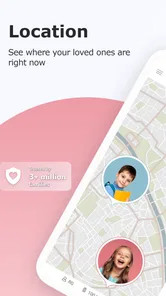
The core feature of Family Locator - Locator 24 is its real-time location tracking. Imagine being able to see where your family members are at any given moment. It’s like having a digital map where everyone in your circle is a moving dot. This is especially handy for parents wanting to ensure their kids are safe or for coordinating meet-ups without the endless “Where are you?” texts.
How It Works
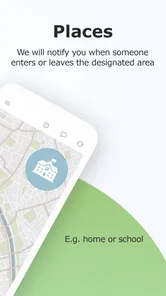
Once everyone in your family has the app installed, you can all share your locations with each other. The app uses GPS technology to provide accurate positioning, and you can even set up geofences. These are virtual boundaries that alert you when someone enters or leaves a designated area, like when your kids leave school or arrive at home.
More From Our News Desk

 Remini - AI Photo Enhancer
Remini Is Our App of the Week for Bringing Old Photos Back to Life
A quick AI restoration tool earns its place by making faded portraits and soft, older photos feel vivid again—provided you know where its polish ends.

 PayPal - Pay, Send, Save
PayPal Reviewed: Who Benefits from Its Reach, and Who Should Skip It
PayPal is most useful when its reach and familiar checkout solve a real payment problem. These reader-by-reader recommendations show where it earns a place—and where friction wins.

 Millionaire 2026 Quiz & Trivia
 Makes Every Answer Count
A familiar quiz-show format succeeds or falters on tiny design decisions: how clearly the game guides a first answer, handles hesitation, and invites one more round.

 Decor Life - Home Design Game
Decor Life Turns Short Breaks Into Bite-Sized Decorating Jobs
A room-by-room decorating game built for quick sessions gains from modern phone habits, but its gentle pace still depends on patience, repetition, and a steady stream of design jobs.

 Sniper 3D:Gun Shooting Games
Sniper 3D’s Quick-Shot Appeal Faces the Upgrade Treadmill
The appeal is immediate: line up a target, steady your aim, and fire. The harder question is whether Sniper 3D can keep players returning after the first rush.

 Blockudoku®: Block Puzzle Game
Blockudoku vs. the Puzzle Pack: A Quick Puzzle With a Repetitive Edge
Blockudoku turns a clean grid into a quiet test of foresight. Against match-three polish and head-to-head simplicity, its lasting appeal is also its biggest limitation.
Latest News



There’s also a handy feature that allows you to check the battery status of your family members’ phones. This means no more worrying about whether their phone died or they’re just not answering your calls!
Using alerts without turning them into noise
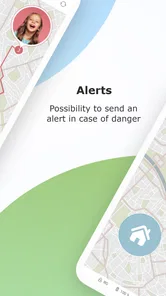
A useful way to approach geofences is to start with only the places that genuinely affect your plans. For example, a parent waiting to collect a child could use an arrival alert to know when to leave, instead of repeatedly checking the map. A household with several regular stops might add more boundaries later, but too many notifications can make people ignore the ones that matter. I’d also agree on what an alert means: arriving at school is a helpful status update, not a substitute for checking in if plans change.
The battery indicator has a different, quieter value. If someone stops appearing to move on the map, a low phone battery can help explain why, but it cannot tell you whether that person is safe or available. I’d treat it as context for deciding whether to send a message or call, not as proof that a location is current. That distinction matters most when a family is coordinating a pickup or travelling somewhere unfamiliar.
Turning a map check into a sensible plan
A location dot is most useful when it answers a practical question, not when it becomes a minute-by-minute measure of someone’s choices. If a family member is delayed, I’d first use the map as a clue, then contact them directly if the timing matters. That keeps the app in its proper role: helping people coordinate, rather than asking a screen to explain why someone has not replied.
It also helps to decide in advance what to do when a location looks old or unexpected. A quick call, a text, or waiting a few minutes may be more appropriate than repeatedly refreshing the map. I would avoid making a household rule that treats every gap in movement as a problem; phones can be put away, left charging, or run low, and the map cannot supply the context a conversation can.
User-Friendly Interface
The app’s interface is super easy to navigate. Upon opening it, you’re greeted with a map and a list of your family members. You can easily zoom in and out to see where everyone is, and tapping on a family member’s icon gives you more details like their exact address and battery percentage. It’s intuitive and designed with the user in mind.
The app also offers some customization options. You can set your own profile picture, choose from different map views, and even customize alerts so you’re notified only about what matters most to you.
A realistic family routine
Picture a parent finishing work while a teenager is travelling home. Rather than sending several “Are you there yet?” messages, the parent can check the shared map and, if they have set an appropriate boundary, receive an alert on arrival. If the teenager’s phone battery is nearly depleted, that detail can prompt a quick call or a plan to conserve power. The benefit is less back-and-forth, but the family still needs a simple backup plan for missed updates: a text or call remains more reliable than assuming a map will settle every question.
This is where Locator 24 differs from ordinary messaging or a one-off map search. A message requires someone to reply, while a map search usually answers a single location question; a family locator is more convenient when the same relatives coordinate repeatedly. On the other hand, if your household only needs to share a meeting point occasionally, a regular messaging app may be less intrusive and simpler to maintain.
When another option makes more sense
Compared with a general-purpose map, Locator 24 is oriented toward an ongoing family circle rather than finding a route or checking one destination. That can be handy when the same people coordinate throughout the week. A messaging app is often the better choice for occasional check-ins because it does not ask everyone to keep a shared location arrangement running. For urgent help, neither a map nor a routine family chat should be treated as a dedicated emergency service.
There is a trade-off in keeping a family locator installed: everyone must be willing to participate, and each person needs to understand the sharing arrangement. If only one member wants the map, or if the family’s needs are limited to sending a meeting point now and then, the extra setup may not be worthwhile. I’d choose the lightest tool that solves the actual problem rather than making permanent sharing the default.
Privacy and Security
One of the first things you might worry about with a location-sharing app is privacy. Rest assured, Family Locator - Locator 24 takes this seriously. You control who sees your location and can turn off location sharing anytime you want. Plus, all data is encrypted, so you can feel safe knowing your family’s whereabouts aren’t being shared with the world.
For a smoother start, I’d set up sharing together and have each person check the location controls on their own phone. That makes expectations visible from the outset and avoids the uncomfortable feeling of discovering that a relative is being tracked by default. It is also worth agreeing on when location sharing should be paused, such as during personal time. For teenagers in particular, involving them in the decision is more likely to build trust than presenting tracking as a rule with no discussion.
Practical setup and troubleshooting habits
When first setting up a shared routine, I’d ask each participant to open the app and confirm that their own location is being shared as intended. If someone does not appear where expected, it is better to check the app and the phone together than to jump to conclusions. A map can only be as useful as the information the participating phones are providing at that moment.
I’d also keep the number of alerts low at first and make changes only after seeing how the household actually uses them. A boundary around a school or home may be useful every day; adding every shop, friend’s house, or stop along a route can create unnecessary interruptions. This is a small but important trade-off: the app’s convenience depends not just on its features, but on keeping the setup focused enough that people pay attention.
Where it fits—and where it doesn’t
The app’s strongest case is a household with recurring coordination needs: school runs, shared errands, or relatives who want a simple way to see whether everyone has arrived. It is less suitable for someone who wants location sharing to replace conversation, for family members who do not consent to being visible, or for people who need a dedicated emergency-response service. A location map can support routine planning, but I would not treat it as an emergency guarantee or assume that a phone’s displayed position is always enough to make a safety decision.
Before paying for anything, I’d first try the free version with a small, agreed-upon routine and decide whether the map and alerts actually reduce friction. Optional purchases span a broad range, so check the in-app details and make sure a paid option addresses a need your family has identified. That is more sensible than buying extra functionality simply because location sharing feels reassuring.
What the version history can—and cannot—tell you
The app’s release history begins in 2018, and version 2.7.36 is its current version. That establishes that Locator 24 has continued to receive versions over time, but a version number alone does not explain which features changed or how the experience differs for existing users. I wouldn’t assume that a particular alert, privacy control, or map behavior was newly added without checking the current app itself. For someone already using it, the practical test is whether the present settings still match the family’s agreement and whether notifications remain useful rather than distracting.
What existing users should reassess
If you already rely on Locator 24, I would review the shared circle and alerts whenever family routines change. A child starting a new school schedule, a relative changing their commute, or a household member wanting more privacy can all make an old setup less suitable. The useful question is not whether every feature is switched on, but whether each person still understands the arrangement and whether the alerts support a real decision.
For someone considering an upgrade, I would first identify the specific inconvenience that remains. The free starting point gives a family a way to test whether shared location is helpful; any purchase should be judged against a clear need, not a general wish for extra reassurance. Since optional items have different prices, read the in-app description carefully before deciding, and make sure the people sharing locations are comfortable with the arrangement regardless of payment.
Why You Might Love It
In a world where everyone’s constantly on the go, keeping track of family members has never been easier. Family Locator - Locator 24 is perfect for busy parents, families with teens, or even just for peace of mind. Knowing where your loved ones are can reduce anxiety and help you feel more connected.
So, whether you’re a parent keeping an eye on your kids, or you have a family member who travels frequently, this app offers a simple solution to stay connected. With its user-friendly interface, robust features, and strong emphasis on privacy, it’s definitely worth checking out.
What I’d watch for
For a new user, the main thing to watch is whether the app fits the family’s habits after the novelty wears off. Do people remember to check it when it would help? Are alerts useful, or do they become background noise? Does everyone remain comfortable with sharing? Those answers matter more than installing every available option, and they are a better guide to whether this kind of tool belongs in your routine.
I’d also keep expectations grounded as the app changes over time. Its current version shows that the product has been maintained across versions, but that alone is not a promise about future features or a guarantee that every family’s phone will report a location exactly as expected. If an update changes how the app behaves for your household, revisit the settings and confirm that the original agreement still makes sense.
My take
I’d recommend giving Locator 24 a try if your family wants a shared map for practical, agreed-upon coordination and is comfortable keeping location sharing active. Its combination of map access, geofence alerts, and battery information addresses several everyday questions in one place. I’d skip it if the people involved don’t want ongoing sharing, or if you need a guaranteed way to contact someone in an emergency. The best result comes from using it as a helpful family tool—with clear boundaries and a fallback call or message—not as a replacement for trust or communication.
family locator - Locator 24 Frequently Asked Questions
Can I download Family Locator - Locator 24 on an iPhone?
Family Locator - Locator 24 is an Android app, and it requires Android 6.0 or later. If you are choosing a locator for a household with different kinds of phones, check that every person who needs to participate has a compatible Android device before downloading. A phone that cannot install the app will not be able to share its location through it.
Does every family member need to install Family Locator - Locator 24?
For family members’ locations to appear through the app, each person whose location you want to view needs the app installed on a compatible smartphone. That makes it worth discussing participation before setting things up, rather than assuming one installation can locate everyone. Each participant should understand the purpose of sharing and agree on how the family will use location information.
Can Family Locator - Locator 24 help me find a lost phone?
The app’s description includes phone-finding alongside family location tracking, so it may appeal to people looking for a way to locate a device as well as keep up with relatives. Its central role is family location sharing, and location services need to be enabled for tracking. Consider what you need from a phone-finding tool and check the app’s options before relying on it in a stressful situation.
Does Family Locator - Locator 24 show a phone’s location in real time?
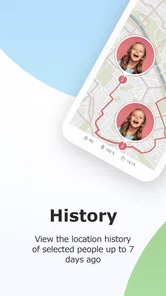
Family Locator - Locator 24 is a GPS-based application designed to help families keep track of each other's whereabouts in real-time. By installing the app on each family member's smartphone, users can view their loved ones' locations on a shared map. The app requires location services to be enabled and offers features such as location history, alerts, and notifications for added safety and peace of mind.
Is Family Locator - Locator 24 free to download, and are there extra costs?
Family Locator - Locator 24 is free to download, so you can try the app without paying upfront. It also offers in-app purchases, with prices ranging from $3.49 to $59.99 per item. Check the purchase details shown in the app before confirming anything, particularly if you plan to use it across several family members or want access to optional paid features.
Pros
- Accurate real-time location tracking
- Easy to set up and use interface
- Battery-friendly operation
- Supports multiple devices
- Customizable alerts and notifications
Cons
- Requires internet for real-time updates
- May drain battery over long use
- Limited features in free version
- Location accuracy may vary
- Subscription required for premium features