Eyezy – GPS Location Tracker
- 288.00
- 2.7
- Installs
- 1.00M
- Price
- Free

Screenshots



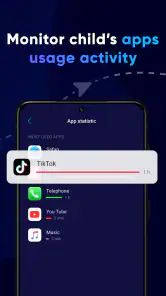
Analysis by Reviewed
I found Eyezy most convincing in the moments when a quick location check can replace a string of worried messages. As a family-safety app from Fortunex Limited, it is built around shared location rather than a broad collection of parenting tools. That focus makes it easy to understand, though it also means its value depends on whether the people in your family will keep using it willingly after the first-week curiosity wears off.
When the first week feels useful
The initial appeal is practical: instead of asking someone to text when they arrive, you can check their location when they have agreed to share it. For a parent coordinating school pickup, or relatives trying to meet after separate errands, that can reduce back-and-forth. I’d treat it as a convenience for agreed check-ins, not as a substitute for a conversation or a guarantee that someone is safe.
A useful habit is to decide together what location sharing is for before relying on it. For example, a family might use it during a child’s trip home or while meeting in a crowded place, then leave it alone the rest of the day. Clear expectations help prevent a location tool from turning into a running test of whether someone is where another person expects them to be.
That distinction matters because the app’s core benefit is not simply seeing a dot on a map; it is reducing uncertainty without demanding an immediate reply. If the person you are checking on is busy, their phone is unavailable, or the location appears confusing, a calm message or call is still the better next step.
Keeping Track: How Eyezy Works
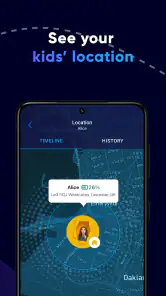
First off, let’s talk about what Eyezy actually does. Essentially, it’s a GPS location tracker designed for Android and iOS devices. You can see where your friends or family members are in real-time, which is super handy for those "where are you?" moments. The app uses GPS technology to pinpoint locations, and you can even check out their movement history, which feels a bit like having your own time machine!
Getting Set Up
Setting up Eyezy is a breeze. You download it, create an account, and invite your loved ones to join your circle. They’ll need to install the app too, but once everyone’s on board, you can start tracking. The interface is friendly and intuitive, so you won’t need a tech guru to help you navigate through it.
One thing I appreciate about Eyezy is its commitment to privacy. You can only track people who have given you permission, which means no creepy stalking. Everyone in your circle knows who’s watching them, and they can opt out anytime they want. It’s all very consensual, and that’s a big plus in my book.
More From Our News Desk

Weather by Xiaomi Review: Clear at a Glance, Less Clear Up Close

X Under Pressure: Can It Recover When Posting Goes Wrong?

Clash of Clans Is Won Between the Battles

Android Auto Makes the Case for Quieter Car Software

MobiOffice: Transforming Mobile Productivity with Seamless Integration

EA SPORTS FC™ Mobile Soccer: Redefining Mobile Sports Gaming
Features That Stand Out
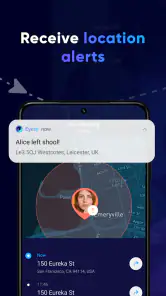
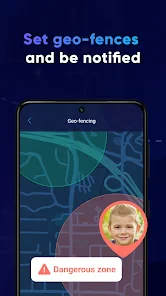
Besides real-time tracking, Eyezy offers some cool features that make it stand out from the pack. You can set up geofences, which are basically virtual boundaries. If a family member enters or exits one of these areas, you’ll get an alert. This is perfect for keeping an eye on kids or making sure elderly relatives are safe.
There’s also a nifty feature for checking battery levels. This might seem minor, but knowing someone’s phone is about to die can save you a lot of unnecessary panic when they go off the grid unexpectedly.
Making the everyday routine work
Geofence alerts are most helpful when they answer a specific question, such as whether a family member has reached a familiar destination. I’d avoid creating a long list of boundaries just because the option exists. Too many alerts can become background noise, and a family may stop noticing the one notification that would have been useful.
For a realistic afternoon, imagine a parent finishing work while a child travels home and another family member handles an appointment. A boundary alert can provide a quick arrival cue, while the battery indicator can offer context if the phone later becomes unreachable. Neither feature tells you why someone is delayed, so I would use them to guide a check-in rather than draw conclusions from the map alone.
Compared with the simplest alternative—sending a text when you arrive—Eyezy asks everyone to install and maintain a shared app, but it can reduce the need for repeated messages. Compared with relying on a phone’s built-in location sharing, the best choice depends on what your household already uses and understands. If an existing tool gives your family the same dependable routine, switching may add more setup than value; Eyezy makes more sense when its shared circle and family-oriented alerts fit a need you already have.
What can wear thin over time
Location sharing only works as a family routine if people agree about when it is appropriate. A teenager may see frequent checks as intrusive, while a parent may see the same checks as reassurance. I’d talk through that difference, agree on a limited purpose, and revisit the arrangement if it starts causing friction. Permission at setup should not be treated as a promise to share forever.
There is also a maintenance cost in keeping the circle useful: each person needs to have the app available and participate, and location information is only as helpful as the device’s ability to report it. Battery awareness gives you one clue when a phone goes quiet, but it cannot explain every gap. If you need guaranteed contact for an urgent situation, a tracker should not be your only plan.
Month-to-month value and cost
Eyezy is free to download and is rated for Everyone. Its current version is 1.8.1, and it requires Android 8.0 or later; the app is also available for iOS. Optional in-app purchases range from $2.99 to $99.99 per item, so I would check the purchase details in the app before committing to anything. The free starting point makes it easier to try the family routine, but recurring value depends on whether the shared location checks and alerts solve a real problem for your household.
The scale of its audience is substantial, with over one million installs, yet its average rating is 2.7 from around 2,900 ratings, alongside 288 written reviews. I would take that mixed reception as a reason to test the experience carefully with the people who will use it, rather than assume that a popular download will suit every family. The rating does not tell me which concern matters most to your household, so a short, agreed trial is more useful than relying on popularity alone.
My Take: Is Eyezy Worth It?
So, after spending some quality time with Eyezy, what’s the verdict? Honestly, I think it’s a solid choice for anyone who wants to stay connected with their family or friends. The peace of mind it offers is invaluable, especially if you’re a worrywart like me.
While it’s not without its quirks, like any app, the benefits far outweigh any minor annoyances. It’s user-friendly, respects privacy, and offers a host of features that genuinely enhance your ability to stay in touch with loved ones without being intrusive.
All in all, if you’re in the market for a reliable GPS location tracker, give Eyezy a try. It’s like having a personal assistant who keeps you connected with what matters most. And hey, in a world where we’re all constantly on the move, that’s not something to take lightly.
Who should keep it installed
I’d recommend trying it if your family regularly coordinates arrivals, errands, or meetups and everyone is comfortable sharing locations. It is less suitable for people seeking a comprehensive parenting suite, anyone who wants covert monitoring, or households where a built-in phone feature already handles the same job without extra setup. For elderly relatives, the same principle applies: discuss the arrangement with them and use the app as one practical aid, not as a replacement for direct contact or other support.
My long-term test would be simple: after the novelty fades, ask whether the app still prevents a particular hassle, whether alerts remain useful, and whether everyone still agrees to participate. If the answer is yes, it earns its place as a low-effort coordination tool. If the family checks it compulsively or ignores its notifications, removing it may be healthier than keeping it out of habit. That is the difference between lasting value and another app that feels helpful for a week, then becomes digital clutter.
A routine that earns its place
One small way to keep the arrangement useful is to make the map a backup to a plan, not the plan itself. Before a school pickup or a shared outing, agree on the likely meeting point and what to do if plans change. Then a location check can answer a narrow question—such as whether someone is approaching—without becoming a substitute for deciding who will call whom when timing shifts. This is especially helpful when more than one adult is coordinating, because it prevents two people from independently interpreting the same delay.
I’d also review the circle when family routines change. A person who no longer needs regular arrival checks may prefer to leave, while a new caregiver may need to be included only for a particular period. Treating membership as something the family can revisit keeps participation meaningful and reduces the sense that sharing is permanent. The practical test is whether each person can explain why they are using the app and what they expect others to do with the information.
What the map can and cannot settle
A location marker is a clue, not a full account of someone’s day. If it seems out of date or places a person somewhere unexpected, I would avoid turning that into an accusation. Ask first whether the phone is with them and whether the situation has changed. This is a useful distinction for parents in particular: a tool that was intended to make a school commute calmer can create more anxiety if every pause or route variation is treated as a problem.
For families who want a dependable arrival confirmation, an agreed text may actually be clearer than continuous checking. Eyezy becomes more compelling when several people need occasional shared context, or when a boundary notification can spare someone from repeatedly opening a map. If only one person needs one simple check-in, the lower-tech routine may be easier to maintain and less likely to make anyone feel monitored.
Choosing it over familiar alternatives
The usual alternatives each have a different trade-off. A direct message is private and easy but depends on the other person remembering to send it. Built-in phone location sharing can avoid another app if everyone already knows how to use it. Eyezy’s appeal is the family-oriented combination of shared location and alerts, but that advantage matters only if its setup and notifications suit the household better than the tools already on its devices. I would not switch simply because a dedicated app sounds more complete.
Before inviting everyone, I’d agree on a short list of ordinary situations where checking is welcome, such as coordinating a pickup or finding one another at a crowded venue. I’d also agree on what not to do: don’t repeatedly refresh the map, don’t infer intent from a location, and don’t expect an alert to explain a delay. These boundaries make the app more likely to remain a practical convenience rather than a source of arguments.
Who may find the upkeep worthwhile
Eyezy is easiest to justify for a household that already has recurring coordination needs and can make location sharing a shared choice. It may be a poor fit for a family that rarely needs to know where anyone is, for someone whose phone use is limited, or for people who feel uncomfortable with location visibility even when it is consensual. In those cases, occasional calls and clear meeting plans are not inferior solutions; they may be the more respectful and reliable ones.
For a caregiver supporting an older relative, I would first make sure the person wants to participate and understands the purpose. A shared location can help with everyday coordination, but it cannot replace checking in directly or arranging appropriate support. Similarly, parents should explain the practical reason for using it and adjust expectations as a child gains independence. The strongest long-term setup is one the people being located still accept, not one that merely gives someone else more information.
My lasting-value check
After the first few weeks, I’d judge the app by a few ordinary questions: did it reduce messages or uncertainty, did the alerts remain relevant, and did anyone feel pressured to keep sharing? If it helps with a recurring task and the family still trusts the arrangement, keeping it installed is reasonable. If its main effect is prompting repeated checks or disagreements, the added visibility is not worth the friction.
That is why I see Eyezy as a focused coordination aid rather than an essential parenting app. Its value is not in watching a map all day; it is in making a handful of agreed moments simpler. Try it with a clear purpose, keep the routine modest, and be willing to stop if the benefit fades. That approach gives the app a fair chance to prove its lasting value without letting a convenience become a habit nobody actually wants.
Eyezy – GPS Location Tracker Frequently Asked Questions
Is Eyezy – GPS Location Tracker free to download, and are there additional costs?
Eyezy is free to download, but it also offers in-app purchases. Those purchases range from $2.99 to $99.99 per item, so the total cost can depend on what you choose to buy. It is worth checking the purchase options shown in the app before committing, especially if you are looking for a family locator without ongoing or optional expenses.
What age rating does Eyezy have, and is it intended for family use?
Eyezy is listed with an Everyone age rating and is described as a family locator app for safety, with real-time location sharing and tracking. Its parenting focus makes it relevant to families considering location sharing. As with any tracking tool, discuss its use with the people involved and make sure location sharing is appropriate for your family’s needs and expectations.
Who develops Eyezy, and what should I know about its reception?
Eyezy is developed by Fortunex Limited. It has been released as a parenting app, and its public reception is mixed: its average rating is 2.7 from around 2.9 thousand ratings, with 288 written reviews. Those figures can help set expectations, but ratings reflect different users’ experiences. Reading recent reviews may help you decide whether the app suits your needs before downloading.
What is Eyezy – GPS Location Tracker and how does it work?
Eyezy – GPS Location Tracker is a mobile application designed to monitor and track the real-time location of a smartphone. It works by utilizing the phone's built-in GPS technology to provide accurate location data. Users can install the app on their device to track their location or that of family members, ensuring safety and peace of mind. The app also allows for geofencing, which sends alerts when a tracked device enters or leaves a specified area.
Is Eyezy – GPS Location Tracker secure and private?
Yes, Eyezy emphasizes user privacy and security. The app encrypts all location data to prevent unauthorized access. Users have control over who can view their location information, and data is only shared with trusted contacts. Additionally, Eyezy complies with data protection regulations, ensuring that user information is handled responsibly and securely.
Pros
- Accurate location tracking.
- Easy to use interface.
- Real-time updates.
- Cross-platform support.
- Battery-efficient.
Cons
- Requires internet connection.
- Subscription needed for full features.
- Limited free version.
- May raise privacy concerns.
- Can be complex for non-tech users.
- Category
- Parenting
- Version
- 1.8.1











