Dreamina AI: Image&Video Maker
- 35.00
- 3.0
- Installs
- 5.00M
- Price
- Free

Screenshots
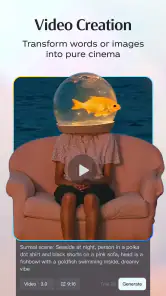
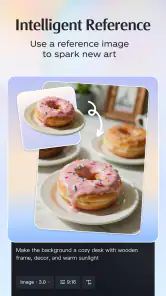
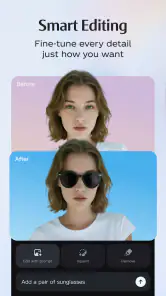
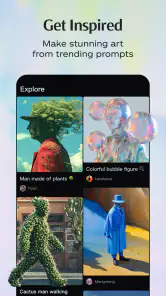
Analysis by Reviewed
When I need a visual but have not settled on its format, I like having a place to explore an image, a video concept, or a designed graphic without committing to a specialist editor right away. That is the appeal of Dreamina AI: Image&Video Maker: its AI-centered creative approach gives a loose idea room to develop in different directions. I find that more useful at the beginning of a project than as a promise of finished, production-ready work.
That distinction shapes how I would use it. Dreamina can help me test possibilities and get past a blank page, but the result still depends on the prompt and my own review. If I need precise control over every detail, I expect to finish in a dedicated editing app. If I want to discover what a visual idea could become, Dreamina’s wider scope is more appealing.
One creative starting point for images and video
Why having both formats matters
Dreamina AI is an Art & Design app from Bytedance Pte. Ltd. Its appeal is not simply that it uses AI; it is that images, videos, designs, and photo effects sit within the same creative proposition. That matters when the task is still taking shape. A social post, for instance, might begin as a visual, turn into a motion idea, and eventually need a matching design. Keeping those possibilities in view can help me explore before settling on a direction.
Compared with the usual alternatives, the distinction is between breadth and control. A dedicated image editor may suit someone who wants precise adjustments to a finished picture, while a video editor is the more natural choice for careful timeline work. Dreamina’s broader approach makes more sense when I want AI to help generate or transform visual material, and I would choose a specialist tool when exact editing control is the priority.
I would not treat the presence of several creative formats as proof that every workflow will feel equally deep. The practical benefit is having a common place to try ideas across formats; the tradeoff is that people with demanding, highly specific editing habits may still want a separate app for the final pass. That is a reasonable division of labor: use Dreamina to explore, then move to a specialist editor if the project needs more hands-on precision.
Making a prompt easier to work with
When I use an AI creative app, the first prompt is rarely the best one. A useful habit is to describe the subject, the setting, and the intended mood separately instead of packing every thought into a vague sentence. For a café announcement, I might decide first whether the focus is a cup, the counter, or the atmosphere, then specify the feeling I want the image to convey. This gives me a clearer basis for judging the result and revising the idea.
The same discipline helps when considering video. A still image can communicate a finished composition, while a video idea needs a sense of change or movement. Thinking about what should remain visually consistent and what should change makes the concept easier to evaluate. I would not assume that an image prompt will automatically translate into a satisfying video; I would treat each format as its own creative decision, even when the starting idea is shared.
You May Like

Clash of Clans Is Won Between the Battles

Android Auto Makes the Case for Quieter Car Software

MobiOffice: Transforming Mobile Productivity with Seamless Integration

EA SPORTS FC™ Mobile Soccer: Redefining Mobile Sports Gaming

How Microsoft OneDrive Became a Mobile Productivity Giant

How Google Translate Breaks Language Barriers Effortlessly
A second practical tip is to make one meaningful change at a time. If I change the subject, style, mood, and framing all at once, it becomes difficult to tell which instruction improved the result. Keeping the core idea steady while adjusting one aspect makes iteration more purposeful. This is especially helpful when the output is close but not quite right: a focused revision is more useful than rewriting everything in frustration.
A realistic everyday use
Imagine I need a fresh visual for a small community event and have only a rough idea: an evening gathering with a warm, welcoming feel. I can use that as a starting point, explore a still design direction, and consider whether a video treatment would suit the announcement better. The value here is not that the app guarantees a finished campaign; it gives me a way to test visual directions before spending time polishing one.
For that kind of task, I would decide on the intended destination early. A graphic meant to be read on a phone needs a clear focal point and room for the event details; an image that is attractive but visually crowded may be less useful than a simpler option. AI-generated visuals can inspire the look, but I would still check that any important text is readable and that the result suits the audience. The app is most helpful when I use it to get unstuck, not when I expect it to make every design judgment for me.
Another useful workflow is to separate idea generation from final editing. I can explore several moods or visual directions first, then choose the one that best fits the event. After that, I can refine the chosen concept rather than treating every generated result as something to keep. That small change in mindset saves effort: the early stage is for discovery, while the final stage is for consistency and clarity.
Where the convenience has limits
The central tradeoff is that AI-assisted creation can produce something visually appealing without necessarily matching the precise image in my head. Prompts require interpretation, and revisions take judgment. If I need exact placement, consistent brand details, or fine control over a finished composition, a conventional editor may be less surprising and more dependable. Dreamina is a better fit when I can be flexible about the route to a result.
There is also a difference between a compelling draft and a usable deliverable. Before sharing an AI-made design, I would inspect the composition, look for awkward details, and make sure the visual communicates the intended message. For video ideas, I would judge whether the motion adds something rather than choosing that format simply because it is available. These checks are not a special flaw of this app; they are part of using generative creative tools thoughtfully.
Cost deserves attention, too. Dreamina is free to download, but it offers in-app purchases priced from $10 to $900 per item. That wide range makes it sensible to try the free experience first and decide whether the app fits my routine before spending. I would check the purchase details in the app before committing, especially if I only need an occasional visual rather than a regular creative workspace.
The app is rated for Teen users. For younger people, I would treat that as a cue to involve a parent or guardian when appropriate, particularly before making purchases or sharing created material. As with any creative app, the output should be reviewed before it is used publicly; a generated image still reflects the choices and responsibility of the person who publishes it.
Who is likely to get the most from it?
I would recommend Dreamina to someone who often starts with a loose visual idea and wants AI-assisted ways to explore it across images, video, designs, and photo effects. It may be especially useful for casual creators, social posts, event concepts, and personal projects where speed of exploration matters more than precise production control. If trying a few directions is part of the fun, the combined creative focus is a real advantage.
I would be more cautious if I needed a reliable specialist editor for detailed image retouching, carefully controlled video assembly, or a tightly repeatable professional workflow. In those cases, a dedicated app is likely to be a better home for the final work, even if Dreamina helps with early inspiration. The useful question is not whether one app can do everything, but whether its broad creative approach matches the job I actually have.
Dreamina AI has a 3.0 average rating from around 8,100 ratings, alongside about 35 written reviews, so I would approach it with measured expectations rather than assuming it will suit everyone. It has been installed over 5 million times, but popularity does not remove the need to test whether its style of AI-assisted creation works for me. The app is free, runs on Android 5.0 or later, and its current version is 2.1.2.
My recommendation is to begin with one small project and a clear goal: make a visual for a post, explore a mood for an event, or test whether an idea works better as an image or video. Keep the first prompt focused, revise one detail at a time, and inspect the result before using it. Dreamina is most worthwhile when I want a flexible starting point for visual ideas, not when I need every creative decision handled automatically. If that distinction fits your expectations, it is an approachable app to try; if precision is the whole job, I would reach for a more specialized editor.
A practical way to judge the first result
Before I spend time refining anything, I would decide what success means for the specific project. For a mood board, an image that suggests the right atmosphere may be enough; for an announcement people need to read, clarity and space for wording matter more. That simple distinction stops me from judging every output as though it were meant to be a finished poster. It also helps answer a common question: the app is most useful when I have a goal I can evaluate, even if I do not yet know the exact look I want.
If I am exploring a design for a small business or community group, I would keep recognizable names, logos, and other essential details out of the part I expect the AI to invent. I can use the generated visual as a starting layer, then handle the precise identifying information separately in an editor that gives me dependable placement. This split workflow is less exciting than asking one tool to do everything, but it reduces the risk of an attractive draft becoming unusable because a crucial detail is wrong or unclear.
Choosing the right tool for the job
Against a conventional image editor, Dreamina’s advantage is the chance to create a direction from an idea rather than only adjust material I already have. Against a dedicated video editor, its appeal is early exploration, not careful assembly of a finished sequence. I would use it to decide whether a concept has promise, then move elsewhere if the work demands exact typography, detailed retouching, or repeatable edits across a set of assets. That makes it a companion to specialist tools rather than an automatic substitute for them.
It is also a sensible choice for someone who does not want to learn a complex editing workflow just to experiment with a personal project. The tradeoff is that convenience does not remove the need to inspect the result. If I were preparing material for a client, a public event, or a business page, I would treat each generated version as a draft and check it against the real brief before posting. For a casual idea or a private creative exercise, I could be more relaxed about imperfections.
Making the trial worthwhile
Because the app is free to install, I would start with a low-stakes task rather than planning a major project around it. A simple visual for a group chat or an early concept for a seasonal post gives me a quick way to see whether the prompt-led approach suits how I think. I would also review any purchase screen carefully before paying: the listed in-app purchase range runs from $10 to $900 per item, so the sensible choice depends on what is actually offered and how often I expect to use it.
Dreamina is available on Android devices running version 5.0 or later, which makes it accessible to a broad range of phones, though the experience still depends on whether I enjoy creating on a mobile screen. The release date is September 8, 2026, and the app is currently at version 2.1.2. I would focus less on the version number than on whether the current workflow feels comfortable for my needs: a tool can be capable and still not suit someone who prefers a desktop canvas or hands-on controls.
Overall, I see Dreamina as an idea-finding workspace for people who like to explore visuals before choosing a final format. It is worth trying when flexibility and inspiration matter more than precision, and easy to pass over when the job depends on detailed, repeatable editing. Starting small, keeping prompts focused, and treating the output as a draft are the best ways I know to find out whether its approach earns a place in my creative routine.
Dreamina AI: Image&Video Maker Frequently Asked Questions
What is Dreamina AI: Image&Video Maker?
Dreamina AI: Image&Video Maker is a creative app for generating and editing visual content with artificial intelligence. Depending on the features available in your version, you can turn written prompts or supplied images into artwork, designs, and short video content, then refine results with editing tools. The app is intended for casual creators and social media users as well as people exploring AI-assisted design; available tools and output options may vary by device, region, and app version.
How do I create an image or video in Dreamina AI?
Start by choosing an image or video creation tool, then enter a clear description of what you want to make. Include useful details such as the subject, setting, visual style, lighting, and mood; for image-to-video features, select a suitable source image if the app offers that option. Review the generated result and adjust your prompt or settings if needed. Processing time, generation limits, and available controls can depend on your account and the current version.
Is Dreamina AI free to download and use?
The app may be available to download at no initial cost, but that does not necessarily mean every feature or generation is free. AI creation services can use daily allowances, credits, subscriptions, or other in-app purchases, and the available arrangements may change. Check the current store listing and the app’s payment screen before starting a paid plan. Pay particular attention to renewal terms, trial dates, cancellation steps, and any limits applied to free use.
Do I need an internet connection, and can Dreamina AI run on my phone?
AI image and video generation commonly relies on online processing, so expect to need an internet connection for creating content and accessing account-based features. The app’s availability and performance depend on your device, operating system version, region, and the requirements listed in the official app store. Video creation and high-resolution outputs may take longer or use more data than basic editing. Check compatibility and available storage before downloading, especially if you plan to save many projects.
What should I know about privacy and using generated content?
Before uploading photos or entering prompts, review Dreamina AI’s privacy policy and the permissions it requests. Avoid submitting sensitive personal information or images of other people without their consent, and check whether uploads may be stored or processed by online services. If you intend to publish or use generated work commercially, read the app’s current terms and any applicable platform rules: ownership, permitted use, watermarking, and restrictions can vary by feature and may change over time.
Pros
- Turns text prompts into images and videos without advanced editing skills.
- Offers a range of AI styles for varied creative results.
- Can animate still images into short video clips.
- Useful for making social media visuals and concept art quickly.
- Combines image and video creation in one app.
Cons
- AI outputs may not match prompts precisely and can need several tries.
- Fine details
- especially hands and text
- may look inconsistent.
- Video clips may be short or lack smooth
- natural motion.
- Some tools or generations may require credits or a subscription.
- Results depend on an internet connection and cloud processing.

- Category
- Art & Design
- Version
- 2.1.2