Hypic - Photo Editor & AI Art
- 1.23K
- 4.4
- Installs
- 50.00M
- Price
- Free
Screenshots

Analysis by Reviewed
My first-week impression of Hypic - Photo Editor & AI Art is that it makes quick visual experimentation feel approachable. I can open a photo, try a different look, and see whether it suits the image without first learning a complicated editing workflow. That easy start is useful, but the better test is whether the app earns a place in my routine once the novelty of filters and AI effects wears off.
A quick start, with room to experiment
Hypic is a photography app from Bytedance Pte. Ltd. Its simple entry point makes sense for casual edits: I might brighten a dim snapshot, soften the overall look, or try a more stylized treatment before sharing a picture. The appeal is less about replacing a dedicated desktop workflow and more about getting from an unedited image to something polished on a phone without much setup.
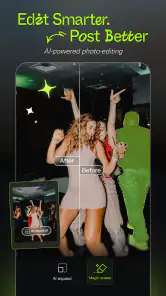
For example, after taking a few pictures at a family gathering, I can choose one portrait, compare a restrained filter with a more dramatic effect, and stop when the result still looks like the person in the photo. That last step matters: an AI treatment can be fun, but the most useful edit is often the one that improves the mood without making the image feel disconnected from the moment.
Choosing edits for the photo, not the other way around
A small but useful habit is to keep an untouched copy or return to the original whenever an edit starts to feel too polished. That gives me room to experiment without treating the first result as final. I also find it helpful to judge a portrait at its intended size: an effect that looks subtle while editing can dominate once the image is viewed in a small social feed thumbnail.
For a casual event album, I would select a handful of representative shots first, find a restrained visual direction, and then apply similar choices to the rest. This is less about making every frame identical than about avoiding abrupt shifts between natural-looking faces and heavily stylized ones. Hypic is best when its effects support a coherent set rather than compete for attention.
What stays useful after the first few edits
The app has a 4.4 average from around 208,000 ratings, and it has been installed over 50 million times. Those figures suggest broad interest, but my own measure of lasting value is whether I return for ordinary pictures, not just novelty effects. Hypic can fit that habit when I want a fast, consistent finish for portraits and social posts. For careful colour work, layered composites, or a repeatable professional process, I would still prefer a more specialized editor with a workflow built around those needs.
A practical tip is to decide what the photo needs before browsing effects. I start with the image itself—its lighting, crop, and subject—then try a look only if it supports the picture. This keeps the process from turning into endless filter comparisons. It also helps me avoid treating every photo as a candidate for an AI transformation; some everyday images are better left natural, or need only a small adjustment.
More From Our News Desk

Weather by Xiaomi Review: Clear at a Glance, Less Clear Up Close

X Under Pressure: Can It Recover When Posting Goes Wrong?

Clash of Clans Is Won Between the Battles

Android Auto Makes the Case for Quieter Car Software

MobiOffice: Transforming Mobile Productivity with Seamless Integration

EA SPORTS FC™ Mobile Soccer: Redefining Mobile Sports Gaming
Where it fits beside other photo editors
Against a phone’s built-in editor, Hypic is the more exploratory choice: it invites me to change a picture’s overall mood, rather than only making a quick correction and moving on. A specialist editor is the opposite trade-off. It is usually a better fit when I need to control a series of images carefully, keep colour treatments consistent, or build a deliberate technical workflow. I would not expect one app to replace both approaches.
That distinction helps answer whether Hypic is suitable for a particular job. For a profile portrait, a casual post, or a quick image that needs a more considered finish, its range can be useful. For product photos that must match across a catalogue, work requiring fine retouching, or images where authenticity is the priority, I would choose a simpler or more controlled tool. The best option depends less on how many effects are available than on how much control the finished picture needs.
Cost, upkeep, and the trade-offs
Hypic is free to download, with in-app purchases ranging from $2.99 to $159.99 per item. I would treat paid options as something to consider only after identifying a tool I genuinely use, rather than assuming every tempting effect is essential. The app is rated for Everyone, and version 7.6.0 requires Android 6.0 or later. Its release date is January 3, 2023.
The main maintenance burden is personal rather than technical: a growing collection of visual choices can make editing slower if I keep chasing whatever looks striking. I get more value by settling on a few treatments that suit the kinds of photos I actually take, then using them selectively. Frequent updates can bring new things to explore, but a fresh effect is not automatically a reason to change a look that already works.
Keeping the routine light
When I have several photos to finish, I would avoid editing them one by one while switching constantly between unrelated styles. Instead, I would group similar pictures, settle on the overall tone, and check each image for its own lighting and subject before saving. That adds a little thought up front but reduces the temptation to keep revisiting earlier choices. It is a practical way to make a quick editor stay quick.
Another useful boundary is to decide when to stop. If the image already communicates the moment and the next change is only making it more conspicuous, I leave it alone. That matters especially with AI-led treatments: novelty can encourage repeated trials, but more experimentation does not necessarily produce a better keepsake. I see the strongest everyday value in using creative effects selectively, not turning every snapshot into a showcase.
An Editor’s Delight
First things first, let's talk about the user interface. Hypic - Photo Editor & AI Art has a sleek and intuitive design that makes navigation a breeze. You don't need to be a tech wizard to figure this one out, folks. The app is designed with the user in mind, offering a seamless experience from the get-go. Everything is just where you'd expect it to be, so you can dive straight into editing without any hassle.
Features Galore
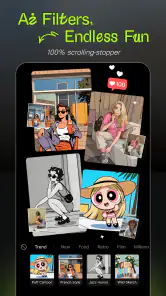
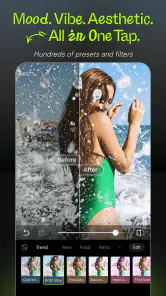
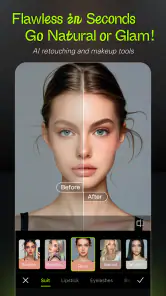
Now, onto the exciting part—the features! Hypic is loaded with an array of editing tools that let you tweak your photos to perfection. From basic adjustments like brightness and contrast to more advanced tools like curves and selective editing, this app has it all. But what really sets it apart is its integration of AI art. Yes, you heard that right! With just a few taps, you can transform your ordinary photos into stunning works of art. The AI filters are truly something special; they can turn a simple portrait into a masterpiece that looks like it stepped out of a gallery.
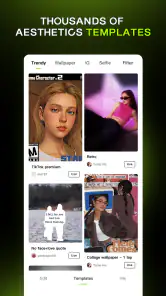
Another feature worth mentioning is the app's vast collection of filters and effects. Whether you're looking to add a vintage vibe or a modern touch, Hypic has got you covered. The filters are versatile and can be customized to suit your style, making it easy to create unique and eye-catching images. Plus, with new updates rolling out frequently, there's always something fresh to explore.
Making creative tools work for ordinary photos
The range is most useful when I give each tool a specific job. I might use a basic adjustment to make a dim scene easier to read, then compare a filter only if the original colours feel flat. If an AI effect changes the picture’s character too much, I can treat that as a quick experiment rather than a failed edit: it has still helped me decide that the natural version is stronger.
For a day-to-day example, imagine taking a quick portrait before meeting friends and wanting a shareable result without sitting down for a full editing session. I would crop carefully, make only the correction the photo needs, and preview a style that suits the lighting. If it makes skin or the setting feel unlike the real moment, I would back away from it. The useful outcome is a picture I am happy to share, not the most dramatic transformation available.
Performance and Usability
In terms of performance, Hypic runs smoothly without any major hiccups. It's fast, responsive, and doesn't drain your phone's battery excessively. This is a huge plus for those of us who spend a lot of time editing on the go. The app also supports high-resolution exports, so your edited photos maintain their quality, whether you're sharing them on social media or printing them out.
One thing I particularly appreciate is the community aspect of Hypic. The app allows you to share your creations with other users and get inspired by their work. It's a great way to connect with fellow photographers and discover new editing techniques.
What to check before settling on a workflow
Before editing a large set, I would try one representative photo and inspect the saved result outside the editing screen. That simple check helps me decide whether the look holds up at normal viewing size and whether it suits the rest of the set. It is also a sensible way to learn which treatments I actually want to use, rather than assuming an attractive preview will become part of my routine.
If I am choosing an editor for regular work, I would ask myself whether speed or precision matters more. Hypic makes the most sense when I want accessible creative options on a phone and do not need every adjustment to follow a strict standard. A more technical alternative is worth the extra learning when images need to match closely or when the edit itself is part of a professional process.
Final Thoughts
All in all, Hypic - Photo Editor & AI Art is a fantastic app for anyone looking to elevate their photo editing skills. With its powerful features, user-friendly interface, and innovative AI capabilities, it's no wonder it's quickly gaining popularity. So, if you're ready to unleash your creativity and transform your photos into art, give Hypic a try. Trust me, you won't be disappointed!
Who will get the most from it
I think Hypic suits people who edit directly on their phones and want an approachable mix of ordinary adjustments, filters, and AI-led styling. It is particularly handy when I need a presentable portrait or post quickly, but I would not choose it as my only tool for precise colour matching across a client gallery. Someone who dislikes stylized looks, prefers manual control over every change, or rarely edits photos may find the extra creative options more distracting than useful.
Compared with a basic phone-gallery editor, Hypic gives me more ways to change the character of an image. Compared with a specialist photography editor, its appeal is speed and accessible experimentation rather than a deeply controlled production process. I would keep both approaches in mind: use Hypic when a quick visual idea is the goal, and reach for a more technical alternative when consistency and fine-grained adjustments matter more than convenience.
A sensible editing routine
For a daily workflow, I would make one deliberate pass instead of stacking effects: choose the image, correct the obvious issue, preview a filter, and check the result at normal viewing size before saving. On a phone screen, a strong effect can look exciting while zoomed in but overpower the picture when viewed as a whole. This quick final check is an easy way to keep portraits believable and avoid edits that compete with the subject.
If I am editing several photos from the same outing, I would also compare them side by side before giving each one a different treatment. A consistent mood makes a small set feel considered, while applying every attractive effect can make the pictures look unrelated. That is where Hypic’s range is both a strength and a source of fatigue: the app gives me options, but I still need to supply the restraint.
When the novelty fades
Over time, I would judge the app by whether its standard editing tools keep solving small, recurring problems—not by how often I try an unfamiliar effect. The lasting use case is a quick portrait or social image that benefits from a little cleanup and a chosen style. If my editing habit shifts toward detailed retouching, exact colour consistency, or complex compositions, I would move that work to a tool designed around those priorities rather than forcing Hypic to cover everything.
For Android users, the minimum requirement is Android 6.0, so it can suit people using a range of devices that meet that baseline. I would still make a small test edit before committing to a larger batch, especially when the final images need to match one another. Hypic is free to try, but the in-app purchase range makes it sensible to check which options are actually useful to me before spending; the core appeal should be clear from the way I use it, not from the promise of more effects.
My long-term verdict
Hypic earns lasting space on my phone when I treat it as a convenient creative editor rather than a complete replacement for every photography tool. Its accessible interface and mix of conventional edits with AI effects make occasional use easy, while its many stylistic choices reward a little self-control. I would recommend it to someone who enjoys shaping portraits and social photos on the go. If your priority is exact, repeatable control—or you simply prefer unedited pictures—it may not become a regular part of your routine.
Hypic - Photo Editor & AI Art Frequently Asked Questions
Is Hypic - Photo Editor & AI Art suitable for everyday photo editing?
Hypic is a photography app for editing photos, applying filters, and trying AI effects. Its focus makes it relevant for people who want to give pictures a creative touch without turning to a separate desktop editor. You can explore whether its editing style fits your everyday needs, such as improving a photo or experimenting with a more artistic look.
What is Hypic - Photo Editor & AI Art, and who makes it?
Hypic is a photography app by Bytedance Pte. Ltd. It is designed for editing photos and creating AI-assisted effects, with the store summary describing filters, AI effects, and a magic touch for editing. The app is free to download, and its content rating is Everyone. These basics can help you decide whether its focus suits the kind of photo editing you want.
What devices can run Hypic - Photo Editor & AI Art?
Hypic is available for Android devices running Android 6.0 or later, so it is worth checking your device’s operating system before downloading. The app is also offered for iOS, although compatibility depends on the requirements shown for your particular device in its app store. Hypic is currently version 7.6.0; keeping an app updated can help you use its current features and improvements.
What features does Hypic - Photo Editor & AI Art offer?
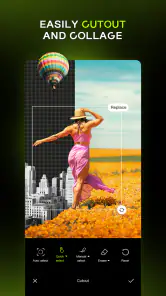
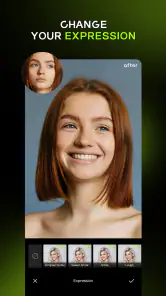
Hypic - Photo Editor & AI Art boasts a variety of features including advanced photo editing tools such as filters, retouching options, and customizable effects. Additionally, it offers AI-driven art generation capabilities, allowing users to transform their photos into stunning artworks with just a few taps. The app also supports batch processing for editing multiple photos simultaneously.
Is Hypic - Photo Editor & AI Art user-friendly for beginners?
Yes, Hypic - Photo Editor & AI Art is designed with a user-friendly interface that caters to both beginners and advanced users. The app provides intuitive navigation and easy-to-use tools, making it simple for anyone to enhance their photos or create AI art. Tutorials and guides are also available within the app to help users get started quickly.
Pros
- User-friendly interface for quick editing
- Variety of AI-powered effects
- Regular updates with new features
- High-quality export options
- Supports multiple image formats
Cons
- Limited free version features
- Occasional in-app ads
- Requires internet for AI tools
- Can be resource-intensive
- Some effects need improvement
- Category
- Photography
- Version
- 7.6.0












