CryAnalyzer - baby translator
- 59.00
- 3.0
- Installs
- 5.00M
- Price
- Free

Screenshots


Analysis by Reviewed
In the first few days with a crying baby, even a small prompt can feel useful. I’d treat CryAnalyzer - baby translator as a source of ideas rather than a true translation tool: it may help me pause and consider a likely need, but the baby’s cues and my own judgment still matter more. That distinction is what determines whether it earns a place on my phone after the initial curiosity wears off.
Why it catches attention in the first week
When a baby is upset and I’m tired, it can be hard to think through the usual possibilities in a calm order. An app that listens to a cry and offers an interpretation gives me something concrete to check. The appeal is not that it can know exactly what a baby wants; it is that it may give a new parent a starting point when every cry sounds equally urgent.
A practical way to use it is to check the basics first, then record the cry if I’m still unsure. That keeps the app from becoming a substitute for noticing hunger cues, checking a nappy, or offering comfort. I would also try not to record every brief fuss: a short burst of crying may not give a useful sample, and reaching for a phone each time could add friction rather than reduce it.
In an ordinary evening, I might already have tried feeding and a nappy change, yet still be unsure why the baby is unsettled. That is the moment when a suggested interpretation can be useful as a prompt to try one sensible next step, then watch the baby’s response. If the suggestion does not fit what I see, I would trust the baby’s behavior rather than keep recording in search of a more convincing answer.
Understanding Your Little One
Ever wondered what your baby's cries mean? Well, with the CryAnalyzer - baby translator, decoding those mysterious wails just got a whole lot easier. I decided to give this app a whirl, and here's my take on it.
When I first stumbled upon the app, I was both skeptical and curious. Could an app really translate baby cries? I mean, we’ve all been there, trying to figure out if it’s a diaper change, a hunger cue, or just a need for a cuddle. So, I dived right in and downloaded the app, ready to put it to the test.
Getting Started with CryAnalyzer
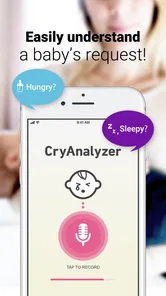
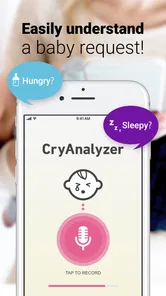
Setting up the app was a breeze. After installing, the app prompts you to record a sample of your baby's cry. The interface is quite user-friendly, with big buttons and clear instructions, making it accessible even in a sleep-deprived state. I liked that it didn’t require much technical know-how, just a few taps and you’re good to go.
More From Our News Desk

Weather by Xiaomi Review: Clear at a Glance, Less Clear Up Close

X Under Pressure: Can It Recover When Posting Goes Wrong?

Clash of Clans Is Won Between the Battles

Android Auto Makes the Case for Quieter Car Software

MobiOffice: Transforming Mobile Productivity with Seamless Integration

EA SPORTS FC™ Mobile Soccer: Redefining Mobile Sports Gaming
For a fair test, I’d record in a reasonably quiet spot and keep the phone near enough to capture the cry clearly, without putting it close to the baby. Household noise, another person speaking, or a television could make it harder to judge the result. This is a small but useful habit: better recording conditions make the app’s suggestion easier to consider, though they still cannot make it certain.
There is a practical trade-off here: stopping to position a phone and make a recording can interrupt the comforting routine already underway. I would not move a settled baby or delay a feed just to get a cleaner sample. If another caregiver is present, one person can continue soothing while the other records from a safe distance; alone, I would choose care first and the app only when it is easy to use without distraction.
The Experience
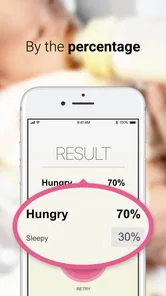
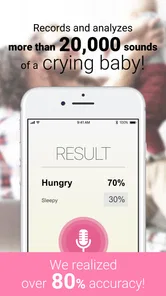
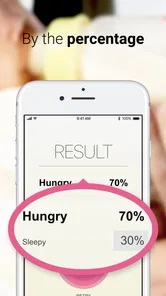
Once I recorded a cry, the app quickly analyzed the sound and presented a possible reason for the crying. It suggested hunger, and to my surprise, my little one did seem interested in a feed right after. Coincidence? Maybe. But it did make me curious to try it out a few more times.
With each cry, the app offered different insights – from suggesting a diaper change to indicating possible discomfort. I found myself relying on it more, especially during those midnight wake-up calls when brain function was at an all-time low. It's like having a tiny interpreter right in your pocket!
For example, during a late-night wake-up, I might use the result as a reminder to run through a quick sequence: check feeding, nappy, temperature and comfort, then settle the baby and see what changes. That is more useful than treating one label as a diagnosis. If crying feels unusual, persistent, or worrying, I would put the phone aside and seek appropriate medical advice rather than wait for another analysis.
This is also where the app differs from a basic crying log or a parenting article. A log helps me notice timing, while general advice gives me a list of possibilities; this app’s distinctive role is to offer an interpretation from a recorded cry. I would use those approaches together only if each reduces guesswork. If logging or recording starts to feel like another task, the simpler option may be better.
Compared with asking a search engine what a particular cry could mean, an on-the-spot analysis feels more focused, but it also risks making a single result seem more certain than it is. A written guide lets me weigh several signs at my own pace; a trusted caregiver may know the baby’s routine better. I see the app as a quick extra perspective between those options, not a replacement for either one.
Some Features I Loved
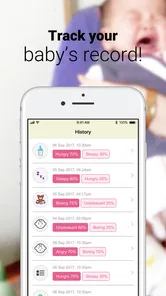
One feature that stood out was the app's ability to log each cry and its interpretation. This way, I could track patterns over time which helped me understand my baby’s needs better. The app also offers tips and advice based on the type of cry, which is a nice touch for new parents still learning the ropes.
For the log to be genuinely helpful, I’d keep its role modest: look for broad patterns rather than trying to draw conclusions from one entry. A note that a certain kind of fuss often happens around a familiar part of the day may prompt me to prepare, but it cannot establish why the baby cried. I would review entries occasionally, not turn every difficult moment into a record-keeping exercise.
A useful way to avoid overreading the log is to compare an interpretation with what happened next: did a feed, a change, or settling actually help? I would treat that as a private memory aid, not proof that the app identified the cause. If the records start making me second-guess ordinary decisions, I would stop logging; the tool should lighten the mental load, not give me another scorecard to maintain.
The app also boasts a community section where parents can share their experiences and tips. It’s a great way to feel connected, especially on those days when you feel like you’re the only one navigating this new world of parenthood.
That community may be most valuable for reassurance and practical peer perspective, not for settling a health concern. Other families’ experiences can suggest questions to ask or routines to try, but babies differ, and a tip that helped someone else may not fit my child. I’d keep that boundary in mind when reading advice while tired or anxious.
I would also be selective about when I browse community advice. During a stressful crying spell, a stream of other people’s experiences could create more possibilities to worry about instead of helping me respond. It makes more sense to read when the baby is settled, take only practical ideas that suit our situation, and turn to a health professional for concerns that need individual guidance.
Who is most likely to keep using it
I can see the strongest fit for a first-time parent who is still learning the difference between a hungry cry, a tired fuss, and a need for comfort. It may also suit a caregiver looking after a baby for only part of the day, since a suggested starting point can make an unfamiliar moment feel less like guesswork. In both cases, the value is a prompt to observe and respond, not a promise that the app can read the baby’s mind.
It is less compelling for someone who already recognizes the baby’s usual cues and has a routine that works. A caregiver who finds phone use distracting, or who becomes anxious when an app offers a possible explanation, may be better served by a simple check of the baby and a familiar soothing approach. I would skip it too if a crying episode needs medical attention; an audio interpretation is not a way to assess a health emergency.
When the novelty wears off
The longer-term question is whether I would still open it once I had learned my baby’s usual cues. For a first-time parent, or anyone caring for a baby whose cries still feel difficult to distinguish, occasional suggestions and a record of past episodes could continue to help. For an experienced caregiver with a reliable routine, the same analysis may become less useful; direct observation may be quicker and less distracting.
CryAnalyzer is a free parenting app from FirstAscent, with a 3.0 average from around 4,200 ratings and over 1 million installs. It is rated for everyone, so its audience is broad, but the practical value is concentrated among caregivers who want a prompt, not a definitive answer. The rating is a reason to keep expectations measured, rather than a verdict on how it will work for every family.
It is listed at version 1.3.24 and requires Android 6.0 or later. Optional in-app purchases range from $1.99 to $7.99 per item, so I’d check what is included before paying and decide whether the free experience already meets my needs. If I only want occasional help identifying possibilities, I would not assume that spending is necessary.
For ongoing use, I would make a small habit of opening it only when the ordinary checks leave me uncertain, rather than building it into every feed or nap. That keeps the app available for the moments when a second perspective might help without making the phone the centre of baby care. I would also revisit whether it is earning its place after a few weeks: if I rarely use the interpretations or already know what to try, removing it is a reasonable choice.
One question a parent may have is whether every cry needs to be analyzed. In my view, no: short grumbles, routine fussing, and moments when the cause is already clear do not need a recording. The app makes most sense when a cry is sustained enough to capture and I have already checked immediate needs. That selectivity is both a time-saver and a way to keep its suggestions in proportion.
Another reasonable question is whether the result should guide what I do next. I would use it to choose a low-risk possibility to check, such as whether the baby may be ready for a feed or needs comfort, then judge by the response. I would not use a label to override an obvious cue, postpone care, or make a medical decision. If it is wrong or unhelpful in a particular moment, I would simply move on.
Final Thoughts
All in all, the app is a nifty tool for parents trying to decode the mystery that is baby cries. While it’s not always 100% accurate, it does offer a helpful starting point. Plus, it’s reassuring to have some guidance when you’re feeling a bit lost. Would I recommend it? Absolutely, especially for new parents looking for a bit of extra support.
So, if you're up for trying something new and are curious about what those cries might mean, give it a shot. Who knows, it might just make those sleepless nights a tad bit easier.
My lasting recommendation is to make it an occasional aid, not a required step in every settling routine. It suits a caregiver who is curious, willing to test suggestions against the baby’s actual response, and comfortable stopping when the app adds no value. If you need dependable medical guidance, dislike using a phone during care, or find the interpretations make you more worried, skip it and rely on direct observation and professional support. For everyone else, its best chance of staying useful is simple: open it when you are genuinely unsure, learn what you can, and let it go when your own read of the baby is clearer.
CryAnalyzer - baby translator Frequently Asked Questions
Is CryAnalyzer free to download, and are there in-app purchases?
CryAnalyzer is free to download, so you can try the app without paying upfront. It also offers in-app purchases, with items priced from $1.99 to $7.99. Check the purchase details shown in the app before confirming anything, especially if someone else may use your device, and remember that the basic download price does not necessarily cover every feature.
What should I keep in mind before relying on a cry-analysis app?
CryAnalyzer is intended to offer possible explanations for a baby's cry, not to replace a caregiver's judgment. A suggested cause should be treated as a prompt to observe the baby and consider their needs, rather than as a diagnosis or guarantee. If you have a concern about your baby's health or safety, respond to what you observe and seek appropriate professional help.
What is CryAnalyzer and how does it work?
CryAnalyzer is a baby translator app designed to help parents understand their baby's cries. The app uses advanced algorithms to analyze the sound of a baby's cry and determine the possible reason behind it, such as hunger, sleepiness, or discomfort. By providing this insight, it aims to assist parents in addressing their baby's needs more effectively.
Is CryAnalyzer accurate in interpreting baby cries?
CryAnalyzer claims to have a high accuracy rate, but it's important to note that no tool can be 100% accurate in interpreting baby cries. The app is based on research and uses sound patterns to make educated guesses. While many parents find it helpful, it's best used as a supplementary tool alongside parental intuition and observation.
Is CryAnalyzer safe to use for my baby?
CryAnalyzer is safe to use as it simply analyzes the sound of your baby's cry using your device's microphone. It does not require any physical interaction with the baby or access to personal data beyond the audio input. Parents can rest assured that the app prioritizes privacy and does not store any personal information.
Pros
- User-friendly interface for easy navigation
- Accurate translation of baby's cries
- Supports multiple languages
- Quick response time for translations
- Free updates with new features
Cons
- Requires internet connection for translations
- Limited to certain types of cries
- May not work well in noisy environments
- App size is relatively large
- Battery consumption could be high











