Contraction Timer & Counter 9m
- 740.00
- 4.9
- Installs
- 5.00M
- Price
- Free

Screenshots
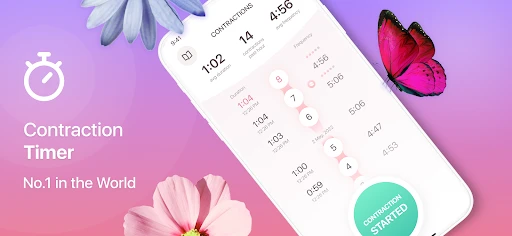
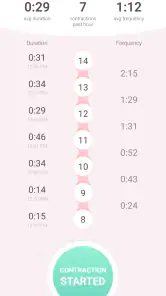
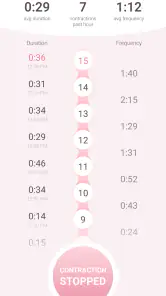

Analysis by Reviewed
When labor begins, even simple tasks can feel harder than they should. I think a contraction timer is most useful when it lets a parent focus on what is happening instead of trying to remember times or do mental arithmetic. Contraction Timer & Counter 9m is built around that focused job: recording contractions and making their timing easier to follow. It is a parenting app from Neiman, and its narrow purpose is both its clearest strength and the main thing to consider before choosing it.
What you can expect from the free starting point
The app is free to download, which makes it easy to try before labor rather than waiting until you are under pressure to decide whether its approach suits you. In-app purchases are listed at $0.99 per item. I would treat that as a reason to check the app’s purchase details for anything you might want, not as evidence that a particular extra is necessary. The core reason to install it is straightforward contraction timing; there is no need to buy anything simply to understand whether a dedicated timer fits your routine.
That distinction matters in this category. Some people start with a clock, notes app, or a message thread with a partner. Those options cost nothing beyond a phone already in hand, but they ask you to record and interpret information yourself. A purpose-built timer can make the sequence easier to keep consistent. The trade-off is that it is another app to open and learn, and its usefulness depends on whether you prefer a dedicated screen over a method you already trust.
A small job that can reduce mental load
In practice, the value of a contraction timer is less about producing a number and more about avoiding a string of small memory tasks. When discomfort comes and goes, it is easy to lose track of when one episode started or how long the pause was. Recording each event as it happens gives you a clearer account to consider later. I would use the app as a practical log, not as a substitute for paying attention to how you feel or following advice from your care team.
A realistic use case is a quiet evening at home when contractions have become noticeable but the pattern is still uncertain. One person can focus on the timer while a partner handles a bag, checks transport arrangements, or contacts the maternity unit if needed. The benefit is not that the app decides what is happening; it is that the two people do not have to reconstruct a timeline from memory while also making decisions. That division of tasks can be especially useful when both are tired or anxious.
Who is likely to get the most from it
I can see this being most useful for someone who wants a dedicated place to time contractions and prefers a simple, task-focused tool. It may also suit a partner or support person who is helping keep track while the person in labor concentrates on comfort. If you have never timed contractions before, having a consistent record can make the process feel less improvised, even though the app cannot tell you what your individual situation means.
It is less compelling if you already have a tracking method that feels effortless, or if you would rather avoid relying on a phone during labor. A paper note and clock can be enough for someone who wants no extra setup. Likewise, a general notes app may be preferable if you want to keep contraction times alongside other observations in one place. The right choice is the one you can use calmly and consistently, not necessarily the one with the most specialized name.
More From Our News Desk

Weather by Xiaomi Review: Clear at a Glance, Less Clear Up Close

X Under Pressure: Can It Recover When Posting Goes Wrong?

Clash of Clans Is Won Between the Battles

Android Auto Makes the Case for Quieter Car Software

MobiOffice: Transforming Mobile Productivity with Seamless Integration

EA SPORTS FC™ Mobile Soccer: Redefining Mobile Sports Gaming
How the timer fits into real labor decisions
A contraction log can support a conversation, but it should not make the decision for you. Labor guidance can depend on personal circumstances and instructions from a clinician, so I would follow the plan given by your healthcare provider rather than treating an app’s pattern or notification as medical advice. If you have concerns, unusual symptoms, or instructions to call at a particular point, contact your care team instead of waiting for a timer to signal anything.
Before labor, it is worth deciding who will operate the phone and where it will be kept. A partner can try the basic timing flow in advance, so neither person has to explore menus during a contraction. Keep the device somewhere reachable, and make sure the person helping knows how to start and stop a recording. This is a small preparation step, but it avoids turning the first use into a test of memory and coordination.
There is also a useful trade-off in assigning one person to record every contraction. A single recorder can keep the entries consistent, while switching between people may make the process less dependable if each person handles timing differently. On the other hand, the person in labor should not feel obliged to keep the phone running if using it becomes distracting. The record is there to help, not to become another task they must manage.
Making the record useful without over-relying on it
When reviewing a sequence, look at it as context rather than a verdict. A set of times may help you explain what has been happening when you speak with a clinician, but the app cannot assess pain, wellbeing, medical history, or other factors that matter to care. If a pattern seems to change, you can use that as a prompt to check your plan or call for guidance; you do not need to wait for a particular notification before asking for help.
One practical approach is to agree beforehand that the support person will handle entries and the user will focus on comfort. If that division stops working, pause the logging. It is better to have an incomplete record than to let the process add pressure. Similarly, do not spend time trying to make every entry perfect. A useful account is one that helps you communicate, not one that requires constant correction while labor is progressing.
People often wonder whether a timer can tell them when to leave for the hospital. I would not use this app as the sole authority on that decision. Its role is to track, while travel plans and when to seek care should follow the instructions you have received from your provider. Another reasonable question is whether a partner can operate it: a helper can manage timing if that is more comfortable, provided the person in labor agrees and the phone is easy to reach.
How it compares with clocks, notes, and broader pregnancy apps
A clock is the simplest alternative, but it leaves the arithmetic and record-keeping to you. A notes app can preserve times and observations together, though you may need to format the information yourself. A broader pregnancy app may appeal if you want several kinds of pregnancy content in one place, but that wider scope can be unnecessary when the immediate need is a focused timing tool. This app’s appeal is its concentration on contractions rather than a promise to handle every part of pregnancy.
That focus has a limit. If you want a highly customizable birth journal, a place to record many symptoms, or a broader set of pregnancy planning tools, a timer alone may feel too narrow. If you prefer an uncluttered way to keep track of starts and pauses, a specialist tool can be less cumbersome than adapting a general-purpose app. I would choose based on the task you actually need during labor, not on the assumption that one app should cover everything.
Design, reliability, and sensible expectations
The original appeal here is a straightforward interface intended for quick use. In a stressful moment, familiar and direct controls matter more than decorative screens. Still, any phone-based workflow brings ordinary friction: the device must be available, the app must be ready to use, and someone needs to remember to record the event. I would test the basic interaction at a calm moment rather than discovering how it works during a painful contraction.
It is also sensible to think about the phone itself. If the battery is low or the device is being used for calls and messages, a paper backup can prevent the timing process from becoming dependent on one screen. That does not mean the app is unsuitable; it is simply a practical contingency for a moment when communication and access to support matter more than maintaining a perfect digital log.
The listing shows an average rating of 4.9 from around 81,000 ratings, with over five million installs. Those figures suggest that many people have found the app worth trying, but they do not tell me whether its approach fits a particular birth plan or personal preference. I would weigh the focused purpose and free access more heavily than popularity when deciding whether to install it.
Cost, platform fit, and who should pass
For a free app, the threshold for trying it is low, while the listed in-app purchase price is $0.99 per item. The value question is therefore less about a large upfront commitment and more about whether any optional purchase is useful to you. I would not assume that paid items are required for the basic reason to use a contraction timer; check what is offered in the app before deciding whether to spend anything.
The app is rated for Everyone, runs on Android 5.0 or later, and its current version is 2.0.6. It was released on August 14, 2018. Those details make it possible to check basic compatibility before relying on it, especially if the phone is older. The age rating describes the app’s content rating; it does not mean the tool is designed to provide clinical guidance.
I would skip it if you do not want to use a phone during labor, if you already have a method that gives you a clearer record, or if you expect an app to interpret symptoms and make medical decisions. I would also avoid making the timer another obligation for the person experiencing contractions. In those situations, a support person, a simple written log, or direct contact with a healthcare professional may be the better choice.
My verdict on the value
For someone who wants a dedicated way to record contractions, Contraction Timer & Counter 9m offers a practical, focused starting point without an upfront download cost. Its usefulness comes from helping you keep a timeline, not from replacing professional advice or deciding when labor has reached a particular stage. I would install it ahead of time, try the basic workflow, and agree with a support person on who will use it if needed.
My recommendation is conditional rather than universal: it is worth trying if a purpose-built timer would reduce mental effort for you, and easy to pass on if a clock, notes app, or your care team’s instructions already serve you better. The strongest reason to choose it is the narrow task it is meant to support; the clearest reason not to is expecting more than a timer can responsibly provide.
So, I recently checked out the Contraction Timer & Counter 9m app, and let me tell you, it’s a game changer for expecting parents. This app is like having a personal assistant in your pocket when it comes to monitoring labor contractions. As someone who values practical and user-friendly apps, I was curious to see how this one would perform, and I’m glad to report that it didn’t disappoint.
What’s the Buzz About?
The app is designed to help you track contractions with precision and ease. It’s especially useful for first-time parents who might not know exactly what to look for when labor kicks in. The app allows users to record the start and end of each contraction, automatically calculating the duration and frequency. This can be super helpful when you’re trying to decide if it’s really time to head to the hospital or just another false alarm.
Intuitive and User-Friendly Design
One of the first things I noticed about this app is its clean and intuitive design. The interface is straightforward, making it easy to navigate even when you’re in a bit of a panic. The buttons are large and user-friendly, which is crucial during those intense moments when precision is key. Plus, there’s a history feature that allows you to review past contractions, so you can look back and see how things have progressed over time.
Features That Stand Out
Beyond the basic timing features, the app also offers some neat extras. For one, there’s a notifications feature that alerts you when your contractions are at a regular interval, suggesting it might be time to make a move. The ability to share your contraction history with your healthcare provider is another smart touch, making it easier to communicate your status during appointments or calls.
Moreover, the app doesn't bombard you with unnecessary ads or complicated settings, which I really appreciate. It's designed to be as supportive as possible, focusing solely on its main purpose without any fluff.
Final Thoughts
In conclusion, this contraction timer is a strong option for expecting parents. It takes some of the stress out of timing contractions and lets you focus more on preparing for your new arrival. While I wish there were a few more customization options available, the app’s simplicity and reliability make it a standout choice. So if you’re looking for a dependable contraction timer, give it a try—you may be glad to have it ready when you need it.
Contraction Timer & Counter 9m Frequently Asked Questions
What does Contraction Timer & Counter 9m do, and who might find it useful?
Contraction Timer & Counter 9m is a parenting app intended to help expectant mothers track labor contractions. It gives you a way to log each contraction and review its timing, which can make it easier to describe what you are experiencing to a healthcare provider. It may be useful during late pregnancy, but it is a tracking aid rather than a source of medical guidance.
Is Contraction Timer & Counter 9m suitable for everyone to use?
The app has an Everyone content rating, so it is listed as suitable for a general audience. Its purpose is specifically to help with contraction tracking, however, so it is most relevant to people who are expecting a baby or supporting someone who is. Anyone using its information to make decisions about labor should continue to follow advice from their doctor or midwife.
Is Contraction Timer & Counter 9m free to download, and does it include in-app purchases?
Contraction Timer & Counter 9m is free to download, so you can try it without paying an upfront price. It also offers in-app purchases priced at $0.99 per item, which may matter if you are deciding whether to use only the free experience or consider optional paid items. The app is listed for a general audience and is intended for tracking labor contractions.
Who makes Contraction Timer & Counter 9m, and what is its user feedback like?
The app is developed by Neiman and is listed in the Parenting category. It has an average rating of 4.9 from around 81,000 ratings, with 740 written reviews. Those figures suggest that many users have shared feedback about it, but individual experiences can differ; it is still worth checking whether its contraction-tracking approach suits your needs before installing.
What is the primary function of the Contraction Timer & Counter 9m app?
The Contraction Timer & Counter 9m app is designed to help expectant mothers track the frequency and duration of their contractions. By doing so, it assists in determining when labor might be progressing and when it might be time to head to the hospital or contact a healthcare provider. The app provides an easy-to-use interface for logging each contraction, making it a valuable tool for those in the late stages of pregnancy.
Pros
- Simple and easy-to-use interface
- Accurate contraction tracking
- Customizable notifications
- Supports multiple languages
- Free and no ads
Cons
- Limited to contraction tracking only
- No integration with health apps
- Lacks advanced analytics
- User interface feels outdated
- No dark mode option
- Category
- Parenting
- Version
- 2.0.6











