Speak and Translate Languages
- 10.49K
- 4.6
- Installs
- 10.00M
- Price
- Free

Screenshots

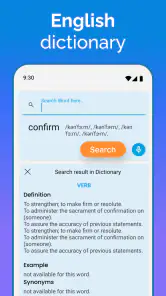
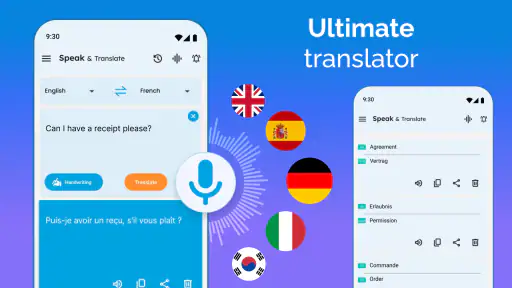
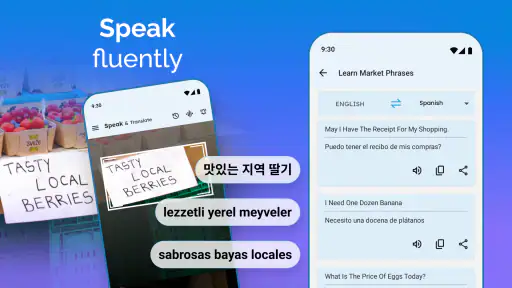
Analysis by Reviewed
I think the best way to judge a translation app is to ask what happens when the conversation matters: can I get a simple message across, and do I know what I’m sharing to do it? Speak and Translate Languages is a communication app from Battery Stats Saver, built around spoken and typed translation. It’s free to install, rated for Everyone, and has a 4.6 average from around 288,000 ratings. That kind of broad adoption makes it easy to consider, but I still treat any automated translation as help with a conversation, not a substitute for understanding every nuance.
Trust starts with realistic expectations
Translation can involve personal details, from a hotel address to a question about someone’s health. I wouldn’t enter sensitive information casually just because a tool is convenient. The app’s central promise is practical language assistance; my advice is to keep what you say focused on the task and avoid sharing details that the other person doesn’t need. When accuracy or privacy is especially important, a trusted human interpreter or a direct conversation with someone fluent is a better choice.
The app has been available since November 6, 2018, and its current version is 8.1.4.2, with Android 5.0 as the minimum operating system. It has over 10 million installs and around 10,000 written reviews. Those figures suggest plenty of people have tried it, but they don’t guarantee that every translation will suit every accent, setting, or language pair. I’d use it as a convenient first step, then confirm important wording rather than treating a smooth-sounding result as proof that it is exact.
What I can control during a translation
The useful choices described in the app’s everyday workflow are straightforward: speak a phrase, type it when speaking is awkward, and save translations that I expect to use again. That gives me a small but meaningful amount of control over how I communicate. I can choose a short sentence instead of an extended explanation, or use text when a voice exchange would be disruptive. Saved phrases can also reduce repeated entry, though I’d check that a stored line still fits the situation before showing or playing it.
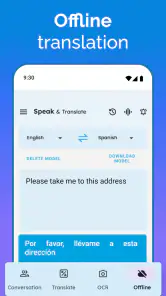
Because translation may depend on an internet connection, I’d plan around connectivity instead of assuming the app will work everywhere. Before leaving Wi-Fi, I’d save essential phrases while I can, such as a simple request for directions or help finding a station. That is a practical backup, not a guarantee of offline translation. If I’m somewhere with weak service, I’d keep questions brief and have another way to communicate ready, especially for time-sensitive needs.
Making a saved phrase useful instead of misleading
I find saved translations most useful when I treat them as situation-specific notes rather than universal scripts. A line prepared to ask about a restaurant dish, for example, may not be clear enough to use later at a pharmacy. Before relying on one, I’d check the wording and make sure I can explain the context with a few simpler words if needed. This is a small habit, but it reduces the risk of presenting a phrase that sounds polished while asking the wrong question.
There is also a practical choice between speaking and typing that goes beyond personal preference. Speech can be quicker when my hands are occupied, but it may be less suitable in a noisy room, around other people, or when the subject is private. Typing gives me a chance to review my own wording before sending it through translation. I’d use the method that makes the original message clearest, rather than assuming voice is always the more convenient option.
More From Our News Desk

Weather by Xiaomi Review: Clear at a Glance, Less Clear Up Close

X Under Pressure: Can It Recover When Posting Goes Wrong?

Clash of Clans Is Won Between the Battles

Android Auto Makes the Case for Quieter Car Software

MobiOffice: Transforming Mobile Productivity with Seamless Integration

EA SPORTS FC™ Mobile Soccer: Redefining Mobile Sports Gaming
Diving into the World of Speak and Translate
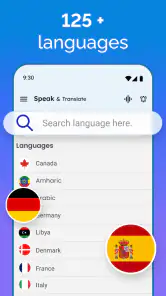
What I love about this app is that it’s like having a personal interpreter right in your pocket. With Speak and Translate Languages, you can translate any spoken word into over 100 different languages. It feels like magic! Just speak into your phone, and voila, the app translates and speaks it back in the language you need. The voice recognition is quite impressive and rarely misses a beat.
How It Works
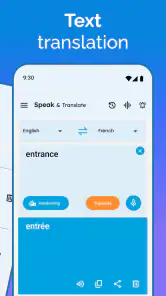
The interface is super user-friendly. You simply tap the microphone icon, speak your phrase, and the app does the rest. What’s even cooler is that it supports text translations too. So, if you’re in a noisy place, or if you just prefer typing, the app has got you covered. And let’s not forget about the real-time voice translation feature. It’s perfect for having a conversation with someone who speaks a different language.
One feature I think is worth mentioning is the ability to save translations. It’s handy for frequently used phrases or words. Just save them, and you can access them anytime without having to re-translate. It’s like creating your own personal phrasebook!
Useful habits for everyday conversations
On a trip, I’d prepare a few short, reusable lines before going out: asking whether a dish contains an ingredient, checking a departure platform, or explaining where I need to go. The benefit is not only speed. Having a saved phrase ready can help when I’m tired, in a queue, or trying to communicate politely without composing a sentence under pressure. I’d keep each phrase specific rather than saving a vague line that could be misunderstood in a different context.
For a live exchange, I’d take turns speaking instead of holding the phone between two people and expecting a perfectly flowing conversation. One person can say a short thought, the app can translate it, and the other person can answer in a separate turn. This makes it easier to notice when a translation seems off and ask for a simpler rephrasing. It is less natural than speaking a shared language, but often more workable than typing every message back and forth.
My Personal Experience
I recently used this app on a trip to Spain, and it was a lifesaver. Ordering food, asking for directions, and even chatting with locals became so much easier. I felt more confident exploring new places, knowing I had a reliable tool to help me communicate. Plus, it’s not just about translating; it’s about connecting with people, and this app makes it so much more accessible.
One thing I would note, however, is that you need an internet connection for it to work, which might be a downside in areas with poor connectivity. But honestly, with Wi-Fi available almost everywhere these days, it’s not a massive issue.
Handling an awkward or uncertain result
If a translation seems strange, I wouldn’t keep repeating the same long sentence and hope for a better result. I’d shorten it, remove idioms, and separate a request into one idea at a time. For example, instead of explaining a complicated travel problem all at once, I’d first say where I need to go, then ask one direct question. That approach gives both people a better chance to spot a misunderstanding and correct it before acting on the answer.
I’d also pay attention to the other person’s response rather than treating the translated output as the end of the exchange. A pause, puzzled expression, or answer that does not match the question is a good reason to try again with simpler wording. Translation tools can make starting a conversation easier, but they cannot tell me whether the other person understood the intended meaning. That last check still belongs to me.
Where it fits among alternatives
Compared with a basic text-only translator, the appeal here is having speech and typing together, which can make quick exchanges less fiddly. A phrasebook is better when I need dependable prepared wording without composing a fresh sentence, while a fluent speaker or professional interpreter is the safer option for legal, medical, or otherwise high-stakes discussions. I see this app as most useful for everyday travel questions and casual conversations, not decisions where a mistranslation could have serious consequences.
It is also worth weighing the free entry point against the in-app purchase range, which runs from $0.99 to $99.99 per item. I’d try the basic workflow first and decide whether it actually fits my routine before paying for anything. If all I need is an occasional typed phrase, another simple translator may be enough; if I often need to speak and listen across languages, this app’s combined approach is more relevant.
Who should try it, and who should pass
I’d recommend giving it a try if you travel, meet visitors who speak another language, or need help with short practical exchanges. For example, at a crowded café I could type a request if noise makes speech recognition difficult, then show or play the result rather than raising my voice. Someone who needs frequent, nuanced dialogue, dependable work without connectivity, or certified translation should look elsewhere. The key question is whether convenience for ordinary communication matters more than the certainty a human expert can provide.
It is especially suited to someone who wants a quick bridge through a small everyday obstacle, not a tool to manage an entire conversation without effort. A visitor asking which bus to take, or a host checking whether a guest needs directions, can make good use of short turns and simple wording. On the other hand, people who need precise professional vocabulary or extended discussions may find that checking each exchange slows them down enough to make another option preferable.
Questions I would settle before relying on it
Would I use it for an urgent or high-stakes exchange? No: I’d choose a qualified interpreter or a fluent person when a mistake could affect health, legal rights, or safety. Would I rely on it with no signal? I would not plan on that; I’d prepare essential phrases ahead of time and keep a backup way to communicate. Can it help with a noisy conversation? Typing is the sensible alternative when speech input is difficult, though a quiet place may still make the exchange easier.
Would I pay for extra access immediately? I wouldn’t. The app is free to install, while optional in-app purchases range from $0.99 to $99.99 per item, so I’d first find out whether the basic speaking, typing, and saved-phrase workflow handles my actual needs. That trial is useful because the right choice depends less on the size of its language offering than on whether I can communicate clearly in the situations I face.
Wrapping It Up
In short, if you’re a globetrotter or just someone who interacts with people from different cultures, Speak and Translate Languages is a must-have app. It’s like having a universal translator in your pocket, breaking down language barriers wherever you go. So, next time you’re planning a trip or find yourself in a multilingual environment, give it a try. You won’t regret it!
My recommendation is more cautious than calling any translator indispensable: I’d use it as a handy communication aid, prepare important phrases in advance, and keep sensitive or high-stakes conversations out of its hands. Its speech-and-text mix and saved translations make it appealing for everyday situations, while reliance on internet access and the limits of machine translation matter in practice. If that trade-off suits the way you travel or communicate, the free starting point makes it reasonable to test for yourself.
A measured choice for ordinary communication
The app’s strong appeal is its mix of spoken and typed translation, paired with a way to keep useful phrases close at hand. Its 4.6 average and more than 10 million installs make it a widely used option, but neither popularity nor a fluent-sounding voice can settle whether one specific sentence is right. I’d judge it by a modest test: can it help me make a clear request, understand the response well enough to continue, and switch to typing when speaking is a poor fit?
For that kind of practical use, I’d be comfortable trying it, especially if I were preparing for a trip or regularly helping people who speak another language. I would keep my wording simple, review saved phrases in context, and avoid entering information that is more personal than the task requires. Those habits do not remove every uncertainty, but they make the tool easier to use responsibly.
There are situations where I would pass: confidential conversations, complicated explanations, important medical or legal decisions, and places where I cannot count on a connection. In those cases, an experienced human is a better choice, and a prepared phrasebook can be more dependable for a narrow set of repeated questions. For casual exchanges, though, this app offers a useful middle ground between typing everything by hand and expecting a stranger to understand my language. My verdict is a cautious recommendation for everyday communication, with clear limits and a human backup when the meaning matters most.
Speak and Translate Languages Frequently Asked Questions
What is Speak and Translate Languages, and who might find it useful?
Speak and Translate Languages is a communication app for translating speech and text. It may be useful when you need help understanding or expressing a phrase in another language, whether you are traveling or handling an everyday conversation. Its tools are intended to support communication, but it is wise to check translations before relying on them in an important situation.
What operating system does Speak and Translate Languages require?
The Android version requires Android 5.0 or later. Before downloading, check your device’s operating system version to make sure it meets that requirement. The app is rated for Everyone, so its age rating is suitable for a broad audience, though parents may still want to review any app’s features and purchase options before a child uses it.
What languages can I use Speak and Translate Languages with?
Speak and Translate Languages is designed for communicating across multiple languages, with voice and text translation among its core functions. That makes it potentially useful when traveling, handling everyday conversations, or working with written messages. Before relying on it for an important exchange, check that the language you need is available in the app and try a short phrase first.
Is Speak and Translate Languages free to download?
The app is free to download, so you can try it without an upfront purchase. It also offers in-app purchases, with individual items priced from $0.99 to $99.99. Review the purchase options shown in the app before buying, and consider whether the free features meet your needs. The app is rated for Everyone, and its minimum operating system requirement is Android 5.0.
What is Speak and Translate Languages app?
Speak and Translate Languages is a mobile application that enables users to communicate effectively in multiple languages. It provides real-time translation for both spoken and written communication, making it a valuable tool for travelers, business professionals, and anyone needing language assistance. The app supports a wide range of languages and dialects, ensuring comprehensive coverage for most translation needs.
Pros
- Supports many languages.
- User-friendly interface.
- Real-time translation.
- Offline mode available.
- Text and voice input options.
Cons
- Requires internet for full features.
- May have occasional inaccuracies.
- Ads in free version.
- Limited offline language pack.
- Can drain battery quickly.
- Category
- Communication
- Version
- 8.1.4.2













