Car Engine Sounds - Gas Pedal
- 95.00
- 4.2
- Installs
- 1.00M
- Price
- Free

Screenshots





Analysis by Reviewed
Ever felt the thrill of revving an engine, but all you've got is your trusty phone? Let me introduce you to Car Engine Sounds - Gas Pedal, a quirky app that brings the roar of a car engine right to your pocket. Trust me, if you're a car enthusiast or just someone who loves a good vroom-vroom, this app is your new best friend.
Where the sound fits into an ordinary day
I find this kind of app works best as a brief bit of fun rather than something to leave running in the background. Picture a quiet afternoon at home: a child interested in cars asks what an engine sounds like, or a friend is comparing imaginary cars, and a quick tap gives you a playful sound to react to. It can also add a little theater to a car-themed game you are making up together. I would keep the volume low in shared spaces, though; an unexpected engine roar can be distracting rather than amusing.
That makes it a better fit for casual car fans, families, and people who enjoy sound effects than for someone seeking driving practice or a technical engine reference. It does not put you behind the wheel or teach vehicle control. If you want a realistic simulator, a racing game or a dedicated driving app is a more suitable choice; if you simply want a quick engine-style sound, this is a lighter alternative to opening a larger game.
A quick sound for small moments
The best way to fit this app into a day is to give it a specific, short job. I can imagine using it during a break to amuse a car-loving friend, or letting a child hear a playful engine effect while talking about different kinds of vehicles. It is less suited to long sessions: novelty audio is most effective when the sound is unexpected, and repeating the same kind of interaction can make the trick wear thin.
There is also a useful distinction between sharing the app and sharing the phone. If someone else wants to try it, I would hand over the device only while stationary and keep the volume at a level that suits the room. That avoids turning a small joke into a nuisance for nearby people. For a group activity, taking turns is more practical than leaving a phone roaring continuously.
Getting the Engine Started
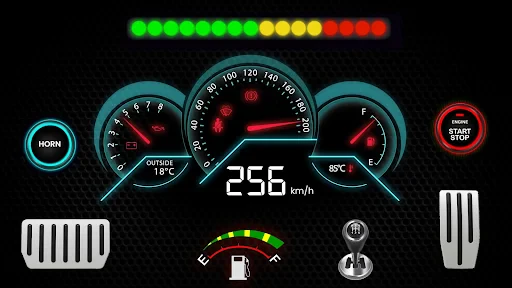
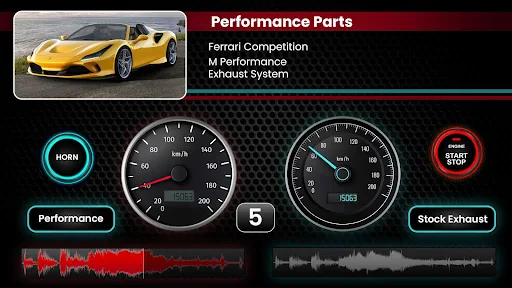
So, what’s the deal with Car Engine Sounds - Gas Pedal? Essentially, it’s an app that simulates the sound of a car engine. You tap the gas pedal on your screen, and voila, your phone lets out a roar that makes you feel like you’re in the driver’s seat of a sports car. Pretty neat, right? The app offers a variety of engine sounds, from the smooth purr of a luxury car to the aggressive growl of a muscle car. It’s like having a mini showroom of engine sounds right on your device.
The Joyride Experience
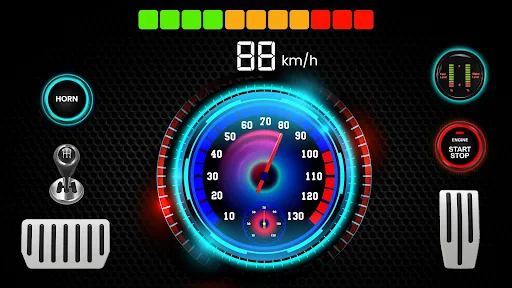
The interface is simple and straightforward. You don’t need a manual to figure this one out. Once you open the app, you’re greeted with a virtual gas pedal. Tap on it, and the app responds with authentic engine sounds. It’s surprisingly satisfying, especially if you’re a gearhead. The responsiveness of the sound to your touch is spot on, and there’s even a feature to rev the engine by long-pressing, which gives it that realistic touch.
More From Our News Desk

Weather by Xiaomi Review: Clear at a Glance, Less Clear Up Close

X Under Pressure: Can It Recover When Posting Goes Wrong?

Clash of Clans Is Won Between the Battles

Android Auto Makes the Case for Quieter Car Software

MobiOffice: Transforming Mobile Productivity with Seamless Integration

EA SPORTS FC™ Mobile Soccer: Redefining Mobile Sports Gaming
Choosing how to listen
Phone speakers are convenient for a quick demonstration, but they are not ideal for judging the texture of an engine sound. Small speakers can make low tones seem thin, and the room can change how sharp or loud the effect feels. I would start at a modest volume, then adjust only if the sound is hard to hear. Headphones can make a brief listen more focused, but they also make it easier to miss what is happening around you, so I would use them only somewhere safe and settled.
The press-and-hold control is worth trying deliberately rather than assuming every touch will feel the same. A short tap is a quick way to get an effect; holding the pedal gives the interaction a more sustained, responsive feel. If you are showing it to someone, demonstrate both gestures once and let them try. That is more satisfying than repeatedly tapping at random, and it makes clear what the on-screen control is meant to do.
What connectivity changes
Because the main appeal is an on-screen pedal and engine audio, I would judge the experience by what happens when you open it, choose a sound, and try the controls—not by expecting online features. Connectivity can still matter in practical ways: a weak connection may slow access to an app or its content, while a stable one is useful when browsing or installing. I would avoid assuming every sound is available in every network situation; instead, check what is ready on your device before counting on it for a trip or gathering.
For a low-friction test, open the app before you need it, try a short press and a longer hold, and confirm that the audio comes through your phone’s speaker or headphones. That small check answers the everyday question of whether it will work for a planned moment without turning a quick sound effect into a last-minute distraction.
Now, don’t expect it to replace the real deal, but for those moments when you’re stuck in traffic or just bored out of your mind, it’s a fun little escape. Plus, it makes for a great conversation starter. Imagine sitting in a meeting, and suddenly your phone roars like a Ferrari. Classic!
When an alternative makes more sense
Compared with a racing game, this is the lighter choice: it focuses on a quick sound interaction rather than a broader activity that asks for more time and attention. A soundboard may be a better fit if you want to trigger many kinds of effects for a performance or video, while a driving simulator is the sensible option if you want a sense of steering, traffic, or vehicle handling. This app’s appeal is narrower, but that focus is also why it can be easier to open for a quick laugh.
It is not a substitute for listening to a real car when you are trying to recognize a mechanical problem. Engine noises can be clues, but identifying a fault takes context and expertise; a phone effect cannot provide that. I would use this for entertainment and conversation, not for learning what a real vehicle’s sound means. That boundary matters most for people who arrive expecting a practical automotive tool because of its category.
Handling interruptions and saving data
Mobile audio has a few simple failure points: the phone may be muted, the media volume may be low, or headphones may be connected when you meant to use the speaker. If a sound does not play as expected, I would first check those settings, close and reopen the app, and try the pedal again before assuming anything more serious is wrong. In a public place, use headphones or keep the volume down; in a car, do not handle the phone while driving. The app is for a playful sound effect, not a reason to take attention off the road.
People watching their mobile data may prefer to install or explore it on Wi-Fi and avoid repeated downloads until they know what the app needs. Audio effects can make a phone feel lively, but they are not worth burning through a data allowance just to demonstrate a quick gag. If you are preparing for a commute, test the sound at home and then put the phone away; the safest use while driving is no use at all.
Making a quick test count
If the app behaves unexpectedly, I would keep troubleshooting simple and avoid changing several phone settings at once. Check whether another audio source is playing, confirm the media volume, and see whether the sound is being routed to a connected headset or speaker. Then reopen the app and try the control again. These checks address the common reasons a phone seems silent without treating a temporary audio hiccup as a problem with the engine effect itself.
For anyone concerned about connectivity, the practical question is whether the experience you want is ready when you need it. Try the app at home before relying on it for a visit, a gathering, or a long outing. If you are using mobile data carefully, do the initial setup and exploration on Wi-Fi where possible, then avoid repeatedly reinstalling or refreshing just to produce a sound. A small amount of preparation is more useful than assuming a network will be available at the exact moment you want to show it.
Why You Might Hit the Brakes
While the app brings plenty of engine excitement, it’s not without its quirks. The sound quality, although decent, can sometimes feel a bit digital, especially if you’re an audiophile. And unless you’re into the novelty of it, the app might lose its charm after a few uses. But then again, isn’t that the case with most novelty apps?
Another trade-off is that the phone is both the control and the speaker, so the effect depends on how and where you use it. In a noisy room, the sound may not come across clearly; turning it up can bother other people rather than improve the experience. In a quiet place, the same effect can feel much louder than expected. I would treat volume as part of the setup, not an afterthought, especially when handing the phone to a child or friend.
There is a difference between “responsive” and “realistic,” too. The pedal interaction gives the sound a playful sense of control, but it does not reproduce the full experience of operating a vehicle. That is not a flaw if you want a novelty, but it is a reason to choose a simulator or real recording library if fidelity and detail are your priority. Knowing which kind of fun you want makes the decision easier.
On the bright side, it’s a free app, so you’re not losing anything by giving it a spin. And who knows, it might just become your go-to app for those moments when you need a quick adrenaline boost or a laugh.
Who should take it for a spin
Auto Xtreme’s app sits in the casual end of the Auto & Vehicles category. It is free to start, rated for Everyone, and has an average rating of around 4.2 from roughly 4,200 ratings, with over a million installs. It was released in 2019, and version 4.1.0 is the current version; it requires Android 8.0 or later. Optional in-app purchases range from about a dollar to around a hundred dollars per item, so I would check the purchase screen carefully before tapping through. The rating and install count suggest broad interest, but they do not tell you whether the sound style will suit your ears.
The purchase range is a good reason to pause before confirming anything. The app is free to start, but optional purchases can vary substantially in cost, so I would read each prompt rather than tapping through quickly. If you are setting it up for a child, that is especially worth doing in advance. The Everyone age rating makes it broadly suitable, but it does not remove the need for an adult to supervise purchases on a shared device.
I’d recommend it to someone who wants a small novelty to share, especially a car fan who enjoys comparing sound effects without needing a full game. I would skip it if your goal is to diagnose a real engine, learn how to drive, or hear carefully recorded audio with studio-level detail. For those needs, a mechanic’s advice, a proper driving simulator, or a focused sound library is a better tool. The useful trade-off is straightforward: this app favors instant, playful interaction over depth and realism.
The connectivity verdict
Connectivity is not the main attraction here; the appeal is the pedal and the engine effect. Still, I would not build a plan around assumptions about what will be available when a signal is weak. Install and explore when you have a dependable connection, then test the exact sound and control you intend to show. This is a small but helpful habit for any app you want to use spontaneously, especially when you are away from home.
For a quick demonstration, a child’s question, or a playful moment with another car fan, the app can be ready in seconds once you know how its controls and audio behave on your phone. For driving instruction, serious sound comparison, or a long activity with varied content, another kind of app is a better match. I see its value in being a compact novelty, not in replacing those more specialized tools.
The Final Lap
In conclusion, Car Engine Sounds - Gas Pedal is a fun and light-hearted app that’s sure to bring a smile to your face. It’s perfect for car lovers or anyone looking to add a little rev to their day. It’s not going to replace the thrill of driving a real car, but it’s a fun substitute when you’re grounded and need a quick vroom fix. So go ahead, download it, and let your phone do the roaring. Who says you need a car to enjoy the sound of an engine?
Car Engine Sounds - Gas Pedal Frequently Asked Questions
Is Car Engine Sounds - Gas Pedal easy to set up and start using?
Car Engine Sounds - Gas Pedal is aimed at making car sounds accessible without needing a real vehicle or driving experience. After installing it, you can explore the engine-sound experience and try the gas-pedal interaction on your device. It is an Auto & Vehicles app from Auto Xtreme, and its straightforward concept should appeal to people who want a quick, playful way to hear and simulate engine revving.
What is Car Engine Sounds - Gas Pedal and what does it offer?
Car Engine Sounds - Gas Pedal is an app designed for car enthusiasts who love the roar of powerful engines. This app offers a collection of engine sounds from different types of vehicles, including sports cars, muscle cars, and supercars. It simulates the experience of revving an engine by using your phone as a gas pedal, providing an engaging sound experience for users. Its store summary welcomes auto lovers to enjoy a car simulator sound experience.
How does the Gas Pedal feature work in this app?
The Gas Pedal feature in Car Engine Sounds app allows users to simulate the experience of pressing a real car's gas pedal. By tilting or tapping your device, the app adjusts the engine sound's intensity and RPM, making it feel like you're actually revving a car's engine. This feature is perfect for those who want to enjoy car sounds without needing an actual vehicle.
Is Car Engine Sounds - Gas Pedal free to use, or are there in-app purchases?
Car Engine Sounds - Gas Pedal is free to download and offers a variety of engine sounds at no cost. However, the app includes optional in-app purchases, priced from $0.99 to $99.99 per item, for users who wish to access additional features or a wider selection of engine sounds. These purchases can enhance the user experience but are not necessary to enjoy the app's core functionality.
Can I use Car Engine Sounds - Gas Pedal offline?
Yes, Car Engine Sounds - Gas Pedal can be used offline. Once you have downloaded the app and the desired engine sounds, you can enjoy the audio experience without needing an internet connection. This makes it a convenient companion for road trips or areas with limited connectivity.
Pros
- Realistic engine sounds enhance experience
- Wide variety of car models available
- User-friendly interface
- easy navigation
- Regular updates with new car sounds
- Offline mode available for convenience
Cons
- Limited customization options
- Ads may interrupt user experience
- Sound quality varies between cars
- No social sharing features
- Requires significant storage space
- Category
- Auto & Vehicles
- Version
- 4.1.0