Holy Bible-Large Print
- 261.00
- 4.9
- Installs
- 50.00K
- Price
- Free

Screenshots
Analysis by Reviewed
I spent time with Holy Bible-Large Print as a reading and reference app, paying particular attention to how comfortably it works for people who read in different environments or have different access needs. Its purpose is straightforward: make Bible reading easier through large text, audio, offline access, and a daily verse. That focused approach is more useful than it may sound, especially when a small phone screen, weak signal, or tired eyes makes a conventional reading app frustrating.
Developed by Bíblia Offline, this free Books & Reference app is aimed at everyday reading rather than academic study tools or social interaction. It is available for everyone by age rating, works on Android 7.0 and later, and the current version is 1.6. The app has built a strong reception, with a 4.9 average from around 4.5 thousand ratings and more than 50 thousand installs. Those figures suggest that its simple reading-first design is connecting with a specific audience, although a high rating should not be taken as proof that every reader will find the interface equally comfortable.
How the large-print design affects reading and navigation
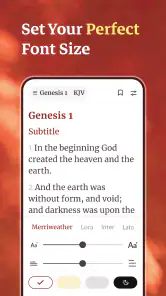
The most important decision here is the emphasis on large print. On a phone, that can make a meaningful difference. Bible passages often contain long chapters, narrow columns, and dense blocks of text, so a larger type treatment reduces the effort needed to keep your place. I found the concept especially suitable for quiet reading before bed, for older readers, and for anyone who becomes uncomfortable after concentrating on small text for several minutes.
Large print is not only about eyesight. It also changes the rhythm of reading. When letters are easier to distinguish, I can scan a verse, return to a previous line, or compare nearby passages without staring at the screen. That helps readers who experience visual fatigue, reduced contrast sensitivity, or difficulty maintaining focus. It is also useful when the phone is held farther away, such as on a stand or across a table.
The trade-off is that larger text naturally shows less content at once. A chapter may require more scrolling, and that can make it harder to understand the broader structure of a passage at a glance. Readers who prefer seeing several paragraphs together, quickly jumping through a long book, or comparing multiple references may find a desktop Bible website or a study-focused app more efficient. The large-print approach favors comfort over information density, and that is a sensible choice, but it is still a choice.
For a smoother routine, I would open the passage before starting a reading session rather than trying to search while distracted. If you are preparing a lesson, sermon, or group discussion, it is worth locating the relevant chapters in advance and keeping your reading position consistent. A large-print interface is most helpful when it removes visual strain; it cannot completely remove the need to navigate through a long text.
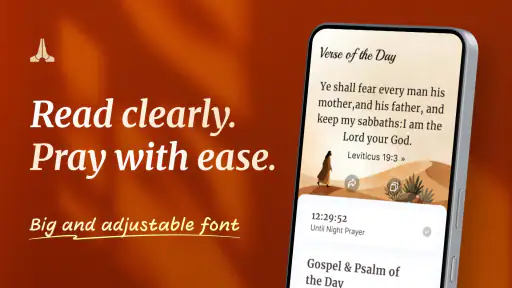
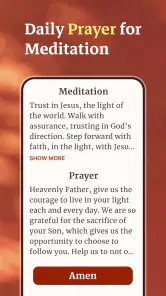
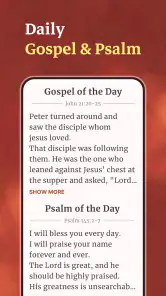
The daily verse adds a low-effort entry point. Instead of deciding which book to read, a person can open the app for a short moment and begin with a single passage. That suits a morning routine, a lunch break, or a brief pause during a stressful day. It also makes the app approachable for someone returning to Bible reading after a long gap. I would not treat the daily verse as a replacement for reading a complete chapter, but it is a practical bridge into a longer habit.
More From Our News Desk

Weather by Xiaomi Review: Clear at a Glance, Less Clear Up Close

X Under Pressure: Can It Recover When Posting Goes Wrong?

Clash of Clans Is Won Between the Battles

Android Auto Makes the Case for Quieter Car Software

MobiOffice: Transforming Mobile Productivity with Seamless Integration

EA SPORTS FC™ Mobile Soccer: Redefining Mobile Sports Gaming
Audio changes the way a reading session can work
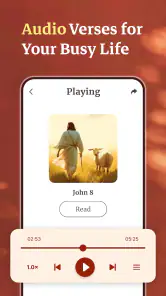
Audio is one of the most important inclusivity features in the package because it gives users another route into the text. Someone with tired eyes can listen instead of reading. A person cooking, walking indoors, or commuting as a passenger can engage without holding the phone close. Readers who process spoken language more comfortably than dense written paragraphs may also find the audio option less demanding.
There is a useful distinction between audio as a convenience and audio as an accessibility aid. In this app, it can serve both purposes, but it does not make every situation effortless. Listening requires a suitable environment, and some people need to replay a verse or pause often to absorb it. Others may prefer reading along, which can be difficult if the spoken pace and the visual position do not stay perfectly aligned. For close study, I would still choose the written passage and use audio as reinforcement rather than assuming it will replace every visual interaction.
A practical workflow is to listen to a passage first, then read the same section when you have more attention available. That can help with pronunciation, overall meaning, and remembering where a familiar verse sits in context. It is also a good option for someone who wants a short reflective session without the visual burden of a bright screen. The app becomes more flexible when reading and listening are treated as complementary modes instead of competing ones.
Motor and sensory considerations in daily use
Any phone-based reading experience asks the user to tap, swipe, and maintain a grip. That matters for people with tremors, limited finger control, joint pain, or fatigue. Large text can improve visual targeting because the reading area is easier to see, but it does not automatically make every control easier to operate. A reader who has difficulty performing repeated swipes may still find long chapters tiring, particularly when the phone is held in one hand.
I would use a stand or rest the phone on a stable surface during longer sessions. This small change reduces the need to grip the device and makes audio easier to start before settling into listening. It also helps readers who need to position the screen at a particular distance or angle. For someone with limited reach, a larger device may offer a more comfortable layout, while a smaller phone may be easier to carry but require more frequent scrolling.
Sensory comfort is equally personal. A bright screen can be unpleasant in a dark room, while a dim screen may be hard to read outdoors. The large-print presentation gives the eyes more generous shapes to work with, but it cannot solve glare, reflections, or general phone-display limitations. I would adjust the device’s own brightness and display settings before reading, especially at night, and use audio when the visual environment is poor.
People who are sensitive to sound should also think about where audio will be used. Listening in a shared room may require headphones, and headphones are not suitable for everyone. Some users need captions or a written alternative for spoken material; the text itself provides that alternative, which is valuable. The strongest part of the design is therefore its choice: you can approach the content visually or audibly depending on your energy, surroundings, and needs.
Situational access: where offline reading matters most
Offline access is more than a convenience for this kind of app. It changes whether the reading habit survives outside reliable connectivity. I would find it useful in a basement, on a flight, in a rural area, during a service where reception is poor, or while traveling with mobile data turned off. A person who keeps the app ready beforehand does not have to postpone reading because a page will not load.
This also helps people who manage limited data plans or share a weak household connection. Instead of depending on a web browser, the app can function as a dedicated reading space. That reduces the number of steps between deciding to read and actually reaching the passage. For someone with cognitive fatigue, fewer interruptions can be just as important as larger text.
The key habit is preparation. I would open the app while connected and make sure the material I expect to use is available before leaving home. Offline reading is most valuable when it is planned rather than tested for the first time in an emergency. It also makes the app suitable for quiet spaces where connectivity is intentionally limited, such as retreats or locations where people want to keep their phone use simple.
A realistic example is an older family member who reads a short passage each morning but struggles with small print and unreliable home internet. With this app, that person can use the larger presentation at the kitchen table, listen when their eyes are tired, and continue reading during a power or connection interruption if the content has already been made available offline. The same workflow could help a caregiver prepare readings for someone who cannot comfortably search or browse for long periods.
Another scenario is a student or volunteer preparing for a group meeting while traveling. The daily verse may provide a quick starting point, while offline access allows a longer passage to remain available in a place with no signal. The app is not trying to become a complete collaboration platform; its advantage is that the core reading task stays close at hand.
Where it compares well with usual alternatives
Compared with opening a Bible in a mobile browser, this app offers a more focused experience. A browser introduces tabs, page layouts, advertisements on some sites, and the possibility of losing the passage when the connection changes. A dedicated offline reader is better suited to someone who wants a predictable path into the text, particularly when large print and audio are priorities.
Compared with a physical large-print Bible, the app is lighter, easier to carry, and offers audio and a daily-verse entry point. A printed book still has advantages: it does not need charging, its page location is tangible, and it may be easier for someone who dislikes touchscreens. Physical pages can also be more comfortable for extended reading when screen glare is a problem. I would recommend the app as a companion rather than insisting it replace a preferred paper Bible.
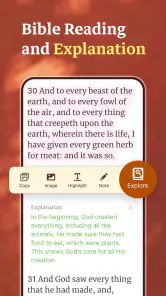
Compared with feature-heavy Bible study apps, this one is likely to appeal to readers who do not want layers of notes, social feeds, plans, or research tools competing with the passage. That simplicity can be a strength for beginners and for people who become overwhelmed by crowded interfaces. On the other hand, a serious researcher may prefer an alternative built around cross-references, original-language tools, extensive commentary, or detailed bookmarking. The right choice depends on whether the main task is comfortable reading or deep textual analysis.
Remaining barriers and who should think twice
The app’s focused design does not eliminate every barrier. Large print may mean more scrolling, and scrolling can be difficult for users with limited motor control. Audio helps users who cannot comfortably read, but it may not suit noisy environments or people who need a highly visual way to compare passages. Offline access helps with connectivity, yet it requires the user to prepare content and keep the device usable.
There is also the broader issue of phone dependence. A reader may be distracted by notifications, calls, or other apps, even when the Bible itself is presented clearly. Someone seeking a distraction-free ritual may prefer a printed book or a dedicated e-reader. Likewise, a person who needs a particular text edition, advanced study apparatus, or a carefully synchronized reading plan should compare the app with specialized alternatives before committing to it.
I would also avoid assuming that “large print” feels identical for everyone. Visual needs vary widely. One person may find the text comfortable while another needs stronger contrast, a different typeface, magnification, or a screen reader workflow. The app is promising for readers who benefit from larger text, but the phone’s own accessibility settings and the user’s device will still influence the final experience. Testing a short passage is the sensible way to decide whether the presentation works for your eyes and hands.
For families, the Everyone age rating makes the app broadly approachable, but suitability is still about reading ability and personal preference rather than age alone. A child may need help navigating a long passage, while an older adult may appreciate the larger text but need assistance with initial setup. In both cases, a short guided introduction can prevent frustration: show how to reach the daily verse, start audio, and return to the desired reading location.
My inclusive verdict after using it
I see Bíblia Offline’s app as a practical choice for people who want the Bible available in a calmer, more readable format. Its strongest qualities are not an enormous list of tools but the way large print, audio, offline reading, and the daily verse address different moments of real life. The best reason to choose it is flexibility of access: read when your eyes are comfortable, listen when they are not, and keep the text available when the internet is unreliable.
I would recommend it to older readers, people who experience visual fatigue, beginners who want a simple starting point, travelers, and anyone who values an offline reading routine. It is also worth trying if conventional Bible apps feel crowded or if browser reading creates too many distractions. The free price removes a major barrier to testing it, and its current version 1.6 keeps the product easy to identify for people comparing installations.
I would choose something else, or use this alongside something else, if my priority were scholarly research, extensive annotation, group interaction, or a paper-like reading experience without a screen. Users with very specific visual, motor, or hearing requirements should judge the actual interface on their own device rather than relying on the label “large print” alone.
Overall, this is a focused reference app that understands a useful truth: access is often situational. The same reader may want big text in the evening, audio while moving around, and offline passages while traveling. For comfortable everyday Bible reading rather than advanced study, Holy Bible-Large Print is a thoughtful free option that earns its place by reducing friction without pretending to solve every accessibility need.
Holy Bible-Large Print Frequently Asked Questions
What devices and operating systems can run Holy Bible-Large Print?
Before downloading, check that your phone or tablet meets the app’s system requirements. Holy Bible-Large Print is available for Android devices running version 7.0 or later. It is a Books & Reference app developed by Bíblia Offline, and the same title may be offered differently across platforms, so confirm compatibility in the store you plan to use.
What is Holy Bible-Large Print, and who is it designed for?
Holy Bible-Large Print is a Bible-reading app focused on making Scripture easier to read on a mobile device. Its enlarged text is especially helpful for users with visual difficulties, older readers, or anyone who prefers a more comfortable reading experience. It can also be useful for daily devotionals, church study, personal reflection, and reading without carrying a physical large-print Bible.
Can I read the Bible offline after downloading Holy Bible-Large Print?
Offline availability can depend on the app version, the selected Bible content, and how the application stores its files. Before relying on it during travel, worship services, or areas with limited connectivity, open several books and chapters while connected to the internet and check whether they remain accessible afterward. Also confirm that any required downloads have finished and that your device has enough storage.
Does the app offer adjustable text size and other accessibility features?
The main advantage of Holy Bible-Large Print is its emphasis on readable, enlarged Scripture text. Depending on the version installed, users may also find options such as screen orientation changes, night or dark reading modes, chapter navigation, and display adjustments. People who need very specific accessibility settings should review the in-app controls after installation, since features may vary between Android and iOS releases.
Does Holy Bible-Large Print include every book of the Bible and a specific translation?
The included books and translation depend on the edition published by the developer. Before beginning a long-term reading plan or Bible study, check the app’s description and its book list to confirm that both the Old and New Testaments are available and that the wording matches your preferred translation. This is particularly important for users who need a particular denomination’s or study group’s version.
Pros
- Large
- clear text improves readability for older users.
- Works offline
- making Scripture available without internet access.
- Simple navigation helps users find books and passages quickly.
- Useful for personal devotion
- study
- and church reading.
- Adjustable display settings can make reading more comfortable.
Cons
- Large-print formatting may require more storage than standard Bible apps.
- Some versions or features may require in-app purchases.
- Limited study tools compared with advanced Bible applications.
- Ads may interrupt the reading experience in the free version.
- Large text can mean more scrolling on smaller phone screens.
- Category
- Books & Reference
- Version
- 1.6