Bedtime Stories - HeyKids
- 6.00
- 3.5
- Installs
- 1.00M
- Price
- Free

Screenshots


Analysis by Reviewed
I judge a bedtime app less by how charming it looks than by whether it helps a family settle into a routine without adding another nightly hassle. Bedtime Stories - HeyKids is aimed at parents who want children’s tales on a phone or tablet, and its appeal is straightforward: it gives storytime a digital home. That can be useful when the usual book is misplaced, a caregiver is taking over, or everyone is too tired to invent a new tale.
Where bedtime routines can get stuck
The tricky moment is often not choosing a story but keeping the transition calm. A child may want to browse indefinitely, or the device itself may become more exciting than the tale. I’d choose a story before handing over the screen, then keep the phone in an adult’s hands while listening. That small change makes the app more of a read-aloud aid and less of an invitation to keep tapping.
This is also where expectations matter. A story app can offer a convenient alternative to finding and opening a paper book, but it does not automatically create a soothing routine. I’d pair it with the same familiar cues each night—dim lights, a settled place, and a clear ending—rather than treating the app as a shortcut to sleep.
Checking the fit before storytime
Animaj’s parenting app is free to download, has an Everyone age rating, and is listed for Android devices running version 5.0 or later. It has a 3.5 average from around 1,000 ratings and more than a million installs. The current version is 2.2.2; optional in-app purchases range from $1.99 to $9.99 per item. I’d check the purchase prompts with a child before handing over the device, especially if they are used to exploring menus independently.
For a smoother first session, open the app yourself, look through the available stories, and settle on one before bedtime begins. If a story is not what your child expected, switch calmly rather than turning the choice into a long browsing session. The app’s focus on fairy tales and short stories makes it most promising for families who want a compact listening or viewing option, not a broad parenting toolkit.
A practical way to use it
On an ordinary evening, I can imagine using it after bath time while a child is already tucked in: pick a short tale, sit nearby, and let the story mark the shift from play to quiet. For a grandparent or babysitter who does not know the family’s usual book choices, a ready-made story can also make the routine easier to continue. The useful trick is to keep the adult in charge of selecting and stopping, so the device does not become the main event.
Making the choice work for different families
I see the strongest fit in households that already use a phone or tablet for occasional family tasks and want a story option ready when a familiar book is not nearby. It can also help when two adults share bedtime duties: agreeing on a story in advance gives a caregiver a simple starting point without asking a child to search through choices. That is a small but useful handoff, especially when the adult taking over does not know which tale has become the current favorite.
More From Our News Desk

Weather by Xiaomi Review: Clear at a Glance, Less Clear Up Close

X Under Pressure: Can It Recover When Posting Goes Wrong?

Clash of Clans Is Won Between the Battles

Android Auto Makes the Case for Quieter Car Software

MobiOffice: Transforming Mobile Productivity with Seamless Integration

EA SPORTS FC™ Mobile Soccer: Redefining Mobile Sports Gaming
For a child who likes to choose, I would narrow the decision to a couple of acceptable options rather than handing over unrestricted browsing. That gives them a little ownership without letting bedtime turn into a search session. If even a brief screen interaction makes your child more alert or argumentative, the app is probably not the right tool for that part of the evening; a paper book or a parent telling a familiar story is likely to be calmer.
How it differs from books and broad video apps
The useful comparison is not simply digital versus print. A paper book makes the adult-child exchange physical and naturally limits the choices in front of you, while a phone is portable and keeps a collection of stories within reach. That portability is handy on a visit or when the regular book is elsewhere, but it also means the screen can bring distractions along with the story. I would treat the device as a container for storytime, not as a toy to pass over for open-ended exploration.
Broad video services are designed for many kinds of viewing, so they can invite children to move from one clip to another. A story-centered option is more aligned with a planned tale, but it is still a screen-based activity and should not be assumed to be screen-free simply because the content is for children. If your priority is a large catalogue to browse, another kind of service may suit you better; if your priority is a quiet, familiar book ritual, print has the clearer advantage.
Small choices that prevent bedtime friction
One practical approach is to decide on the story while the child is still occupied with an earlier part of the evening, then open the selected tale only once everyone is settled. This separates choosing from listening, which can prevent a child from treating the device as a menu to explore. I would also agree on the stopping point before beginning. A calm ending is easier to manage when it is part of the plan rather than a surprise after the child has become absorbed.
If the device is shared, I’d keep the adult’s usual bedtime selection separate from a child’s general screen time in the way the family manages the device. That makes it easier to present the app as part of a routine rather than a reward that must be extended. It also avoids relying on the child to navigate purchase choices. Free to download does not mean every in-app option is free, so an adult should handle any decision involving a paid item.
When another option may work better
Compared with a printed book, an app is easier to carry and can offer a quick choice without needing a shelf of titles nearby; a physical book, however, avoids screen use and gives a child something tangible to turn through. Compared with an open-ended video platform, a story-focused app may feel more appropriate for a planned bedtime moment, while families who want a large, searchable media library may prefer a service built around broader viewing. The best fit depends on whether convenience or a screen-free wind-down matters more in your home.
If the app does not open or a story fails to play, I’d first close and reopen it, check that the device has a working connection if the content needs one, and make sure the app and operating system are compatible. If the problem persists, restarting the device is a sensible next step. These checks are useful general troubleshooting, not a guarantee that every playback issue has the same cause. A network problem, device setting, or temporary software glitch can interrupt storytime without reflecting the story collection itself.
Separating app trouble from routine trouble
When a child loses interest, asks to change stories repeatedly, or becomes upset when the screen is put away, I would not assume that a technical fault is involved. Those reactions may mean the selection was not a match, the child is not ready to settle, or the device is making the transition harder. I’d try one planned story at a consistent point in the evening before changing the app or device settings. If the same difficulty happens with books and other bedtime activities too, the broader routine may need attention rather than another app adjustment.
For playback problems, it helps to notice whether the issue is limited to one story or affects the app more generally. Close and reopen the app, check the device’s connection when needed, and verify that the installed app and operating system are compatible. If the problem continues, a device restart is a reasonable basic check. I would avoid repeatedly tapping controls while a child is waiting; pause the attempt, troubleshoot away from the bedtime moment, and use a familiar book as a backup so a technical delay does not become the evening’s main event.
A Magical Nightly Companion
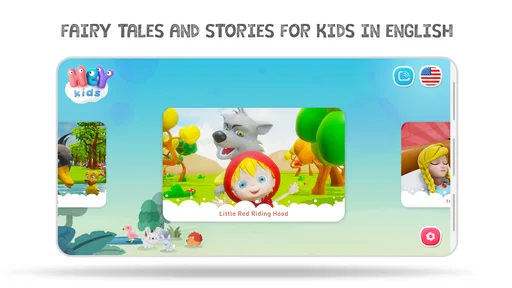
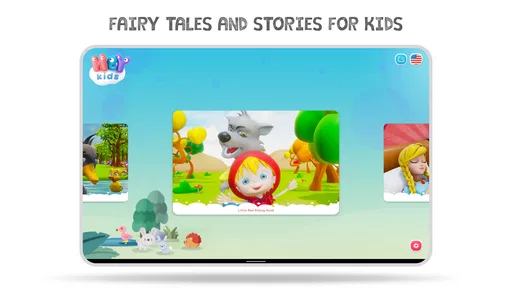
As soon as I downloaded Bedtime Stories - HeyKids, I was greeted with a colorful and inviting interface that immediately caught my little one's attention. The app is designed to be intuitive, making it easy for both kids and adults to navigate. It comes packed with a delightful selection of stories that cater to different age groups and interests. Whether your child is into adventurous tales or soothing lullabies, there's something here for every young dreamer.
Engaging Narratives and Beautiful Illustrations
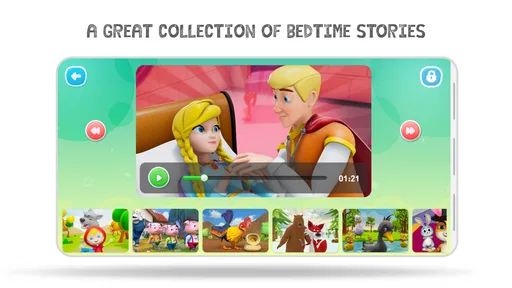
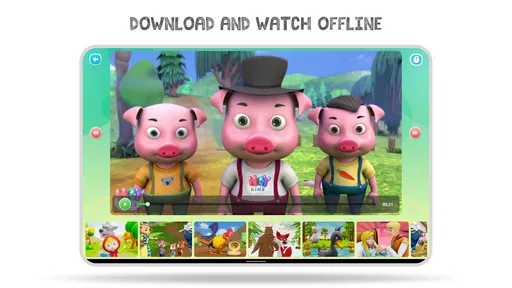
The stories are not just engaging but are also beautifully illustrated, which is a big plus for visual learners. As a parent, I appreciate the balance between text and images, making it easier for kids to follow along. Each story is narrated in a way that captures attention, with voiceovers that bring characters to life, making bedtime a fun and interactive experience.
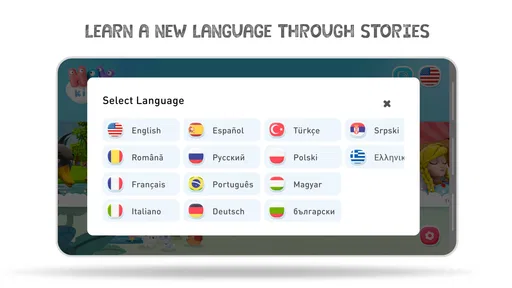
What I found particularly charming is the app's ability to switch between different languages. It’s a fantastic tool for parents who want to introduce their kids to new languages or for those in bilingual households. It adds an educational layer to the entertainment, which is always a win in my book!
Customization and User-Friendly Features
One of my favorite features is the ability to customize playlists. You can curate a list of favorite stories, ensuring your child's preferred tales are just a tap away. The app also allows you to set a timer, so you can control how long storytime lasts – perfect for those nights when you need a little extra time to yourself.
The developers have done a remarkable job of ensuring the app is user-friendly. Even if you’re not tech-savvy, you’ll find navigating the app a breeze. Plus, there are no annoying ads interrupting the flow of the stories, which is a huge relief for both parents and kids!
Keeping expectations realistic
The app’s appeal depends on how your child responds to stories on a screen. A child who enjoys following illustrated tales may settle into it, while another may focus on the device more than the narration. I would try a story together at a relaxed time before making it a regular bedtime step. That gives you a chance to see whether the format calms your child, holds their attention, or leads to more requests for screen time.
It also makes sense to treat any customization as a convenience rather than a substitute for choosing thoughtfully. A short list of known favorites can reduce decision-making, but the adult still has to judge whether the chosen story suits the child’s mood and the time available. If the night is already running late, a familiar, brief book may be a better fit than opening a device and making new choices.
Final Thoughts
All in all, Bedtime Stories - HeyKids is a fantastic tool for parents looking to enrich their bedtime routines with engaging and educational content. It’s not just an app; it’s a gateway to a world of imagination and learning. So, if you’re ready to transform bedtime into a magical adventure, I highly recommend giving this app a try. Sweet dreams!
My practical verdict
I’d recommend it to families who want a child-friendly collection of short stories to support an existing bedtime habit, particularly when variety and easy access are more useful than a screen-free routine. It may be less suitable for parents who want a fully offline, device-free ritual, or for children who find it hard to stop using a screen once it is in front of them. In that case, a familiar paper book may be the better choice.
The app was released in September 2019, and its 2.2.2 version is the one to check when troubleshooting; I would compare the installed version with what the device offers before assuming a story issue is a broader fault. Its free starting point makes it easy to try, but paid items mean I would review any purchase choice myself rather than letting a child decide. Overall, I see it as a practical storytime option, not a substitute for a parent’s presence or a routine that already works.
Bedtime Stories - HeyKids Frequently Asked Questions
What is Bedtime Stories - HeyKids, and who develops it?
Bedtime Stories - HeyKids is a parenting app centered on children’s stories, with the short description “Bedtime Stories.” It is developed by Animaj and is intended for families looking for fairy tales and short stories for children. The app is free to download, and its content rating is Everyone, making it a family-focused option to consider for a bedtime routine.
What are the main features of Bedtime Stories - HeyKids?
Bedtime Stories - HeyKids offers a wide range of narrated stories that are perfect for bedtime listening. The app features a variety of classic and new stories, designed to engage young listeners and help them wind down before sleep. The stories are accompanied by soothing background music and visuals, making it an ideal tool for parents to create a calming bedtime routine.
Is Bedtime Stories - HeyKids suitable for all ages?
Yes, Bedtime Stories - HeyKids is designed to cater to children of various age groups. The app offers stories that are appropriate for toddlers, preschoolers, and older children. Each story is crafted to be age-appropriate, with content that is both entertaining and educational, ensuring a safe and enriching experience for all young listeners. Its Everyone content rating also makes it a family-friendly choice, though parents can still decide which stories best suit their child.
Can I use Bedtime Stories - HeyKids offline?
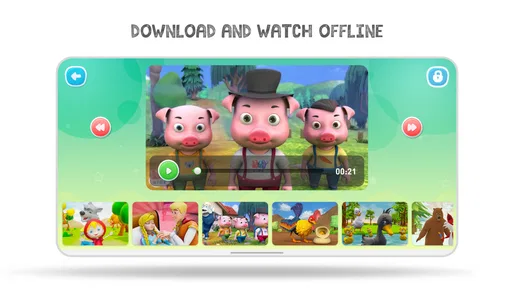
Bedtime Stories - HeyKids does offer offline functionality. Users can download their favorite stories to access them without an internet connection. This feature is particularly useful for parents who want to ensure their children have access to their favorite bedtime stories during travel or in areas with limited internet connectivity.
Are there in-app purchases in Bedtime Stories - HeyKids?
Yes, while Bedtime Stories - HeyKids offers a range of free content, there are also in-app purchases available. These purchases can unlock additional stories and features, providing a more extensive library of bedtime tales for users who wish to expand their collection. Individual purchases range from $1.99 to $9.99, so parents may want to review the options and set appropriate permissions before children use the app.
Pros
- Engaging animations for kids
- Wide variety of stories
- Easy to navigate interface
- Offline access available
- Includes soothing lullabies
Cons
- Limited free content
- Contains ads
- No parental control features
- Stories may be too short
- In-app purchases required











