Be Closer: GPS Family Location
- 1.84K
- 4.4
- Installs
- 10.00M
- Price
- Free

Screenshots
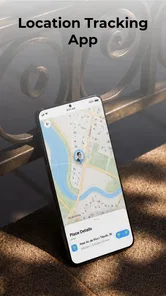
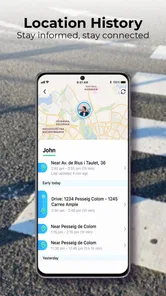
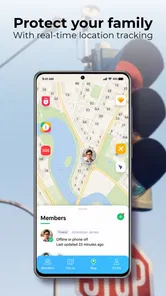
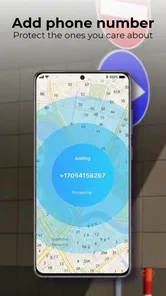
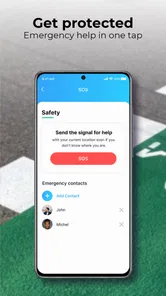
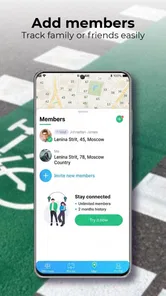
Analysis by Reviewed
Ever found yourself in a situation where you just needed to know the whereabouts of your family members without bombarding them with texts or calls? Well, that's where Be Closer: Family location comes to the rescue! This nifty app has become a go-to solution for many families looking to stay connected and ensure safety without being intrusive.
What Is It All About?
At its core, Be Closer: Family location is a family GPS tracker that allows you to keep tabs on your loved ones in real-time. Whether it's making sure your kids get to school safely or checking if your spouse is stuck in traffic, this app provides peace of mind with just a few taps on your smartphone.
Easy Peasy Setup
Setting up the app is a breeze. Once you've downloaded it, you simply invite your family members to join your circle. It's as simple as sending an invite link. They accept, and voilà, everyone is connected! The interface is user-friendly, so even those who aren’t tech-savvy will find it easy to navigate.
Getting to a Useful First Check
For a first-time user, the most useful first step is agreeing as a family on when location sharing is welcome and what you expect from it. Once everyone has joined, check that each person’s location appears before relying on the app for a pickup or a school run. If someone is not showing up, ask them to open the app and review their phone’s location settings rather than assuming the person has chosen not to share. That small check helps separate a setup issue from a genuine reason to get in touch.
Features That Stand Out
One of the standout features is the real-time location tracking. The app updates constantly, so you get the most recent information about your family’s whereabouts. But that's not all. It also provides notifications for when family members arrive at or leave certain locations. This geofencing feature is handy for knowing when the kids arrive home from school or if your partner has left work.
Another impressive feature is the app’s ability to show the battery level of each family member’s device. This way, you’ll know if someone’s phone is about to die, which could explain any lack of contact.
Making Location Alerts Work for Real Routines
Arrival and departure alerts are most useful when they answer a question you would otherwise need to ask repeatedly. A parent waiting at home can use an arrival notice as a simple signal that a child has reached the agreed destination; someone coordinating an evening pickup can check whether a relative has left work before setting out. I’d keep alerts focused on a few regular places instead of turning every movement into a notification. Too many updates can make the phone noisy and make the important ones easier to miss.
More From Our News Desk

Weather by Xiaomi Review: Clear at a Glance, Less Clear Up Close

X Under Pressure: Can It Recover When Posting Goes Wrong?

Clash of Clans Is Won Between the Battles

Android Auto Makes the Case for Quieter Car Software

MobiOffice: Transforming Mobile Productivity with Seamless Integration

EA SPORTS FC™ Mobile Soccer: Redefining Mobile Sports Gaming
The battery indicator adds context, but it is not a guarantee that a person is reachable: a charged phone may still be offline, and a low battery is a prompt to plan a backup, not proof that something is wrong. If a location looks stale or unexpected, I’d use it as a reason to check in calmly rather than treating the map as a perfect live record. GPS location can be affected by a phone’s settings and connection, so a call or message remains the sensible fallback when timing matters.
Who It Suits—and When Another Approach Is Better
This is a good fit for households who already want to share locations openly, especially parents coordinating school journeys, partners arranging pickups, or relatives checking that an older family member has reached a familiar destination. It can reduce routine “Are you there yet?” messages without replacing conversation. A practical weekday routine might be agreeing that a child will share their trip home, then using the arrival alert to know when to start dinner or meet them at the door.
Compared with asking everyone to send a text at each stop, a shared location view can save effort and provide useful context, including the phone’s battery level. But a text is often better for a one-off meeting, and a phone’s built-in location-sharing option may be enough if your family already uses it and does not need a separate family app. I would skip this kind of tracker if family members are uncomfortable sharing their whereabouts or if the goal is to monitor someone without their informed agreement. Trust and clear boundaries matter more than any map.
Why Families Love It
Families appreciate the sense of security that comes with using the app. It’s not about being nosy, but rather ensuring that everyone is safe and sound. The app fosters communication and trust, allowing family members to share their locations willingly. Plus, the app’s intuitive design means everyone, from kids to grandparents, can use it without a hitch.
What to Know Before You Rely on It
Be Closer is a free parenting app from Golden Gate Media, rated for Everyone, and its current version is 4.7.8. It has a 4.5 average from around 134,000 ratings and more than 10 million installs. Optional in-app purchases range from $1.99 to $64.99 per item, so I’d check what is offered in the app before paying; the core download is free. It first appeared on February 5, 2019, and requires Android 9 or later.
My practical advice is to test the routine on an ordinary day before depending on it for a time-sensitive trip. Have each person check that sharing is working, decide which places deserve alerts, and agree on what to do if a phone runs low on battery. The app is most reassuring when everyone understands what the location view can tell them—and when they know to use a direct call if a situation needs an immediate answer.
In Conclusion
If you’re looking for a reliable way to keep your family connected and safe, this app is definitely worth considering. The ease of use, coupled with its robust features, makes it a valuable addition to any family’s digital toolkit. So go ahead, give it a try. You might just find it’s the missing piece in your family’s safety puzzle.
Be Closer: GPS Family Location Frequently Asked Questions
What permissions should I review before installing Be Closer: Family location?
Before installing, consider whether you are comfortable with an app whose central purpose is family location sharing. GPS and location access are relevant to that use, so review the permissions presented on your device and decide what you want to allow. It is also worth discussing location sharing with family members first, especially if several people will use the app together.
Can every family member choose whether to share their location?
Location sharing works best when everyone involved understands how it will be used and agrees on their preferences. Before setting up the app, talk with family members about who will be able to see locations and when sharing should be active. You can review the location and app permissions on each device, then adjust them to reflect the choices made by your family.
Is Be Closer: Family location free to download, and are there purchases inside the app?
Be Closer: Family location is free to download, so you can try the family location-sharing app without paying upfront. It also offers in-app purchases, with listed items ranging from $1.99 to $64.99 each. Consider whether those optional purchases suit your needs before downloading, and check the purchase details in your app store before confirming anything.
Who is Be Closer: Family location intended for?
Be Closer: Family location is a parenting app for families who want to stay connected through location sharing. Its store age rating is Everyone, and the app’s central purpose is to help family members check where one another are. Since location sharing involves personal information, it is sensible for family members to discuss how they plan to use it and agree on sharing preferences.
What is Be Closer: Family location and how does it work?
Be Closer: Family location is a mobile application designed to help families stay connected by sharing their real-time locations. The app uses GPS technology to provide accurate and up-to-date location information for all family members who have the app installed on their devices. This ensures that families can easily keep track of each other's whereabouts, which can be especially useful for coordinating meet-ups or ensuring the safety of loved ones.
Pros
- Real-time location tracking for families.
- Easy to set up and user-friendly interface.
- Low battery consumption compared to others.
- Customizable alerts for specific zones.
- Cross-platform availability on Android and iOS.
Cons
- Requires constant internet connection.
- Privacy concerns with location sharing.
- Limited features in the free version.
- Some users report occasional app crashes.
- Location accuracy may vary by region.











