Bayut – UAE Property Search
- 59.00
- 4.8
- Installs
- 1.00M
- Price
- Free

Screenshots





Analysis by Reviewed
When I start looking for a home in the UAE, the hard part usually isn’t finding a listing—it’s turning a vague idea into a shortlist I can actually act on. I tried Bayut – UAE Property Search with that in mind. It’s a free House & Home app from Bayut, and its focus on UAE property makes it more useful for a local search than a general classifieds app. I’d use it to explore apartments, villas, offices, or shops to buy or rent, then check the promising options more carefully before arranging a viewing.
Start with a workable search
The easiest way to get value from a property app is to decide what you need before browsing: a location, a type of property, and a realistic budget. Bayut’s search and filters help turn that starting point into a more manageable set of options. I’d begin broadly, then tighten the search rather than setting every preference at once. That way, I can see whether my expectations fit the available choices and adjust one requirement at a time.
For example, if I’m moving for work and don’t yet know a neighborhood well, I can compare areas first and save possible homes as I go. If I already know where I want to live, I can focus on the property type and amenities that matter most. This is where the app’s range is useful: it supports searches beyond homes, so someone comparing a shop or office can use the same starting point without treating a residential search as the only option.
First Impressions Matter
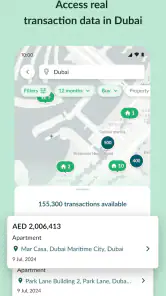
From the moment you open the app, you're greeted with a sleek and intuitive interface that screams user-friendliness. It's not just pretty; it's functional. The search bar is right at the top, where it should be, just waiting for you to type in your dream location. Need a villa in Dubai or perhaps an apartment in Abu Dhabi? Just type it in, and boom, the app does the rest.
What I found super helpful is the variety of filters available. You can narrow down your search by property type, price range, and even amenities. Want a pool or a gym in your new building? No problem. The app's got you covered.
The Nitty-Gritty
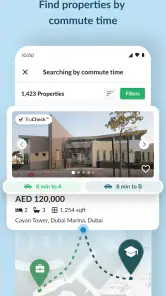
Now, I know what you're thinking: "Does this app really have enough listings?" Oh, it does. With thousands of properties listed, from studio apartments to luxurious villas, there’s something for everyone. Plus, the listings are updated frequently, so you're always seeing the most current offerings. I was impressed by the detailed descriptions and high-quality photos that accompany each listing. It helps to get a feel of the property before you even step foot in it.
And let's not forget about the map feature. It's integrated with Google Maps, so you get a clear view of the neighborhood and its surroundings. Perfect for those who want to check out nearby schools, parks, or even the local coffee shop scene.
More From Our News Desk

Weather by Xiaomi Review: Clear at a Glance, Less Clear Up Close

X Under Pressure: Can It Recover When Posting Goes Wrong?

Clash of Clans Is Won Between the Battles

Android Auto Makes the Case for Quieter Car Software

MobiOffice: Transforming Mobile Productivity with Seamless Integration

EA SPORTS FC™ Mobile Soccer: Redefining Mobile Sports Gaming
Turn browsing into a shortlist
The practical payoff comes from combining the map, listing details, and Favorites rather than relying on any one of them. I’d save several plausible options, then compare them in one sitting: which location fits my daily route, which listing matches my must-haves, and which is only tempting because of attractive photos? That small pause helps prevent a common property-search mistake—contacting someone about a home before noticing that a basic need, such as the area or layout, does not fit.
For a realistic weekday search, I might browse during a commute break, save a few candidates, and return at home to inspect their locations and descriptions more carefully. The handoff still matters: an app can help me identify what to ask, but I’d want to confirm the details directly with the listing contact and arrange a viewing before making a decision. Photos and map context are useful screening tools, not substitutes for checking a property in person.
A useful habit is to compare like with like. I’d keep rental options separate from purchase candidates and avoid judging a commercial unit against a home just because both appear in the same broad search. For each saved listing, I’d write down the one thing that could rule it out—perhaps the area, the asking price, or a missing feature. That makes the next review quicker and keeps a promising photo from dominating the decision.
Beyond the Basics
One feature that stands out is the mortgage calculator. I mean, who doesn't want to know if they can actually afford their dream home, right? Just plug in the numbers, and the app does the math for you. It's these little extras that make the app not just a tool, but a real companion in your property search journey.
I also loved the "Favorites" feature. Found a place that tickles your fancy? Just hit the heart icon, and it’s saved for later. It’s like creating a little wishlist of potential homes.
I’d treat the calculator as an early planning aid, not the final word on what a purchase will cost. It can help me think through affordability while I’m comparing homes, but it doesn’t replace a full budget or advice from the people involved in a transaction. Similarly, saving favorites is most useful when I attach a reason to each choice in my own notes—such as location, space, or a particular amenity—so a long list doesn’t become a collection of indistinguishable hearts.
For a buyer, the calculator is most helpful before falling in love with a particular property: I can use it to test whether a rough purchase scenario deserves more investigation, then speak with the appropriate financial professionals about the real numbers. Renters should not mistake it for a rental-budget tool. In that case, I’d set a comfortable ceiling in the search itself and leave room for other moving costs when deciding what is genuinely affordable.
Who will get the most from it?
Bayut makes the most sense if you’re actively searching in the UAE and want property-specific browsing rather than a general marketplace feed. Renters can use it to shape an area-and-budget shortlist; buyers can use the listings and calculator to organize an initial search; and people looking for commercial premises can browse offices and shops alongside residential options. The app is also useful if you’re still learning which locations to consider, since the map gives another way to judge a listing beyond its photos.
I’d choose a different approach if I were searching outside the UAE, or if I only wanted informal local recommendations rather than listings to follow up on. And if I’m already working with an agent who is managing a tightly defined search, browsing another set of options may add noise instead of value. In either case, the app’s usefulness depends on whether I’m prepared to compare and verify listings, not just scroll through them.
Compared with general classifieds, a property-focused search feels better suited to narrowing choices by home type, area, and amenities. A broad marketplace can still be useful when I want casual local posts or items beyond real estate, while personal recommendations can surface neighborhood context that listings may not capture. I see Bayut as the discovery tool in that mix, not a replacement for local knowledge or professional help.
It is a particularly good fit for someone who can browse in short sessions and return to a saved shortlist later. A household making a joint decision can use the same candidates as a starting point for discussion, even if each person weighs location, space, and budget differently. Someone who expects the app to make that decision for them may find the process frustrating: property search still requires trade-offs and follow-up.
Where the search needs a human check
Property decisions involve details that a phone screen can’t settle: whether the rooms feel right, how the surroundings work at the time I’d actually be there, and whether the listing still matches what is available. I’d use Bayut to decide which questions to ask and which places deserve a visit, then confirm current terms and practical details with the relevant contact. That’s the main friction in the workflow: discovery is convenient, but the final checks and arrangements happen outside the browsing stage.
For example, if I find a place that looks close to work, I’d check the route at the time I expect to travel rather than relying on a map impression alone. I’d also ask about details that matter to my own situation before setting aside time for a viewing. That small amount of preparation helps make a visit useful, but it still depends on getting clear answers from the person handling the listing.
Photos can also create a false sense of certainty. They help me rule out obvious mismatches and prepare questions, but they cannot tell me how a room feels, what noise is like, or whether the surrounding area suits my routine. I would not make a rental or purchase decision from images and a calculator alone. A viewing and careful confirmation are essential handoffs from browsing to action.
The app is free, rated for Everyone, and developed by Bayut. It has a 4.8 average from around 14,000 ratings, with over a million installs, which suggests it is a familiar option for UAE property searches. Its current version is 12.4.1, and it runs on Android 8.0 or later. Those details are useful context, but a broad user rating cannot tell me whether a particular listing is current or appropriate for my needs.
A practical choice, with sensible limits
If I were helping a friend start a UAE property search, I’d suggest using Bayut to define the field, save a small number of realistic candidates, and prepare for direct follow-up. I wouldn’t advise spending an evening collecting every attractive listing. A focused shortlist makes it easier to compare locations and ask useful questions, while an endless scroll can make very different options blur together.
The app’s strongest role is early and middle-stage research: moving from “somewhere in the UAE” to a few properties worth checking. It is less suited to someone who needs a decision made entirely online, has no time to verify details, or is searching for a property outside its UAE focus. In those cases, a local professional or a source centered on the relevant market may be a better starting point.
Bayut is a free House & Home app, first released on January 20, 2015. I like that its purpose stays clear: it helps me explore UAE property options and organize my next steps. The rating and reach make it a well-established choice, but they are not a substitute for inspecting a home, checking a commercial space, or confirming terms with the relevant contact.
In conclusion, Bayut – UAE Property Search isn’t just another app on your phone. It’s a gateway to finding your next home in the UAE with minimal fuss. With its user-friendly interface, comprehensive listings, and handy extras like the mortgage calculator, it's a must-have for anyone serious about their property hunt. So, whether you're a first-time buyer or a seasoned investor, give it a go. Who knows, your dream home might just be a tap away.
Bayut – UAE Property Search Frequently Asked Questions
Is Bayut – UAE Property Search free to download?
Bayut is free to download and is designed for people searching for homes and commercial properties in the UAE. Its focus is on browsing places to buy or rent, including apartments, villas, offices, and shops. You can explore the app before deciding whether its property-search tools fit what you need.
Can I use Bayut to search for both rentals and properties for sale?
Yes. Bayut is intended for people looking to rent or buy property in the UAE, so it can be useful whether you are searching for a home to move into or comparing purchase options. The app covers apartments, villas, offices, and shops, giving residential and commercial property seekers a starting point for browsing relevant listings.
Which devices and operating systems can run Bayut?
Bayut is available for Android, with support for devices running Android 8.0 or later. Before downloading, check your device’s operating system to make sure it meets that requirement. The app is developed by Bayut and is listed for everyone, making it suitable for a broad audience interested in property searches.
What features does Bayut – UAE Property Search offer to users?
Bayut – UAE Property Search provides a comprehensive platform for finding properties in the UAE, including homes for rent and sale, commercial properties, and off-plan projects. The app features advanced search filters, interactive maps, detailed property descriptions, high-quality photos, and virtual tours to assist users in finding the perfect property. It also offers insights into market trends and neighborhood guides to enhance the property search experience.
Can I narrow property searches by location or type?
Bayut is designed to help users focus their browsing on relevant property options. Its search tools let you filter by location and property type, and the app also includes maps to help you consider where a listing is situated. These options can make it easier to compare homes or commercial properties that suit your search, rather than browsing every available category at once.
Pros
- Comprehensive property listings
- User-friendly interface
- Detailed property descriptions
- Advanced search filters
- Real-time updates
Cons
- Limited to UAE properties
- Sometimes slow loading
- Occasional app crashes
- Requires stable internet
- Advertisements can be intrusive
- Category
- House & Home
- Version
- 12.4.1