Bark - Parental Controls
- 1.87K
- 3.9
- Installs
- 500.00K
- Price
- Free

Screenshots




Analysis by Reviewed
Ever felt like you need a digital watchdog to keep an eye on your kid's online activities? Well, let me introduce you to Bark - Parental Controls, an app that’s got your back in the wild world of the internet. I took a deep dive into this app and here’s what I found.
Setting Up: Easy Peasy Lemon Squeezy
First things first, setting up Bark - Parental Controls is as smooth as butter. The app guides you through a straightforward installation process, which is a breath of fresh air if you’re not exactly a tech wizard. Once you’ve got it up and running, you’ll link your kid's devices, and voilà, you’re in control.
Features That Pack a Punch
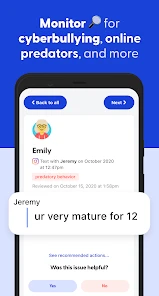
This app is like a Swiss Army knife for parental controls. With Bark, you get a slew of features designed to keep your kids safe online. From monitoring social media interactions to tracking text messages and emails, it’s like having a superpower. And the best part? It alerts you to any potential threats, so you can step in before things get out of hand.
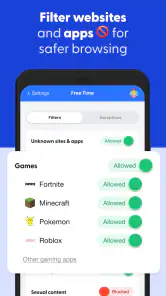
One feature that caught my eye is the screen time management tool. It’s perfect for those moments when you need to pull the plug on endless gaming sessions or late-night TikTok marathons. You can set schedules for when your kids can use their devices, helping them strike a balance between screen time and other activities.
Privacy: Because It Matters
In a world where privacy is often a concern, Bark takes it seriously. The app only alerts you to potential issues, rather than giving you a play-by-play of every single message. This means you’re not snooping but still keeping your kids safe. It’s a win-win situation, maintaining trust while ensuring safety.
Getting Alerts: Keeping You in the Loop
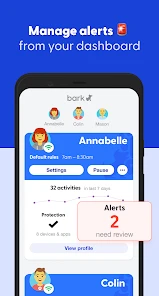
Bark sends you alerts via email or text whenever it detects something you should be aware of. This feature is like having an extra pair of eyes, ensuring you’re always in the loop, no matter where you are. Whether it’s cyberbullying, explicit content, or online predators, you’ll get a heads-up, allowing you to act swiftly.
Another great thing is how customizable the alerts are. You can tweak the settings to decide what you want to be notified about, which is pretty neat if you ask me. It means you won’t get bombarded with notifications about every little thing, only the stuff that matters.
Final Thoughts
In conclusion, if you’re looking for a reliable ally in managing your child’s online presence, Bark - Parental Controls might just be your new best friend. It’s user-friendly, packed with useful features, and respects privacy, all while keeping you informed. Give it a shot, and you might find yourself breathing a little easier knowing Bark’s on duty.
Pros
- Comprehensive web filtering options
- Real-time location tracking
- Screen time management
- Customizable restrictions
- User-friendly interface
Cons
- Limited free version features
- Requires internet connection
- May slow down device
- Complex setup for beginners
- Limited customer support

- Category
- Parenting
- Version
- 5.4.3











