Barcode Scanner
- 930.00
- 4.4
- Installs
- 1.00M
- Price
- Free

Screenshots
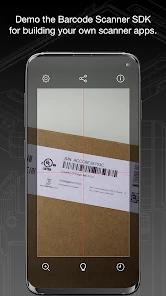
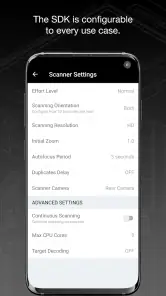
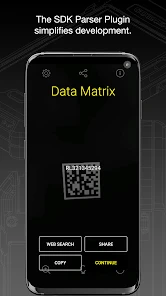
Analysis by Reviewed
Barcode scanning has a particular appeal in the first week: a small label that once looked like meaningless stripes suddenly becomes something you can investigate. I can see the attraction for anyone who likes checking an item before buying it, but the real test is whether scanning remains useful after the novelty fades. Barcode Scanner is a free Android app from Cognex Corporation, in the Libraries & Demo category, and its straightforward purpose makes it easy to try without turning it into a major commitment.
The first-week appeal is immediate
The basic routine is easy to understand: open the app, aim the phone at a barcode, and use the result as a starting point for learning about the item. That low-friction approach is the strongest reason to give it a try. I would not expect a barcode scan to settle every shopping question, though. A code can help identify a product, but the usefulness of the information that follows depends on what is available for that particular item and on whether the result matches the package in your hand.
That distinction matters in practice. A scan is most helpful when I already have a specific question, such as whether two packages are the same size or what an unfamiliar product is called. It is less satisfying if I expect one tap to produce a complete, always-current picture of a product’s origin, ingredients, price, and quality. I treat scanning as a quick lookup, then check the packaging or another trusted source for details that could affect a decision.
Where it can earn a place in a routine
The app has been around since Feb 29, 2012, and its current version is 5.0.16 (218). That long-running presence makes it feel less like a novelty built around a short-lived trend and more like a focused utility. Its average rating is 4.4 from around 14,000 ratings, with around 930 written reviews, and it has over 1 million installs. Those figures suggest that plenty of people have found a reason to keep a scanner available, but they do not tell me whether it will suit your particular shopping habits.
The strongest recurring use is occasional, practical checking rather than constant browsing. I could use a scan to identify a packaged item while making a list, compare an unfamiliar product with one I already buy, or keep track of an item I want to research later. A useful habit is to decide what question I want answered before scanning. That keeps the phone from becoming a distraction and makes it easier to notice when the result is incomplete or not relevant to the exact package.
Its maintenance burden appears modest for someone who only needs a basic scanner: it is free, rated for Everyone, and supports Android 5.0 or later. The more important upkeep is not technical but practical. I would keep the app only if I use it often enough to remember it exists, and I would check that the information it returns is still useful rather than assuming an old result remains current. A scanner can help start a decision; it cannot replace checking the label, comparing quantities, or confirming a detail that matters to you.
When the habit becomes more effort than help
Barcode Scanner is not automatically the best choice for every shopper. If your phone’s built-in camera already recognizes the codes you encounter and gives you the answers you need, installing a separate app may add little. If you want a dedicated price-comparison service, a nutrition-focused database, or detailed product research, an app designed specifically for that task may be a better fit. This scanner makes most sense when quick barcode lookup is the recurring need, not when you expect it to replace every shopping tool.
There is also a small but real source of fatigue: scanning can feel productive even when it has not answered the question. A code may identify a product without telling you whether the price is good, whether a formulation has changed, or whether the package in front of you matches the result. I would use it as one step in a decision, not as proof. If the app cannot return a useful match, checking the printed name or searching by the exact product details is a sensible fallback.
Unpacking the Magic of Barcode Scanning
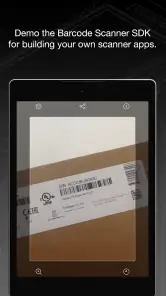
First things first, the Barcode Scanner app is incredibly user-friendly. You don't need to be a tech wizard to navigate through it. Simply open the app, point your camera at any barcode, and voila! Within seconds, you're presented with a wealth of information about the product. From pricing to nutritional information and even product reviews, it’s like having a personal shopping assistant right in your pocket.
Features that Stand Out
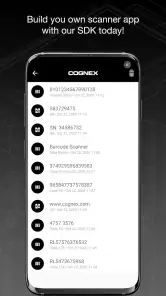
One of the standout features of this app is its speed. The scanning process is lightning-fast, so you’re not left awkwardly lingering in the aisle. Plus, it supports a wide range of barcode formats, ensuring that no product is left unscanned. Another neat feature is the ability to save your scan history. Ever scanned something and forgot to note the details? No worries, the app has got your back by keeping a record of all your scans.
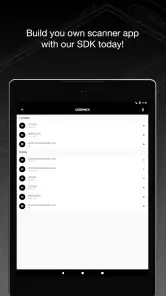
Moreover, the app’s interface is clean and intuitive. The design is minimalistic, focusing on functionality without overwhelming visuals. This simplicity is perfect for users who want efficiency without the fluff.
Enhancing Your Shopping Experience
Beyond just scanning, the app also provides price comparisons from various retailers. This means you can ensure you're always getting the best bang for your buck. Additionally, for those health-conscious individuals, the app offers detailed nutritional information, allowing you to make informed choices about what you're putting into your body.
And let's not forget about the environmental benefits. By understanding more about the products you purchase, you can make more sustainable choices, supporting brands that align with your values.
A Few Final Thoughts
In a world where information is at our fingertips, the Barcode Scanner app is a tool that democratizes access to product details. Whether you're a bargain hunter, a health enthusiast, or just someone who loves to know more about the things you buy, this app is a fantastic addition to your smartphone toolkit. It’s reliable, efficient, and most importantly, incredibly handy. So next time you're out shopping, give it a try—you might just find yourself wondering how you ever lived without it!
A realistic shopping test
Imagine I am comparing two boxes of the same pantry staple while shopping for the week. I scan one, note the product identity, then scan the other and check that the size and variant really match before comparing prices. That last check is important: a lower figure is not automatically a better deal when package quantities differ. I would use the scan to narrow the comparison, then do the simple unit-price calculation myself if the shelf labels make it necessary. The app is most useful here as a shortcut to recognition, not as a substitute for careful arithmetic.
The same approach works for a product I have never bought before. A scan may give me a name or a starting point for research, but I would still read the physical label for allergens, ingredients, storage instructions, or any claim that affects my health. Packaging can vary by country and change over time, so a result that looks close is not enough when a detail is consequential. For casual curiosity, a quick match is convenient; for a dietary restriction, I would trust the actual package first.
Small habits that make scans more useful
I get more value by treating each scan as a note attached to a decision. If I am considering a household item, for example, I can scan it while standing in the aisle and revisit the saved scan history when I make my next list. That is more practical than trying to remember a product name later. It also helps to scan the exact package rather than a nearby item with similar branding; variants, sizes, and multipacks can look nearly identical at a glance.
Scan history is useful as a short-term memory aid, but I would not treat it as a carefully organized shopping database. Before relying on a previous entry, I would confirm that it refers to the same version and package I am looking at now. A simple personal routine—scan, check the match, then write down only the detail I actually need—keeps a long trail of old scans from becoming noise. If I rarely revisit past items, the history feature may matter less than the quick identification itself.
Lighting and presentation can also affect the experience of using any phone camera as a scanner. I would hold the phone steady, make sure the full code is visible, and avoid scanning through glare or a heavily curved part of the package. If a barcode does not register immediately, shifting the angle or moving the phone slightly is more useful than repeatedly tapping without changing anything. This is a small practical point, but it prevents a simple lookup from becoming an awkward delay in a busy shop.
Choosing it over built-in and specialist tools
Compared with a phone camera that can recognize a code, a dedicated scanner earns its place when its focused workflow is easier to reach or its results are more useful for the products I check. The camera is the sensible first option if it already handles the job without an extra app. Barcode Scanner is more appealing when I want a tool whose main purpose is scanning and I value keeping a history of what I have looked up. I would not install both by default; I would try the built-in option first and add this app only if it solves a repeated annoyance.
Specialist apps have a different advantage. A nutrition service may be better for someone who needs dependable dietary tracking, while a price-comparison tool may be stronger for monitoring offers across retailers. Those tools can involve their own databases and routines, so the right choice depends on the question. Barcode Scanner sits closer to the quick-lookup end of the spectrum: useful for identifying and checking, but not necessarily the best home for an ongoing health, budget, or product-research project.
It is also worth separating a barcode’s job from the decisions people hope it will make for them. The code is an identifier, not a guarantee that every retailer’s price is included or that every product attribute is complete. I would compare like with like, verify important details against the package, and treat a missing or mismatched result as a cue to use another method. That expectation keeps the app helpful without asking it to be an all-purpose shopping authority.
Who will keep using it—and who can skip it
I can recommend trying it to shoppers who regularly encounter unfamiliar packaged goods, people who like keeping a record of products they have checked, and anyone who wants a straightforward barcode tool rather than a broad shopping platform. It is also a reasonable fit for someone who scans now and then and wants a simple place to begin a lookup. Because it is free and intended for Everyone, there is little financial commitment involved, although the real value still comes down to whether the habit fits your routine.
I would skip it if I only scan a code once in a while and my phone’s camera already gives me a satisfactory result. I would also choose a more specialized service if I need a structured nutrition log, detailed ingredient checks, price alerts, or a reliable basis for a high-stakes purchase. The app can contribute to those decisions, but the scanner itself should not be confused with the deeper records or tools those jobs may require.
For a household, one useful pattern is to use scans during shopping but make the final list somewhere else that everyone can access. A scan can help identify the exact brand or variant to buy again, while a shared list remains the better place for quantities and reminders. This division of labor avoids expecting scan history to work like a shared pantry manager. It is a modest workflow, but it makes the app more likely to support a real habit instead of becoming another icon opened once and forgotten.
What lasting value looks like
After the first few curious scans, I would judge the app by how often it saves me a small bit of effort. If it helps me recognize a product, compare two packages more carefully, or remember an item for a later shop, it has earned a place as a lightweight utility. If every scan sends me elsewhere to confirm the basics, or if I already get the same result from my camera, the separate app may not justify the space on my phone. That is not a failure; it is simply a sign that the need is occasional.
My long-term advice is to keep expectations narrow and the habit intentional. Use it when a barcode can answer a concrete question, check the physical package when accuracy matters, and choose a specialist tool when the task grows beyond a quick lookup. Barcode Scanner is a sensible option for that small, recurring job—not an essential companion for every shopper. Its best quality is convenience when needed; its main limitation is that convenience cannot make incomplete or unsuitable information complete.
Barcode Scanner Frequently Asked Questions
Does Barcode Scanner work offline, or does scanning require an internet connection?
The core action of scanning a barcode uses your device’s camera, but what happens after a scan can depend on the code. A code may contain information that can be displayed directly, while a web link needs an internet connection to open its destination. If you plan to use scanned results for online product research or websites, make sure your device can connect to the internet.
What should I check before installing Barcode Scanner?
Check that you are choosing the Barcode Scanner app developed by Cognex Corporation, and confirm that it is compatible with your device’s operating system. Also consider whether you are comfortable granting camera access, since the camera is central to scanning. Looking through the app’s current listing and recent user feedback can help you decide whether its simple barcode-focused purpose suits your needs.
Who developed Barcode Scanner, and what kind of app is it?
Barcode Scanner is a Libraries & Demo app developed by Cognex Corporation. Its brief description, “Barcode Scanner,” reflects its focused purpose, while the store summary describes it as “Barcode scanning made simple!” The app is intended for people who want a straightforward way to scan barcodes with a mobile device. Its uncomplicated focus may appeal to shoppers, readers, and anyone who encounters a barcode in everyday use.
What is the main function of the Barcode Scanner app?
The Barcode Scanner app is designed to quickly and efficiently scan a variety of barcodes, including QR codes, UPC codes, and other barcode formats. Its primary function is to read barcodes using your device's camera, providing instant access to product information, prices, and web links embedded in the code. This app is especially useful for price comparison, product research, and accessing special offers or information linked to QR codes.
Is the Barcode Scanner app free to use?
Yes, Barcode Scanner is free to download. That makes it easy to try if you want a barcode-scanning tool without paying upfront. The app is rated for Everyone, so its stated age suitability is broad. Before installing, use the official app-store listing to check that you have selected the Cognex Corporation app and that it is available for your device.
Pros
- Fast and accurate scanning
- User-friendly interface
- Supports multiple barcode formats
- No unnecessary permissions
- Offline functionality
Cons
- Contains ads
- Limited customer support
- Occasional scanning errors
- No cloud backup feature
- Interface can seem outdated

- Category
- Libraries & Demo
- Version
- 5.0.16 (218)