BabyTime (Tracking & Analysis)
- 308.00
- 4.6
- Installs
- 1.00M
- Price
- Free

Screenshots




Analysis by Reviewed
If you’re a new parent, you know that keeping track of your baby’s activities can feel like a full-time job. Enter BabyTime, an app designed to make this task just a bit easier. Let me share my experience with this nifty tool.
Getting Started with BabyTime
First things first, installing BabyTime is a breeze. Available on both Android and iOS, it’s just a tap away on your app store. Once installed, you’re greeted with a clean, intuitive interface that almost feels like a warm hug in the hectic world of parenting. The app doesn’t overwhelm you with options right off the bat, which is a relief.
Tracking Your Baby’s Every Move
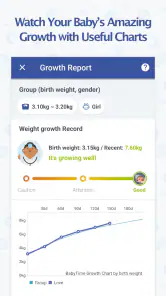
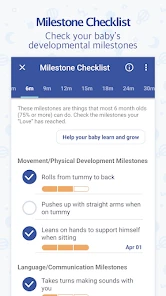
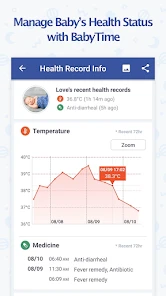
Now, let’s dive into the real meat of the app—tracking. You can log everything from feeding and diaper changes to sleep patterns and growth milestones. It’s like having a personal assistant dedicated to your baby’s needs. I found the feeding tracker particularly helpful. Whether you’re breastfeeding, bottle-feeding, or both, the app offers a straightforward way to keep tabs on your baby’s intake.
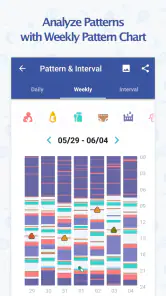
And it doesn’t stop there. You can also track your baby’s sleep schedule, which is a lifesaver when you’re trying to figure out those elusive naps. The app even lets you set alarms and reminders, so you never miss a beat—literally.
Analyzing the Data
What sets BabyTime apart is its analysis feature. After logging a few days’ worth of data, you can see patterns and trends in your baby’s behavior. This is incredibly useful for tweaking routines or discussing any concerns with your pediatrician. I was genuinely impressed by how detailed and easy-to-understand the reports were.
The app’s ability to sync data across multiple devices is another feature worth mentioning. Whether you’re using a tablet or a phone, your data stays up-to-date, making it easier to share responsibilities with your partner.
Room for Improvement
No app is perfect, and BabyTime is no exception. While the interface is user-friendly, there are times when it can feel a bit slow, especially when switching between different tracking features. A little optimization would go a long way in making the experience smoother.
Another area where the app could improve is in offering more customization options. While the default settings are adequate, having the ability to tailor notifications and reports to suit individual preferences would be a game-changer.
Final Thoughts
All in all, BabyTime is a solid app that delivers on its promises. It’s a reliable companion for new parents navigating the whirlwind of baby care. The comprehensive tracking and insightful analysis make it a must-have tool in your parenting arsenal. While it has its minor flaws, the benefits far outweigh them.
If you’re in search of an app that helps you stay on top of your baby’s needs without adding to your stress, give BabyTime a try. It might just become your new best friend in the parenting journey.
Pros
- User-friendly interface for easy navigation.
- Comprehensive tracking of baby's activities.
- Customizable reminders for feeding schedules.
- Data analysis helps understand baby's habits.
- Syncs data across multiple devices.
Cons
- Limited free features; most require subscription.
- Occasional syncing issues reported by users.
- Interface may feel cluttered for some users.
- No offline mode available for data tracking.
- Ads in the free version can be intrusive.

- Category
- Parenting
- Version
- Varies with device