BabySparks - Development Activ
- 915.00
- 4.1
- Installs
- 1.00M
- Price
- Free

Screenshots

Analysis by Reviewed
During the first week with BabySparks - Development Activ, the appeal is easy to understand: when I want an idea for playing with a young child, I can browse an organized set of activities instead of trying to invent something from scratch. The suggestions are aimed at early development, and the videos make it easier to see what an activity involves before I try it. That practical starting point matters more to me than a long list of milestones on its own.
I would treat the app as a source of prompts, not a parenting checklist. A suggested activity is an option for shared play, not a test of whether a child is developing correctly or a task that must be completed every day. That distinction helps the app feel useful without turning family time into another obligation. For questions about a child’s health or development, a qualified professional is still the right person to consult.
Where the first-week appeal comes from
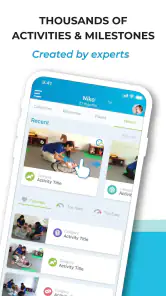
BabySparks is a parenting app from BabySparks, built around play ideas and developmental milestones for children from birth through 36 months. Its scale is substantial: the app offers more than 1,800 activities, while the older description of 1,300 activities no longer reflects the current catalog. The activities cover areas such as motor, cognitive, sensory, and social-emotional development, giving parents several ways to find a starting point rather than relying on one style of play.
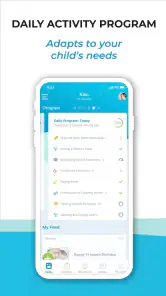
The app’s age-based daily plans can reduce the small but familiar planning burden of deciding what to do together. I would use them as a menu: choose an activity that fits the child’s mood, available space, and the time I have, then move on if it is not working. A plan is helpful when it gets me started; it is less helpful if I feel I have to finish every suggestion to be a good parent.
For example, on a busy morning I might have only a few minutes before getting ready to leave. Instead of opening the app and trying to complete a full plan, I can look for one manageable idea, watch its demonstration, and adapt it to the room and the child’s attention that day. The useful habit is not checking off a session. It is having a concrete suggestion ready when I want to turn a brief stretch of time into attentive play.
What works better over time
The catalog is most valuable when I use it to vary familiar play, not when I assume every activity must be new. A child may enjoy repeating a simple game, and repetition can make it easier for a parent to notice how the child responds. I would save the app for moments when I need a fresh angle, then return to activities that already fit our routine. That keeps the suggestions from competing with play the child is already enjoying.
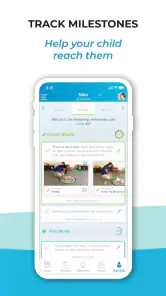
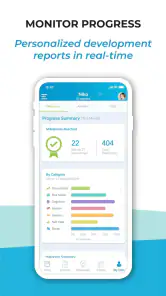
Progress tracking can also be more useful as a memory aid than as a scorecard. A parent can use notes about activities and milestones to recall what the child has tried and which kinds of play seem to hold their interest. But I would avoid reading a missed milestone or an uneven pattern as a diagnosis. Development is not a performance chart, and an app cannot replace an individual conversation with a pediatrician or another qualified specialist when a concern persists.
More From Our News Desk

Weather by Xiaomi Review: Clear at a Glance, Less Clear Up Close

X Under Pressure: Can It Recover When Posting Goes Wrong?

Clash of Clans Is Won Between the Battles

Android Auto Makes the Case for Quieter Car Software

MobiOffice: Transforming Mobile Productivity with Seamless Integration

EA SPORTS FC™ Mobile Soccer: Redefining Mobile Sports Gaming
Compared with parenting books, social media tips, or a general web search, BabySparks offers a more organized route from a child’s age to an activity idea, with a demonstration available in the app. Those alternatives can be better when I want broader context, varied viewpoints, or professional guidance; the app is better suited to answering the narrower everyday question, “What could we try together now?” Its strongest role is practical inspiration, not a complete source of developmental advice.
Keeping the habit light
To make the app sustainable, I would decide in advance how much attention it deserves. One quick browse when I want an idea is a realistic routine; treating daily plans as assignments could make the experience feel like one more item on an already crowded parenting list. If a child is tired, unsettled, or simply more interested in another kind of play, closing the app and following their lead is a sensible choice.
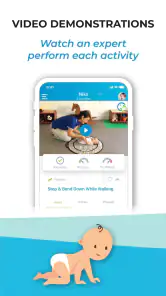
The video demonstrations are a useful bridge between reading an activity and trying it, but they still require a parent to translate the example into their own home. Space, household objects, energy, and a child’s changing mood all affect whether an idea is practical. I would preview an activity first, then simplify it rather than chasing an exact setup. This small adjustment can prevent browsing from taking longer than the play itself.
There is a trade-off in having such a large catalog: plenty of options can help when I feel short on ideas, but an abundance of suggestions can also make choosing harder. A simple rule helps: pick one activity that looks appealing, give it a fair try, and stop searching once the child is engaged. The point is not to find the perfect developmental exercise. It is to make shared attention easier to begin.
Who is likely to keep using it
I can see BabySparks being especially useful for a first-time parent who wants a structured source of play ideas, or for a caregiver who looks after the same child regularly and wants activities to draw on across the week. It may also suit families who enjoy tracking milestones as a personal record, provided they can keep that record in perspective. The app’s free download makes it possible to explore the experience, while in-app purchases range from $1.49 to $119.99 per item, so I would check the available purchase details before committing to anything paid.
It is less compelling for parents who already have a comfortable rhythm of play and do not want another app shaping it, or for anyone looking for medical screening, expert assessment, or a guarantee that a child is on schedule. It is also not a substitute for child-led play: a suggestion can be useful, but a child’s interest is a better reason to continue than a plan’s place in a sequence. If your main need is reassurance about a concern, speak with a professional rather than relying on activity tracking.
Practical details and recurring value
The app is free to download, rated for Everyone, and has an average rating of 4.1 from around 15,000 ratings, with roughly 915 written reviews and more than one million installs. It was released on January 13, 2016, and version 4.8.50 requires Android 6.0 or later. Those details make it a well-established option to consider, though popularity alone cannot tell me whether its approach will suit my family. I would judge it by whether I actually return to the activities, not by its place in an app store.
As a practical question, does it need to become part of every day to be worthwhile? I do not think so. A few well-timed visits can be valuable if they help me find an activity I would not have thought of; daily use is only worthwhile when it fits naturally into our routine. And if I stop opening it after the initial curiosity fades, that is useful feedback: perhaps I prefer a book, advice from a trusted professional, or simply following the child’s lead without a planned prompt.
Unpacking the Features
When I first downloaded BabySparks - Development Activ, I was immediately impressed by the sheer volume of activities it offers. The app has over 1,300 activities that cater to various developmental stages from birth to age three. Each activity is tailored to help with different areas like cognitive, motor, sensory, and social-emotional skills. I found this particularly helpful because, let’s be honest, sometimes it’s hard to come up with new, engaging ways to play with your child that also feel educational.
What’s also great about BabySparks is its personalized experience. The app adapts to your child’s unique needs by offering daily activity plans based on age and development level. It’s like having a personalized tutor for your baby, which makes me feel more confident that I’m doing the right thing for my little one.
The User Experience
Now, let’s talk about the user interface. BabySparks keeps it clean and simple, which I appreciate because, as a busy parent, I don’t have time to fiddle around with complicated menus. The app is intuitively designed, with easy navigation that lets you jump into activities quickly. Plus, the videos demonstrating each activity are a lifesaver. They’re straightforward and make it super easy to understand how to engage with your child effectively.
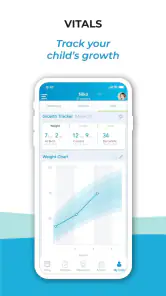
Another thing I love? The progress tracking. The app allows you to track your child’s development over time, so you can see which areas they’re excelling in and which ones might need a little extra attention. It’s incredibly satisfying to watch your child hit those milestones and know you’ve played a part in it.
Wrapping It Up
All in all, BabySparks - Development Activ is a fantastic tool for any parent looking to boost their child’s early development. With its vast array of activities, personalized plans, and user-friendly design, it’s a resource I find myself recommending to all my parent friends. Sure, it’s not a substitute for professional advice, but it’s a great supplement that provides reassurance and creative ideas when you need them most.
So, if you’re eager to give your child a head start in life, why not give BabySparks a try? It’s a small investment for something that could make a big difference in your child’s developmental journey. And hey, who doesn’t want a little extra help in the parenting department? I know I do!
BabySparks - Development Activ Frequently Asked Questions
Is BabySparks suitable for parents with busy schedules?
BabySparks can fit into a family routine by offering activity ideas that parents can choose when they have time. You do not need to treat the suggestions as a rigid schedule: try an activity when it works for you and your child, and adjust the pace around naps, meals, and other commitments. The app is best approached as a source of ideas, not another obligation.
What ages and developmental stages does BabySparks cover?
BabySparks focuses on early childhood, with activities and milestones intended for children from birth through age three. This makes it most relevant to parents of infants and toddlers who want ideas suited to their child's early development. The app is categorized for everyone, but its activity content is specifically aimed at supporting children during their first three years.
Is BabySparks free to download, and what costs should I expect?
BabySparks is free to download, so you can explore the app before deciding whether to spend money on it. It also offers in-app purchases, with prices ranging from about $1.49 to $119.99 per item. Check the purchase details shown in the app before confirming anything, especially if a child may use the device.
What is BabySparks and how does it benefit my child's development?
BabySparks is an educational app designed to support your child's early development through a series of tailor-made activities. It offers a wide range of exercises and games that are aligned with developmental milestones. The app is beneficial as it helps parents track and encourage their child's physical, cognitive, social, and emotional growth, ensuring they develop essential skills from an early age. Its library includes more than 1,800 activities and milestones for children from birth through age three, giving parents ideas to choose from as their child grows.
How often should I use BabySparks with my child?
The frequency of using BabySparks can vary depending on your child's age and developmental stage. Generally, it is recommended to engage with the app's activities daily to maximize developmental benefits. The app provides a structured program that suggests daily activities, making it easy for parents to incorporate them into their routine without overwhelming their schedule. Treat those suggestions as flexible ideas rather than a requirement; you can adjust the pace to suit your family's routine and your child's interest.
Pros
- Promotes early childhood development.
- Includes a variety of activities.
- User-friendly interface.
- Tracks developmental milestones.
- Offers expert guidance.
Cons
- Limited free content.
- Subscription can be pricey.
- Requires internet for full access.
- Occasional app crashes.
- Some activities need parental involvement.
- Category
- Parenting
- Version
- 4.8.50











