Babysits - Find Babysitters
- 116.00
- 4.2
- Installs
- 1.00M
- Price
- Free

Screenshots




Analysis by Reviewed
When a childcare plan falls through, the hardest part is often not opening another app but knowing what to check first. Babysits is a parenting app from Babysits that helps families look for babysitters and arrange care. I find it most useful as a way to organize a search and start conversations; I wouldn’t treat a profile or an app-based check as a substitute for meeting a caregiver and deciding whether they’re right for my child.
Where a search can stall
The first friction point is usually the search itself: a nearby result is only a starting point, not proof that someone is available for the hours you need. I’d enter a location carefully, then compare profiles against the actual schedule, travel distance, and kind of care involved. If the list feels thin, widening the area may help, but it also means checking whether the commute makes sense for both sides.
Another common pause comes after finding a promising profile. A polished introduction can’t answer practical questions such as how a sitter handles a bedtime routine or whether they’re comfortable with a child’s particular needs. I’d use messaging to ask about those details and arrange a conversation before relying on a match. That extra step takes time, but it is more useful than choosing quickly based on a single appealing profile.
Set up the search around real needs
Before browsing, I’d write down the days and times I need, the location, and the main responsibilities. That makes the availability and experience filters more purposeful instead of turning the search into a long scroll. Languages can matter too, especially when a family wants a sitter who can communicate comfortably with a child or another caregiver.
There’s a useful trade-off here: strict filters save time but can hide candidates who might fit well despite not matching every preference. I’d start with the essentials, then loosen preferences one at a time if the results are limited. For a one-off evening, punctuality and the bedtime plan may matter most; for regular care, consistency and the ability to build a relationship deserve more weight.
Use conversations to recover a stalled plan
If a sitter stops replying or the first choice is unavailable, I wouldn’t assume the whole search has failed. I’d keep a short list of a few suitable profiles and contact them with the same clear outline of the shift, including start and finish times and the expected tasks. That makes replies easier to compare and avoids repeating the basics later.
For a realistic example, imagine a work meeting running late and the usual caregiver cancelling. I’d search for the needed window, check that a profile’s availability fits rather than just its general experience, and ask whether the sitter can manage the child’s normal routine. If the timing is too tight to have a proper conversation, I’d favor an already familiar caregiver or another established arrangement over rushing into a new one.
More From Our News Desk

Weather by Xiaomi Review: Clear at a Glance, Less Clear Up Close

X Under Pressure: Can It Recover When Posting Goes Wrong?

Clash of Clans Is Won Between the Battles

Android Auto Makes the Case for Quieter Car Software

MobiOffice: Transforming Mobile Productivity with Seamless Integration

EA SPORTS FC™ Mobile Soccer: Redefining Mobile Sports Gaming
Make the first conversation count
A profile can help me decide whom to contact, but I’d use the first conversation to test the practical fit, not simply to repeat what is already written. I’d explain the routine, ask how the sitter would handle a likely snag, and leave room for them to ask about the child and the household. A relaxed, specific exchange often tells me more than a quick yes to a broad question such as whether someone is “good with kids.”
I’d also separate essential requirements from preferences before messaging. If a child needs medication, has a food restriction, or finds transitions difficult, I’d bring that up early and discuss the exact responsibilities rather than assuming the sitter has understood a short profile note. This is a useful way to avoid a mismatch before either side invests time in arranging a meeting.
Keep the arrangement clear after a match
Once both sides seem interested, I’d write down the agreed hours, duties, payment, and any key household instructions somewhere easy to revisit. The app can help people find one another and communicate, but a clear agreement still matters outside the search. For recurring care, I’d check that everyone understands whether the schedule is fixed or changes week to week, and how to handle a cancellation.
For a first visit, I’d leave time for a handover rather than scheduling the sitter to arrive at the exact moment I need to leave. I’d show where useful items are, explain the child’s usual routine, and make sure the caregiver knows how to reach me. That small buffer is especially worthwhile when the child has not met the sitter before; it gives everyone a calmer start and lets me judge how the introduction feels.
Discovering Babysitters Made Easy
Let’s kick things off by talking about the app’s main feature – finding babysitters. The interface is pretty straightforward, which is a breath of fresh air. You pop in your location, and bam! You’re greeted with a list of potential babysitters in your area. It’s like having a little black book of babysitters right at your fingertips.
The Interface and Usability
One of the first things I noticed was how user-friendly the app is. Navigating through the app is a breeze. The developers did a fantastic job making sure everything is where you’d expect it to be. Plus, the search filters are super handy. You can narrow down your search by availability, experience, and even languages spoken. It’s all about making life easier for us frazzled parents!
The profiles of each babysitter are detailed, giving you a good sense of who you might be inviting into your home. From their experience and references to hourly rates and reviews from other parents – it’s all laid out for you. And let me tell you, those reviews are a lifesaver. Nothing beats getting the lowdown from other parents who’ve been in your shoes.
Building Trust and Safety
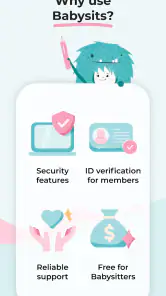
Another aspect I appreciate is the emphasis on trust and safety. In today’s world, you can never be too careful, right? Babysits includes features like ID verification and background checks, which is a big thumbs up in my book. Knowing that the app has these safety nets in place gives me a little more peace of mind.
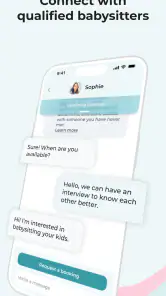
Moreover, the app encourages open communication between parents and babysitters, which is key. You can message potential sitters directly through the app to ask any questions or set up an interview. It’s like having a safety net within a safety net.
Community and Support
One feature that surprised me was the community aspect. Babysits isn’t just about finding babysitters; it’s also about connecting with other parents. There’s a whole section where parents can share tips, advice, or even just vent about the ups and downs of parenting. It’s a nice touch that fosters a sense of community.
If you ever run into any issues, their customer support is just a tap away. They’re responsive and eager to help, which makes the whole experience feel more personal.
What the app can—and cannot—settle
Babysits has a 4.2 average from around 9,700 ratings, and it has passed a million installs. Those figures suggest plenty of families have tried it, but they can’t tell me whether an individual sitter is a good fit. I’d still check references directly where appropriate, agree on duties and payment before the appointment, and make sure another trusted adult knows the plan.
The app is free to install and is rated for Everyone. It has in-app purchases, listed at $24.99 to $99.96 per item, so I’d review any purchase prompt carefully and decide whether the free experience meets my needs before paying. The current version is 9.1.3, and the minimum operating system is 7.0. If something seems stuck, I’d first check that the app is updated, the location entered is correct, and the selected availability matches the time needed; then I’d try again or contact support rather than assuming the sitter search itself is broken.
When another route makes more sense
Compared with asking friends or family, an app-based search can expose you to caregivers outside your existing circle and make it easier to compare profiles. The trade-off is that you have to do more of the vetting yourself. A family referral may offer personal context, while a local agency or established childcare arrangement may suit parents who want a more guided process. I’d choose Babysits when I’m comfortable screening and interviewing candidates, not when I need someone immediately with no time to check fit.
It’s especially useful for parents who need occasional care, are new to an area, or want to explore several options before committing. It’s less suitable if you need guaranteed last-minute coverage, prefer all vetting to be handled by someone else, or have requirements that call for specialist childcare support. In those cases, I’d start with a trusted personal network or a provider equipped for that specific need.
Who will get the most from it
I see the strongest fit for parents who can plan ahead enough to compare candidates and have a conversation before booking. It may be handy for an occasional date night, a recurring afternoon when work runs late, or a family settling into a new neighborhood without a well-established local network. In each case, the value is having a place to start looking and a way to narrow options, while keeping the final decision in the parent’s hands.
It is less compelling for someone who wants a fully managed service that takes responsibility for matching and vetting, or for a family facing an urgent gap with no time to assess a new person. It also may not solve a highly specialized care need by itself. I’d treat it as a useful search channel, not as a guarantee that a suitable sitter will be available for every date, location, or set of requirements.
Small habits that make the search easier
One practical trick is to keep the initial message short but complete: state the dates, hours, location area, and the main tasks, then ask one or two questions that matter to your family. That gives a candidate enough context to respond meaningfully without turning the first contact into a long questionnaire. If I’m contacting several people, I’d keep the essentials consistent so I can compare answers fairly.
I’d also avoid treating every profile detail as equally decisive. Reviews and experience can inform my shortlist, but neither replaces a direct conversation about the actual child and routine. Conversely, a profile that misses one nonessential preference may still be worth considering if the person communicates clearly and can meet the core needs. That balance helps prevent filters from making the search narrower than it needs to be.
Practical verdict
As an app from Babysits, a developer focused here on connecting families with childcare options, Babysits gives parents a practical starting point for finding and contacting sitters. Its main strength is the combination of searchable profiles, filters, and direct communication; its main limitation is that families still need to do the careful evaluation and coordination themselves. The listing identifies it as a parenting app released on November 17, 2016, and the current version is 9.1.3, but I’d judge it primarily by whether its search and contact process suits the way I arrange care.
In conclusion, Babysits is a robust tool for parents looking to find trustworthy babysitters. It’s user-friendly, focuses on safety, and even offers a community for parents to lean on. If you’re in need of a trustworthy babysitter and a little parental camaraderie, this app might just be what you’re looking for.
Babysits - Find Babysitters Frequently Asked Questions
Is Babysits available for both parents and babysitters?
Yes. Babysits is intended for parents looking for childcare and babysitters who want to connect with families. Parents can use it to search for caregivers, while babysitters can create profiles that describe their skills and availability. This two-sided setup makes the app useful for arranging a potential match, though users should take time to communicate and decide whether a caregiver is right for their family.
What devices can I use to install Babysits?
Babysits is an app in the Parenting category, and its current version is 9.1.3. It requires Android 7.0 or later, so checking your device’s operating system before downloading is worthwhile. The app is free to install and is rated Everyone. These details can help you decide whether it suits your device and household before you begin setting up a profile.
What is Babysits and how does it work?
Babysits is a platform designed to connect parents with babysitters in their local area. It functions as a marketplace where parents can search for babysitters based on various parameters such as location, experience, and reviews. Babysitters can create profiles showcasing their skills and availability, making it easier for parents to find a suitable match. The app aims to provide a secure and user-friendly interface for both parties to communicate and arrange babysitting services.
How can I ensure the safety of my child when using Babysits?
Safety is a top priority on Babysits. The platform allows parents to read reviews and ratings from other users before hiring a babysitter. Additionally, babysitters can undergo background checks and verify their profiles to increase trust. Parents are encouraged to conduct interviews and meet potential babysitters beforehand. Babysits also offers guidelines and tips on ensuring safe babysitting experiences, helping parents make informed decisions.
Is Babysits free to use, or are there any costs involved?
Babysits is free to download, with in-app purchases priced from $24.99 to $99.96 per item. The platform offers free and premium membership options. Creating a profile and browsing listings is free, while premium subscriptions provide additional features such as enhanced visibility, the ability to contact more babysitters, and access to detailed reviews. Users can choose the plan that best suits their needs and review the available pricing before deciding whether to purchase.
Pros
- User-friendly interface for easy navigation.
- Wide network of babysitters available.
- Real-time chat feature for instant communication.
- Advanced search filters to match specific needs.
- Verified reviews for trustworthy information.
Cons
- Subscription required for full access.
- Limited features in the free version.
- Occasional app glitches reported.
- Some areas have fewer babysitters.
- No built-in payment system.
- Category
- Parenting
- Version
- 9.1.3











