Babyname
- 1.40K
- 3.8
- Installs
- 500.00K
- Price
- Free

Screenshots


Analysis by Reviewed
Choosing a baby name can be a delightful journey or an overwhelming task, depending on how you approach it. If you're diving into the pool of potential names for your little one, let me introduce you to the Babyname app—your new best friend in the world of baby naming.
A quicker way to find common ground
What makes this parenting app useful is the way it turns a decision two people can find hard to discuss into a simple activity they can do together. Instead of taking turns reading long lists aloud, you can make individual choices and then focus on the names you both like. That shared shortlist is the practical payoff: it gives a couple something concrete to talk about without requiring either person to defend every name they reject.
I can picture using it during a quiet evening at home: each parent swipes through names separately, then they compare their overlap over dinner. It keeps the first pass light, while leaving room for the more personal conversation that matters later—how a name sounds with the family name, whether it feels right when spoken aloud, and whether both parents can imagine using it every day.
The Joy of Name Hunting
The Babyname app is like your personal naming assistant. It's designed to make the process of choosing a baby name as enjoyable as possible. When you first open the app, you’re greeted by a sleek and user-friendly interface. The app is incredibly intuitive, which means you don’t have to be a tech whiz to navigate it.
Swipe Right for the Perfect Name
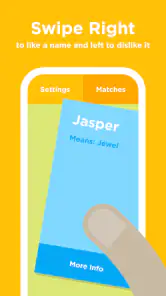
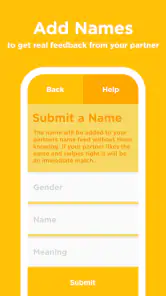
If you’re familiar with dating apps, the swiping feature in Babyname will feel like second nature. You simply swipe right if you like a name or left if you don’t. This makes the process not only fun but also quick. You can even sync with your partner's account to ensure both of you are on the same page—or should I say, same name?
One useful way to handle the swiping is to avoid trying to settle on a winner in one sitting. I’d use an early session to mark names that spark interest, then revisit the shared options later when there is less pressure to make a final call. A quick yes or no is a good discovery tool, but it cannot account for every preference: a name can look appealing on screen and feel awkward when paired with a surname or said aloud. Treat the app’s matches as a starting shortlist, not a decision made for you.
Discover Names with Rich Histories
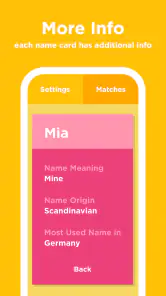
One of the coolest features of this app is its ability to provide you with the origins and meanings of names. It’s like having a mini history lesson at your fingertips. Ever wondered where the name "Eleanor" comes from or what "Leo" means? The app’s got you covered! It enriches the naming process by giving you stories behind the names, which could inspire you to choose a name with a meaningful backstory.
More From Our News Desk

Clash of Clans Is Won Between the Battles

Android Auto Makes the Case for Quieter Car Software

MobiOffice: Transforming Mobile Productivity with Seamless Integration

EA SPORTS FC™ Mobile Soccer: Redefining Mobile Sports Gaming

How Microsoft OneDrive Became a Mobile Productivity Giant

How Google Translate Breaks Language Barriers Effortlessly
That context can help when two names appeal for different reasons: one may have a sound you love, while another carries a meaning that feels personally significant. I’d still treat a short in-app explanation as a conversation starter rather than the only source for a family or cultural naming decision. If a name’s background is important to you, checking it against a trusted reference gives you a better basis for choosing than relying on a swipe alone.
Customization and Personalization
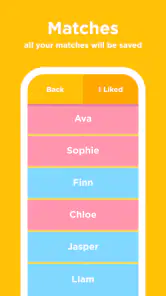
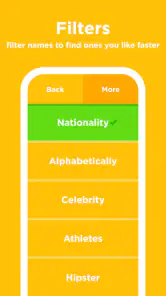
The app allows you to filter names by gender, popularity, and even the first letter. This level of customization ensures that you can narrow down your options without feeling overwhelmed. Plus, you can save your favorite names to a list, making it easy to revisit them later and make your final decision.
Those filters are most helpful when you use them to reduce the field, not to shut out every surprise. For example, starting with a preferred first letter can make browsing feel manageable, but occasionally widening the filter may uncover a name you would not have searched for yourself. The saved list also gives you a useful pause point: keep a few contenders there, return after a day or two, and see which still feels right once the initial novelty has passed.
Where it fits among naming options
Compared with browsing a baby-name book or a general website, this app’s main difference is the shared, swipe-based process. Books and reference sites are better when you want to read broadly or research a name in depth; Babyname is better when you and a partner want a low-effort way to find overlap. It is not a substitute for discussing family traditions, pronunciation, spelling, or how a name will work in daily life. Those are the parts that a shortlist can organize but cannot decide.
It is also worth knowing what kind of commitment the app asks for. Babyname is free to download, with optional in-app purchases ranging from $0.99 to $7.99 per item. It is rated for Everyone, and its current version is 3.4.0, with Android 7.0 or later required. DoSomethingGood released it on February 2, 2015; it has a 3.8 average from around 10,000 ratings, about 1,400 written reviews, and over 500,000 installs. Those figures suggest an established app, but I would still judge it by whether its approach suits the way you and your partner like to make decisions.
Who will get the most from it
I’d recommend it most to expecting parents who enjoy browsing together but have different starting points, or who want to turn a pile of possibilities into a manageable shortlist. It can also suit someone who likes discovering meanings and origins while exploring. If you are choosing alone, prefer a carefully curated book, or already have a short list and need detailed guidance on pronunciation, cultural context, or legal naming requirements, a reference source or a direct conversation with family may serve you better. The app is a helper for the search, not an authority on what your child should be called.
A useful aid, not the final arbiter
In today’s world, sharing is caring, and Babyname understands that. With its social features, you can share your favorite names with friends and family to get their opinions. It’s a seamless way to involve loved ones in your decision-making process without endless group texts.
I would use that sharing selectively. Feedback from a trusted person can reveal an association you had not considered, but inviting too many opinions can turn a private choice into a popularity contest. Agree together on whose input you actually want, and keep the shortlist focused on what the parents like. That makes the social tools useful without letting outside reactions drown out your own judgment.
Making a shortlist work in real life
A shared match is a helpful sign of interest, but it is not proof that a name suits both parents equally. I’d use the list to begin a second, slower round: say each candidate aloud, try it with the surname, and picture using it in ordinary situations such as calling a child in from another room. This moves the decision beyond the quick impression that a swipe captures. It can also expose practical differences early, before either person becomes attached to a name the other finds difficult to use.
For a couple with mismatched schedules, the app’s separate browsing can make the process easier to fit around daily life. One person can look during a commute or a quiet break, and the other can browse later; the shared activity gives them a starting point when they next talk. I would still make time for that conversation rather than treating the overlap as an automatic answer. A match gives you a smaller set to discuss, not the reasons each name matters to you.
There is a useful trade-off in the format: it lowers the social pressure of rejecting a suggestion, but the simplicity can make serious preferences seem too easy to reduce to yes or no. If one parent cares deeply about honoring a relative, for example, a fast swipe may not capture the feeling behind that preference. I’d pause on names with family significance and discuss them separately instead of judging them only by the same quick browsing rhythm as every other option.
Choosing how much help to invite
The option to share names is most useful when you know what kind of feedback you want. Rather than asking a large group to vote on a favorite, I’d send a small shortlist to one or two people whose judgment I trust and ask a focused question: does any name bring an unexpected association to mind? That can be more constructive than collecting unfiltered reactions. It also keeps the final choice with the parents, where it belongs.
If you would rather keep the search private, you can still use the app’s browsing and saved favorites without turning the process into a family discussion. That matters for parents who find unsolicited opinions stressful or who want to wait until they have a firmer shortlist before mentioning names. Sharing can broaden the conversation, but it is not necessary to get value from the core idea of comparing preferences.
What to expect before you start
The app makes the most sense if both people are willing to browse in the same general way. A partner who dislikes swiping or prefers to begin with a family tree, a book, or a carefully researched list may not find the format engaging. In that case, I’d use the app as one source of possibilities rather than trying to make it the couple’s entire naming process. Each person can bring names from their preferred approach and use the shared shortlist as a place to compare, not as a rule about where suggestions must come from.
Its free download makes it easy to test whether the method suits you, while optional purchases mean the experience may include paid extras. I would start with the basic browsing and see if you actually return to it before paying for anything. The value is not simply the number of names you encounter; it is whether the shared process helps you have a calmer, more focused conversation. If it does not, spending more is unlikely to solve a mismatch in how you want to choose.
Another practical point is that the app is a discovery aid, not a comprehensive naming reference. Its meanings and origins can help you notice a name’s story, but parents who need careful cultural, historical, or pronunciation research should verify important details elsewhere. Likewise, it cannot settle questions about local naming rules or predict how a name will be received in a particular family. Knowing this boundary helps you use the app confidently without asking it to answer questions it was not designed to resolve.
I’d also resist turning the filters into a checklist that rules out anything unexpected. Filtering by gender, popularity, or first letter can make a large search feel manageable, but each filter narrows what you see. If your list begins to feel repetitive, loosening one preference can be a better next step than endlessly swiping through the same kind of option. The point is to surface names worth discussing, not to make the search perfectly tidy.
In conclusion, if you’re on a quest to find the perfect name for your bundle of joy, the Babyname app is a fantastic tool to have by your side. It combines fun, functionality, and a bit of education to make the name-choosing journey as smooth as possible. So grab your phone, download the app, and let the name hunting begin!
My verdict is positive, with a clear caveat: its strength is making the first stage of choosing feel shared and less intimidating, not resolving every question a family may have about a name. If you and your partner want a playful way to discover mutual favorites, I think it is worth trying. If you want authoritative research or prefer to make the choice without swiping and sharing, you may be happier with a book, a reference site, or a simple conversation and handwritten list.
Babyname Frequently Asked Questions
Is Babyname available for my device, and what age group is it intended for?
Babyname is a parenting app for Android, with a minimum operating-system requirement of version 7.0. Its content rating is Everyone, so its store age classification is broad; the app itself is designed to help parents explore baby names. Before downloading, check that your device meets the operating-system requirement and that the app is available for your platform.
Who develops Babyname, and is it still maintained?
Babyname is developed by DoSomethingGood. It was released on February 2, 2015, and its current version is 3.4.0. Those details can help you identify the app and its developer when choosing what to install. The app is focused on finding a baby's name together, so its main appeal is the shared naming process rather than a general parenting toolkit.
What is Babyname and how does it work?
Babyname is a mobile application designed to help expectant parents find the perfect name for their baby. The app offers a unique swipe feature, similar to popular dating apps, where users can swipe right if they like a name or left if they don’t. This interactive approach allows both parents to connect their apps and see which names they both like, making it easier to agree on a name.
Is Babyname free to use?
Yes, Babyname is free to download and use. It offers a basic version that provides access to a wide database of baby names. However, the app also offers in-app purchases for additional features such as more name suggestions, access to premium name lists, or the removal of ads to enhance the user experience. Optional purchases range from $0.99 to $7.99 per item, so review the available options before buying.
Can Babyname be used offline?
No, Babyname requires an internet connection to function properly. The app needs to access its online database to provide name suggestions and synchronize name preferences between devices. Therefore, ensure you have a stable internet connection to enjoy seamless access to all its features.
Pros
- Easy to use interface
- Wide variety of names
- Customizable search filters
- Includes name meanings
- Free to download
Cons
- Contains ads
- Limited offline functionality
- Occasional app crashes
- Some features require in-app purchases
- Name database not always updated
- Category
- Parenting
- Version
- 3.4.0











