Baby Translator & Cry Analyzer
- 48.00
- 3.2
- Installs
- 500.00K
- Price
- Free

Screenshots

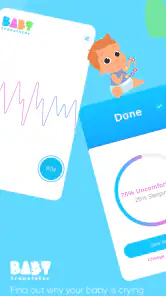



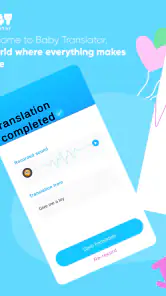

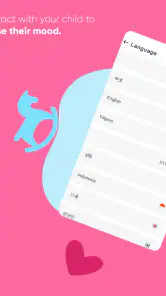
Analysis by Reviewed
I approached Baby Translator & Cry Analyzer with a mixture of curiosity and caution. The idea is easy to understand: use an AI-based tool to interpret a baby’s cry and offer parents another clue when the reason for the crying is not obvious. In everyday life, that could sound appealing, especially during a tired night when feeding, sleep, discomfort, and a wet diaper can all look the same from the other side of the room.
After spending time with this parenting app, my view is fairly measured. It can be a convenient prompt for thinking through common possibilities, but I would not treat its interpretation as a diagnosis or as a replacement for observing the baby. Its average rating of 3.2 from around 1.2 thousand ratings reflects that mixed feeling: the concept is interesting, yet a tool dealing with infant cries has to be especially clear about what it can and cannot do.
That distinction matters more here than it would with a casual entertainment app. A parent may open it while stressed, holding a crying child and looking for certainty. My main recommendation is to use it as a supporting observation tool, never as the final authority on a baby’s health.
What the app is trying to do in a real parenting routine
A quick second opinion during confusing moments
The app belongs to the parenting category and is developed by Bankrot Studio. Its central appeal is the attempt to turn a baby’s cry into a more understandable signal. In practice, I see the value less as “translation” in the literal sense and more as a structured nudge: it may encourage me to pause and consider whether the baby could be hungry, tired, uncomfortable, or seeking attention instead of reacting randomly.
That can be useful for new parents who are still learning their child’s patterns. A baby does not always cry for one clean reason, and the same sound can happen after a missed nap or during a feeding problem. A prompt from the app may help organize the next thing to check, particularly when two caregivers are trying to work together and one of them needs a simple starting point.
I would not expect the result to be precise enough to settle a difficult situation. Infant cries vary with age, temperament, environment, and the child’s current condition. Even a confident-sounding interpretation should be compared with visible signs such as body movement, facial expression, feeding behavior, temperature, breathing, and the length of the crying episode.
Where it fits better than ordinary guesswork
The most sensible use is during ordinary, low-risk uncertainty. Imagine a parent returning from a walk with a baby who starts crying before the usual nap. The parent checks the diaper, offers a feed if appropriate, lowers the noise, and then uses the app as one more prompt while watching the baby’s response. If the child settles after a familiar routine, the result becomes part of a broader observation rather than a standalone answer.
That workflow is more realistic than expecting the app to identify a hidden medical problem. It also gives the parent a chance to compare the suggestion with what they already know about the child. Over time, the useful information may come from recognizing recurring circumstances around crying rather than from any single analysis.
A practical tip is to avoid opening it at the exact moment you are already overwhelmed unless another adult can supervise the baby. Recording or interpreting sound should never distract from holding the child safely, checking breathing, or responding to an urgent situation. The app is optional; those basic checks are not.
Why the store numbers deserve context
Baby Translator & Cry Analyzer is free to install, has an Everyone content rating, and has passed the half-million-install mark. Those details make it easy to try, but popularity does not prove that its interpretations are reliable for every baby. The current version is 1.03.12, and the app supports Android 7.1 or later, so compatibility is relatively broad for people using older devices.
There are in-app purchases ranging from $1.99 to $19.99 per item. I would personally spend time with the free experience before paying for anything. A parenting tool should earn trust through clear behavior and useful results, not through the pressure of a tired parent feeling that a purchase might provide certainty.
Trust, controls, and the moments that need extra care
What I look for before trusting an AI parenting tool
With an app that analyzes a baby’s cry, trust is not just about whether the interface looks polished. I want to know what happens when I start an analysis, what choices are presented before audio is captured, whether the result is explained in understandable language, and whether I can stop using the feature without losing control of the device. Visible choices matter because parents may be operating the phone with one hand and limited attention.
I also prefer an app that keeps its role modest. The phrase “AI-based” describes the approach, but it does not automatically tell me how accurate a conclusion will be in a particular home. A responsible reading of any result is: “This is one possibility to consider.” It should not become: “The phone has identified the cause.” That is especially important when the baby appears unwell or the crying is unusual.
My advice is to read each permission request and in-app prompt instead of tapping through automatically. Only grant access that is clearly needed for the action you are trying to use, and revisit the phone’s app settings if you stop using the analyzer. These are simple habits, but they are more meaningful than assuming that a parenting label guarantees careful data handling.
Audio is a sensitive part of the experience
A baby’s cry is personal household audio, and the surrounding recording may include adult voices, visitors, television, or other children. That makes the recording step a data-sensitive moment even before considering the interpretation itself. I would avoid capturing conversations that are unrelated to the analysis and would not use the app in a room where another person reasonably expects privacy.
I would also keep the phone close enough to capture the intended sound without placing it in an unsafe position near the baby. A phone on a cot, pillow, or changing surface can become a distraction or a physical hazard. The safest workflow is to keep the device in an adult’s hand or on a stable surface away from the child, then return attention immediately to the baby.
Another useful habit is to treat every result as temporary context. I would not build a permanent conclusion about a child from one recording, and I would not share an audio clip casually in a family group or on social media. If a recording is no longer needed for the immediate task, removing it from the phone when possible is a sensible privacy step.
When the app should be put aside
There are situations where opening a cry analyzer is the wrong move. If a baby has trouble breathing, appears unusually limp or difficult to wake, has a concerning injury, shows signs of a serious allergic reaction, or simply seems seriously unwell, I would seek appropriate medical help rather than wait for an app interpretation. The same applies when a parent’s instincts say something is wrong even if the app offers a reassuring label.
This is not a criticism unique to Bankrot Studio; it is a basic limit of the category. Sound alone cannot provide the physical examination, medical history, and professional judgment that a clinician can provide. The app may fit a routine question such as “Could this be tiredness?” It does not fit the question “Is my baby in danger?”
How it compares with familiar alternatives
The usual alternatives are simple observation, a feeding and sleep routine, notes about patterns, advice from an experienced caregiver, and professional medical guidance when needed. Those methods are slower in some moments, but they include information an audio analyzer cannot capture. A parent can see whether the baby is rubbing their eyes, drawing up their legs, refusing a feed, or reacting to a change in temperature.
The app’s advantage is speed and structure. It may give a tired parent a short list of possibilities when their thoughts are scattered. A notebook or phone note has the opposite strength: it can reveal patterns over several days without pretending to interpret a single cry. I would use both approaches differently. The analyzer can support an immediate check; notes and observation are better for learning the child’s routine.
For a parent who already has a dependable calming routine and feels comfortable reading the baby’s signals, this app may add little. For a first-time parent who wants a low-cost experiment, the free entry point makes trying it reasonable, provided expectations stay modest. Families who need medical reassurance, detailed developmental tracking, or a strong record-keeping system would be better served by tools designed specifically for those purposes.
Small workflow choices that improve the experience
I found three practical principles especially important. First, check the obvious physical needs before recording: diaper, hunger, temperature, clothing, position, and overstimulation. This prevents the app from becoming an excuse to delay a simple response. Second, use the result to choose one calm action, then observe what happens instead of running repeated analyses until the answer sounds comforting.
Third, compare the app’s suggestion with the circumstances around the cry. A result that points toward tiredness after a missed nap deserves a different response from the same result during a fever or after a fall. Context is the part the parent contributes, and it is often more important than the label displayed on the screen.
I would also avoid treating a successful prediction as proof that every future prediction will be correct. Babies change quickly, and a familiar cry can have a different cause on another day. Keeping that uncertainty in mind protects the parent from overconfidence and keeps the app in its proper supporting role.
Who is most likely to benefit
This app is most suitable for caregivers who want an additional prompt during ordinary crying episodes and who are comfortable making the final decision themselves. It may be particularly approachable for someone in the early months of parenting who is trying to build confidence and wants a simple way to pause before cycling through the same responses.
It may also help two caregivers communicate. Instead of one person saying “I have no idea what is wrong,” they can use the result as a starting point and divide the checks: one person prepares a feed, the other checks the diaper and environment. The benefit here is not that the app takes over parenting, but that it can turn a vague moment into a small, shared process.
I would skip it if you are looking for a medical diagnostic instrument, a detailed baby journal, or a guarantee that a cry has been correctly identified. I would also skip it if recording infant audio makes you uncomfortable or if the app’s visible choices do not give you enough confidence about how you are using it. There is no obligation to keep a tool that adds more worry than help.
Cost, expectations, and a sensible trial
Because the app is free to install but includes paid items, I would begin with a short trial during calm daytime situations rather than testing it for the first time during a difficult night. Notice whether the process is quick enough for your routine, whether the result is understandable, and whether the suggested possibilities match what you can observe. That gives you a fair basis for deciding whether paid content would be worthwhile.
I would not pay simply because the app uses AI or because a particular result sounds authoritative. A purchase makes sense only if the available experience already fits your needs and the additional option has a clear, practical benefit for your household. If the free use feels confusing, a paid item is unlikely to solve the more important issue of trust.
My cautious verdict
Baby Translator & Cry Analyzer is an interesting parenting companion with a clear everyday use case, but its value depends heavily on how responsibly it is used. I like the idea of giving a tired caregiver another way to organize their thoughts, and the free installation makes experimentation accessible. The app can be helpful when the baby seems otherwise well and the parent is considering ordinary causes of fussiness.
At the same time, the modest average rating of 3.2 suggests that expectations should remain realistic. I would not describe this as a dependable interpreter of every cry, and I would never use it to delay medical advice or replace direct care. The most important trust decision is the parent’s: check what the app asks to access, keep control over recordings and choices, and remember that a result is only one small piece of context.
My final recommendation is therefore conditional. Try it if you want a free, AI-oriented prompt for low-risk parenting moments and are willing to verify every suggestion against the baby’s behavior. Pass on it if you need clinical certainty, detailed tracking, or stronger confidence than an audio-based experiment can reasonably provide. Used with those boundaries, it may earn a place in a parent’s toolkit; used as an authority, it is the wrong tool for the job.
Pros
- Analyzes different cry patterns to suggest possible baby needs.
- Simple interface makes it easy to start an analysis quickly.
- Useful as an extra observation tool for new parents.
- May help identify recurring crying patterns over time.
- Can provide reassurance during stressful crying episodes.
Cons
- Cry interpretations are estimates
- not medical diagnoses.
- Accuracy may vary between babies
- devices
- and recording conditions.
- Background noise can affect the analysis results.
- Some features may require in-app purchases or subscriptions.
- Should never replace professional advice or attentive caregiving.

- Category
- Parenting
- Version
- 1.03.12











