Baby Tracker - Newborn Log
- 5.01K
- 4.9
- Installs
- 1.00M
- Price
- Free
Screenshots
Analysis by Reviewed
When a newborn’s day seems to run together, remembering the details can become its own job. I find a simple log most useful not as a substitute for paying attention, but as a shared memory aid: it can help me answer practical questions without relying on a tired guess. Baby Tracker - Newborn Log is aimed at that everyday need, with a focus on recording feeding, sleep, and diaper changes.
What the free option means in practice
The app is free to install, which makes it easy to try before deciding whether it belongs in your routine. It also offers in-app purchases priced at $4.99 per item. I’d treat those as optional spending rather than assume you need them: first see whether the basic tracking habit is helpful, then judge any paid item by the specific benefit it offers you. The listed price tells me the entry point is free, but it doesn’t establish that every feature is free or that a purchase is necessary.
That distinction matters with a parenting log. A free app has little value if recording each event feels like another chore, while a modest paid extra could be worthwhile if it solves a problem you actually encounter. I would not buy anything simply because I felt I ought to be a more organized parent. Start with the routine you need, and spend only if the app’s own purchase screen makes the added value clear.
Effortless Tracking for New Parents
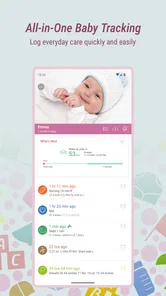
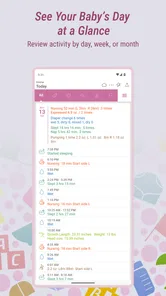
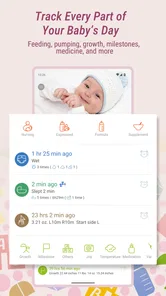
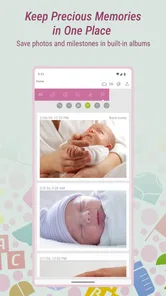
One of the standout features of Baby Tracker - Newborn Log is how it simplifies the chaos of keeping tabs on your baby's daily activities. From feeding schedules to diaper changes, this app has got you covered. I remember those early days when everything was a blur—this app turned that blur into a manageable routine. You can log feedings, sleep patterns, and even growth milestones with just a few taps. It's like having a personal assistant dedicated to your baby’s needs.
Intuitive and User-Friendly Design
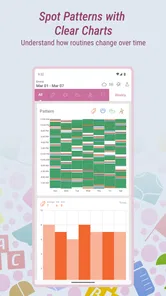
The app’s design is super intuitive. Even in my sleep-deprived state, I found navigating through its features a breeze. The interface is clean, and the icons are easy to understand, which means you’re not left fumbling around when you should be focusing on your little one. And don't get me started on the color-coded logs—it's a simple touch, but it makes spotting patterns and irregularities so much easier!
Make the log work for your household
A useful way to start is to agree with anyone sharing care on what is worth recording, rather than trying to document every detail. For instance, one caregiver can enter a feed while the other handles a diaper change, so the next handover begins with a clearer picture. If you are the only person using the log, it can still help during a busy day: check the recent entries before a feed instead of trying to reconstruct the morning from memory.
There is a trade-off here. Logging only helps when it stays easier than the note-taking or texting it replaces. If entering every event interrupts a moment with your baby, record only the details you routinely need to recall. And if you notice that alerts or logs are making you more anxious rather than more prepared, simplify your use instead of treating every pattern as a problem to solve.
More From Our News Desk

 Remini - AI Photo Enhancer
Remini Is Our App of the Week for Bringing Old Photos Back to Life
A quick AI restoration tool earns its place by making faded portraits and soft, older photos feel vivid again—provided you know where its polish ends.

 PayPal - Pay, Send, Save
PayPal Reviewed: Who Benefits from Its Reach, and Who Should Skip It
PayPal is most useful when its reach and familiar checkout solve a real payment problem. These reader-by-reader recommendations show where it earns a place—and where friction wins.

 Millionaire 2026 Quiz & Trivia
 Makes Every Answer Count
A familiar quiz-show format succeeds or falters on tiny design decisions: how clearly the game guides a first answer, handles hesitation, and invites one more round.

 Decor Life - Home Design Game
Decor Life Turns Short Breaks Into Bite-Sized Decorating Jobs
A room-by-room decorating game built for quick sessions gains from modern phone habits, but its gentle pace still depends on patience, repetition, and a steady stream of design jobs.

 Sniper 3D:Gun Shooting Games
Sniper 3D’s Quick-Shot Appeal Faces the Upgrade Treadmill
The appeal is immediate: line up a target, steady your aim, and fire. The harder question is whether Sniper 3D can keep players returning after the first rush.

 Blockudoku®: Block Puzzle Game
Blockudoku vs. the Puzzle Pack: A Quick Puzzle With a Repetitive Edge
Blockudoku turns a clean grid into a quiet test of foresight. Against match-three polish and head-to-head simplicity, its lasting appeal is also its biggest limitation.
Latest News



Sharing Made Simple
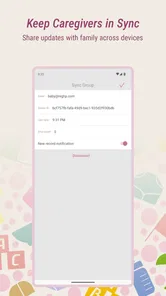
Another great feature is the ability to share information with your partner or caregiver. It takes a village to raise a child, and being able to synchronize data with my partner has been a game-changer. There’s no longer a need for constant back-and-forth texting about the last feeding time or diaper change. Everything syncs seamlessly, keeping everyone on the same page.
Where a tracker helps—and where it doesn’t
Compared with a paper notebook, a phone-based log can make recent entries easier to check when the day is hectic, while a notebook may suit someone who prefers to keep screens out of caregiving. Compared with a general notes app, a dedicated baby tracker is more directly organized around baby-care records; the trade-off is that a simple note can be more flexible if you want to record unusual details in your own format. I’d choose the approach that the other caregivers will actually use consistently.
For a realistic handover, imagine one parent taking over after a stretch of care and wanting to know when the baby last fed or slept. A shared record can replace a hurried recap, but it still depends on someone entering the event. Before relying on it together, make sure each caregiver knows how to find the latest entry and agrees on when to log it. That small habit is more useful than trying to create a perfect diary.
Peace of Mind with Notifications
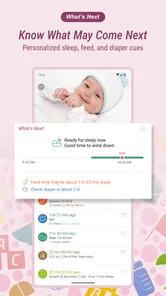
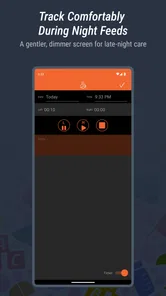
Who knew that an app could provide such peace of mind? With the notification feature, I get gentle reminders about upcoming feedings or nap times. It's like having a little nudge that helps me stay on track without feeling overwhelmed. Plus, I can customize these alerts to suit my baby’s unique schedule. Trust me, every bit of extra help counts when you’re running on minimal sleep!
Fit, limits, and practical expectations
I see the strongest case for this app when more than one caregiver needs a quick, common record, or when sleep deprivation makes routine details hard to remember. It is less compelling if you dislike entering information on a phone, already have a reliable paper system, or want a highly flexible journal rather than structured baby-care tracking. A log can make conversations more specific, but it should not become a reason to judge a baby’s day against a rigid schedule.
It is also worth keeping the purpose narrow. Use the record to help recall what happened and to share routine information; do not treat a pattern in an app as a diagnosis or as a replacement for professional advice. If your main question is medical, the useful next step is to speak with a qualified clinician, not to collect more entries.
A calmer handover, not a perfect record
The most useful routine is usually the one that survives an ordinary, messy day. I’d begin by logging only the events that tend to come up in conversation: the most recent feed, a stretch of sleep, or a diaper change that the next caregiver might ask about. Once that feels natural, add another detail only if it answers a real question. This keeps the log from turning into a second job and makes it easier to notice whether tracking is actually helping.
There is also a practical difference between recording an event immediately and filling in several entries later. Immediate logging is more reliable, but it may not be convenient while you are soothing or carrying the baby. A quick handover note or a short pause after the moment can be a reasonable compromise, as long as everyone understands that a delayed entry is an estimate rather than a precise record. I would rather have a small, honest log than a complete-looking one assembled from guesses.
For caregivers who take turns, agree on a simple convention before the first busy day: what counts as a completed feed for your own record, who enters it, and whether a missed entry should be left blank or added later with a note. That kind of agreement prevents duplicate records and avoids the frustrating question of whether an entry was forgotten or simply not needed. The app can centralize information, but shared habits are what make that information dependable.
Choosing between an app, notes, and paper
Baby Tracker sits between the freedom of a blank notes app and the simplicity of a paper notebook. Its baby-care focus is helpful when the same kinds of questions recur, because feeding, sleep, and diaper information belong in a purpose-built record rather than scattered across messages. A notes app may be better if you want to capture long observations in your own words, while paper can win when you want something visible without unlocking a phone. I would not switch from a method that already works just because a dedicated tracker sounds more complete.
The choice also depends on who needs to see the record. A shared digital log can reduce repeated explanations between caregivers, but it assumes that everyone is comfortable using the same app and remembers to update it. A notebook is easier to pass across a room but can be misplaced or unavailable when someone is away from it. If one caregiver strongly prefers a different method, keeping the process simple matters more than insisting on a single tool.
Using reminders without letting them take over
Notifications are most helpful when they prompt a check-in, not when they dictate what should happen next. A baby’s day can vary, and a reminder based on a routine should not be mistaken for a rule. I’d choose only alerts that solve a recurring memory problem, then review whether they still help as the household’s rhythm changes. If a notification creates pressure or gets ignored, it is not adding value just because it appears on the screen.
Likewise, a visible pattern is a starting point for a conversation, not proof that something is wrong. A log can make it easier to describe a concern clearly when speaking with a clinician, but it cannot interpret a baby’s health. Keeping that boundary in mind makes tracking more useful and less likely to turn ordinary variation into needless worry.
Baby Tracker is a parenting app from NIGHP SOFTWARE. It has an average rating of 4.9 from around 66,000 ratings, with about 4,900 written reviews, and has been installed over a million times. It is free to download, is rated for Everyone, and its current version is 4.53; the app dates back to July 9, 2015, and requires iOS 7.0 or later. Those figures suggest a well-established audience, but the better test for me is whether the logging and sharing fit your own caregiving routine.
Who is likely to get the most from it?
I’d recommend trying it if you are caring for a newborn with another adult and often find yourselves repeating the same questions at handover. It can also suit a solo caregiver who wants a compact record to check after a long, interrupted stretch of care. The app is less likely to be a good match for someone who finds phone use distracting, dislikes structured entries, or prefers to keep baby-care notes on paper. Those are not failures of the app; they are signs that a different system may fit better.
It may also be the wrong tool if what you really want is a medical guide, a detailed free-form journal, or a strict schedule that tells you what your baby should do. Its value is in helping organize routine information, not making parenting decisions on your behalf. If that is the job you need done, choose a tool or professional suited to that need rather than expecting a log to become something else.
Is the free starting point worth trying?
Before settling on it, I’d ask myself three practical questions: will I remember to enter the events I care about, will the other caregiver use the same record, and are reminders genuinely helpful in our household? If the answers are mostly yes, trying the free app is a reasonable low-commitment starting point. If you want no phone-based tracking at all, a notebook is likely a better fit; if you need a medical assessment, neither a tracker nor a notebook can provide one.
I would hold off on an in-app purchase until I had used the free version enough to identify a specific gap. The $4.99-per-item price makes it especially sensible to judge each purchase on its own rather than assume a paid option will improve the whole experience. If the basic logging already answers your everyday questions, there may be no reason to spend. If a purchase screen describes something you genuinely need, compare that benefit with the cost before deciding.
In conclusion, Baby Tracker - Newborn Log is more than just an app; it’s a support system for new parents. It takes the guesswork out of your daily routine, allowing you to focus on what truly matters—spending quality time with your newborn. If you're looking for a tool to help you navigate the incredible, yet challenging journey of parenthood, this app might just be your new best friend. Give it a try, and you might wonder how you ever managed without it!
Baby Tracker - Newborn Log Frequently Asked Questions
What kinds of baby-care details can I record with Baby Tracker - Newborn Log?
Baby Tracker - Newborn Log is aimed at keeping everyday baby-care notes in one place, with breastfeeding, diaper changes, and sleep patterns highlighted as its main tracking areas. That makes it a practical option if you want to refer back to routine details rather than rely on memory. Consider whether those are the records you most want to keep before downloading.
What should I know about the app’s age rating and cost before downloading?
Baby Tracker - Newborn Log is a free parenting app with an Everyone age rating, so its stated audience is broad. The free download is a low-commitment way to see whether the basic tracking approach works for your family. In-app purchases are also available, so review any purchase choices carefully and decide for yourself whether an optional paid item is worthwhile.
Is Baby Tracker - Newborn Log suitable for parents who want a simple way to record everyday routines?
Baby Tracker - Newborn Log is a parenting app focused on recording everyday baby care. Its store description highlights breastfeeding, diaper changes, and sleep patterns, making it relevant for parents who want to keep routine notes together. The app is free to download, and its Everyone age rating makes it broadly accessible. Whether its tracking approach fits your household depends on which routines you want to log.
Who develops Baby Tracker - Newborn Log, and is it a well-established app?
Baby Tracker - Newborn Log is developed by NIGHP SOFTWARE and has been available since July 9, 2015. It has been installed more than one million times and has an average rating of 4.9 from around 66,000 ratings, alongside roughly 4,900 written reviews. Those figures suggest a substantial user base, though individual experiences can still differ depending on a family's needs and expectations.
What features does Baby Tracker - Newborn Log offer for new parents?
Baby Tracker - Newborn Log offers a comprehensive suite of tools designed to help new parents manage their newborn's daily activities. The app allows you to track feeding times, diaper changes, sleep patterns, and growth milestones. It also includes features for logging medical history and reminders for vaccinations, ensuring you have all the essential information about your baby's health and development at your fingertips.
Pros
- User-friendly interface.
- Tracks feeding, sleep, and diapers.
- Customizable reminders.
- Syncs across multiple devices.
- Detailed growth charts.
Cons
- Requires manual data entry.
- Limited free features.
- Ads in free version.
- Sync requires account.
- Occasional sync issues.