Baby tracker - feeding, sleep
- 9.12K
- 4.9
- Installs
- 1.00M
- Price
- Free
Screenshots
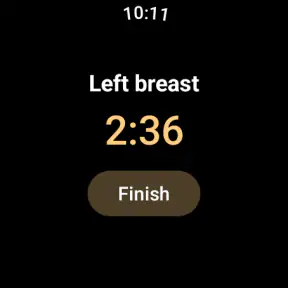
Analysis by Reviewed
I find a baby tracker most useful when it helps me remember what happened, rather than asking me to become a full-time record keeper. That is the appeal of Baby tracker - feeding, sleep: it gives everyday care a place to land, so I can check a recent feed or nap instead of trying to reconstruct the day from memory. For a tired parent, that small reduction in mental clutter can matter more than a long list of extra tools.
A record you can actually use during a busy day
In practice, the value of logging is less about creating a perfect chart and more about spotting context. If a baby is unsettled, I can look back at the timing of recent feeds, sleep, and diaper changes and describe the day more clearly. My tip is to record the event as close to when it happens as you reasonably can; trying to enter several missed events at once makes the timeline less dependable and adds another chore to an already full day.
A realistic routine might be a parent checking the last feeding after waking from a short nap, then logging the next change while another caregiver takes over. That shared reference can be especially handy when family members trade shifts, because “I think it was around an hour ago” becomes a usable record rather than a guess. I would still treat the notes as a memory aid, not as a substitute for a clinician’s advice or a reason to worry over every variation in a baby’s routine.
When a tracker helps—and when it gets in the way
Compared with a paper notebook, an app is easier to search and update one-handed, while a loose note on a phone can be quicker if all you need is a single reminder. The advantage here is having feeding and sleep information alongside diaper entries, rather than scattering it across separate notes. The trade-off is that tracking only helps when the habit stays manageable: if entering every detail makes you feel more anxious or interrupts time with your baby, keep the record simple or take a break.
I’d be cautious about expecting the app to interpret a pattern or tell you what your child needs. A log can help you notice sequences and explain them to a healthcare professional, but babies’ routines change, and a record is not a diagnosis. It is also worth agreeing with anyone who shares caregiving on what to log, so entries remain useful instead of becoming a source of confusion about whether something was already recorded.
Navigating Through Baby's Daily Routine
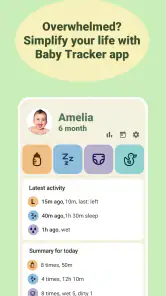
One of the first things I noticed about the Baby tracker - feeding, sleep app is how intuitive the interface is. As soon as you open it, you're greeted with a dashboard that lets you log feedings, sleep schedules, and diaper changes in just a few taps. It's super user-friendly, even if you're juggling a baby in one arm and your phone in the other. This app really understands what it means to be a multitasking parent!
Feeding Logs Made Easy
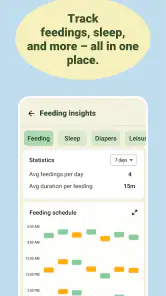
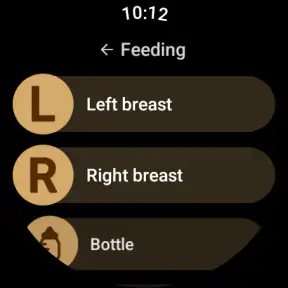
Feeding a baby can feel like a never-ending cycle, and remembering when you last fed them can be tricky, especially during those late-night sessions. This app lets you track both breastfeeding and bottle feeding, allowing you to input the amount of milk and the exact time of feeding. It’s like having a personal assistant to remind you of your baby’s nutritional needs.
More From Our News Desk

Clash of Clans Is Won Between the Battles

Android Auto Makes the Case for Quieter Car Software

MobiOffice: Transforming Mobile Productivity with Seamless Integration

EA SPORTS FC™ Mobile Soccer: Redefining Mobile Sports Gaming

How Microsoft OneDrive Became a Mobile Productivity Giant

How Google Translate Breaks Language Barriers Effortlessly
Sleep Tracking: A Dream Come True
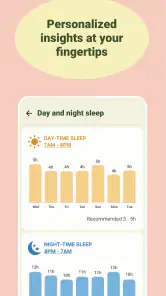
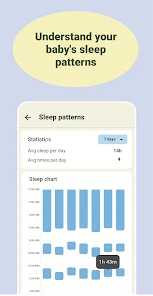
Ah, sleep! The holy grail for every parent. With this app, you can easily monitor your baby's sleep patterns. It records when your baby falls asleep and wakes up, providing insights into their sleep habits. This feature is especially useful when trying to establish a routine or figure out why your little one might be a bit cranky.
Diaper Duty Without the Drama
Tracking diaper changes is another nifty feature. You can log each change, noting whether it was wet, dirty, or both, which is crucial for monitoring your baby's health. The app even provides reminders if you haven’t logged a change in a while, ensuring you’re always on top of things.
Overall, the Baby tracker - feeding, sleep app is a staple for any new parent. It’s like having a diary for your baby’s daily routine, all wrapped up in a sleek, easy-to-use app. Plus, knowing that all this data is stored in one place gives you peace of mind, especially during pediatrician visits where details about feedings and diaper changes can be invaluable.
If you're a new parent, or even a seasoned one looking for a bit more organization, I’d highly recommend giving this app a try. It takes a bit of the guesswork out of parenting and lets you focus more on those precious moments with your little one.
What to expect before you start
Amila’s parenting app is free to download and is rated for Everyone; optional in-app purchases are available, listed at $2.99 to $30.00 per item. It has a 4.9 average from around 128,000 ratings, with over 1 million installs and around 9,100 written reviews. Those figures suggest it has found an audience, but I’d judge its usefulness by whether logging fits your household, not by popularity alone. It was released on July 18, 2017, and its focus remains practical: recording routine events rather than replacing personal judgement.
For a first-time parent, that can be a reassuring starting point; for an experienced caregiver who already remembers the routine, the extra logging may not earn its place. I’d also skip it if you want an app to make feeding or sleep decisions for you. If you do try it, begin with just the entries that answer a real question in your day—such as when the last feed happened—and add more only if the record genuinely helps. That keeps the tracker in its proper role: a convenient notebook for baby care, not another standard you have to meet.
Making the log useful to more than one caregiver
The strongest shared-care routine is not necessarily the one with the most entries; it is the one everyone can keep up consistently. Before a partner, relative, or sitter starts recording events, agree on a simple convention: log a feed when it is finished, or at the start, and use the same choice each time. That small decision prevents two people from reading the same event differently later. If someone is taking over for only a short stretch, the recent timeline can help them orient themselves without a long handover conversation.
I would also avoid asking every caregiver to document details they do not need. If the main question is when the baby last ate, that may be enough for the next shift. If you are keeping sleep and diaper notes too, decide which of those are useful to the household rather than treating every available field as an obligation. A tracker should reduce the number of things people have to remember, not create a second job for whoever is on baby duty.
A practical handover, not a perfect diary
Imagine a parent who has been up through the night and is handing the baby to someone else in the morning. Instead of trying to recall a blur of wake-ups, they can check the recent entries, mention the last feed and sleep period, and let the next caregiver continue the record. Later, if the baby seems unsettled, the family has a clearer account of what happened. The point is not to prove that every minute was logged; it is to make the next decision or conversation a little less dependent on tired memory.
For appointments, I would use the log as a prompt for specific questions rather than assume it tells the whole story. A short summary of the routine may help you explain what you have noticed, but your own observations still matter: whether the baby seemed comfortable, how the day differed from usual, and what concerns you. The app can organize timestamps; it cannot supply that context for you.
Choosing what to record and what to leave out
One useful way to keep tracking sustainable is to set a narrow goal for the first few days. For example, record feeds if you often lose track of their timing, then add sleep entries only if you are trying to understand a particular stretch of the day. This makes it easier to tell whether the information is earning the effort. If you find yourself opening the app simply to fill gaps that no longer answer a real question, that is a good reason to simplify.
There is also a difference between a pattern worth noticing and a rule worth enforcing. A record may show that naps have varied or that feeding times are not identical from day to day; that does not mean a parent should force the routine into a neat schedule. I find the app most helpful when it supports observation without turning normal variation into a scorecard. If the numbers make you more worried rather than better informed, step back and discuss concerns with a qualified professional.
How it compares with ordinary notes and broader trackers
A paper notebook has one real advantage: it is available without unlocking a phone, and some people find handwriting easier during a quiet moment. A basic note on a phone is similarly low-effort when the only thing you want to remember is one feed. The appeal of this app is more specific: feeding, sleep, and diaper records sit within a baby-care tracker instead of being scattered among unrelated notes. That organization can save time when you want to review a sequence or pass information to another caregiver.
Broader parenting apps may appeal to families who want many kinds of guidance or planning in one place, while a spreadsheet can suit someone who enjoys building a very particular record. I would not choose this tracker on the assumption that it replaces those tools or provides expert interpretation. Its practical strength is the straightforward routine log. If you want a highly customized system, a paper chart or spreadsheet may feel more flexible; if you want a compact record of everyday care, a dedicated tracker is easier to maintain than designing one yourself.
Where convenience has limits
Logging on a phone is convenient only when reaching for the phone is convenient. During a feed, while settling a baby, or when another child needs attention, entering information immediately may be awkward. In that case, I would rather make a brief mental note and add the event at the next calm moment than interrupt care just to keep the timeline exact. But if several events pile up, the record becomes less reliable, so it helps to be honest about whether your household can use the habit consistently.
Another trade-off is the attention a tracker can invite. A timeline can make small changes visible, which is useful when you are preparing to explain a concern, but it can also tempt a parent to check and compare constantly. I would treat the app as a record to consult when there is a practical reason, not a feed to monitor throughout the day. That distinction matters most for parents who already feel overwhelmed by advice, schedules, or pressure to measure every part of infant care.
Who is likely to get the most from it
I think it fits first-time parents who want a dependable place to note routine events, families sharing care across shifts, and anyone who repeatedly forgets whether a feed or diaper change happened recently. It can also be useful during a period when you are trying to describe a changing routine clearly, provided you use the entries as context rather than as a verdict. The combination of feeding, sleep, and diaper notes is most valuable when those details are connected to a real question you want to answer.
On the other hand, I would skip it if you dislike phone-based tracking, if a notebook already works well for you, or if logging tends to increase your anxiety. It is also not the right choice for someone expecting a tracker to make medical decisions or guarantee a sleep routine. The best alternative depends on the need: a simple phone note for one reminder, paper for a screen-free habit, or professional advice for health concerns. A baby log can support those choices, but it should not replace them.
A low-pressure way to decide
Amila’s app is free to start, with optional purchases shown at $2.99 to $30.00 per item, so I would first decide whether its everyday record-keeping earns a place in your routine before considering anything beyond the basic use. It is rated for Everyone and has been available since July 18, 2017. Its average is 4.9 from around 128,000 ratings, alongside over 1 million installs and around 9,100 written reviews. Those figures offer a sense of its reach, but they cannot predict whether you will enjoy logging during a demanding week.
My recommendation is to try a deliberately small workflow: record the event you most often forget, use the timeline when handing care over, and review after a few days whether the notes actually helped. If you see a clear benefit, keep going; if it feels like busywork, stop or return to a simpler note. That is the fairest test for a parenting tracker. Its value is not how complete the record looks, but whether it gives you a little more confidence and leaves more attention for your baby.
Baby tracker - feeding, sleep Frequently Asked Questions
Does Baby Tracker need an internet connection to record feeds and sleep?
If you are considering Baby Tracker for busy days or overnight care, it is useful to know how it fits into your routine. The app is described as a breastfeeding and sleep tracker, so its central purpose is to help keep those details organized. Before relying on it as your only record, consider trying the logging process and seeing whether it works comfortably in the places where you usually care for your baby.
Can more than one parent or caregiver use Baby Tracker together?
Baby Tracker may be relevant to households where care is shared, since keeping feeding and sleep information in one place can help caregivers follow a consistent routine. The app is described as a tracker for your little one, and its focus is everyday baby care. If several people will use it, consider how you want to coordinate entries and make sure everyone understands the routine for recording them.
Is Baby Tracker free to download, and are there any in-app purchases?
Baby Tracker is free to download, so you can try it without paying upfront. The app also offers in-app purchases, which may be relevant if you want access to optional paid features. Consider whether those extras suit your needs before purchasing, and check the purchase details displayed in the app so you understand what you are choosing.
Who is Baby Tracker designed for, and what does it help parents keep track of?
Baby Tracker is a parenting app for caregivers who want a convenient place to record everyday baby care. Its focus is feeding and sleep, making it especially relevant to parents who want to keep those routines organized. It can also be useful for caregivers who share responsibility for a little one and want to follow the same daily picture.
What features does the Baby Tracker app offer for new parents?
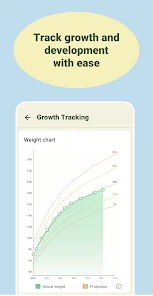
The Baby Tracker app provides a comprehensive suite of features designed to assist new parents in managing their baby's daily needs. It includes tools for tracking feeding schedules, sleep patterns, diaper changes, and growth milestones. Additionally, the app offers reminders, data analysis, and sharing capabilities to keep everyone in the family informed.
Pros
- User-friendly interface for easy tracking.
- Comprehensive tracking for feeding and sleep.
- Customizable reminders for activities.
- Syncs data across multiple devices.
- Data export for pediatrician appointments.
Cons
- Ads in free version can be intrusive.
- Limited features without subscription.
- Initial setup can be time-consuming.
- Some users report occasional sync issues.
- No offline mode for data entry.
- Category
- Parenting
- Version
- Varies with device












