Baby Tracker App | Glow
- 3.64K
- 3.9
- Installs
- 1.00M
- Price
- Free

Screenshots
Analysis by Reviewed
In a household with a newborn, care often passes from one tired person to another, and the hardest part can be remembering what happened between handoffs. I find a baby log most useful when it replaces guesswork with a quick record, not when it turns every moment into a task. Baby Tracker App | Glow is built around that practical need: recording everyday care so parents and caregivers can refer back to a shared routine.
A useful handoff, not a substitute for talking
Picture one caregiver finishing a bottle and noting it before the next person takes over. The incoming caregiver can check the recent entries instead of asking a string of questions while the baby is unsettled. That small habit can be especially handy after a broken night, when feeding times and diaper changes blur together. I’d still use a quick verbal update for anything urgent or unusual; a log is a memory aid, not a conversation or a medical record.
Glow Inc. makes this free parenting app, which is rated for Everyone and has reached over a million installs. It has a 3.8 average from around fourteen thousand ratings, and its current version is 4.57.0. Those figures suggest a widely used tool with a mixed reception rather than a universally loved one. In my view, the appeal is straightforward: it focuses on routine tracking instead of trying to replace every other parenting resource.
Choose what belongs in the log
Before inviting another caregiver into any shared routine, decide what you actually want to record. Feeding and diaper notes may be useful to everyone who provides care, while growth measurements or appointment details may be better handled by one parent. I would keep entries factual and brief, and avoid putting sensitive family information into a shared device or account unless everyone using it understands who can see it.
The app includes in-app purchases ranging from $0.99 to $99.99 per item, so I’d look at the available options before assuming every part of the experience is included in the free download. If you only need a basic record, start with the everyday tracking and see whether it fits your routine before paying for anything. The app is designed for baby care, but that doesn’t make it a medical authority: use your clinician’s advice for health concerns, and don’t treat a pattern in a log as a diagnosis.
Keeping Up with Baby’s Routine
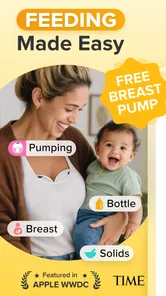
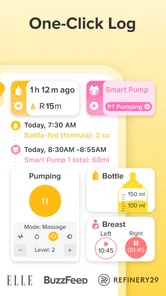
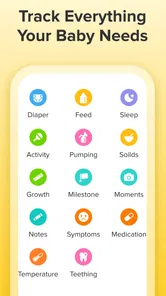
One of the most impressive features of this app is its comprehensive tracking capability. You can effortlessly log every feeding session, whether it’s breastfeeding, bottle feeding, or even solid foods as your baby grows. The app allows you to time each session, note which side you nursed from, and keep track of ounces consumed. This detailed logging is essential, especially during those early days when your pediatrician asks for specifics about your baby’s feeding habits.
Sleep Tracking Made Simple
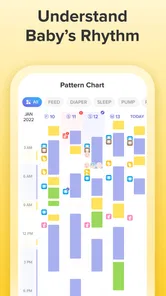
Sleep is another critical aspect of your baby’s development, and monitoring it can be as challenging as ensuring they get enough. The app’s sleep tracker provides an easy way to log sleep durations, patterns, and even the quality of your baby’s sleep. With this data at your fingertips, adjusting nap times or bedtime routines becomes a breeze, ultimately helping your baby sleep more soundly.
More From Our News Desk

Weather by Xiaomi Review: Clear at a Glance, Less Clear Up Close

X Under Pressure: Can It Recover When Posting Goes Wrong?

Clash of Clans Is Won Between the Battles

Android Auto Makes the Case for Quieter Car Software

MobiOffice: Transforming Mobile Productivity with Seamless Integration

EA SPORTS FC™ Mobile Soccer: Redefining Mobile Sports Gaming
Diaper Duty Details
No one loves diaper duty, but it’s a crucial part of parenting. With this app, tracking diaper changes is straightforward and even a bit fun. You can note if it’s a wet or dirty diaper and view your baby’s bowel movement patterns over time, which can be incredibly helpful for spotting any irregularities that might require a pediatrician’s attention.
Another cool feature is the health and growth tracker. You can log your baby’s weight, height, and head circumference, ensuring they’re on the right developmental path. Plus, the app allows you to set reminders for doctor appointments or vaccinations, so nothing slips through the cracks.
User-Friendly Interface
What truly sets the app apart is its user-friendly interface. Even sleep-deprived parents find it easy to navigate and input data. The design is clean, intuitive, and doesn’t bombard you with unnecessary features that can complicate usage. The app’s creators have clearly understood the needs of parents, delivering a product that caters directly to those needs.
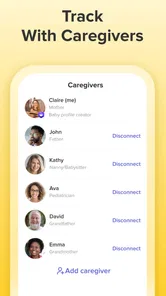
Additionally, the app syncs across devices, allowing both parents or caregivers to stay updated on the baby’s schedule in real-time. This synchronization feature is a game-changer for families juggling caregiving duties.
Working Together Without Confusion
For shared care to help rather than create noise, agree on a simple routine: enter an event soon after it happens, use the same approach to quantities and notes, and check the log before repeating a task. In practice, consistent entries matter more than recording every small detail. If one caregiver logs a feed and another forgets, the timeline can give a misleading impression, so treat gaps as missing information rather than proof that an event did not happen.
The same principle helps when a grandparent or babysitter is involved. A short explanation of what to record is usually more useful than expecting someone to learn every screen under pressure. I’d keep the handoff focused on the baby’s immediate routine and use a parent’s own judgment for decisions about feeding or care. If several people use one device, think about who can access it and avoid leaving private notes visible to someone who does not need them.
Where a tracker helps—and where it doesn’t
Compared with a paper notebook, a phone log is easier to update one-handed and can make recent entries quicker to check. Compared with a general notes app, a purpose-built baby tracker gives the records a more relevant structure, which can be useful when you want to compare feeds, sleep, diapers, or growth over time. A notebook may still be the better choice for families who prefer a screen-free routine, want a record that stays physically at home, or need a format they can tailor freely.
There is a trade-off in detailed tracking: it can make a busy day feel more manageable, but it can also become another chore. I would begin with only the categories that answer a real question—such as how long it has been since a feed or what to report at an appointment—and add more only if they help. If logging makes you anxious or distracts from caring for the baby, simplify the routine or stop. No app can decide what matters more than your family and clinician.
Who is likely to get the most from it?
I’d recommend trying it if you are caring for a young baby with another adult, want a clear timeline for everyday routines, or often need to recall details at a health appointment. It may be less suitable if you want a minimal checklist, dislike recording personal routines on a phone, or expect a tracker to interpret health patterns for you. Its Everyone age rating describes the app’s content classification, not a recommendation that children manage the account; adults should decide how a device is used and what information is shared.
The practical question is whether the records reduce uncertainty in your home. Try a few days of consistent entries, then ask whether the log helped with handoffs or recall. If it did, keep the routine focused; if it became a burden, a simpler note or a conversation may work better. That is a more useful test than trying to capture every detail just because the app can track several parts of baby care.
A realistic routine across a long day
Imagine one parent handles the early morning, while another takes over later and a relative watches the baby for part of the afternoon. The app is most useful in that kind of day when each person logs only the details the next caregiver needs: the last feed, a recent diaper change, or when a nap began. Rather than scrolling through everything, agree on which recent entries matter at handoff. That makes the record a practical checkpoint instead of a demand to document the whole day.
For an appointment, the same selective approach can help. If you have been noting feeding or sleep because there is a specific question to discuss, look back at those entries before you leave and explain the context to the clinician. A timeline can help you remember; it cannot tell you what a pattern means. I would not use a few logged days to make a major change to feeding or sleep without appropriate guidance.
Keeping the account and device boundaries clear
Shared care does not automatically mean every caregiver should use the same account or have access to every detail. Before setting up a routine on a household phone or tablet, decide who will enter information and whether that device is also used by children or visitors. A lock screen, account sign-in, or a device left unattended can affect who might see personal notes, so I would keep the log free of details that do not need to be there.
If a caregiver cannot or should not access the app, a short verbal handoff or a written note may be the more sensible option. That is particularly true for occasional babysitting: explaining one simple point is easier than relying on someone to navigate a tracking routine they rarely use. The value of a shared record depends on the people using it, not on adding more users for its own sake.
How much tracking is enough?
A useful test is to tie each category to a decision or a question. If recording naps helps you communicate with another caregiver, keep it. If tracking a detail does not change what you do or help you recall something important, it may not deserve a place in your daily routine. This prevents the app’s range of tracking from turning into a checklist that feels compulsory.
There is also a practical difference between a complete log and a reliable one. A small number of consistent, timely notes can be more useful than an ambitious record with long gaps. If two people enter information, agree on basic conventions—such as whether a note describes the start or end of an event—so that later entries are easier to interpret. I would not spend time correcting minor omissions unless they matter for a real conversation or care decision.
When another approach is a better fit
A paper notebook is a reasonable alternative if you want something anyone in the home can read without opening an app, or if you prefer not to use a phone during care. A general notes app can suit someone who wants a completely flexible format and only occasional reminders. Baby Tracker’s advantage is that its focus is specifically on routine baby-care details, but that structure is not automatically better for every family.
I would also skip a detailed tracker if keeping records adds stress, if the household cannot agree on who should see them, or if you need professional interpretation rather than a timeline. The app can help you organize observations, but it does not replace a pediatrician, a direct conversation, or your own judgment about an immediate need. Choosing a simpler method in those circumstances is not a failure to use the app well; it may be the better choice.
Who is likely to get the most from it?
I’d recommend trying it if you are caring for a young baby with another adult, want a clear timeline for everyday routines, or often need to recall details at a health appointment. It may be less suitable if you want a minimal checklist, dislike recording personal routines on a phone, or expect a tracker to interpret health patterns for you. Its Everyone age rating describes the app’s content classification, not a recommendation that children manage the account; adults should decide how a device is used and what information is shared.
The practical question is whether the records reduce uncertainty in your home. Try a few days of consistent entries, then ask whether the log helped with handoffs or recall. If it did, keep the routine focused; if it became a burden, a simpler note or a conversation may work better. That is a more useful test than trying to capture every detail just because the app can track several parts of baby care.
In conclusion, the Baby Tracker App | Glow is more than just a tool; it’s a partner in parenting. By organizing and simplifying the daily routines of caring for your little one, it allows parents to focus more on enjoying precious moments rather than worrying about what comes next. For any new parent looking for a robust, easy-to-use app to help navigate the early stages of parenting, this app is definitely worth checking out. Trust me, it’s like having a personal assistant dedicated to your baby’s well-being!
Baby Tracker App | Glow Frequently Asked Questions
What is Baby Tracker App | Glow, and what can I use it for?
Baby Tracker App | Glow is a parenting app for caregivers who want a convenient place to record everyday baby care. Its focus is tracking feeding, sleep, diapers, growth, and development, so it can help keep routine notes together rather than scattered across memory or separate records. It is intended as a tracking aid for parents and other caregivers.
Who develops Baby Tracker App | Glow, and what is its age rating?
Baby Tracker App | Glow is developed by Glow Inc and is listed in the Parenting category. Its content rating is Everyone, making it suitable for a general audience. The app’s focus is reflected in its short description, “Baby Tracker,” and its summary highlights feeding, sleep, diapers, growth, and development as areas parents can record.
What age group is Baby Tracker App | Glow intended for?
Baby Tracker App | Glow is a parenting app for caregivers who want to keep track of everyday baby care and development. Its content rating is Everyone, so it is suitable for a general audience. The app’s focus is reflected in its short description, “Baby Tracker,” and its summary highlights feeding, sleep, diapers, growth, and development as areas parents can record.
What features does the Baby Tracker App by Glow offer?
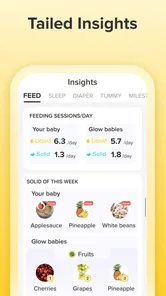
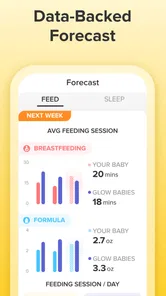
The Baby Tracker App by Glow is designed to help parents track their baby's daily activities and development. Features include feeding and diaper tracking, sleep logs, growth charts, and milestone tracking. The app also provides reminders and insights based on the data you input, helping you stay organized and informed about your baby's health and development.
Is the Baby Tracker App by Glow free to use, or does it require a subscription?
The Baby Tracker App by Glow offers a free version with basic features, but to access premium functionalities, such as advanced insights and personalized tips, a subscription is required. The premium version offers more detailed tracking and analysis, which can be particularly useful for parents who want in-depth information about their baby's progress. In-app purchases are available, with prices ranging from $0.99 to $99.99 per item.
Pros
- User-friendly interface for easy navigation.
- Tracks feedings
- sleep
- diapers
- and milestones.
- Offers personalized insights and tips.
- Supports multiple profiles for twins or siblings.
- Syncs data across multiple devices.
Cons
- In-app purchases for premium features.
- Occasional sync issues reported by users.
- Limited offline functionality.
- Some users find notifications overwhelming.
- Subscription required for advanced features.












