Baby Daybook - Newborn Tracker
- 7.46K
- 4.7
- Installs
- 1.00M
- Price
- Free
Screenshots
Analysis by Reviewed
When I choose a newborn tracker, I care less about having a chart for everything and more about whether I can record something quickly while tired, find it again later, and share a clear picture of the day with another caregiver. Baby Daybook - Newborn Tracker is built around that practical routine: it brings everyday baby-care notes together, rather than asking me to juggle separate logs for feeds, sleep, and diapers. That makes it worth considering if you want one place to establish a consistent record.
Choose a tracker for the questions you actually have
Before settling on any baby-care app, I would ask what I need the record to do. Am I trying to remember when the last feed happened, make handovers between caregivers smoother, or notice a broader pattern in sleep and feeding? Those are different needs. A detailed log can help when information gets hard to hold in your head, but tracking for its own sake adds taps without necessarily making care easier.
For me, the best starting point is a short list of details that would genuinely help tomorrow. Perhaps the next caregiver needs to know when the baby last ate, or I want to describe a run of unsettled nights more clearly. Keeping that purpose in view makes it easier to decide which entries belong in the routine and which can stay unrecorded. The goal is a useful record, not a perfect one.
The app’s appeal is that it can bring several daily-care details into one place. That matters most when the same information is useful to more than one person. If I am the only person who ever checks a log, a quick note or a paper calendar might be enough. If care rotates, a shared record can reduce the need to reconstruct a day from memory, provided everyone is comfortable using the same system.
What to consider before you start
The app is a free parenting app from Baltapis, with in-app purchases ranging from $1.99 to $99.99 per item. It has a 4.8 average from around 67,000 ratings, and more than a million installs. It is rated for Everyone and has been available since May 4, 2014. Those details suggest a well-used, established tool, but popularity alone does not tell you whether its style will suit your household. I would judge it by how naturally its tracking fits your day and whether you actually use the records it creates.
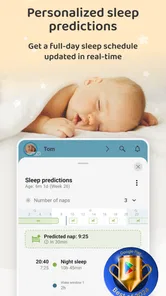
One useful way to approach setup is to begin with only the activities you already need to remember. If you try to capture every detail from the first day, logging can become another chore. Once the basic routine feels comfortable, add more tracking where it helps you answer a real question, such as how the day’s naps relate to feeding times. The app’s personalized sleep predictions may be useful as a planning prompt, but I would treat any prediction as a guide to observe alongside your baby, not a schedule that overrides their cues.
How the app fits into everyday care
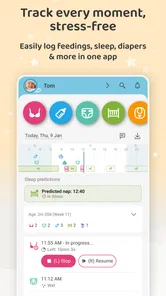
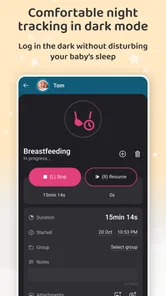
First off, let’s talk about its incredible user-friendly interface. I mean, the Baby Daybook - Newborn Tracker makes logging feedings, diaper changes, and naps a breeze. It’s like the app just gets you! The interface is clean, intuitive, and doesn’t require a tech genius to navigate. You can easily switch between activities, ensuring nothing slips through the cracks.
More From Our News Desk

 Remini - AI Photo Enhancer
Remini Is Our App of the Week for Bringing Old Photos Back to Life
A quick AI restoration tool earns its place by making faded portraits and soft, older photos feel vivid again—provided you know where its polish ends.

 PayPal - Pay, Send, Save
PayPal Reviewed: Who Benefits from Its Reach, and Who Should Skip It
PayPal is most useful when its reach and familiar checkout solve a real payment problem. These reader-by-reader recommendations show where it earns a place—and where friction wins.

 Millionaire 2026 Quiz & Trivia
 Makes Every Answer Count
A familiar quiz-show format succeeds or falters on tiny design decisions: how clearly the game guides a first answer, handles hesitation, and invites one more round.

 Decor Life - Home Design Game
Decor Life Turns Short Breaks Into Bite-Sized Decorating Jobs
A room-by-room decorating game built for quick sessions gains from modern phone habits, but its gentle pace still depends on patience, repetition, and a steady stream of design jobs.

 Sniper 3D:Gun Shooting Games
Sniper 3D’s Quick-Shot Appeal Faces the Upgrade Treadmill
The appeal is immediate: line up a target, steady your aim, and fire. The harder question is whether Sniper 3D can keep players returning after the first rush.

 Blockudoku®: Block Puzzle Game
Blockudoku vs. the Puzzle Pack: A Quick Puzzle With a Repetitive Edge
Blockudoku turns a clean grid into a quiet test of foresight. Against match-three polish and head-to-head simplicity, its lasting appeal is also its biggest limitation.
Latest News



One record for several kinds of care
What truly sets this app apart is its comprehensive tracking capabilities. You can log everything from breastfeeding times and bottle feedings to sleep patterns and even tummy time. It’s like having a little notebook in your pocket that never runs out of pages. Plus, the app allows you to track multiple babies, which is a lifesaver for parents with twins or more!
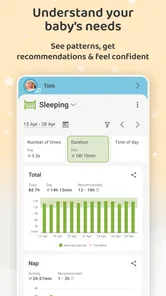
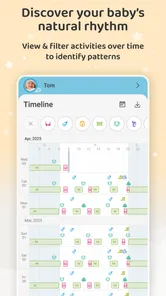
Not to mention, the statistics feature is a gem! It provides you with detailed insights into your baby’s habits, helping you to identify patterns. You’ll find it super helpful when talking to your pediatrician, as you can provide accurate data on your baby’s development.
That range is useful when a question crosses categories. For example, if a baby’s naps seem to shift, a combined record can help me look back at the surrounding day rather than relying on a single sleep note. The useful insight is not that one event caused another; it is that keeping context together may help me describe what I observed more clearly. I would bring those observations to a clinician when needed, rather than treating app statistics as a diagnosis.
Making the shared record useful
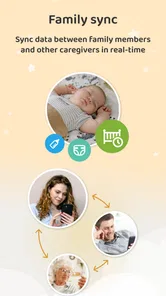
For a realistic example, imagine one caregiver handles an early feed and another takes over later. Rather than relying on a sleepy handover from memory, each can check the activity record and continue from there. That is where shared syncing can be more valuable than a paper notebook: it keeps the running log accessible to the people caring for the baby. A practical habit is to agree on who records an event, so the same feed or diaper change is not entered twice.
A small household rule makes that workflow more dependable: record an event when care changes hands, or as soon as the person who handled it has a free moment. If both caregivers enter events independently, a duplicated entry can make the day look busier than it was. If neither does, the log becomes incomplete. I would agree on one simple convention rather than trying to create a complicated system while everyone is tired.
For families with twins or more, keeping each child’s entries distinct is especially important. A caregiver who is switching between babies may otherwise have to rely on memory for who ate or slept when. The app’s multiple-baby tracking is a practical reason to consider it over a notebook with loosely labeled pages, though it still depends on caregivers consistently selecting the right child before logging.
The all-in-one approach also has a trade-off. A dedicated sleep tracker or a simple notes app may feel lighter if you only want to record one thing, while a paper log can be easier for someone who does not want to use a phone during care. Baby Daybook makes more sense when you want several kinds of routine information together and expect to revisit it. If logging starts to distract you from being present, narrow the record to the details you genuinely use.
Predictions, reminders, and judgment
Personalized sleep predictions can be most useful as a cue to prepare, not as a promise about what will happen. I would use them to think ahead about a calm transition or to notice whether a predicted window seems to match the baby’s behavior over time. A prediction that does not fit a particular day should not become a source of pressure; babies are not clocks, and real-life routines vary.
Now, one of my favorite features has to be the real-time syncing. This is perfect for parents who need to share information with a partner or a caregiver. The app updates immediately, so everyone is on the same page. No more awkward “Did you feed the baby?” conversations!
Moreover, the app offers reminders that you can set for feedings or medication. Honestly, it’s like having a little digital nanny who never forgets. You can even customize these reminders to suit your baby's schedule, ensuring you never miss a beat.
I would be selective about notifications. A reminder can be reassuring when several people share responsibility or when a routine is easy to lose track of, but frequent alerts can turn a helpful tool into another source of noise. For medication in particular, I would use reminders as a prompt within whatever instructions a health professional has given, not as a replacement for those instructions. If an alert does not help with a real task, there is little reason to keep it enabled.
When a simpler alternative is better
Baby Daybook sits between a single-purpose tracker and a do-it-yourself log. Compared with a basic notes app, it is organized around baby-care activities, which can make entries easier to review as a routine rather than a stream of unrelated notes. Compared with a paper notebook, it offers a shared digital record and can make it easier to look back across different types of entries. Those advantages matter only if the people involved will actually use it.
A focused sleep-only tool may be a better fit for someone who wants to concentrate on one question and does not need feeding or diaper records. A plain notebook may suit a caregiver who prefers writing by hand, wants a low-distraction approach, or does not want to coordinate a digital workflow with others. I would also skip a tracker if recording ordinary care makes me more anxious or interrupts time with the baby. No app is essential to good caregiving.
There is a practical middle ground if I am unsure: use the app for the events that repeatedly cause confusion, and leave the rest alone. If shared handovers are the main problem, the record can focus on feeds and diapers. If I am trying to understand sleep, I can add sleep entries without turning every part of the day into a data project. That selective approach preserves the convenience of an organized tracker without asking the family to document everything.
Where it may not fit
I would recommend it most to parents who want a shared, ongoing record, especially when care passes between family members, or to parents of more than one baby who need to keep each child’s routine distinct. It may be less appealing if you prefer not to track daily care, want a highly minimal tool, or find notifications stressful. Reminders are helpful when they support a routine; they are not a substitute for judgment or medical advice, and a log should not turn every irregular day into a problem to solve.
One question parents often have is whether they need to record everything to get value from the app. I do not think so. A partial record can still help with handovers or with recalling a recent pattern, as long as everyone understands that it is partial. When accuracy matters for a specific conversation, I would note the details that are relevant and avoid presenting an incomplete log as a complete picture.
Another useful question is whether sleep predictions should determine the day’s schedule. I would not use them that way. They can help me plan around a possible window, but the baby’s cues and the family’s circumstances still matter more. If predictions add pressure or make normal variation feel like failure, I would stop consulting them and keep only the tracking that makes daily care clearer.
It is also worth thinking about who will maintain the log. Shared tracking works best when a partner, relative, or other caregiver knows the basic routine and agrees to enter events consistently. If one person is expected to do all the logging while also handling every task, the record may become burdensome. In that situation, a few spoken handover notes or a simpler paper record may be more realistic than an app with several categories.
If you later decide to move to another tracker, the real cost is not just choosing a different interface: it is deciding whether to carry forward useful history or start a fresh record. Before switching, identify which notes you actually refer to—such as feeding patterns or sleep history—and keep those accessible for caregiver handovers or appointments. That simple review can also show whether the app is earning its place in your routine.
I would make that decision after looking at the way the app is used, not simply at how long it has been installed. If caregivers check the shared record and it prevents repeated questions, keeping it may be worthwhile. If nobody reviews the entries, or if the act of logging is more frustrating than helpful, moving to a simpler option is a sensible choice. The most useful system is the one the household can maintain without resentment.
My recommendation
All in all, the Baby Daybook - Newborn Tracker is a must-have for any new parent. It’s not just an app; it’s a lifeline that helps you navigate the chaotic world of parenting with just a bit more ease. Whether you’re a first-time parent or adding to your growing family, this app will quickly become your go-to for tracking your little one's daily activities.
So, go ahead and give it a download. You’ll wonder how you ever managed without it!
My more measured recommendation is to try it if you want a shared place for several kinds of baby-care notes and are willing to build a modest logging habit. Start with the activities that solve an immediate problem, agree with other caregivers on who records each event, and treat sleep predictions as flexible prompts. If you prefer one-purpose tracking, handwriting, or no routine logging at all, a simpler alternative may fit you better. For households that do want a combined record, this app offers a practical way to keep daily details together without asking memory to do all the work.
Baby Daybook - Newborn Tracker Frequently Asked Questions
What is Baby Daybook - Newborn Tracker, and what can I use it for?
Baby Daybook - Newborn Tracker is a parenting app from Baltapis that helps parents keep everyday baby-care information organized. Its core tracking areas include sleep, feedings, diapers, and growth, bringing routine details together in one place. It may be useful if you want a clearer overview of your baby’s day and a convenient way to review care patterns.
Is Baby Daybook - Newborn Tracker free to download?
Baby Daybook - Newborn Tracker is free to download, with optional in-app purchases available. If you are considering paid options, check the purchase choices in the app and decide whether they suit your needs and budget. You can begin with the free download and explore the app before choosing to spend anything.
Can Baby Daybook - Newborn Tracker help me keep a consistent routine for my baby?
Baby Daybook is a parenting app for recording everyday care, including sleep, feedings, diapers, and growth. Keeping these details together can make it easier to review your baby’s routine and share useful updates with caregivers. The app also offers personalized sleep predictions, which can help parents plan around rest times while remembering that every baby’s needs and patterns are different.
Who develops Baby Daybook - Newborn Tracker, and is it suitable for all ages?
Baby Daybook - Newborn Tracker is developed by Baltapis and is rated Everyone. Its focus is on helping parents and caregivers organize baby-care information, so the rating describes the app’s content rather than suggesting that it is intended for children to use independently. Adults can use it to keep track of routines and share relevant care details with others involved in looking after the baby.
What features does Baby Daybook - Newborn Tracker offer to new parents?
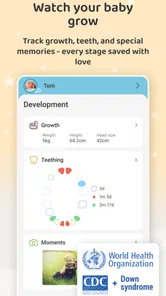
Baby Daybook - Newborn Tracker provides a comprehensive set of features designed to assist new parents in managing their newborn's daily activities. The app allows you to track feeding times, diaper changes, sleep patterns, and more. Additionally, it offers customizable reminders and detailed statistics to monitor your baby's growth and routines effectively.
Pros
- Intuitive and easy-to-use interface.
- Comprehensive tracking features for newborns.
- Supports syncing across multiple devices.
- Customizable reminder notifications.
- No ads in the premium version.
Cons
- Limited features in the free version.
- Premium version requires a subscription.
- Lacks advanced analytics for tracking.
- Can be overwhelming for new users.
- Occasional syncing issues reported.