Baby Connect: Newborn Tracker
- 2.53K
- 4.5
- Installs
- 100.00K
- Price
- Free

Screenshots


Analysis by Reviewed
Newborn days are full of small details that become surprisingly difficult to remember: when the last feeding happened, how long a nap lasted, which diaper was wet, or whether a growth measurement was taken at home or at a clinic. I found Baby Connect: Newborn Tracker useful because it turns those scattered notes into one organized parenting record instead of leaving everything in memory, text messages, or random phone notes.
This is a free parenting app from Seacloud Software, available for Everyone and currently listed as version 10.43. It has built a strong audience, with an average rating of 4.5 from around 11 thousand ratings and more than 100 thousand installs. That does not automatically make it right for every family, but it does suggest that the basic idea has proved practical for many parents.
My overall impression is that this is less about giving parenting advice and more about helping you observe your baby’s routine. That distinction matters. If you want an app that tells you exactly what your child should do, this may feel too record-focused. If you want a dependable place to capture daily care and spot patterns, it has a much clearer purpose.
How Baby Connect fits into real newborn routines
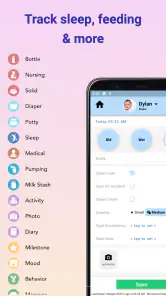
The current version brings together the areas parents usually track during the first months: sleep, feeding, diapers, growth, and milestones. I like that these are treated as parts of the same record rather than separate apps. A feeding can be understood alongside a nap, and a change in diaper habits can be considered with the rest of the day’s routine.
In practice, the value appears when you are tired. A newborn schedule rarely follows a neat timetable, and relying on memory after a broken night is unreliable. Opening the app and recording an event soon after it happens is much easier than trying to reconstruct the day later. Even a short entry can prevent the familiar question, “When did we last feed the baby?” from becoming a guessing game.
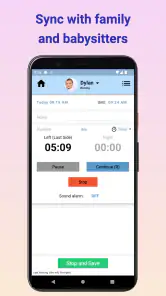
The app is especially helpful when more than one adult shares care. One parent may handle the early morning, another may take over later, and a grandparent or babysitter may need a quick view of what has already happened. A shared record can reduce repeated questions and make handoffs calmer. The important habit is consistency: everyone should agree on what counts as a completed entry and record it in roughly the same way.
The biggest strength is continuity: Baby Connect gives everyday observations a place where they can be reviewed together instead of disappearing into separate conversations.
What I would track first
I would not begin by trying to record every possible detail. That can make the app feel like another chore, especially during the first weeks at home. I would start with the information that answers immediate care questions: feeding times and amounts when relevant, sleep periods, and diaper changes. Once that routine feels manageable, growth and milestones can be added more deliberately.
This staged approach is one of the best ways to avoid abandoning a tracker. The app can hold a broad picture of your baby’s development, but you do not need to use every part of it on the first day. A short, reliable record is more useful than a detailed record that stops after a week.
For breastfeeding, bottle feeding, or a combination of both, the practical challenge is keeping entries clear enough to compare later. I found it helpful to use the same style of note each time rather than changing between vague descriptions and detailed ones. If you are monitoring a mixed routine, consistency becomes more important than filling in every optional field.
A realistic day with the app
Imagine a parent starting the day after a difficult night. The baby fed sometime before dawn, slept again, and woke while the parent was preparing breakfast. Instead of opening a messaging thread or searching through paper notes, the parent records the new feeding and checks the previous entry. Later, after a nap and diaper change, those events are added while they are still fresh.
By afternoon, the app is not magically making the day easy, but it is removing some mental work. A partner arriving home can look at the record rather than asking for a complete verbal summary. If the baby seems unusually unsettled, the parent has a clearer timeline to discuss with a healthcare professional. The app does not diagnose the reason for a change, but it can make the description more precise.
At night, the temptation is to skip logging because the phone feels like one more task. That is a real weakness of any tracker. My advice is to keep nighttime entries brief and fill in extra context later only if it matters. The goal is to preserve useful facts without allowing the tracking process to interrupt rest more than necessary.
More than a feeding and diaper log
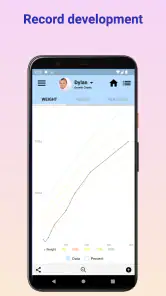
Many baby trackers focus heavily on feeding and diapers, which are important but only part of family life. Baby Connect also gives space to growth and milestones, making it more useful as a longer-running record. Those sections are not necessarily something you need to open every day. They work better as occasional updates that help you remember changes over time.
Growth information is most useful when you treat it as a record of measurements rather than a source of instant reassurance or alarm. Measurements can vary depending on equipment, timing, clothing, and who takes them. I would use the app to keep the information together and bring it to appointments when helpful, while leaving interpretation to a qualified healthcare professional.
Milestones have a different role. They can help you remember when a new skill appeared and give you a way to look back later. However, milestone tracking can also make parents compare their baby too closely with an imagined schedule. I would use it as a personal journal, not as a pass-or-fail test.
How the product has evolved
The app was released on August 25, 2011, and the current version is 10.43. That long history is relevant because a newborn tracker has to survive changing phones, changing family routines, and changing expectations about mobile apps. The version number shows that the product is still being maintained as an active application rather than sitting untouched after its original launch.
What I can say confidently from the current product details is that its scope now covers a broad set of baby-care records, not only one narrow activity. I would separate that present-day observation from any assumption about what future updates will bring. A long-running app may continue to change, but parents should judge it by the tools available now rather than by hoped-for additions.
For existing users, a current version can be reassuring because it means the app remains relevant to people who have used it across different stages of infancy. At the same time, a mature app can feel less simple than a brand-new single-purpose tracker. More sections usually mean more choices, and more choices can slow down quick entries if the interface does not match your habits.
That is the central trade-off I noticed: Baby Connect aims to be a complete record, while the fastest possible tracker would probably ask you to do less. Families who want one place for many kinds of information will appreciate the wider scope. Parents who only want a one-tap sleep timer may prefer something more limited.
Useful workflows that are easy to overlook
One smart workflow is to use the app as a handoff tool rather than only as a personal diary. Before another caregiver takes over, the incoming person can review the latest entries and ask about anything unusual. This is more efficient than explaining the entire morning from memory, especially when the routine includes several short naps or frequent feeds.
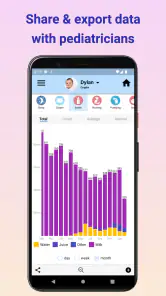
A second useful approach is to prepare a concise history before a pediatric appointment. I would review the recent record beforehand and identify the few patterns or questions that actually matter. The app can help you remember timing and frequency, but it should support a conversation with a clinician, not replace one. Taking a long unfiltered list may be less useful than highlighting a clear change.
A third is to use the record to test assumptions. Parents often feel that the baby “barely slept” or “fed constantly,” but exhaustion can distort perception. Looking back at the entries may reveal a different pattern. That does not mean the numbers tell the whole story; mood, comfort, and the quality of sleep matter too. Still, the record can turn a vague concern into a more specific question.
A fourth is to reduce detail strategically during busy periods. If you are traveling, recovering, or caring for more than one child, choose the categories that are most important for that day. A tracker should adapt to your capacity. Treating every field as mandatory is a quick way to turn a helpful tool into a source of guilt.
Where the experience may become frustrating
The most obvious limitation is the effort required to maintain accurate records. The app can organize information, but it cannot capture events you forget to enter. Newborn care is repetitive and tiring, so missed entries are inevitable. If incomplete records make you anxious, a comprehensive tracker may create more pressure than relief.
There is also a learning curve caused by breadth. An app that includes sleep, feeding, diapers, growth, and milestones has to accommodate different kinds of information. That is useful for a family seeking a complete history, but it may feel excessive when all you want to know is when the baby last woke up.
Another trade-off is cost. The app is free to download, but in-app purchases range from $4.99 to $119.99 per item. That makes it important to understand which parts of your intended workflow require additional spending before you commit to using it as your main record. A free starting point is welcome, but the possible purchase range is significant enough that budget-conscious parents should check the available options carefully.
I also would not choose this app as a substitute for medical guidance. Tracking symptoms, feeds, sleep, or measurements can improve the information you share with a professional, but an app cannot assess a baby’s condition. If something concerns you, use the record as supporting context and contact the appropriate healthcare service.
Who will get the most from it
Baby Connect is a strong fit for parents who like seeing a connected history rather than isolated notes. It is particularly practical for families sharing care, parents managing a mixed feeding routine, and anyone who wants to preserve growth and milestone information alongside daily events.
It may also suit parents who have already tried paper logs and found them difficult to search. Paper can be comforting and immediate, but it is harder to review across several days. A phone-based record is easier to update while moving around the house and more convenient when you need to check an earlier entry.
I would be more cautious about recommending it to someone who dislikes tracking or feels overwhelmed by baby-care statistics. If your ideal experience is almost invisible, a simple notes app or a single-purpose timer may be better. Those alternatives sacrifice the broader history, but that may be exactly the right trade if simplicity keeps you consistent.
It is also not the best choice for a parent looking primarily for articles, community discussion, or personalized medical explanations. Its value is in recording and organizing your baby’s routine. Choosing it for a different purpose would lead to disappointment, even though the app itself may work well within its intended role.
What current users should watch
Existing users should watch how well the app still fits their routine as their baby grows. Newborn tracking can be intensive at first, then gradually shift toward occasional sleep notes, growth updates, and milestones. You may not need the same level of detail forever. Periodically simplifying your habits can keep the record useful without making it feel like a permanent obligation.
I would also pay attention to the balance between the free experience and optional purchases. Because the app is free but includes paid items, the sensible approach is to begin with the workflow you actually need, then decide whether an upgrade solves a real problem. Do not buy extra capability merely because the app contains many categories.
For anyone installing it now, the minimum operating-system requirement is Android 6.0, which is relevant if you are using an older phone. The Everyone content rating also makes it broadly suitable from a content perspective, though the person operating the app still needs to decide what information should be recorded and shared within the family.
Finally, watch your own emotional response to the data. If reviewing entries helps you communicate and notice patterns, continue. If it encourages constant comparison or makes every irregular nap feel alarming, reduce the tracking scope. The best use of Baby Connect is supportive and practical, not obsessive.
My recommendation after using it
I see Baby Connect as a well-rounded record-keeping tool for parents who want more than a basic timer. Its broad coverage, long-running development, and current version make it a credible option for organizing the messy details of early childcare. The average rating of 4.5 and its audience of over 100 thousand installs reinforce that it has found a meaningful place in this category, although those figures cannot tell you whether its level of detail matches your personality.
I would recommend starting small: log the events that answer your most common questions, establish a shared routine with other caregivers, and add growth or milestones when they become useful. That approach lets you benefit from the app’s depth without turning every moment with your baby into an administrative task.
My honest verdict is that this is best for families who want a shared, evolving baby record and are willing to spend a little time maintaining it. It is less suitable for people seeking medical advice, social features, or an ultra-minimal tracker. If you value organized history and practical handoffs, the free download is worth trying; just evaluate optional purchases and your own tracking tolerance before making it the center of your routine.
Pros
- Tracks feeding
- sleep
- diapers
- growth
- and health data in one place.
- Shared syncing helps parents and caregivers stay updated across devices.
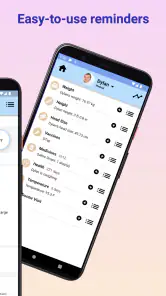
- Customizable timers and reminders support different routines and schedules.
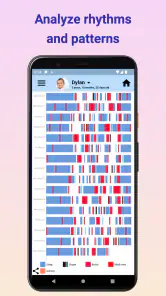
- Detailed charts make it easier to spot patterns in a baby's habits.
- Supports notes and photos
- creating a useful record for pediatric visits.
Cons
- Many advanced features require a paid subscription or purchase.
- The large number of tracking options can feel overwhelming at first.
- Manual data entry may become repetitive during busy days and nights.
- Some features depend on an internet connection for syncing between users.
- The interface may feel more practical than visually modern to some parents.

- Category
- Parenting
- Version
- 10.43











