Asiacell
- 8.81K
- 4.5
- Installs
- 10.00M
- Price
- Free

Screenshots



Analysis by Reviewed
For someone managing an Asiacell line, the useful question is not whether a carrier app can replace every way of handling an account; it is whether it makes common tasks easier when you are away from a shop or a computer. Asiacell is a free business app from ASIACELL COMMUNICATIONS PJSC, built around managing Asiacell, YOOZ and Elite lines. I see its value as practical and specific: it brings those services into one mobile place, though it makes the most sense if you already use one of them.
A practical fit for more than one line
If your household or work involves several eligible lines, being able to manage Asiacell, YOOZ and Elite services from the same app may be more convenient than keeping separate routines for each. Before relying on it for someone else’s number, I would check which line is active in the app and confirm the account details before making a change. That small habit helps avoid the familiar mistake of recharging or checking the wrong line when you are in a hurry.
Picture getting ready to leave home and wanting to check a line before a long day out. Opening a carrier app is often quicker than finding a shop, and having account management available from wherever you are is the central convenience here. I would still treat the app as a handy control point, not a guarantee that every task will be available in every situation; keep the usual customer-service route in mind if an account issue needs more help.
Seamless User Experience
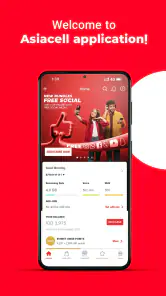
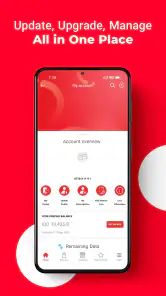
Right off the bat, the Asiacell app impresses with its sleek and intuitive user interface. Navigating through the app feels like a breeze, and even if you aren't the most tech-savvy person, you'll find your way around without breaking a sweat. The design is clean, user-friendly, and everything is just a tap away.
Effortless Account Management
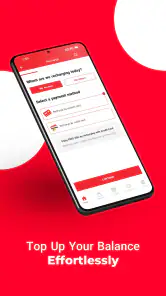
Managing your Asiacell account has never been easier. You can check your balance, recharge your account, and even view your data usage in real-time. The app sends timely notifications to remind you of upcoming bills or low balances, so you're never caught off guard. It's like having a personal assistant that keeps track of everything for you.
Exclusive Offers and Promotions
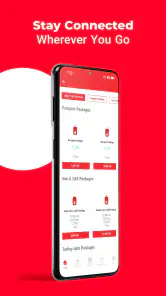
One of the coolest features of the Asiacell app is the exclusive offers section. The app regularly updates with new promotions, allowing you to take advantage of special deals that aren't available elsewhere. Whether it's extra data, discounted call rates, or special bundles, there's always something to look forward to.
Enhanced Customer Support
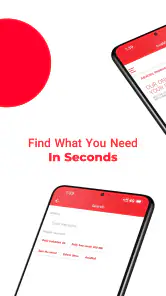
Getting in touch with customer support can sometimes be a hassle, but the Asiacell app makes it simpler. You can reach out to customer service directly through the app, and the response time is impressively quick. Plus, the FAQ section is comprehensive and answers most of the common queries you might have.
More From Our News Desk

Weather by Xiaomi Review: Clear at a Glance, Less Clear Up Close

X Under Pressure: Can It Recover When Posting Goes Wrong?

Clash of Clans Is Won Between the Battles

Android Auto Makes the Case for Quieter Car Software

MobiOffice: Transforming Mobile Productivity with Seamless Integration

EA SPORTS FC™ Mobile Soccer: Redefining Mobile Sports Gaming
Where it fits—and where it doesn’t
Compared with handling a line through a shop or a general phone-settings screen, a carrier app is useful because it focuses on account tasks rather than device controls. That focus is also its limitation: it is not a general-purpose business tool, and it will not help much if you do not use an Asiacell, YOOZ or Elite line. If you only need occasional assistance and prefer speaking to a person, contacting support directly may suit you better.
A sensible routine is to check the line and the details of any offer before committing to a recharge or bundle. Promotions can make a plan attractive, but the right choice depends on your own calling and data habits; an offer is not automatically a saving if it does not match how you use the service. For people who manage a line regularly, checking the account before acting can make the app more useful than opening it only when something has gone wrong.
What to expect over time
The app has been available since October 21, 2015, and its 4.5 average from around 771,000 ratings, alongside over 10 million installs, suggests that many users have chosen it. Those figures are a broad signal of reach, not a promise that every screen or support interaction will feel the same for everyone. It is rated for Everyone, so its intended audience is broad, but the practical benefit still depends on having an eligible line and finding the account tools useful.
For existing users, I would keep it installed if checking or managing a line is part of ordinary life; for a prospective user, the main decision is simply whether those services are yours to manage. It is free, so trying it is a low-commitment way to see whether the app fits your routine. I would judge it by whether it makes account tasks clearer and more convenient, while keeping another support route available for anything that cannot be resolved through the app.
In conclusion, the Asiacell app is more than just a utility tool; it's a must-have for any Asiacell user. With its seamless experience, easy account management, and a plethora of exclusive offers, it truly enhances your telecom experience. So, if you haven't downloaded it yet, what are you waiting for? Give it a try and see for yourself how it can simplify your life.
Asiacell Frequently Asked Questions
Can I use Asiacell without an internet connection?
Asiacell is designed to let you manage your Asiacell, YOOZ, and Elite lines from a mobile device, so an internet connection is important for accessing its account features. You can download the app over Wi-Fi and open it whenever you need to manage a line. If you use mobile data, your own plan may apply.
Who develops the Asiacell app?
The app is developed by ASIACELL COMMUNICATIONS PJSC and is intended for customers who want to manage supported lines on a phone. It is listed in the business category, with a free download and an Everyone age rating. Those details make it a straightforward option to consider if you use Asiacell, YOOZ, or Elite services.
Can I manage more than one type of Asiacell line in the app?
The app is intended for managing Asiacell, YOOZ, and Elite lines, so it can be useful if you use one of these services. Its focus is account management from a mobile device, making it easier to handle supported lines from anywhere. Before downloading, consider whether the line you want to manage is one of these types.
Is Asiacell free to download, and is it suitable for all ages?
Asiacell is free to download and has an Everyone content rating, so its listed age suitability is broad. The app is a business tool for managing mobile lines rather than an entertainment game. Your mobile provider may still charge separately for data or services you choose to use, so check your own plan when using it away from Wi-Fi.
What is Asiacell and what services does it offer?
Asiacell is a leading telecommunications operator in Iraq, providing a comprehensive range of mobile services to its users. The app offers features such as balance top-up, data plan purchases, tracking usage, and accessing customer support. It is designed to enhance user convenience by allowing them to manage their mobile services directly from their smartphones.
Pros
- Wide network coverage across Iraq.
- Affordable prepaid and postpaid plans.
- Fast internet speeds with 4G LTE.
- User-friendly mobile app interface.
- Excellent customer service support.
Cons
- Limited international roaming options.
- Occasional network congestion issues.
- Inconsistent service in remote areas.
- Limited data rollover features.
- App lacks advanced management tools.
- Category
- Business
- Version
- Varies with device











