Artspire: AI Video Generator
- 23.00
- 3.1
- Installs
- 1.00M
- Price
- Free

Screenshots
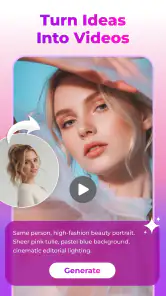
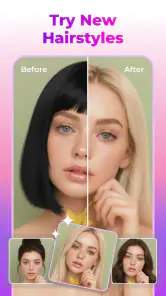
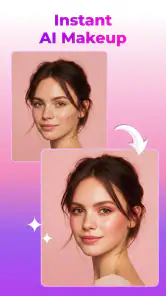

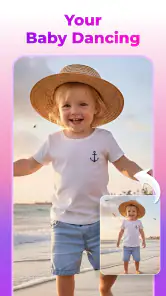
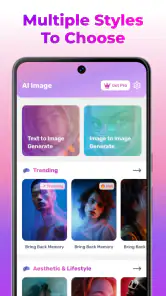
Analysis by Reviewed
Turning a still image into something that feels alive is usually harder than it looks. A photo has to carry the composition, while motion, atmosphere, and timing have to be added without making the result feel random. Artspire: AI Video Generator takes that basic challenge and puts it into a phone-friendly creative workflow. I found it most interesting as a quick way to experiment with photo-to-AI art and short dynamic visuals, rather than as a replacement for a full video editor.
The app comes from NXL AI Solutions and sits in the Art & Design category. It is free to install, aimed at Everyone, and supports devices running Android 8.0 or later. The current release is version 3.5.0, and its broad reach is reflected in more than a million installs. That makes it easy to understand the appeal: you can start with an image you already have and explore an AI-generated result without first learning a complicated desktop program.
My overall impression is mixed in a useful way. Artspire can be enjoyable when I treat each generation as a visual draft, a social post idea, or a small creative prompt. It becomes less convincing when I expect precise animation, dependable character consistency, or the level of control offered by a conventional timeline editor. The average rating of 3.1 from roughly 1.7 thousand ratings also suggests that the experience will not suit everyone equally, so it is worth approaching the app with realistic expectations.
How I use Artspire from a single photo
A simple starting workflow
I begin with one image that has a clear subject. A portrait with a visible face, a product shot with clean edges, or a landscape with a strong foreground usually gives the app a better visual foundation than a crowded snapshot. This is not just an aesthetic preference. When the source image already has a clear point of focus, any generated movement has a better chance of supporting the image instead of competing with it.
From there, I treat the first result as a test rather than a final export. The useful question is not “Did the AI make a perfect video?” but “Which part of this idea is worth keeping?” Sometimes the motion adds enough energy to make an otherwise ordinary photo more engaging. At other times, the generated movement changes the subject in a distracting way. Looking at the first attempt as a draft makes the process less frustrating.
For an everyday example, imagine I want to share a picture from a weekend walk. Rather than uploading several similar photos, I would choose the one with the clearest skyline or most interesting foreground, create a moving version, and compare it with the original. If the animation makes the scene feel more atmospheric, it could work as a short social update. If the sky, buildings, or people begin to warp, I would keep the still image instead of forcing the effect.
That choice is one of the app’s most important practical lessons: the quality of the source photo often matters more than the ambition of the idea. A sharp, well-framed image gives an AI generator fewer problems to solve. A dark, compressed, or cluttered image may still produce something amusing, but I would consider it an experiment rather than dependable creative material.
Choosing images for better results
I get more usable outcomes when the subject is separated from the background. A person standing against a simple wall, a flower against open space, or a car photographed from a clean angle gives the generated motion a clearer visual hierarchy. Busy backgrounds can be attractive in a normal photograph but become difficult when the app tries to infer how different areas should move.
Images with several faces require extra caution. Even when the overall composition looks good, small changes to facial details can make the result feel unnatural. For that reason, I would use Artspire more confidently for mood boards, visual jokes, scenic posts, and concept sketches than for an important family memory where every face must remain exact.
I also avoid judging a result only by its thumbnail. A still preview can make an animation look polished, while the movement itself reveals distracting shifts. I prefer to watch the whole result before deciding whether it is suitable for sharing. That small habit prevents me from choosing a visually attractive frame that does not represent the complete clip.
Where the free entry point helps
The free price makes experimentation approachable. I can try the basic creative idea before deciding whether it deserves more time or spending. That is particularly useful for beginners who are curious about AI visuals but do not yet know whether they will use them regularly.
There is also a practical distinction between free access and unlimited professional production. Artspire includes in-app purchases ranging from $4.99 to $79.99 per item. I would therefore decide on a workflow before buying anything: test the type of images I plan to use, identify whether the output quality fits my needs, and only then consider paid options. For casual experimentation, the free starting point may be enough; for frequent creation, the cost deserves more deliberate attention.
Settings I check before generating
I look through every visible choice before pressing generate, even when the available controls seem simple. AI tools often reward consistency, and changing several things at once makes it difficult to understand what improved or caused a problem. I prefer to keep the source image fixed, adjust one creative choice, and compare the result with the previous attempt.
When the app offers a choice that affects style or motion, I think about the purpose of the clip first. A gentle treatment makes more sense for a travel photo, while a stronger visual transformation may suit a poster concept or a playful portrait. The best setting is not necessarily the most dramatic one. Excessive movement can pull attention away from the subject and make a short clip feel less believable.
I also pay attention to the difference between an image that should remain recognizable and one that is meant to become an interpretation. If I am animating a product, recognizable shape and color matter more than visual novelty. If I am creating an abstract art idea, unexpected changes may be part of the appeal. Deciding this before generating helps me judge the result fairly instead of calling every unusual detail a failure.
Another useful habit is to keep a small set of source images ready. I might prepare a portrait, a landscape, and a simple object photo, then see which type works best with the app’s visual treatment. This gives me a clearer sense of its strengths than repeatedly testing one difficult image. It also makes the app feel less like a one-off novelty and more like a tool I can evaluate methodically.
Making the process faster
The quickest workflow is not necessarily the one with the fewest taps. I save time by deciding the intended destination first. A casual message to a friend, a social post, a mood board, and a presentation concept all need different levels of polish. If the result is only meant to communicate an idea, I do not spend as long refining small visual imperfections.
I also separate selection from generation. First I choose the strongest image from my camera roll. Then I decide what kind of mood I want. Only after that do I open the creative process. This prevents me from generating multiple versions simply because I have not decided what I am trying to achieve.
For repeatable work, I use a naming and comparison habit outside the creative decision itself: I keep the original photo alongside the generated result and compare them immediately. That makes it easier to notice whether the animation genuinely adds value. Without the original beside it, an unusual result can seem more impressive simply because it is different.
A further time-saver is knowing when to stop. If several attempts all distort the same important detail, I change the source image or abandon that concept. Repeating the same input with the same expectation rarely turns an unsuitable photo into a dependable result. Artspire is most efficient when I let it suggest possibilities rather than demanding that it solve every image.
Using it with other creative tools
Compared with a regular photo editor, Artspire offers a more direct route to motion and imaginative transformation. A conventional editor is better when I need exact cropping, color correction, layers, masking, or controlled retouching. Those tools give me predictable changes, while an AI generator gives me a quicker but less certain interpretation.
Compared with a full mobile video editor, Artspire is also more focused. A timeline editor is the better choice when I need multiple clips, precise cuts, captions, music placement, or carefully timed transitions. I would use Artspire to create a visual starting point and then move to another editor if the project required detailed assembly. That combination makes more sense than asking one app to handle both generative experimentation and precise post-production.
It also differs from ordinary slideshow makers. A slideshow simply presents still images through timing and transitions. Artspire attempts to make the image itself feel dynamic, which can create a stronger sense of atmosphere. The trade-off is control: the slideshow approach is predictable, while AI-generated motion may produce a more surprising but less reliable result.
Advanced limits that affect real projects
The main limitation is control over the exact movement. I can have a clear creative intention, but the generated result may interpret it differently. That is acceptable for exploratory art, but it becomes a problem when the animation must follow a storyboard or preserve a person, logo, or object with precision.
Consistency is another concern. If I want a series of images to feel like one continuous visual campaign, each generation may need close inspection. Small differences in faces, shapes, lighting, or background behavior can make separate results feel disconnected. For a professional brand sequence, I would prefer a workflow with stronger manual control and repeatable parameters.
There is also a quality trade-off between speed and refinement. The appeal of a phone-based AI generator is that it lowers the barrier to trying an idea. That convenience does not automatically produce a finished piece. I still need to select the source carefully, review the motion, and decide whether the result is clean enough for its intended audience.
I would be cautious about using the app for sensitive or highly personal images. Any creative application involving photos deserves thoughtful handling, especially when the image includes other people. Artspire is best used with material I am comfortable processing through an AI-based creative workflow, and I would avoid treating it as the right place for every private photograph simply because it is convenient.
Who should try it, and who should skip it?
I think Artspire is a good fit for curious beginners, casual creators, social media users, and artists who enjoy exploring variations quickly. It is also useful for someone who has a folder of ordinary photos and wants to find a more imaginative presentation for them. The low-friction approach makes it easy to test an idea without committing to a complicated editing course.
It may also suit students or hobbyists building visual references. A generated image can help communicate the mood of a project, suggest an art direction, or turn a rough thought into something easier to discuss. In that role, the app’s unpredictability can actually be productive because it may reveal an angle I had not considered.
I would skip it if my priority is frame-by-frame precision, reliable identity preservation, professional compositing, or a complete video-production environment. I would also choose a conventional editor when the project depends on exact text placement, carefully timed sound, or a sequence that must remain consistent from beginning to end. Artspire can contribute to those projects as an idea generator, but it should not be mistaken for the entire production pipeline.
What the current release means for compatibility
The current version, 3.5.0, supports Android 8.0 and newer. That is helpful for people using older compatible phones, although AI-focused creative work can still feel more comfortable on a recent device with a good screen and enough free storage. The minimum operating-system requirement tells me whether installation is possible; it does not guarantee that every phone will feel equally quick or comfortable during creative work.
The Everyone content rating makes the app broadly approachable. In practice, the more important question is how responsibly the generated images are used. A general audience can enjoy the artistic side, but younger users may still benefit from guidance when experimenting with other people’s photographs or sharing generated results publicly.
My verdict after building a repeatable habit
After using Artspire as a photo-to-motion sketchbook, I see its value clearly. It makes the first step into AI-assisted visual creation feel approachable, and it can turn a static image into something more expressive with very little preparation. The strongest results come from a disciplined routine: choose a clean source, decide the purpose, change one creative variable at a time, watch the complete result, and stop when the animation no longer improves the image.
Artspire is best when I use it to discover a visual direction, not when I demand perfect control from it. That distinction explains both its charm and its limitations. The app can create an engaging draft for a post, a mood reference, or a playful experiment, but a traditional photo editor or mobile video suite remains the better choice for exact corrections and structured production.
Because it is free to start, I would recommend trying it with a few different image types before considering any in-app purchase. Test a simple portrait, a landscape, and an object with clean edges. If the results match the way you like to create, the app may become a handy part of your routine. If you need predictable, repeatable animation for important work, you will probably outgrow it quickly.
My final recommendation is therefore selective but positive. For imaginative experiments and quick visual ideas, Artspire: AI Video Generator is worth exploring. For polished projects that depend on accuracy, continuity, and detailed editing, I would pair it with more controlled tools rather than relying on it alone. Its best quality is not that it removes creative decisions, but that it gives me a fast way to test them.
Artspire: AI Video Generator Frequently Asked Questions
Can Artspire: AI Video Generator turn an existing photo into an AI video?
Artspire is presented as a creative AI video generator that can turn photos into AI art and dynamic videos. That makes it worth considering if you want to transform an image rather than build every scene from scratch. The result will depend on the photo and the generation style you choose, so review the finished video before saving or sharing it.
Which devices can run Artspire: AI Video Generator?
Artspire is available for mobile devices, with support beginning at Android 8.0. If your device meets that requirement, you can explore the app’s AI video and image-based creative features. The app is free to download, though some features may involve in-app purchases, so check the purchase details before committing to a particular workflow.
What is Artspire: AI Video Generator, and what can I create with it?
Artspire: AI Video Generator is an AI-powered creative app designed to turn written prompts, images, or ideas into short videos. Its main appeal is the ability to experiment with animated scenes, visual effects, social media clips, and stylized content without advanced editing skills. Results depend heavily on the clarity of your prompt, the source material, and the selected generation style.
Is Artspire: AI Video Generator free to download and use?
The app is free to download, but some features are offered through in-app purchases, with items ranging from around five dollars to around eighty dollars. Before creating multiple videos, check the current pricing page and in-app purchase details, because plans and limits can change. Also verify whether unused credits expire and whether a subscription renews automatically.
Does Artspire create videos quickly, and does it require an internet connection?
Artspire relies on cloud-based artificial intelligence, so an active internet connection is generally required for generating and processing videos. Creation time can vary according to the prompt, video length, visual complexity, server demand, and your connection speed. Simple requests may finish relatively quickly, while more detailed generations can take longer or occasionally require another attempt.
Articles Related to Artspire: AI Video Generator
Clash of Clans Is Won Between the Battles
Its raids are quick; its community is a long-term project of coordination, teaching, rivalry, and shared responsibility—with all the friction that entails.
Android Auto Makes the Case for Quieter Car Software
The car interface is no longer judged by how much it can do, but by how quietly it helps. Android Auto shows what drivers now expect—and what still gets in the way.
MobiOffice: Transforming Mobile Productivity with Seamless Integration
MobiOffice: Word, Sheets, PDF is redefining mobile productivity with a surprising blend of functionality and innovation.
EA SPORTS FC™ Mobile Soccer: Redefining Mobile Sports Gaming
Dive into EA SPORTS FC™ Mobile Soccer, where immersive gameplay and strategic depth transform mobile sports gaming.
Pros
- Turns simple text prompts into creative short videos quickly.
- Offers multiple visual styles for experimenting with different ideas.
- Useful for social media creators needing fast video concepts.
- AI generation reduces the need for advanced editing skills.
- Can help transform rough ideas into visual storyboards.
Cons
- Results may vary noticeably depending on how precisely prompts are written.
- Some generated clips can contain visual glitches or unnatural motion.
- High-quality exports or extra features may require a subscription.
- AI processing can take longer during busy periods or on older devices.
- Creative control is limited compared with a full manual video editor.

- Category
- Art & Design
- Version
- 3.5.0