Aqara Home
- 166.00
- 4.3
- Installs
- 500.00K
- Price
- Free

Screenshots



Analysis by Reviewed
I recently got my hands on the Aqara Home app, and I must say, it's been an interesting journey integrating my smart home ecosystem under one roof. If you're thinking about diving into the world of smart home automation, this app might just be the key to unlocking simplicity and convenience.
The First Impressions
Upon launching the Aqara Home app, the clean and intuitive interface was the first thing that caught my eye. It's laid out in a way that even those who aren't tech-savvy can navigate with ease. The dashboard provides a quick overview of all the connected devices, showcasing their status and offering a seamless way to control them with just a few taps.
Setting Up: A Breeze or a Challenge?
Setting up the devices via the app was surprisingly straightforward. The app guided me through each step with clear instructions and managed to pair all my devices without a hitch. From motion sensors to smart bulbs, each piece of equipment synced perfectly, and I was up and running in no time. The integration with other smart home systems like Apple HomeKit and Google Assistant is also a huge plus, offering flexibility for users with diverse setups.
Features That Stand Out
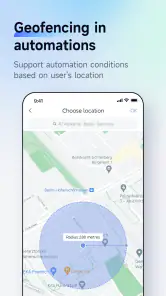
One of the standout features is the automation capabilities. Creating scenes and automations is not just a feature; it's an experience. I could set up automations that fit my lifestyle, like turning on the lights when I enter a room or adjusting the thermostat based on the time of day. The app allows for a high degree of customization, which is perfect for those who want their home to react intelligently to their needs.
Another feature worth mentioning is the security aspect. With notifications and alerts for any unusual activity, it adds an extra layer of security to your home. This peace of mind is something I truly value, especially when I'm away for extended periods.
The User Experience
The user experience on Aqara Home is quite robust. The responsiveness of the app is commendable, and I rarely encountered any lag or crashes. It's refreshing to use an app that feels as reliable as this one. Navigating through different options and settings is straightforward, and the graphical representations of data, like energy usage, are both informative and visually appealing.
One minor hiccup I did encounter was the occasional delay in device response, but honestly, it wasn't a dealbreaker. These minor delays were few and far between and seemed to rectify themselves without much intervention.
Final Thoughts
In conclusion, the Aqara Home app is a solid choice for anyone looking to streamline their smart home management. It's user-friendly, feature-rich, and integrates well with other platforms, making it a great addition to any household. If you're in the market for a smart home app that doesn't overwhelm you with complexity, this is definitely one to consider. So, go ahead, give it a try, and let your home become smarter with ease!
Pros
- Intuitive user interface
- Wide range of device compatibility
- Reliable automation features
- Easy setup process
- Secure data handling
Cons
- Limited third-party integration
- Occasional connectivity issues
- No desktop application
- Requires stable internet
- Limited customer support

- Category
- House & Home
- Version
- 6.0.6