AppClose: Co-Parent Essentials
- 1.94K
- 4.3
- Installs
- 1.00M
- Price
- Free

Screenshots




Analysis by Reviewed
My first impression of AppClose: Co-Parent Essentials is that it is built for the practical, repeatable parts of raising a child across two households: sorting dates, keeping conversations in one place, and tracking shared costs. That focus makes it easier to understand than trying to bend a general calendar and a long text thread into a co-parenting system. The key question, though, is whether it remains useful after the first burst of setup—and I think it depends on whether both parents are willing to make it part of their routine.
Why the first week can feel easier
When plans are scattered across messages, emails, and paper notes, bringing the main coordination tasks together can feel like an immediate relief. AppClose is a free parenting app from AppClose, Inc, and its average rating of 4.6 across around 28,000 ratings suggests that many users have found a reason to keep it in their toolkit. It is rated for Everyone, has passed a million installs, and its current version is 3.4.5.
The first useful step is agreeing on what belongs in the shared calendar. I would start with recurring handoffs, school or activity commitments, and appointments that affect both households, rather than trying to enter every detail of family life at once. That keeps the calendar readable and gives each parent a clear reason to check it. For an ordinary weekday, one parent can add a changed pickup plan while the other checks the same schedule before leaving work, avoiding a separate round of “did you see my message?” texts.
Why AppClose Stands Out
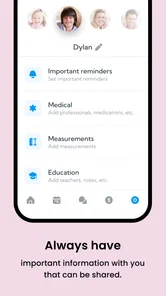
First off, let's talk about the interface. Sleek and intuitive, AppClose makes it super easy to navigate through its various features. As soon as I opened the app, I was greeted with a clean dashboard that lays everything out clearly. No more fumbling around trying to find what you need—everything is just a tap away.
Features That Make a Difference
One of the standout features has to be the shared calendar. This isn't just any calendar; it's specifically designed for co-parents. You can easily schedule and keep track of your child's activities, appointments, and even custody arrangements. What I love is that both parents can update the calendar, ensuring everyone is on the same page. No more 'I didn't know about the soccer practice' excuses!
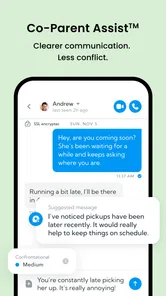
Another feature worth mentioning is the secure messaging system. Communication is key in any co-parenting relationship, and AppClose offers a private, secure way to message your co-parent without the usual text message drama. Plus, it keeps all your conversations organized within the app, which is a blessing for anyone trying to keep their personal and co-parenting lives separate.
Using the tools without creating extra work
The calendar and messages work best when they replace a habit rather than add another place to check. A useful approach is to treat the calendar as the source of truth for dates and use messages for the context behind a change: for example, record a revised pickup time on the schedule, then send a short note explaining the reason. That leaves less room for an important detail to disappear in a busy conversation.
More From Our News Desk

 Remini - AI Photo Enhancer
Remini Is Our App of the Week for Bringing Old Photos Back to Life
A quick AI restoration tool earns its place by making faded portraits and soft, older photos feel vivid again—provided you know where its polish ends.

 PayPal - Pay, Send, Save
PayPal Reviewed: Who Benefits from Its Reach, and Who Should Skip It
PayPal is most useful when its reach and familiar checkout solve a real payment problem. These reader-by-reader recommendations show where it earns a place—and where friction wins.

 Millionaire 2026 Quiz & Trivia
 Makes Every Answer Count
A familiar quiz-show format succeeds or falters on tiny design decisions: how clearly the game guides a first answer, handles hesitation, and invites one more round.

 Decor Life - Home Design Game
Decor Life Turns Short Breaks Into Bite-Sized Decorating Jobs
A room-by-room decorating game built for quick sessions gains from modern phone habits, but its gentle pace still depends on patience, repetition, and a steady stream of design jobs.

 Sniper 3D:Gun Shooting Games
Sniper 3D’s Quick-Shot Appeal Faces the Upgrade Treadmill
The appeal is immediate: line up a target, steady your aim, and fire. The harder question is whether Sniper 3D can keep players returning after the first rush.

 Blockudoku®: Block Puzzle Game
Blockudoku vs. the Puzzle Pack: A Quick Puzzle With a Repetitive Edge
Blockudoku turns a clean grid into a quiet test of foresight. Against match-three polish and head-to-head simplicity, its lasting appeal is also its biggest limitation.
Latest News



There is a trade-off: a shared system only stays current if both parents participate. If one person continues to rely on ordinary texts or assumes the other will enter every update, the app can become a second inbox instead of a shared record. I would agree on a simple routine at the start—who adds appointments, how quickly changes are entered, and what counts as urgent—so the app supports cooperation rather than becoming another source of disagreement.
Financial Tracking
I have to admit, the financial aspect of co-parenting can be a headache. But AppClose offers a nifty solution with its expense tracking feature. You can log expenses, send payment requests, and even keep a record of who paid for what. It's all there, neatly organized, so you don’t have to dig through old receipts or emails.
For recurring costs, it helps to record an expense while the receipt or payment detail is still easy to find, then use the request and record to keep the follow-up tied to that cost. This is especially useful for expenses that might otherwise be debated later because neither parent remembers when they were paid. It is still a tracking tool, not a substitute for agreeing on what counts as a shared expense; settling that expectation outside the app can prevent a tidy record from turning into a new argument.
Where it fits—and where it may not
Compared with the usual combination of a shared phone calendar, email, and text messages, AppClose offers a more co-parent-focused place for schedules, communication, and expenses. General-purpose tools may be a better fit if both parents already maintain them reliably or only need to share occasional dates. AppClose makes more sense when coordination is frequent and separating parenting logistics from personal conversations would be valuable.
I would hesitate to recommend it to a parent who expects an app to resolve a difficult communication dynamic on its own. It can organize information, but each person still needs to use it thoughtfully. If the other parent will not participate, or if the family’s needs are limited to a simple calendar, a shared calendar alone may require less upkeep. The choice is not about collecting the most tools; it is about choosing the one both households will actually check.
Financial Tracking
I have to admit, the financial aspect of co-parenting can be a headache. But AppClose offers a nifty solution with its expense tracking feature. You can log expenses, send payment requests, and even keep a record of who paid for what. It's all there, neatly organized, so you don’t have to dig through old receipts or emails.
Accessibility and Compatibility
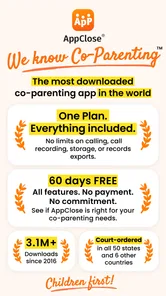
Whether you're an Android enthusiast or an iOS devotee, AppClose has got you covered. The app runs smoothly on both platforms, ensuring you can access your co-parenting tools wherever you are. Plus, it's free to download, which is a major bonus for families on a budget. They've managed to pack a lot of functionality into a free app, which is no small feat.
It is free to download, with in-app purchases ranging from about $9 to $99 per item, so I would check what any optional purchase offers before spending. The app was released in May 2016, and the current version is 3.4.5; Android support starts at version 5.0. Those details matter if you are setting it up on an older device or deciding whether the free experience is enough for your household.
What makes it last month to month
The lasting value is less about novelty than the small decisions it can keep from becoming repeated conversations. A schedule change, an activity, and a shared expense are easier to revisit when each has a sensible home. To keep maintenance light, I would review upcoming dates once a week, add new commitments as soon as they are agreed, and avoid duplicating the same information in several places. That routine turns the app into a reference point instead of another chore.
There can still be fatigue if every minor exchange becomes a formal entry, or if parents keep checking multiple channels because they do not trust the shared record. I would reserve the calendar for actionable dates and use messages when a change needs explanation, rather than logging every conversation as if it were an event. That boundary keeps the system useful without asking it to manage the emotional side of co-parenting.
Making a workable handoff routine
A useful test is whether the app helps at the moment a plan changes, not merely whether the calendar looks complete. Imagine that an after-school activity runs late and the usual pickup needs adjusting. The parent who learns about the change can add the revised arrangement and send a concise message with the relevant context. The other parent can check both pieces before setting off. This makes the app most valuable when a detail has a real consequence for the day, rather than treating every small family conversation as something that needs to be documented.
For families with several recurring commitments, I would also keep entries specific enough to be useful at a glance. “Practice” may mean little when both parents are busy; adding the child-related context and the time or handoff detail that matters can save a follow-up exchange. At the same time, too much commentary in calendar entries makes them harder to scan. My rule would be to put the what and when in the calendar, then use a message for the why if it affects the other parent’s decision.
Who benefits from a shared record
This is especially suited to co-parents who have frequent schedule changes, several activities to coordinate, or shared costs that otherwise end up in separate notes and message threads. It can also help when each parent wants to keep parenting logistics distinct from unrelated personal communication. The benefit is not that every disagreement disappears; it is that practical details have a more consistent place to be checked and updated.
By contrast, parents who communicate smoothly and only need to share a handful of dates may be better served by the calendar they already use. A dedicated app asks both people to remember another routine, and that cost is hard to justify if the current method is reliable. I would also avoid presenting it as a solution to a serious conflict: a neutral record can reduce confusion, but it cannot make another person respond, agree, or enter information accurately.
Keeping expenses useful rather than contentious
Expense tracking is most helpful when both parents first agree on the basic process: what they plan to record, when they will add it, and how they will handle a request that needs discussion. Without that shared expectation, a list of costs can simply make disagreements easier to revisit. I would enter expenses promptly and keep the message around a request brief and factual, so the record is easier to understand later without turning it into a running argument.
There is also a practical distinction between documenting a payment and resolving it. A record can help each parent remember what was paid and what was requested, but it does not decide whether a purchase should have been shared. If expenses are rare or already handled clearly between you, a separate tracking workflow may feel like overkill. If they recur and details are often forgotten, having them alongside the co-parenting schedule may be worth the extra habit.
Questions worth settling before relying on it
Before making AppClose the main place for coordination, I would settle a few everyday expectations with the other parent: which events belong on the calendar, how quickly changes should be entered, and which channel to use when something is urgent. The app is better suited to keeping a shared record than assuming that a message will be seen immediately. For a time-sensitive change, I would not rely on an app entry alone; I would use whatever direct contact method both parents have agreed is appropriate, then update the shared record so it stays accurate.
It is also sensible to decide whether both households are comfortable using the same system before moving every detail into it. One parent can set up a clear calendar, but the arrangement is only genuinely shared if the other parent checks and updates it too. If they prefer not to participate, keep expectations realistic and choose a simpler method that both will use rather than maintaining parallel records indefinitely.
Maintenance, fatigue, and the long view
The recurring work is modest but real: dates need to be entered, changes need to be kept current, and expense details need attention while they are easy to verify. A short weekly check can catch an upcoming handoff or activity that would otherwise be missed, while adding changes as they happen prevents a backlog. I would keep the routine small enough to survive busy weeks; an elaborate system that depends on perfect data entry is likely to be abandoned.
Fatigue tends to arrive when the app becomes one more inbox, when parents duplicate entries elsewhere, or when every interaction feels like record-keeping. The answer is not to document more, but to define what deserves a shared entry and then stick with that boundary. The app earns its place when it saves effort across repeated weeks, not because it has been installed or filled with old details. If the two parents stop checking it, the original convenience quickly turns into maintenance with little return.
In conclusion, if you're navigating the sometimes choppy waters of co-parenting, AppClose: Co-Parent Essentials could be just the tool you need to make the journey smoother. Its user-friendly design, robust features, and emphasis on security and communication make it a must-have for any co-parent. Give it a try, and you might just find it becomes your go-to app for all things co-parenting.
My recommendation is more measured: try it when coordination happens often enough that scattered messages and expense notes are causing real friction, and invite the other parent to agree on a simple shared routine. Skip it if you only need an occasional date reminder or know the other person will not use a common system. For families who do keep it current, its recurring value is practical rather than flashy: fewer details to reconstruct and one more chance to keep the child’s schedule clear.
AppClose: Co-Parent Essentials Frequently Asked Questions
Is AppClose: Co-Parent Essentials suitable for parents who do not live together?
AppClose: Co-Parent Essentials is centered on co-parenting, so it may suit parents who live separately and need a shared way to handle practical family arrangements. Its focus is coordinating schedules, expenses, and communication rather than replacing the conversations or decisions parents make together. Whether it fits your situation depends on which parts of co-parenting you want to keep organized.
What should I consider before inviting my co-parent to use AppClose?
The app’s shared approach is most useful when both co-parents are willing to participate and keep relevant information organized in one place. Before getting started, consider which schedules, expenses, and conversations you would like to coordinate and whether the other parent is comfortable using an app for that purpose. AppClose is designed to support practical coordination, not to resolve disagreements on its own.
Who is AppClose: Co-Parent Essentials designed for?
AppClose: Co-Parent Essentials is intended for parents who share parenting responsibilities and want a central place to coordinate family logistics. It may be useful when co-parents need to keep schedules, expenses, and conversations organized together. The app is in the Parenting category and is rated for Everyone, so its focus is practical coordination rather than entertainment.
What is AppClose: Co-Parent Essentials?
AppClose: Co-Parent Essentials is a comprehensive application designed to facilitate co-parenting by providing tools to manage schedules, track expenses, and communicate efficiently. The app aims to help co-parents stay organized and reduce conflicts by offering features like shared calendars, messaging, and expense tracking. It's available for both Android and iOS platforms, ensuring accessibility for all users.
Is AppClose: Co-Parent Essentials free to use?
Yes, AppClose: Co-Parent Essentials is free to download. In-app purchases are also available, so the free download and any optional purchase are separate considerations. Before confirming a transaction, review the purchase details in your app store, especially if you share a device or payment method. This helps you understand any cost before you proceed.
Pros
- User-friendly interface with intuitive navigation.
- Comprehensive tools for co-parenting coordination.
- Secure messaging for private communication.
- Customizable calendars for scheduling flexibility.
- Expense tracking feature for shared budgeting.
Cons
- Limited free features, premium required for full access.
- Occasional syncing issues between devices.
- No integration with third-party apps or services.
- Customer support response can be slow at times.
- In-app ads can be intrusive for free users.