All Document Reader & Editor
- 461.00
- 4.2
- Installs
- 10.00M
- Price
- Free
Screenshots
Analysis by Reviewed
When a household shares a tablet or passes one phone around to look at a form, a PDF reader can be more useful than another app with a narrow purpose. I see All Document Reader as a practical place to open common files without first working out which separate viewer is needed. That convenience has limits: it can simplify access, but it does not replace good file organization or turn a shared device into separate personal workspaces.
A shared screen, with a little care
Imagine someone sends a school permission form while another person is using the family phone. A document reader can make it easier to open the attachment, check the pages, and decide what to do next without installing a dedicated app for each format. For household use, I’d still treat the device’s file folders as shared unless each person already has a clear way to keep their documents separate. A reader is a viewing tool, not a boundary between people’s files.
That distinction matters most when a document contains information intended for just one person. Before passing the phone across the room, I’d close the file and return to a neutral screen rather than assume the next person will not see it. For a shared tablet, a household folder system can help too: use names that identify the owner or purpose, and avoid relying on memory to distinguish similar forms. These are small habits, but they address the awkward part of shared reading that an all-in-one viewer cannot solve.
What to check before relying on it
Before making it the default stop for important documents, I’d try a few files that reflect real use: a multipage PDF, a spreadsheet, and a document someone may need to mark up. That quickly shows whether the controls suit the task and whether the text is comfortable to read on a small screen. For a document that must retain precise formatting or be revised collaboratively, I’d keep a full office editor available; a mobile reader is better for quick checks than for every serious editing job.
I’d also test the exact workflow, not just whether a file opens. Can you find it again after closing it? Is the relevant page easy to locate? Does the display make a table legible without constant zooming? Those checks help separate “it supports this kind of file” from “it works well for the way we use this file.” If someone needs to make a change, try that on a nonessential copy first and compare the result before treating the app as the final editor.
All Document Reader & Editor is a free productivity app from WeFindertools, with optional in-app purchases ranging from $1.99 to $49.99 per item. It has a 4.2 average from around 19,000 ratings and more than 10 million installs. Those figures suggest it has broad appeal, but I’d judge it by whether it handles the files I actually receive, not by popularity alone. Its Everyone age rating makes it suitable for a general audience, while the contents of documents opened on a shared screen still deserve ordinary household discretion.
Keeping household files manageable
One useful habit is to treat opening and organizing as separate jobs. Use the reader to inspect a file, then save or move it into a folder with a name that makes sense to everyone who uses the device. This reduces the chance of confusing a current form with an older copy. For sensitive paperwork, I’d avoid leaving it open when handing the device to someone else, and I wouldn’t assume that using one reader automatically creates private accounts or protected spaces.
You May Like

Clash of Clans Is Won Between the Battles

Android Auto Makes the Case for Quieter Car Software

MobiOffice: Transforming Mobile Productivity with Seamless Integration

EA SPORTS FC™ Mobile Soccer: Redefining Mobile Sports Gaming

How Microsoft OneDrive Became a Mobile Productivity Giant

How Google Translate Breaks Language Barriers Effortlessly
A practical routine is to agree on a few predictable labels, such as the person’s name followed by the document’s purpose, rather than creating a complicated filing scheme nobody remembers. If a form has been replaced, make the older copy clearly distinguishable before another household member opens it. This is especially useful when several people receive similar school, travel, or appointment paperwork. The reader helps with access; a consistent naming habit is what keeps the household from acting on the wrong version.
For a quick coordination task, one person can open a shared schedule or form, read the relevant details aloud, and then close it before passing the device along. That is a better fit than treating the app as a shared editing workspace. If two people need to make changes at the same time, a purpose-built collaborative service is more appropriate; a general document reader is useful for inspection and simple follow-up, not a substitute for a coordinated office workflow.
Device fit and account boundaries
The app’s current version is 1.10.6 and it requires Android 7.0 or later. If you’re choosing it for a household Android device, that requirement is worth checking before download. The key question is less whether one app can open many file types and more whether everyone can find the right file afterward. A simple naming routine often matters more than adding another tool.
Because it is free to install and includes optional purchases, I’d make the purchase boundary clear if children or other family members use the same device. The listed purchase range runs from $1.99 to $49.99 per item, so it is sensible to check the device’s purchase settings rather than assume that “free” means every option is included. That is a household device-management step, not a reason to expect a particular family-control feature inside the reader.
For younger users, the Everyone age rating is a useful starting point, but it does not change what a document itself may contain. A child could still open a personal bill or a private form if it is stored where they can browse. I’d keep sensitive files in an appropriate place on the device and supervise access according to the household’s needs. The app can be suitable for general use without making every file appropriate for every person.
Who will get the most from it?
I’d recommend it to people who regularly receive PDFs and office documents and want one convenient place to inspect them on a phone. It can also suit a shared-device household when the goal is quick access rather than private, separate document libraries. If your work depends on advanced spreadsheet formulas, exact page layout, or detailed collaboration, a dedicated office suite is likely the better choice. And if you only open a document once in a while, your phone’s built-in viewer may already be enough.
It is particularly handy for the person who gets a document while away from a computer and needs to check one detail: a date on a form, a number in a table, or the page where a signature is required. In that moment, opening one general reader can be less fussy than deciding which specialist app to use. I would still avoid making a quick phone check the last step for a high-stakes document if the layout or edit needs to be exact.
The trade-off with a general-purpose reader is that breadth does not guarantee depth in every format. A spreadsheet may be fine to inspect but awkward to change; a dense PDF can remain uncomfortable on a small display; and an edit that looks acceptable on a phone may need a second look on a computer. If a file is central to work or study, I’d use this app for quick access and keep the specialist tool for the final review.
Compared with separate PDF and office apps, the appeal is having fewer app switches for everyday viewing. Compared with a phone’s built-in viewer, it may be worth trying if you regularly encounter several kinds of documents and want a more unified place to handle them. The built-in option is still the sensible choice for occasional reading, while a full office suite is stronger when editing and collaboration are the main job. I’d choose based on the task rather than install another app simply because it claims broad support.
For anyone wondering whether it replaces a desktop editor, my answer is no—not for precise layout work, complex spreadsheets, or collaborative revisions. If you mainly need to read, check, and sometimes annotate documents on a phone, it may cover more of your routine. If you need dependable advanced editing, use software designed around that work and treat a mobile reader as a convenient companion.
For me, the strongest case is convenience: fewer app switches when a file arrives unexpectedly. The trade-off is that convenience should not be mistaken for full desktop editing, private household accounts, or automatic organization. I’d keep it as a handy general reader, test it with the file types I use most, and pair it with sensible habits for saving and sharing documents.
Have you ever been in a situation where you needed to quickly access a document on your phone, only to realize you didn't have the right app to open it? Enter All Document Reader, a lifesaver for anyone who deals with a variety of file types on their mobile device. Let me tell you all about it!
A Versatile Solution for All Your Document Needs
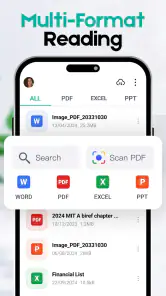
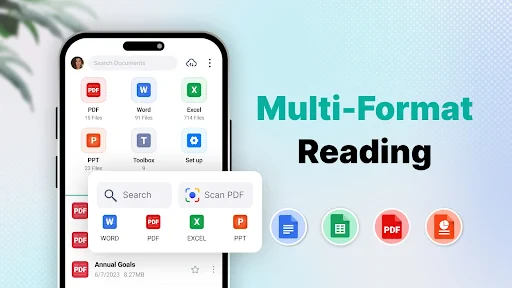
All Document Reader is one of those apps that you didn’t know you needed until you have it. It's like having a Swiss Army knife for documents right in your pocket. From PDFs to Word documents, Excel spreadsheets, and even PowerPoint presentations, this app can handle it all. The best part? You don’t need to switch between different apps for different file types. It’s all right here, folks!
Easy Navigation and User-Friendly Interface
One of the first things I noticed about this app is how easy it is to navigate. The user interface is clean, and everything is just where you'd expect it to be. Whether you're a tech newbie or a seasoned pro, you'll find it intuitive to use. No more fiddling around trying to figure out how to open a file or where your downloads are stored. It's all laid out in a straightforward manner.
Features that Stand Out
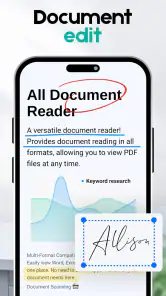
Okay, let's talk about features, because All Document Reader is packed with them. Not only does it support multiple file formats, but it also allows you to view, edit, and share your documents with ease. Need to highlight important sections or add annotations? No problem. The app supports these functions, making it perfect for students and professionals alike.
For a useful low-friction workflow, I’d mark only the passages that matter for the next action rather than annotate every point I notice. On a meeting agenda, that might mean highlighting a decision and adding a short note beside it; on a form, it could be marking the section that still needs attention. This keeps mobile markup functional instead of turning the screen into a crowded substitute for a proper editing session.
One trade-off worth keeping in mind is that viewing, annotating, and editing are different levels of work. A note can help you remember what to ask or change, but it does not automatically make a document suitable for formal revision. If the file must preserve its original appearance or be returned in a specific format, I’d make a copy before editing and check the finished result in the tool that will be used to submit or share it.
Another feature worth mentioning is the app's ability to sync with cloud storage services. Whether you use Google Drive, Dropbox, or any other service, you can easily access your files from anywhere. This means you can start editing a document on your desktop and pick up right where you left off on your phone. How cool is that?
Performance and Reliability
In terms of performance, the app doesn’t disappoint. It's fast and reliable, with minimal loading times even for large files. I've tried using it on both Android and iOS devices, and it works seamlessly across platforms. Plus, the developers are constantly updating it to fix any bugs and improve functionality, so you know you’re getting a top-notch product.
Even when a file opens promptly, I’d judge reliability by what happens after the first page: whether the rest of a long document is easy to navigate, whether a table remains readable, and whether annotations are clear enough to revisit later. My habit is to check the specific file I need before leaving home or handing a device to someone else, rather than discovering a display issue at the moment it matters. This is a small but useful distinction between a quick demo file and the paperwork a household actually depends on.
So, there you have it! If you're looking for a comprehensive document management solution that’s efficient, user-friendly, and packed with features, give All Document Reader a try. Trust me, it will make managing your files a breeze and keep you organized without breaking a sweat.
All Document Reader & Editor Frequently Asked Questions
Can I scan paper documents and convert files with All Document Reader?
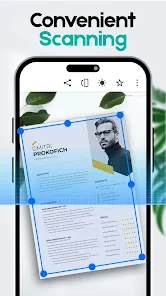
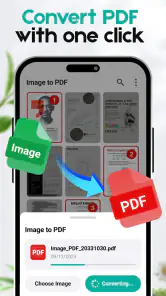
All Document Reader is presented as a PDF reader and viewer with scanning and file conversion features. These tools may be useful if you want to bring paper documents into a digital workflow or change files into a more convenient format. If scanning or conversion is central to your needs, check how the relevant tools work in the app before relying on them for a particular task.
Will All Document Reader work on my phone or tablet?
All Document Reader is a mobile app, and the Android version requires Android 7.0 or later. Check your device’s operating system and the app store for your platform before downloading, since compatibility can differ between devices and operating systems. Meeting the minimum Android requirement is a useful first step, but the store page is the best place to check whether the current app version is available for your device.
Is All Document Reader available for both Android and iOS?
All Document Reader is an app for opening and working with documents on mobile devices. Before downloading, check that the version offered in your device’s app store is compatible with your operating system. The Android minimum listed for the app is version 7.0, so Android users should make sure their device meets that requirement. Availability and compatibility can vary by platform.
What types of documents can All Document Reader open?
All Document Reader is a versatile application designed to open a wide range of document formats. It supports PDFs, Word documents (DOC, DOCX), Excel spreadsheets (XLS, XLSX), PowerPoint presentations (PPT, PPTX), and text files (TXT). This makes it an essential tool for users who frequently handle different types of documents on their mobile devices.
Is All Document Reader free to use, or does it require a subscription?
All Document Reader is free to download, with in-app purchases available. The app offers a free version with basic features that should be sufficient for most casual users. Paid options range from $1.99 to $49.99 per item and may suit users looking for additional functionality. Check the purchase details in the app before paying, so you understand what each option includes.
Pros
- Supports various file formats
- Easy-to-navigate interface
- Quick loading of documents
- Offline access available
- Minimal ads for free users
Cons
- Limited editing features
- Occasional slow rendering
- No cloud storage integration
- Ads in free version
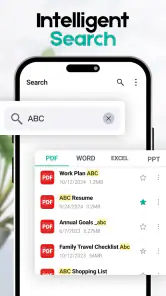
- Lacks advanced search tools

- Category
- Productivity
- Version
- 1.10.6













