Phone Locator: Family Location
- 352.00
- 4.2
- Installs
- 5.00M
- Price
- Free

Screenshots
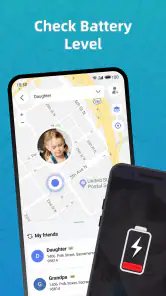
Analysis by Reviewed
I’d treat Phone Locator: Family Location as a practical coordination tool, not a substitute for calling someone or making a safety plan. Its appeal is easy to understand: when relatives agree to share their whereabouts, a quick glance can answer a small but nagging question without another round of messages. That can be useful for families with different schedules, though it only works well when everyone is comfortable taking part.
What to expect from location updates
Location apps are most helpful when you need a broad sense of where someone is, rather than a guarantee of pinpoint accuracy at every moment. GPS results can be affected by the phone’s surroundings and connection, so I wouldn’t use a map dot as proof that someone has arrived at a particular door or is safe. If an update seems stale or unexpected, I’d check in directly before drawing conclusions.
That distinction matters in everyday use. A parent waiting for a child after an activity may find a shared location reassuring, while a time-sensitive pickup still deserves a text or call. A tracker should reduce uncertainty, not create a new argument when a phone hasn’t refreshed as quickly as expected.
Making it work for a family, not just one phone
The useful setup is a shared agreement: who can view whose location, when sharing is appropriate, and what the family will do if someone’s phone is off or unavailable. I’d explain the purpose to children in plain language instead of presenting tracking as a secret. For adults, consent should be just as clear; family connection works better when everyone understands the arrangement.
A small practical tip is to agree on a backup routine before relying on the map. For example, family members can message when they leave a regular activity, while location sharing helps coordinate the last part of the journey. This avoids treating an app notification as the only signal that everything is fine.
Compared with texting, location sharing can save repeated “Where are you?” messages when several people are meeting. Compared with a general-purpose navigation app, a family tracker is aimed at keeping relatives connected rather than planning a route. If your main need is turn-by-turn directions, traffic guidance, or navigating an unfamiliar place, a dedicated maps app is the better fit. If you only need to share your location once, a one-off message may be simpler than asking everyone to adopt another app.
Choosing it for the right household
I’d be most likely to recommend this app to a family whose members already communicate regularly and want a shared view to make routine plans less cumbersome. It can be particularly handy when several adults are coordinating school pickups, errands, or a meeting point, because each person can check the general situation without making the person who is travelling answer a string of messages. The benefit is less about watching every movement and more about avoiding unnecessary back-and-forth.
More From Our News Desk

Weather by Xiaomi Review: Clear at a Glance, Less Clear Up Close

X Under Pressure: Can It Recover When Posting Goes Wrong?

Clash of Clans Is Won Between the Battles

Android Auto Makes the Case for Quieter Car Software

MobiOffice: Transforming Mobile Productivity with Seamless Integration

EA SPORTS FC™ Mobile Soccer: Redefining Mobile Sports Gaming
It is a weaker fit for a household where one person expects constant visibility and others are uncomfortable with that arrangement. In that situation, the friction is not a technical problem; it is a mismatch in expectations. I’d settle the boundaries before installing anything: whose locations are shared, what situations justify checking, and whether someone can pause participation without turning it into a conflict. If those terms cannot be agreed on, ordinary calls and voluntary, one-time location sharing are likely healthier choices.
For a practical trial, I’d start with one routine rather than making the app part of every family decision. A week of using it only for the school run or the evening commute can show whether it actually saves messages. If the group still relies on calls for all coordination, or if the map creates more questions than it answers, there is little reason to make it a permanent habit.
Tracking Made Easy
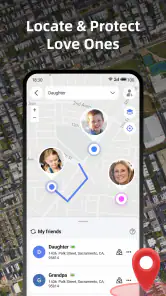
First things first, let's talk about how Phone Locator: Family Location makes tracking super easy. Once you've got the app installed, setting it up is a breeze. You just need to ensure that everyone in the family has it on their phone, and voila, you're all set! The app uses GPS technology to pinpoint the exact location of each member, and it updates in real-time. It's like having a personal detective on standby, minus the trench coat and magnifying glass.
Features That Stand Out
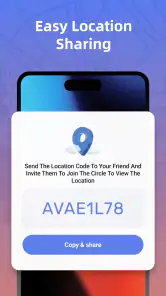
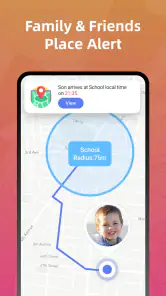
Now, what really impressed me were the app's standout features. For starters, there's this cool feature called "Geofencing." Imagine drawing a virtual fence around a particular area—say, your home or your child's school. Whenever someone enters or leaves this zone, you get an instant notification. It's like magic! Plus, the app allows you to share your location with family members, which comes in handy if you're coordinating meet-ups or just want to ensure everyone's safe during a night out.
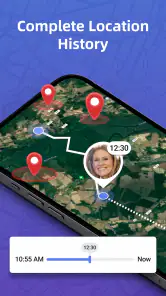
Another feature that caught my eye is the history tracking. Ever wondered where your teenager was all day? Well, this app keeps a log of past locations, so you can review them whenever you like. It's a great way to have those "Where were you?" conversations backed by data.
Using alerts and history thoughtfully
Geofencing is most helpful when an arrival or departure gives you a useful prompt, not when you expect it to explain everything that happened. I’d pick one or two familiar places and decide in advance what an alert should change: perhaps it means a parent can start driving to a pickup point, or that someone can stop waiting by the door. That turns a notification into a small coordination cue instead of a running commentary on another person’s day.
There is also a trade-off between convenience and attention. Each extra boundary creates another chance to receive an alert that does not require action. I’d keep the setup simple at first, then add a place only if the family has a recurring reason to know about it. If an alert arrives at an odd time, I’d treat it as a reason to check the context, not as proof of a problem.
Location history needs even more care because a record can look more definitive than it is. A route or stop may be incomplete or imprecise, and it does not explain why someone went somewhere. If I were using that feature with a teenager, I’d agree together on a narrow purpose—such as clearing up a specific timing concern—rather than making routine review part of the relationship. The map can provide a starting point for a conversation, but it cannot replace one.
Why It’s a Must-Have
So, why should you consider downloading this app? Well, beyond the obvious safety benefits, Phone Locator: Family Location brings a sense of connection. In today's fast-paced world, it’s easy to lose track of each other. This app ensures that you're always just a tap away from your loved ones. Plus, the interface is super user-friendly, so even the least tech-savvy family member can navigate it without any hiccups.
One thing I absolutely love is that it respects privacy. You can set permissions and decide who gets to see your location and when. So, no worries about Big Brother watching you 24/7.
A realistic day of coordinating plans
Imagine two adults leaving work at different times while a child finishes an after-school activity. One adult can use the shared map to see who is nearer, then contact the child or the other adult to confirm the handoff. That is a sensible use: the map helps decide who should make the next move, while direct communication confirms the important detail. If the child’s phone is unavailable, the family’s agreed backup plan still matters more than a missing marker.
For a group meeting across town, the app can reduce repeated location questions, but it is not a replacement for choosing a clear meeting point. A busy entrance, a large park, or a multi-level venue can make “nearby” less useful than a specific landmark and a message. I’d use the map to judge approach and timing, then switch to a short text when people need to identify one another.
This is also where a family tracker differs from the usual alternatives. Messaging apps are often enough for a single meetup, while a navigation app is better when the problem is finding a route or avoiding traffic. A family location tool makes more sense when the same group wants ongoing, mutual coordination. The right choice depends on whether your need is a one-time share, route guidance, or a shared family routine.
Speed, stability, and phone limits
In day-to-day use, I’d judge speed by whether the location is fresh enough for the task, not by how quickly the app opens. A map can feel responsive while still showing an older position, so checking the update context matters. Families should also expect that a phone with poor reception, limited battery, or location access turned off may be harder to locate reliably. Those are practical constraints of phone-based tracking, not problems a family app can solve by itself.
For lighter use—checking where everyone is before dinner or coordinating a meeting—the app’s purpose is straightforward. During a busy day with several people moving between places, accuracy and freshness matter more, and I’d keep a messaging backup available. If a location stops updating, first ask the person to check their phone and connection rather than repeatedly refreshing the map or assuming something is wrong.
What to do when a location looks wrong
If a marker seems stuck, I’d avoid turning repeated refreshes into the first response. The person carrying the phone can check whether the device is reachable and whether its location access is available, then send a direct message if timing matters. This simple recovery routine separates a temporary phone issue from a genuine change of plans and prevents the family from treating silence on a map as an emergency signal.
For anyone concerned about battery use, I would approach the app as a tool to test in the household’s normal routine rather than assume constant tracking is free of device trade-offs. GPS and background activity can affect how a phone behaves, while an older or already low-battery device may have less room for extra tasks. Keeping phones charged before a long day and agreeing on check-ins for critical moments are more dependable habits than expecting an app to overcome a depleted device.
Availability and device fit
Phone Locator: Family Location is a free Maps & Navigation app from WeFindertools. It has a 4.2 average from around 14,000 ratings, with more than 5 million installs, and it is rated for Everyone. Version 1.3.26 requires Android 7.0 or later; the app was released on August 2, 2024. Those details make it accessible to a broad range of Android users, though the whole family still needs compatible phones and a shared willingness to use it.
Those device requirements are worth checking across the group before anyone depends on the app for a routine. A family may have one person using an older phone, another with a nearly full battery by evening, and someone else who keeps location access off to conserve power or preserve privacy. In that mix, a tracker can be useful for some members and inconsistent for others. I’d agree on a fallback that works for everyone, instead of making participation in the app the only way to coordinate.
The app is also not the right answer for locating a person who has not agreed to share their location, or for a situation requiring emergency response. Families looking for detailed route planning should use a navigation-focused tool; people who only need to say “I’m here” once can send a one-off location through a messaging service. This one earns its place when shared, ongoing family coordination is the actual need.
I’d recommend it to families who want ongoing location sharing and can agree on sensible boundaries. I’d skip it if you need professional-grade tracking, turn-by-turn navigation, or a way to locate someone who has not agreed to share their location. The app’s strongest case is everyday coordination, not emergency response. Used with clear expectations and a direct way to contact each other, it can make family logistics easier without asking a map to do more than it can.
Final Thoughts
All in all, Phone Locator: Family Location is more than just a tracking app—it's a tool for peace of mind and family safety. Whether you're a concerned parent or just someone who enjoys staying connected with family, this app is definitely worth a download. So, give it a whirl and see how it fits into your daily routine. After all, in a world where staying connected is everything, why not make it a little easier?
Phone Locator: Family Location Frequently Asked Questions
What does Phone Locator: Family Location do?
Phone Locator: Family Location is a Maps & Navigation app focused on phone tracking and GPS location sharing. It is designed for people who want to coordinate location sharing with family and keep track of shared locations. Before downloading, consider whether this kind of tool suits your family’s needs and make sure everyone who will participate is comfortable sharing their location.
Is Phone Locator: Family Location free, and who can use it?
Phone Locator: Family Location is free and has an Everyone content rating. Its family location-sharing focus may be useful for households that want to coordinate where members are, but the rating is not a substitute for discussing privacy and consent. Anyone considering it should make sure that the people involved understand how location sharing will be used.
What Android version does Phone Locator: Family Location require?
Phone Locator: Family Location requires Android 7.0 or later. Before downloading, check your device’s operating system version and confirm there is enough space and that location services and internet access are available for the functions you intend to use. Compatibility is only one part of the decision; also consider whether your family is comfortable using a location-sharing app.
What should I check before downloading Phone Locator: Family Location?
Phone Locator: Family Location is a Maps & Navigation app from WeFindertools, with a free price and an Everyone content rating. It is intended for phone tracking and GPS location sharing, so it is most relevant to people who want to coordinate location sharing with family. Before downloading, check that your device runs Android 7.0 or later and consider whether the people you plan to connect with are comfortable sharing their location.
How is Phone Locator: Family Location rated by users?
Phone Locator: Family Location has an average rating of 4.2 from around 14 thousand ratings, with hundreds of written reviews. Those figures offer a general sense of how users have responded, but individual experiences can differ depending on device settings, connectivity, and how the app is used. It is sensible to read recent user feedback alongside the app’s features before deciding whether it suits your family.
Pros
- Accurate real-time location tracking
- Easy-to-use interface
- Battery-friendly operation
- Cross-platform compatibility
- Geofencing alerts for safety
Cons
- Requires internet connection
- Limited features in free version
- Potential privacy concerns
- Occasional location inaccuracies
- May drain battery on older devices
- Category
- Maps & Navigation
- Version
- 1.3.26













