Phone Tracker
- 677.00
- 4.1
- Installs
- 10.00M
- Price
- Free
Screenshots
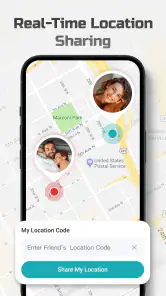
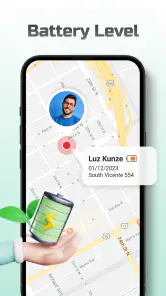
Analysis by Reviewed
Before relying on a location app, I like to decide what question I actually need it to answer. Is it “Has my teenager reached the agreed meeting place?”, “Where did I last leave my phone?” or “Which route is someone taking right now?” Those are different jobs, and Phone Tracker is most helpful when I use it for a practical location check rather than expecting it to replace communication or navigation.
Choose the job before opening the map
A useful way to start is to agree on one routine with the people sharing locations. For example, a parent and child might use a check-in when the child reaches a familiar destination, rather than having the parent watch every movement. That keeps the app focused on reassurance and makes it clearer what to do if a location looks old or unexpected: contact the person first, then decide whether anything else is needed.
This distinction also helps set expectations around speed. A map that shows a position is not necessarily showing a live, continuously updating position. The tracked phone has to be able to report where it is, and conditions affecting that phone can affect what appears. I would treat an update as useful evidence of a recent location, not as a promise that the person is standing exactly on the displayed point at that moment.
When a location check saves time
Consider a busy afternoon when a family member is travelling between school, an activity, and home. Instead of sending several messages asking where they are, I could check the shared location at the agreed moments. If the phone appears to have reached the usual destination, that may be all the reassurance I need. If the display has not changed, a quick call or message is more informative than repeatedly staring at the map.
That workflow is especially helpful when the person is in a place where replying immediately is inconvenient. It is less useful when the situation calls for a definite response right now. For a pickup, for instance, I would still confirm a meeting point and use ordinary communication if plans change. A location view can reduce guesswork, but it should not become the sole plan for coordinating people.
Small habits that make the map more useful
One non-obvious trade-off is that more checking does not always produce more certainty. Frequent refreshes can make small shifts or gaps feel meaningful even when the phone’s position is simply not updating as expected. I find it more sensible to check at agreed milestones, such as arrival, than to interpret every change as a story about the person’s route.
For a lost device, the same restraint helps. Note the last position and think through the places the phone could realistically be: a home, a workplace, a car, or somewhere visited recently. The map can narrow the search, but it cannot identify the exact pocket, room, or bag. If the location is not fresh, retracing steps and trying a direct call when appropriate may be more useful than repeated map checks.
You May Like

Clash of Clans Is Won Between the Battles

Android Auto Makes the Case for Quieter Car Software

MobiOffice: Transforming Mobile Productivity with Seamless Integration

EA SPORTS FC™ Mobile Soccer: Redefining Mobile Sports Gaming

How Microsoft OneDrive Became a Mobile Productivity Giant

How Google Translate Breaks Language Barriers Effortlessly
Who will get the most from it
I see the best fit for people who want a shared, low-effort way to check locations with family or keep track of their own devices. The app makes more sense when everyone involved understands the arrangement and the reason for it. That shared expectation is not just a matter of courtesy: it helps prevent a safety tool from turning into constant monitoring or a source of friction.
Someone who only needs to find their own missing phone once in a while may prefer the built-in finder on their device, since it is already tied to that platform’s account and recovery tools. Likewise, a traveller who needs directions, traffic choices, or public transit guidance should use a dedicated navigation app. Phone Tracker’s value is in checking where a participating phone is, not in planning how to get somewhere.
When I consider a location app, I care less about flashy extras than about whether I can make sense of the screen quickly when I need it. Phone Tracker is aimed at finding a phone and checking locations, so its appeal is practical: a family member can share their whereabouts, or I can look for a device that has gone missing. It is a free Maps & Navigation app from WeFindertools, rated for Everyone. Its 4.1 average across around 25,000 ratings and more than 10 million installs suggest that many people have tried it, though those figures alone cannot promise the same experience on every phone.
What to expect when checking a location
The basic idea is easy to understand: set up an account, add the people or devices you want to follow, then check the map when you need a location. In everyday use, the important distinction is between seeing a recent position and treating it as a guarantee of where someone is at this exact second. Location apps depend on the tracked phone being available and able to provide its position, so I would use the map as a helpful check rather than as a substitute for contacting someone directly.
That matters most when timing is tight. If a child is walking home, for example, I would check the location as one reassuring signal, then message or call if the route looks unexpected or the map has not refreshed as I hoped. A tracker is most useful when everyone knows it is being used and agrees on why; it is a poor fit for secret monitoring or for resolving a conversation that would be better handled openly.
Getting Started with Phone Tracker
So, I decided to give Phone Tracker a whirl and see what all the fuss was about. The first thing that struck me was how simple the installation process was. A quick trip to the App Store or Google Play, a download, and voila! You're all set up. The app greets you with a friendly interface that's intuitively designed, so even if you're not a tech wizard, you'll find your way around just fine.
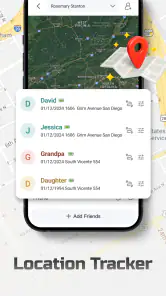
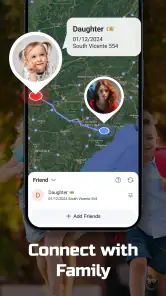
Once logged in, you're prompted to set up your account and add the people you want to track. This could be your family members or your own devices. The app supports multiple devices, which is a neat feature if you're juggling a few gadgets.
The Features That Stand Out
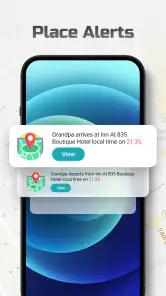
One of the standout features is real-time tracking. The app lets you see where your loved ones are at any given moment. Imagine the peace of mind when you can check in on your kids and ensure they're safe on their way home from school. The accuracy is impressive, and you can even set up geofences to get alerts when someone enters or leaves a designated area.
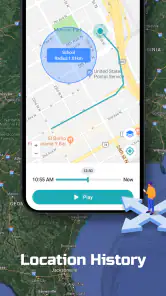
Another cool feature is the location history. This allows you to view the routes taken by your tracked devices over the past few days. It's like having a personal detective in your pocket, but without the trench coat and magnifying glass.
For those prone to losing their phones, the app's device locator is a godsend. It helps you track down your misplaced phone with ease. No more frantic searching between couch cushions or under car seats. Just a quick look at the app, and you'll know exactly where your phone is hiding.
Using history, alerts, and device finding wisely
Location history is more useful as a way to understand a journey than as a record to scrutinize minute by minute. If someone is late, I would first look for the broad route and whether the phone appears to have moved, rather than infer intent from a small detour or a gap. Buildings, weak reception, and a phone left behind can all make a map point less conclusive than it looks. Treating history as context helps avoid turning a handy safety tool into a source of needless worry.
Geofence alerts can also work best when they answer a specific, practical question: has a family member arrived at school, or has a device reached home? I would keep the monitored places limited to the ones that matter. Too many boundaries can make alerts harder to notice, while a single arrival notification can save repeated checking. Before relying on an alert, make sure the person carrying the phone knows what it means and that you have agreed on the routine.
For a lost-phone search, I would use the app as one step in a calm recovery routine: check the last position, consider whether the phone might be indoors or in a vehicle, and then try calling it if that is safe and appropriate. A map can narrow the search area, but it cannot tell you whether a phone is under a cushion or in a pocket. If the displayed position seems stale, retracing the last places you visited may be more productive than repeatedly refreshing the same screen.
User Experience and Performance
In terms of performance, the app runs smoothly without any noticeable lag. It’s lightweight, so it doesn’t eat up too much of your phone’s resources or battery life, which is a huge plus. The notifications are prompt and reliable, ensuring you stay updated without any unnecessary delays.
I found the user interface to be quite pleasant. The developers have done a great job at keeping it simple yet functional. Everything is where you expect it to be, and you don’t have to jump through hoops to find what you need. Plus, the app is available in multiple languages, making it accessible to a broader audience.
Reliability, battery, and day-to-day limits
Even a well-organized tracker has to work with the phone it is following. If a device is switched off, out of reach, or unable to provide a fresh position, the map may not answer the question you have right away. That is why I would not make this the only plan for a time-sensitive pickup or an emergency. A direct call, a clear meeting point, and ordinary communication remain better backups when certainty matters.
Battery expectations deserve the same practical thinking. Location sharing involves a phone reporting where it is, so I would avoid assuming that any tracker can deliver constant updates without affecting the device’s day. If the person being tracked is heading out for a long stretch, keeping the phone charged and using the app for meaningful check-ins rather than watching the map continuously is a sensible compromise. This is especially relevant for older or budget phones, where background activity can feel more noticeable.
The app’s current version is 1.7.21, and it supports Android 7.0 and later. That makes it an option for some older Android devices, but the operating system floor does not guarantee that every older handset will feel equally responsive. On a phone that already struggles with maps or background tasks, I would test the essentials first: whether the location appears, whether an alert arrives, and whether the app remains usable after the screen has been off. Its release date is May 9, 2024, so I would also keep the app updated rather than assume an old installation behaves like the current one.
How it fits beside other location options
Compared with checking in by text or phone call, a tracker can reduce repetitive “Where are you?” messages and make a shared route easier to follow. Compared with a phone’s built-in device-finding tools, it is more oriented toward keeping an eye on people and several devices together, rather than only locating your own lost handset. The right choice depends on the job: for a one-off lost-phone search, the platform’s native finder may be the simpler first stop; for agreed family check-ins, a shared tracker can be more convenient.
I would skip this kind of app if you want turn-by-turn navigation, public transit directions, or a replacement for a full mapping service. Its focus is knowing where a participating phone is, not planning a trip. I would also avoid installing it for someone without a clear, mutual understanding of location sharing. Those boundaries are not a minor etiquette point; they are what make tracking useful rather than intrusive.
Final Thoughts
All in all, Phone Tracker is a solid choice if you’re looking for a reliable tracking app. It combines ease of use with powerful features, making it a versatile tool for anyone concerned about safety and security. Whether you’re keeping tabs on your family or just trying to keep track of your devices, this app has got you covered.
So, if you’re on the lookout for an app that offers peace of mind in the palm of your hand, give Phone Tracker a try. It might just be the companion you never knew you needed.
My recommendation is to start with one simple, agreed use case—such as checking that a family member has reached a familiar destination—before relying on more complicated routines. That makes it easier to see whether the location view and alerts suit your household, and whether the app behaves well on the phones involved. If your priority is navigation, emergency response, or a guaranteed live position regardless of connectivity, choose a tool designed for that specific need instead.
Phone Tracker Frequently Asked Questions
Can I use Phone Tracker on my Android device?
Phone Tracker is intended for Android devices running Android 7.0 or later. Before downloading, check your device’s operating-system version in its settings to make sure it meets that requirement. The app is listed in Maps & Navigation and is designed around phone location, so consider whether that purpose fits what you need before installing.
Who makes Phone Tracker, and what is the app intended to do?
Phone Tracker is an app from WeFindertools, described as “Phone Tracker and GPS Location.” Its focus is phone location and navigation-related use. If you are considering it for a particular situation, such as keeping track of a device, review the app’s permissions and privacy information and make sure everyone involved understands and agrees to any location sharing.
Is Phone Tracker free, and what should I know before downloading it?
Phone Tracker is a free Maps & Navigation app from WeFindertools, intended for users who want a phone-location tool. Its straightforward purpose may suit people looking for a dedicated tracking app, but check the permissions and privacy information during installation and setup before sharing location access. It is rated for Everyone and is available for Android devices running version 7.0 or later.
What is Phone Tracker and how does it work?
Phone Tracker is an application designed to help users track the location of their smartphones or other mobile devices. It works by utilizing GPS technology to pinpoint the exact location of the device in real-time. Users can view the location on a map through the app interface, making it easy to track the device wherever it goes. This is particularly useful for parents wanting to keep an eye on their children’s whereabouts or for individuals wanting to locate a lost phone.
Is Phone Tracker safe to use and does it protect my privacy?
Yes, Phone Tracker is generally safe to use, but it’s crucial to ensure that you download it from a reputable app store like Google Play or Apple’s App Store to avoid any potential security risks. The app typically requires permission to access your location data, so users should be aware of the privacy implications. It’s advised to review the app’s privacy policy to understand how your data will be used and protected. Always ensure you have explicit consent if you plan to track someone else's device.
Pros
- Accurate real-time location tracking.
- User-friendly interface and easy setup.
- Battery-efficient tracking technology.
- Cross-platform compatibility.
- SOS feature for emergencies.
Cons
- Requires internet for real-time tracking.
- Limited features in free version.
- Privacy concerns over data sharing.
- May drain battery on older devices.
- Subscription needed for advanced features.
- Category
- Maps & Navigation
- Version
- 1.7.21