AI Story Generator Novel Maker
- 1.16K
- 4.4
- Installs
- 1.00M
- Price
- Free
Screenshots
Analysis by Reviewed
I approached AI Story Generator Novel Maker as a writing companion rather than a replacement for a real author. Its central promise is simple: help turn a rough idea into a story, a plot outline, or a short piece of fiction. After using it with different kinds of prompts, I found its most useful role is getting me past the blank page. It can suggest a direction quickly, but the quality of the result still depends heavily on how clearly I describe the characters, conflict, mood, and ending I want.
This is a free app in the Books & Reference category, developed by Identifier Studio. It has reached more than a million installs and holds a 4.4 average from roughly eighteen thousand ratings, which gives it a reassuring level of visibility among mobile writing tools. The Everyone age rating also makes it approachable for younger writers, students, and families, although the subject matter produced by any AI writing tool can still depend on the prompts entered.
Turning a vague idea into a workable story
I find that a loose premise becomes more useful when I treat each generated response as a decision point, not a finished answer. In the next section, I’ll look at how the app’s online-dependent moments fit into that process, and why it helps to save promising ideas somewhere you control.
The capability that matters most
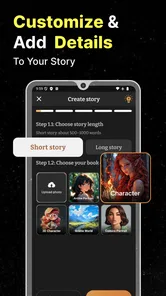
The strongest part of the experience is the way it helps shape an undeveloped idea. I can begin with something as loose as “a student finds a door that only appears during rain,” but a more useful prompt includes the relationship between the characters, the emotional tone, the setting, and the kind of ending I want. The app then gives me material to react to instead of asking me to invent every sentence from nothing.
That distinction matters. I would not describe the app as a dependable author that understands a complete novel from beginning to end. I see it more as a fast brainstorming partner. It is good at opening several possible paths, presenting a basic conflict, and making a small concept feel like the beginning of something. The real creative work starts after that first output, when I decide what deserves to stay.
For me, the most productive use is not pressing a button and accepting the first story. It is asking for a starting version, identifying the parts that feel promising, and then rewriting the direction with more specific instructions. A generic request tends to produce a generic result. A prompt that names the protagonist’s fear, the setting’s rules, and the desired pace gives me much more to work with.
The practical advantage is momentum, not literary perfection. If I already know exactly what I want to write, a normal notes app or word processor may be faster and more controllable. If I have only a half-formed image or a title, this app becomes much more valuable because it supplies a first structure that I can challenge and improve.
More From Our News Desk

Weather by Xiaomi Review: Clear at a Glance, Less Clear Up Close

X Under Pressure: Can It Recover When Posting Goes Wrong?

Clash of Clans Is Won Between the Battles

Android Auto Makes the Case for Quieter Car Software

MobiOffice: Transforming Mobile Productivity with Seamless Integration

EA SPORTS FC™ Mobile Soccer: Redefining Mobile Sports Gaming
What the first draft is really good for
The generated text works best as a disposable draft. I use it to test whether an idea has enough tension to support a scene, whether two characters have an interesting disagreement, or whether a proposed twist arrives too early. Even when the wording is not suitable for publication, the output can reveal a useful question: what would happen if the protagonist made the opposite choice?
That makes the app helpful for several kinds of users. A new writer can study how a premise becomes a sequence of events. A student can use it to explore creative-writing exercises, provided the final work is genuinely their own. Someone who writes casually can create a bedtime tale, a playful mystery, or a quick science-fiction scenario without spending an hour staring at an empty document.
I also found value in using it before writing manually. Instead of asking it to produce the entire story, I can use a generated concept as a private planning aid. I then keep only the conflict, discard the prose, and write the scene myself. This approach avoids the flat feeling that often comes from accepting an unedited machine-written passage while still benefiting from the app’s speed.
How I would use it in practice
I get better results by treating each request as a small writing brief. I include the genre, the intended audience, the approximate emotional direction, and one or two details that must remain consistent. I also state what I do not want, such as an overly cheerful ending or a narrator who explains every feeling. These constraints make the response easier to judge.
For a longer project, I would not rely on one enormous request. I would first develop the premise, then work on the main characters, then create a sequence of scenes. After each stage, I would copy the parts I want to keep into a separate document. That workflow is important because an AI-generated story can drift: a character’s motivation may change, a setting may acquire rules that were never intended, or a conflict may be resolved before the story has earned it.
A useful technique is to ask for alternatives rather than corrections. If a scene feels weak, I would request three different complications instead of asking for a vague improvement. This gives me choices and keeps me in the role of editor. Another good method is to ask for a shorter version of a scene, then compare it with the longer one. The shorter attempt often exposes unnecessary explanation and helps me see the central action.
I would also keep a small “story bible” outside the app. It can contain names, ages, relationships, important locations, and rules of the fictional world. Before starting a new section, I can use those notes to make the prompt more precise. This is especially useful for novel planning, where continuity matters more than a single attractive paragraph.
A realistic everyday scenario
Imagine that I have twenty minutes during a commute and a children’s story idea about a lonely lighthouse keeper who hears music from the sea. I could enter the premise, specify a gentle tone, ask for a clear beginning, middle, and ending, and use the response to find the emotional center of the tale. I might keep the idea of the music representing memories, but replace the generated characters and wording with my own.
Later that evening, I could return to the same concept and ask for several possible obstacles: a storm, a missing visitor, or a lighthouse mechanism that stops working. The point would not be to publish the output unchanged. The point would be to choose the obstacle that best fits the story I want to tell. In this situation, the app saves the most valuable resource for a casual writer: the effort required to move from a blank screen to a decision.
Where the experience needs patience
The app’s convenience has a clear tradeoff. Fast generation can encourage shallow writing habits if I stop questioning the result. Some passages may sound smooth while saying very little, and a familiar plot shape can appear when the prompt is too broad. I have to check whether the characters actually want something, whether their decisions cause the next event, and whether the ending follows from what came before.
Continuity is another reason to edit carefully. When I build a story in separate stages, I cannot assume that every new response will remember the exact details I had in mind. Repeating the essential facts in the prompt is safer than expecting an earlier idea to remain perfectly stable. This adds work, but it is also a useful discipline for any longer writing project.
There is a difference between generating an outline and generating finished prose. An outline can be judged by its sequence of events, while prose needs a personal voice, rhythm, and precise observation. I would trust the app more for the former than the latter. If my goal is a polished novel with a distinctive style, I would use a dedicated writing environment for drafting and revision, keeping this app for ideation and experimentation.
Users should also think about originality before sharing generated work. I would never assume that a first response is unique simply because it was created for my prompt. I would reshape the premise, replace predictable phrasing, add personal details, and verify that the final piece reflects my own choices. That is particularly important for school assignments, competitions, or any project where authorship rules apply.
Free access and paid considerations
The app is free to download, which makes it easy to test without committing immediately. It includes in-app purchases ranging from about five dollars to thirty dollars per item, so I would check exactly what a paid option unlocks before buying. The sensible approach is to use the free experience long enough to decide whether the app fits my writing habits, rather than paying simply because a larger project feels urgent.
Its current version is 12.3, and it requires Android 11 or later. That requirement is worth checking before installation, especially on an older phone or a device kept for a child. On a compatible device, the app’s mobile format suits quick idea sessions, but serious editing may still feel more comfortable in a larger writing environment with better document organization.
Who benefits most from it
I would recommend it most strongly to beginners, hobby writers, students working through creative prompts, and experienced writers who want a rapid source of alternatives. It is particularly useful when the problem is not a lack of imagination but difficulty choosing a direction. The app can show several possible routes, allowing me to respond with “not that, but closer to this,” which is often how a real idea becomes clearer.
It is also a good fit for people who enjoy short fiction and do not need a complete professional manuscript. A quick mystery, a themed writing exercise, or a playful story for a family activity can benefit from the app’s immediacy. The Everyone rating supports its broad accessibility, but I would still supervise younger users’ prompts and review the generated material before sharing it with children.
I would skip it if I need strict manuscript management, detailed continuity control, advanced revision tools, or a guaranteed personal writing voice. A conventional notes app is better for storing and arranging my own drafts, while a full writing program is better for managing chapters and sustained revision. This tool earns its place before those stages, when I need possibilities rather than perfect organization.
Identifier Studio has positioned the app as an accessible AI writing utility, and the strong adoption suggests that its basic idea resonates. Still, popularity does not remove the need for judgment. The most satisfying results come when I provide creative direction, reject weak suggestions, and rewrite actively. The app rewards participation; it does not reward passive copying.
My final take
After using it as a story-planning companion, I see AI Story Generator Novel Maker as a practical way to break creative inertia. Its best contribution is the first spark after an idea has stalled. It can turn a premise into possible conflicts, scenes, and directions quickly enough to make writing feel approachable, especially on a phone.
I would recommend trying it if you want help developing plots or short fiction and are comfortable treating generated text as raw material. I would not recommend relying on it as the sole author of a serious novel. The strongest workflow is to generate, question, select, and rewrite. Used that way, the app gives me useful creative friction without taking ownership of the story away from me.
AI Story Generator Novel Maker Frequently Asked Questions
Does AI Story Generator Novel Maker work on my device?
AI Story Generator Novel Maker requires Android or iOS version 11 or later. Before downloading, check your device’s operating-system version and make sure you have enough space for the app. The app is designed for mobile use, so you can work on story ideas from a compatible phone or tablet. If your device meets the requirement, you can decide whether its writing tools suit the way you prefer to draft.
Is AI Story Generator Novel Maker free to download?
Yes, AI Story Generator Novel Maker is free to download. The app also offers in-app purchases, with items priced from $4.99 to $29.99. You can begin with the free app and review the available purchase options if you want access to additional features. Check the payment screen carefully before confirming a purchase, especially if you are comparing options or managing a device used by more than one person.
Is AI Story Generator Novel Maker suitable for beginners?
Yes. AI Story Generator Novel Maker can be useful if you are new to creative writing and want a starting point for an idea. You can describe a premise or ask for help with characters, scenes, or plot concepts, then build on the result in your own words. Treat its suggestions as drafts rather than finished work, and revise them to match your voice and goals.
What kinds of writing can I create with AI Story Generator Novel Maker?
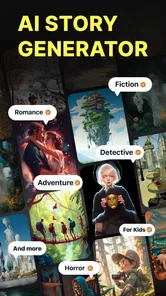
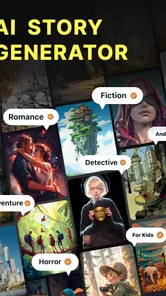
The app is aimed at story writing, with features described for AI story writing, plot generation, novel writing, and short-story generation. You can use it to explore an idea, develop a storyline, or draft material to edit yourself. The result will depend on the prompt you provide, so clear instructions about genre, characters, setting, and mood can help guide the output.
What is AI Story Generator Novel Maker?
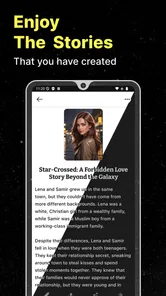
AI Story Generator Novel Maker is a writing app designed to help users create fictional stories, novels, character ideas, scenes, and plot concepts with artificial intelligence. After entering a prompt, genre, theme, or basic storyline, the app can generate written content that you may edit, expand, or reorganize. It is intended for brainstorming and drafting rather than replacing a writer’s personal creativity and revision process.
Pros
- Generates story ideas quickly when you feel stuck.
- Supports multiple genres and storytelling styles.
- Useful for outlining characters
- plots
- and chapters.
- Simple interface makes it accessible for beginners.
- Can help turn short prompts into longer story concepts.
Cons
- Generated writing may feel repetitive or lack originality.
- Some advanced features may require a subscription.
- Results often need editing for grammar and consistency.
- Longer stories can lose track of characters or plot details.
- Requires clear prompts to produce useful
- focused content.













