TCG Card Scanner TCG Collector
- 1.35K
- 4.7
- Installs
- 1.00M
- Price
- Free

Screenshots
Analysis by Reviewed
I like TCG Card Scanner TCG Collector most as a practical way to bring some order to a growing card collection, rather than as a substitute for checking every card carefully. Its appeal is easy to understand: scanning can cut down on manual cataloging, while collection-management tools give you a place to keep track of what you own and what you may want to trade. I’d recommend trying it if you regularly handle cards, but I would treat any scan or price information as a starting point, not the final word.
Where a scanner can save real effort
The biggest advantage of a camera-based catalog is the time it can save when you’re sorting a stack after a trade, opening a box of cards, or trying to remember whether a card is already in your collection. With a manual spreadsheet, every entry takes attention; scanning offers a quicker first pass and makes it easier to turn a pile into a searchable record. That difference matters most when you’re cataloging many cards at once, not when you only need to log one or two.
There’s a useful workflow here: scan first, then review the results before relying on them. If a card has a similar-looking version, unusual printing, or details that are hard to see in a quick photo, take a moment to compare the identification with the physical card. A recognition delay or a mistaken match can carry through to your collection record, so checking as you go is less frustrating than trying to untangle a batch of uncertain entries later.
I’d also separate the job into short sessions instead of aiming for a perfect inventory in one sitting. A focused pass through one small box or one type of card makes it easier to catch duplicates and questionable matches while the cards are still in front of you. Keep uncertain entries aside and return to them under better light rather than repeatedly scanning the same card in a hurry. That simple habit protects the quality of the catalog without turning collection day into a tedious audit.
Useful for trading, with a sensible price check
Keeping cards marked for trade or sale can help when you’re preparing for a meetup or talking through a swap with another collector. Instead of flipping through boxes to see what you’re willing to part with, you can use your saved collection as a working reference. Exporting that information also gives you a way to share or preserve a record outside the app, which is helpful if you want a separate copy of your inventory.
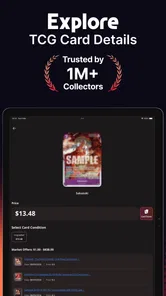
Price tracking is convenient, but I wouldn’t use an app estimate as the sole basis for a deal. A card’s condition, edition, and the buyer’s local market can affect what someone is actually willing to pay. Check the physical card and compare current offers before agreeing to a trade or sale. That extra step is especially worthwhile for a card whose value would make a small identification or condition mistake matter.
For trading, I find it helpful to decide what the list is for before scanning: a private inventory, a shortlist of cards I might part with, or a record I’m ready to share. Those are different levels of commitment. Marking a card as available should not replace checking that it is still in your possession and in the condition you remember. A quick review just before a meetup can prevent the awkward moment of offering a card that has already been traded or discovering that the copy in your hand is not the one in your record.
More From Our News Desk

Weather by Xiaomi Review: Clear at a Glance, Less Clear Up Close

X Under Pressure: Can It Recover When Posting Goes Wrong?

Clash of Clans Is Won Between the Battles

Android Auto Makes the Case for Quieter Car Software

MobiOffice: Transforming Mobile Productivity with Seamless Integration

EA SPORTS FC™ Mobile Soccer: Redefining Mobile Sports Gaming
Getting started and deciding whether it fits
At the time of writing, the app is free to download, with in-app purchases ranging from $3.99 to $39.99 per item. It’s rated for Everyone, and the current version is 1.1.4, requiring Android 10 or later. Identifier Studio is the developer. The app has a 4.6 average from around 21,000 ratings, with over 500,000 installs. Those figures suggest it has found an audience, but I’d still judge it by whether its scanning and organization suit the cards you personally collect.
For a first session, I’d start with a small, mixed group of cards rather than trying to catalog a whole collection in one go. That gives you a feel for how the camera handles your cards and lets you catch any entries that need correction before you build up a large record. It’s also a good way to decide whether the app’s organization works for you. If you’re unsure about paying for anything, use the free experience first and consider an in-app purchase only if a specific paid option solves a problem you’ve actually run into.
This test is useful because a scanner’s convenience depends on the way you collect. If your cards are already sorted by game or set, try a few from each group and see whether the resulting catalog is easy to browse. If they are mixed together, use that first session to learn whether scanning helps you impose order or merely creates another list to maintain. Either outcome is worth knowing before you spend time entering a larger collection.
This is a stronger fit for collectors who want a phone-based inventory, regularly trade, or need a quick way to review what they own. It may be less useful if you collect only a handful of cards, prefer a spreadsheet you control directly, or need exact condition-based valuations for buying and selling. A spreadsheet takes more setup but can be tailored to unusual fields; checking cards manually against a trusted marketplace may be better when accuracy and current sale prices matter more than convenience.
A realistic use is getting ready for a local card meetup: scan the cards you’re considering trading, review the list at home, and make sure the physical versions match the saved entries before you leave. That makes the app a planning aid rather than something you need to operate in the middle of every conversation. If recognition takes a second try, you can resolve it before the meetup instead of holding up a trade while you troubleshoot.
Another practical use is checking a collection before buying more cards. If you are trying to avoid acquiring another copy of something you already own, a catalog on your phone can give you a quick reference while browsing or discussing a purchase. I would still confirm a close match against the card itself, especially where different printings look alike. The benefit is not that the app makes the buying decision for you; it is that a recorded collection can make the decision less dependent on memory.
One trade-off to keep in mind is that cataloging still depends on your input and attention. A scanner can identify a card, but it cannot make decisions for you about whether its condition is accurately represented or whether you want to keep it. The app works best when you treat scanning as the beginning of an organized record, then maintain that record as your collection changes.
Getting Started with TCG Card Scanner TCG Collector
Right off the bat, downloading and setting up the app was a breeze. It’s just a quick download away from transforming your card chaos into calm. Once you fire it up, the interface is clean and straightforward, which I personally appreciate. No one wants to deal with a clunky app when all you want to do is dive into your collection.
Scanning and Cataloging
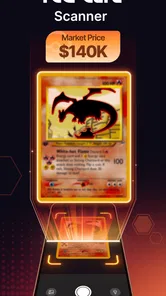
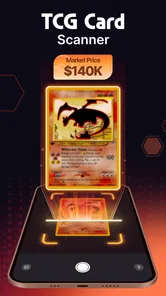
The core feature of this app is its ability to scan cards with your phone’s camera. Just point, shoot, and let the app do its magic. It uses a smart recognition system to identify the card and adds it to your digital collection. I tried it with a variety of cards, from Pokémon to Magic: The Gathering, and it handled them all like a champ.
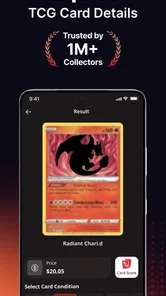
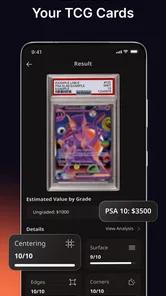
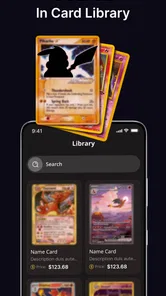
Once scanned, each card is neatly cataloged with all its details. You can view your collection by set, rarity, or even specific attributes. It’s like having a personal assistant who remembers every card detail for you.
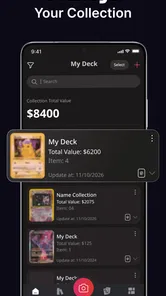
That organization becomes more useful when you give it a purpose. For instance, I would use one pass to record what I own, then a separate review to decide which cards might be available for trade. Keeping those decisions distinct reduces the chance of treating every card in the inventory as something I am willing to part with. It also makes the collection easier to consult when I’m trying to answer a simple question, such as whether I already have a particular card.
Managing Your Collection
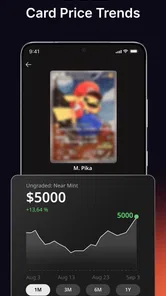
What really stood out to me was how the app offers tools for managing trades and sales. You can mark cards you’re willing to trade or sell and even keep track of prices. This is a lifesaver if you’re active in the trading community. Plus, the app updates prices regularly so you’re always in the know.
Additionally, the app supports exporting your collection data. Whether you want to back it up or share it with friends, the export feature is handy and straightforward.
Exporting is most valuable when it is part of a habit, not a one-time rescue plan. I’d save a copy after a substantial cataloging session or after changing a batch of trade markings, then keep the file somewhere I can find it. That gives me a separate reference if I want to review the inventory outside the app. It is also a useful checkpoint: looking at the exported record can reveal whether my own categories and entries are consistent, or whether I need to clean up a few uncertain scans.
Community and Connectivity
Another neat feature is the social aspect. You can connect with other users to share your collection or find trading partners. It’s a fantastic way to expand your circle and meet fellow card enthusiasts. Who knew an app could make collecting feel so communal?
I would approach sharing selectively. A full collection may be more information than a potential trading partner needs, while a focused set of cards is easier to discuss. Before sharing anything, decide whether you are showing what you own or actively offering particular cards. That distinction keeps conversations clearer and lets you use the social tools with a practical purpose rather than sharing an inventory just because the option is there.
The User Experience
In terms of performance, the app runs smoothly with minimal glitches. The developers seem to be on top of updates, ensuring the app stays functional and user-friendly. The only hiccup I encountered was a slight delay in card recognition on rare occasions, but it was nothing a quick rescan couldn’t fix.
The design is visually appealing without being overwhelming. It’s simple, yet effective, making it easy to navigate even for the less tech-savvy among us. The app’s color scheme is gentle on the eyes, which is a plus when you’re staring at it for extended periods cataloging your collection.
Even with a straightforward interface, camera-based cataloging has a physical rhythm that a spreadsheet does not. You need to position each card, give the camera a clear view, and check the match before moving on. A bright, even setting and a clean surface are sensible ways to make a scanning session less fiddly. When a card does not read cleanly, pausing to adjust it is better than quickly accepting a likely match and creating a correction job for later.
The app also sits between two familiar approaches: manually maintaining a spreadsheet and relying on marketplace searches. A spreadsheet gives you full control over fields and can be better for unusual personal notes, but every entry takes typing and upkeep. Marketplace checks are stronger when you need to judge a particular sale or compare current offers, yet they are not as convenient for seeing your own collection at a glance. This app’s advantage is the middle ground: faster inventory work with a collection-focused view, provided you still verify important details yourself.
One question collectors often have is whether a scan should be treated as a definitive identification. I wouldn’t. Use it as a quick candidate match, then compare the title and visible card details with the physical copy before saving or trading it. Another is whether a price shown in the app is enough to set a sale price; my answer is no. Condition and the market for a specific copy matter, so use the figure as a prompt for further checking rather than a promise of what you will receive.
It is also worth asking whether the app can replace a complete collection system. For a collector who wants a quick phone inventory and trade reference, it can serve that role well. For someone who needs custom fields, detailed grading records, or a carefully controlled financial ledger, a spreadsheet or another specialized workflow may be the better home base. The right choice depends less on how many cards you own than on how much detail you need to preserve for each one.
Final Thoughts
In the world of trading card collecting, having an organized system is key, and the app delivers on that front. It’s a reliable companion for both seasoned collectors and newbies alike. The ease of use, combined with its powerful features, makes it a standout in the app market.
Whether you’re looking to manage a massive collection or just starting out, this app is a solid choice. Give it a try, and soon enough, you’ll wonder how you ever managed without it. Happy collecting!
My recommendation is more specific: try it if sorting, remembering duplicates, or preparing trade options has become a recurring chore. Give it a small real-world test before committing your whole collection, and keep checking scans and price estimates where a mistake could affect a deal. If you want a flexible record built around custom details, or you only need occasional valuation checks, a spreadsheet or direct marketplace research will likely suit you better.
For collectors who value a quick inventory they can carry to a meetup, the balance is appealing. The free download makes it easy to see whether the workflow fits, while optional purchases mean I would wait until I know exactly what extra value I need. Used with a little care, TCG Card Scanner TCG Collector is best understood as a convenient organizer and trading companion—not an authority on every card or its final worth.
TCG Card Scanner TCG Collector Frequently Asked Questions
What should I check before installing TCG Card Scanner TCG Collector?
TCG Card Scanner TCG Collector is a free app in the Sports category, and it is intended for Android devices running version 10 or later. Checking your device’s operating system before downloading can help avoid installation problems. The app is developed by Identifier Studio, and optional in-app purchases are available if you later want to buy additional features.
Who develops TCG Card Scanner TCG Collector, and what devices can install it?
TCG Card Scanner TCG Collector is developed by Identifier Studio and is available for Android devices running version 10 or later. It is a free app in the Sports category, with optional in-app purchases. Before downloading, check that your device meets the minimum operating-system requirement so the app can be installed and used as intended.
What is TCG Card Scanner TCG Collector used for?
TCG Card Scanner TCG Collector is a specialized app designed for trading card game enthusiasts. It allows users to scan their cards quickly and accurately using their smartphone camera. The app provides detailed information about each card, helping users keep track of their collection, check card values, and manage trades efficiently.
How accurate is the card scanning feature?
The TCG Card Scanner utilizes advanced image recognition technology to ensure high accuracy when scanning cards. While most scans are precise, users should ensure good lighting and a clear camera focus for optimal results. The app is consistently updated to improve the accuracy of its scanning capabilities.
Is the app compatible with all trading card games?
While the TCG Card Scanner supports a wide range of popular trading card games, it may not cover every game on the market. The app frequently adds support for additional card games based on user demand, so it's advisable to check the app's description for the latest compatibility updates.
Pros
- Accurate card recognition technology.
- Supports multiple card games.
- User-friendly interface.
- Frequent updates with new features.
- Organizes collections efficiently.
Cons
- In-app purchases can be costly.
- Requires stable internet connection.
- Limited offline functionality.
- Occasional scanning inaccuracies.
- High battery consumption.





