Comic Book Value Scanner
- 64.00
- 4.5
- Installs
- 50.00K
- Price
- Free
Screenshots

Analysis by Reviewed
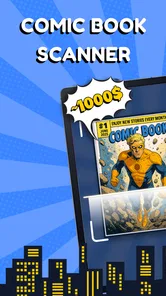
I’d treat Comic Book Value Scanner as a quick starting point when I want to identify a comic and get a sense of its possible value, not as a substitute for careful research before buying or selling. Its focused purpose is appealing: rather than browsing a broad comics database first, I can begin with the book in my hands and see whether the app can help point me toward a useful price reference. That makes it most interesting for collectors sorting a box, checking a flea-market find, or trying to decide which issues deserve a closer look.
The app sits in the comics category and is made by Identifier Studio. It is free to download, rated for Everyone, and has a 4.5 average from around 1,400 ratings, with more than 50,000 installs. Those figures suggest a solid amount of interest, but they do not tell me how accurately a particular issue will be recognized. I would judge each result against the comic itself: issue number, edition, condition, and any unusual printing details can all matter when estimating value.
Getting past the first scan
I find the first scan most useful as a way to orient myself, not as a final answer about a comic’s identity or worth. In this section, I’d focus on the small checks that can make a scan easier to interpret and help me decide whether the next step is another attempt or a closer look at the book itself.
Why a scan may not settle the question
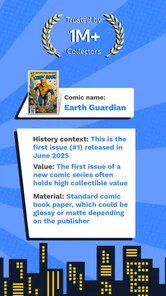
A camera-based identifier sounds straightforward, but comics are not always easy targets. Glossy covers can catch reflections, older books may be faded or worn, and a cover image may not distinguish one printing from another. A result that looks plausible is therefore a lead, not proof that the app has matched the exact copy or edition. For valuable books, verify the issue and edition before treating an estimate as a selling price.
When a scan seems off, I would first check the physical comic rather than repeatedly aiming the camera at it. Look for the issue number, title, publisher details, and any edition or printing notation visible on the cover or inside the book. If the cover has glare, changing the angle or moving to even, indirect light is a sensible general camera check. These steps do not guarantee recognition, but they can give an identification tool a clearer image to work with.
There is also a practical distinction between identifying a comic and valuing a specific copy. Even a correct match cannot, by itself, describe every detail of condition. Creases, spine wear, missing pages, stains, and restoration can change what a buyer would pay. I use any scanner estimate as a way to decide what to investigate next, not as an appraisal that accounts for every flaw.
Simple checks before relying on a result
Before scanning a stack, I would make sure the phone is running a compatible system: the app’s minimum operating-system requirement is version 10. I would also check that the app is current; the listed release is version 1.3. These are basic first checks if the app will not open or behaves unexpectedly, rather than evidence that an update will solve every issue.
More From Our News Desk

Weather by Xiaomi Review: Clear at a Glance, Less Clear Up Close

X Under Pressure: Can It Recover When Posting Goes Wrong?

Clash of Clans Is Won Between the Battles

Android Auto Makes the Case for Quieter Car Software

MobiOffice: Transforming Mobile Productivity with Seamless Integration

EA SPORTS FC™ Mobile Soccer: Redefining Mobile Sports Gaming
It helps to test with a comic whose cover and issue details are easy to read. That gives me a clearer sense of whether the camera setup is the obstacle or whether a particular book is simply difficult to identify. For a fair test, keep the entire cover in view, avoid a strong reflection, and do not let fingers cover printed details. If a result is inconsistent, compare it with the comic’s own identifying information before scanning again.
I would also separate a technical problem from an uncertain match. A camera that cannot focus or a screen that freezes calls for ordinary phone troubleshooting, such as closing and reopening the app and checking that the device is operating normally. A scanner that responds but suggests the wrong issue is a different problem: more attempts may help with image clarity, but the final check still needs to come from the comic’s printed details.
A more useful way to work through a collection
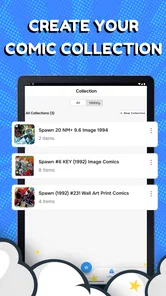
For a box of mixed issues, I would scan in small batches and keep a simple note of the title, issue number, and any result worth checking later. That is more reliable than trying to remember which scan belonged to which book after moving through a large pile. It also prevents one uncertain match from quietly becoming the assumed identity of several similar-looking issues.
A useful second pass is to divide books into “identified confidently” and “needs checking.” The first group can be organized or researched further; the second deserves closer inspection of the cover and publication details. This workflow is especially helpful when several issues share a character or similar artwork. It keeps the scanner in its proper role: a sorting aid that can save time, rather than the final authority on a collection.
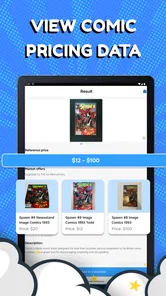
For a possible sale, I would not set a price from a single estimate. First confirm that the app’s match corresponds to the exact issue and edition. Then inspect the copy’s condition and compare the result with current, relevant market references. A guide can give a useful orientation, but an asking price and a completed sale are not necessarily the same thing. This extra check matters most for books that appear unusually valuable or have condition-sensitive appeal.
When the trouble is not the app
Sometimes the awkward part is the comic, not the scanner. A worn cover can obscure text, a reflective surface can wash out artwork, and a book with an unusual printing can be hard to distinguish from a standard copy using its front image alone. In those cases, I would not keep repeating the same scan and assume the app has failed. I would inspect the issue information directly and use a comics reference or knowledgeable collector for confirmation when the distinction matters.
Likewise, a price that feels surprising is not automatically a technical error. Condition, demand, edition, and the difference between a guide estimate and a real transaction can all affect the comparison. If the identification is right but the number does not fit what I see elsewhere, I would check that the references describe the same edition and a similar condition. The app can help narrow the search, while broader research is better for making a final financial decision.
Phone conditions can add friction too. Poor lighting and reflections are easy to overlook when scanning several books quickly. I would try a clean, unobstructed view and a different angle before concluding that recognition is unreliable. If the camera itself is malfunctioning in other apps, the issue is more likely to need general device troubleshooting than repeated changes to the comic-scanning process.
Making the first session useful
When I try a new scanner, I would avoid starting with the rarest or most confusing book in the box. Pick an issue with a readable cover and clear identifying details, then compare what the app returns with what is printed on the comic. That first check gives a practical baseline: I learn whether scanning feels convenient for my collection before I spend time working through more ambiguous books.
A realistic use would be sorting comics after bringing home a mixed bundle. I would scan a few covers, note the results that appear worth investigating, and set aside anything whose edition or issue number is unclear. Later, I could check those uncertain books individually rather than holding up the whole sorting session. The benefit is not that every comic gets a definitive price immediately; it is that I can direct my attention toward the books most likely to need research.
For the same reason, I would keep a note tied to the physical stack rather than rely on memory. A short record of title, issue, and the reason a result needs checking is enough to prevent a likely mix-up between similar covers. This is a modest bit of extra work, but it matters if I pause midway or scan several books with the same character and artwork. The app may help begin identification; my own labeling keeps the result connected to the right comic.
Where scanning fits among other methods
Compared with searching manually, a camera-first approach can reduce the effort of figuring out what terms to enter when a comic is unfamiliar. But a scanner is less useful when the important difference is a small printing note, a variant, or a condition detail that is not obvious from the cover. Manual lookup takes longer at the start, yet gives me more direct control over which issue and edition I am comparing.
I would use the two approaches together rather than treat them as rivals. Let the scan suggest a direction, then confirm the identification from the book and compare like with like in a reference. A collector who already knows the publisher, issue, and edition may find manual searching just as quick, while a newcomer faced with an unsorted box may appreciate having a first lead. Neither method turns a rough condition judgment into a professional appraisal.
The app is on version 1.3 and requires Android 10 or later. That makes checking the phone’s operating-system version a sensible step before trying to install it, especially on an older device. If the requirement is met but the app still misbehaves, I would separate basic device issues from recognition accuracy: a failure to launch is different from a scan that returns a questionable match.
Costs and expectations before committing
The app is free to download, but it includes in-app purchases priced from $4.99 to $39.99 per item. That range is worth knowing before relying on it for frequent collection work. I would start with the free experience and decide whether it fits my actual routine before considering any purchase. The presence of paid items does not, on its own, tell me which functions they cover, so I would check the purchase details inside the app before paying rather than assume a particular feature is included.
This is a useful distinction for casual users. If I only want to check a few comics, a free first look may be enough to decide whether the scanning approach helps me. Someone cataloguing a large collection should think more carefully about whether the app’s workflow and any optional costs suit the job. For detailed inventory management or dependable grading, a dedicated cataloguing method and specialist references may be a better fit than relying on a scanner alone.
Compared with manually searching a comics database, scanning can make the first step feel faster because I begin with the physical book rather than guessing search terms. Manual lookup, however, gives me more control over edition details and lets me compare records deliberately. I see the strongest use for the app in bridging those approaches: scan to get oriented, then use the printed issue details and independent references to confirm what I have.
Who I would recommend it to
Comic Book Value Scanner makes the most sense for a curious collector who wants a convenient first pass through comics and understands that a scan is not a guarantee of identity or value. It can be particularly handy when sorting a mixed box and deciding which books deserve a closer look. A casual seller may also find it useful for building a shortlist of issues to research before listing them.
I would be more cautious if I needed formal appraisal, precise condition grading, or a definitive price for a high-value sale. In those situations, a specialist’s assessment and comparisons with relevant sales are more appropriate. I would also skip the app if I strongly prefer entering every detail manually or need a comprehensive collection-management system; its central appeal is the scan-led starting point, not a promise to replace those methods.
My practical verdict is that this is a promising convenience tool when I use it with sensible expectations. The rating and adoption suggest that many people find the idea useful, but my confidence in any particular result would still depend on checking the comic itself. Start with a clear, easy-to-read issue, confirm its printed details, and treat the price as a clue for further research. If that cautious workflow suits you, Identifier Studio’s app is worth trying; if accuracy must be settled in one step, a scanner should not be your only source.
Comic Book Value Scanner Frequently Asked Questions
What is Comic Book Value Scanner, and what does it do?
Comic Book Value Scanner is a mobile app designed to help comic collectors identify books and research their potential market value. Depending on the app’s available features and its current data sources, you may be able to scan a cover or enter details such as a title, issue number, and publication year. Treat any estimate as a useful starting point for research, not a guaranteed selling price.
How accurate are the comic book values shown in the app?
An app estimate cannot account perfectly for every factor that affects a comic’s price. Condition, edition, printing, grading, completeness, and recent buyer demand can all make a significant difference. Scanning or entering the wrong issue may also lead to an unsuitable result. Before buying, selling, or insuring a valuable book, compare the result with recent sales and, when appropriate, seek a professional grading or valuation opinion.
Can I identify any comic book by scanning its cover?
Cover scanning can make searching quicker, but it may not identify every book correctly. Older, rare, damaged, variant, or poorly lit covers can be harder to match, and similar artwork may produce confusing results. Check the issue number, series, publisher, year, and edition against the physical comic before relying on a match. If scanning does not work, use any manual search options the app provides.
Is Comic Book Value Scanner free, and are there in-app purchases?
Pricing and access can vary by platform, region, and app version. Check the app’s store listing before downloading to see whether core features are free, whether a subscription or one-time purchase is offered, and what any trial includes. Also review renewal terms before starting a trial. Store listings are the most reliable source for current pricing, since plans and features can change over time.
What should I check before downloading Comic Book Value Scanner?
Read the current Google Play or Apple App Store listing to confirm device compatibility, supported features, recent updates, and any costs. Review the developer’s privacy information to understand what data the app collects and how it is used. If you plan to catalog a collection, check whether the app offers suitable organization or export options, and keep a separate record of important books and valuations.
Pros
- Quickly scans comic covers to help identify issues.
- Useful for checking a collection while browsing a shop or sale.
- Can make it easier to spot comics that may need further research.
- Handy starting point for organizing and evaluating a collection.
- A focused tool for comic collectors rather than a general price guide.
Cons
- Scan results may be inaccurate for damaged
- obscure
- or variant editions.
- Estimated values can vary from actual sale prices and market demand.
- Good lighting and a clear
- unobstructed cover may be needed for scans.
- It may not recognize every comic
- especially older or niche issues.
- Collectors should verify issue details and prices with other sources.













