AI Interior Design Home Decor
- 140.00
- 4.1
- Installs
- 1.00M
- Price
- Free

Screenshots
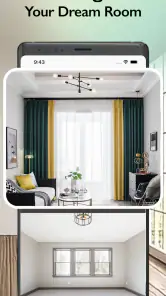
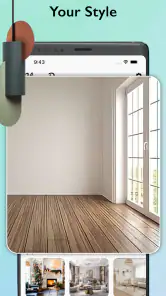
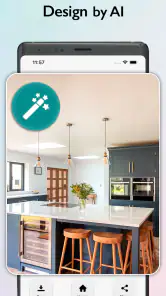

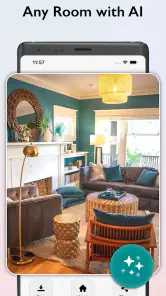


Analysis by Reviewed
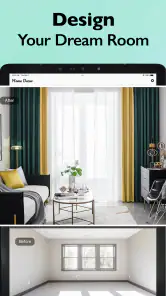
When I want to rethink a room but can’t yet picture what would suit it, a photo-based AI design app can give me somewhere useful to begin. AI Interior Design Home Decor is built around that visual starting point: I can explore a different look using the room I already have, rather than relying only on inspiration images from someone else’s home. I see it as a way to clarify taste and compare broad ideas, not as a replacement for measurements or professional plans.
A quick visual starting point
The most useful idea here is turning a room photo into a starting point for design decisions. Instead of trying to picture a new look from a mood board alone, I can begin with the space I actually have and explore how a different style or palette might change its feel. That makes the app most helpful early in a project, when I need inspiration more than a final floor plan.
For example, if I am unsure whether a living room would feel calmer with lighter colors or more character with a bolder direction, seeing a generated concept can help me choose which idea deserves further thought. I would treat the result as a visual prompt, not proof that a particular sofa will fit or that a color will look identical under my own lighting.
Getting Started with AI Magic
The first thing that struck me about AI Interior Design Home Decor is its user-friendly interface. Installing and setting it up was a breeze. Once I opened the app, I was greeted with a sleek dashboard that didn’t leave me fumbling around like a lost tourist. It’s like having a personal decorator right in your pocket, offering tailored design suggestions based on your space and taste.
Features That Stand Out
What sets this app apart is its AI-powered recommendations. You simply snap a picture of your room, and the app analyzes the space, lighting, and existing decor. Within seconds, it offers a variety of styles, color palettes, and furniture arrangements tailored just for you. It’s like having an interior design genie at your command!
Another nifty feature is the virtual reality (VR) mode. This allows you to visualize changes in real-time. You can literally see how a new sofa or that trendy lamp would look in your living room without lifting a finger. Talk about planning before buying!
Make the photo work for you
A small amount of preparation can make a room-based design result easier to judge. I would take the photo from a spot that shows the main furniture and the room’s boundaries, rather than zooming in on a decorative detail. Keeping the camera level and avoiding a pile of laundry or bags in the foreground also helps me focus on the design idea instead of distractions. These steps do not guarantee a perfect rendering, but they make comparisons more useful.
More From Our News Desk

Weather by Xiaomi Review: Clear at a Glance, Less Clear Up Close

X Under Pressure: Can It Recover When Posting Goes Wrong?

Clash of Clans Is Won Between the Battles

Android Auto Makes the Case for Quieter Car Software

MobiOffice: Transforming Mobile Productivity with Seamless Integration

EA SPORTS FC™ Mobile Soccer: Redefining Mobile Sports Gaming
I would also change one broad decision at a time. If I switch the overall style and the color direction together, it becomes hard to tell which change improved the room. Trying a few distinct looks first, then narrowing in on a palette, gives the generated options a practical role: they help me make choices before I spend time shopping or moving heavy furniture.
Designing with Ease
One of the best things about this app is its ease of use. Even if you’re a newbie at home decor, the app guides you through every step. There’s a handy tutorial to get you started, and the app’s intuitive design ensures you’re never more than a few taps away from your next great idea.
The app also caters to various styles, from minimalist to bohemian, ensuring that there’s something for everyone. And if you’re someone who loves to keep up with the latest trends, the app updates regularly, providing fresh ideas to keep your home looking chic and modern.
Where it fits in a real project
Picture a renter who has just moved into a plain apartment and wants the living room to feel warmer without committing to paint or large purchases. A quick visual experiment can suggest whether a softer, more natural look suits the existing floor and furniture. The renter can then use that direction to choose a cushion, rug, or lamp in a real shop. That is a sensible use: the app narrows the field, while measurements, samples, and the actual room decide what to buy.
Compared with browsing general inspiration boards, this photo-first approach keeps the discussion tied to your own room. It can be more immediately relevant than collecting attractive images that do not match your layout. On the other hand, a conventional floor-planning tool is the better choice when exact dimensions, clearances, or furniture placement are the central problem. I would not rely on an AI image to settle whether a large piece fits through a doorway or leaves enough walking space.
A practical way to compare ideas
I’d use the app in short, purposeful passes rather than treating every generated variation as a candidate for the whole room. First, I would decide what I’m trying to change: the atmosphere, the color balance, or the overall style. Then I’d keep the room photo and that goal consistent while comparing a small number of directions. This makes it easier to notice whether a result actually solves my problem or merely looks striking on its own.
A useful follow-up is to write down what I like in a result before moving on: perhaps the lighter feel, a warmer palette, or less visual clutter. Those observations can guide real-world choices even if the generated furniture or details are not usable as a shopping specification. In that sense, the best output may be a clearer brief for myself, not an image I want to reproduce exactly.
Where imagination needs a reality check
The main trade-off is that a convincing-looking concept can feel more definite than it is. A generated arrangement may help me imagine a mood, but it is not a substitute for checking dimensions, testing fabric samples, or seeing how daylight changes a paint color. I would use it before a purchase to compare directions, then verify every practical detail separately.
It is also less suited to someone who already has a precise plan and wants accurate technical drawings, or to anyone expecting the app to make design decisions without personal judgment. People who enjoy exploring ideas visually will likely get more out of it than users who prefer a measured plan and a fixed shopping list from the start.
What to check before acting on a design
One common question is whether an AI room image can tell me exactly what to buy. I would not use it that way. Treat the visual as a way to evaluate the broad direction, then measure the room and the furniture separately. For paint or upholstery, compare physical samples in the room at different times of day; a screen image can’t account for every surface, bulb, or window in the home.
Another practical question is whether it works for every kind of room photo. The approach is most useful when the image clearly shows the space and its main features. A tight crop, a mirror reflection, or a room crowded with temporary items can make the result harder to interpret. If the first image feels confusing, I’d take another from a wider, steadier viewpoint before concluding that the design idea itself is wrong.
Endless Possibilities
With this app, you're not just limited to pre-set templates. You have the freedom to mix and match elements, experiment with different textures, and even get advice on where to purchase specific items. The app’s ability to personalize suggestions based on your feedback makes it a powerful tool in any decorator’s arsenal.
Ultimately, I find the app most worthwhile when I have a real room and an open question, rather than a finished design waiting to be executed. It can help me move from a vague feeling—“this space needs to be lighter”—to a visual direction I can discuss, test, and refine. I would still rely on real measurements and my own judgment before making changes, but as an early creative aid it can make the first step less intimidating.
Who is likely to get the most from it?
Identifier Studio’s House & Home app is free to install, with optional in-app purchases ranging from $3.99 to $39.99 per item. It is rated for Everyone, runs on iOS 11 or later, and its current version is 14.7.4. Its 4.1 average from around 22,000 ratings and more than one million installs suggest that many people have tried it, though I would judge it by whether its visual approach suits my own project. I would check the available purchase choices before leaning on paid options for a longer design session.
The broader choice is between visual exploration and precision. A mood-board app is handy when I want to collect references and build a style vocabulary, while a measured floor planner is stronger for testing whether furniture fits and how people will move through a room. This app occupies the space between those approaches: it connects inspiration to my own room, but it should not be the final authority on dimensions or renovation decisions.
I’d recommend it most to someone who has a room but no clear direction, wants a quick way to compare visual moods, and is comfortable treating AI output as inspiration rather than a construction plan. If you need exact measurements or a dependable specification for renovation work, choose a dedicated planning method instead. For early-stage decorating, though, this app can help turn “I want the room to feel different” into a few concrete ideas worth testing.
AI Interior Design Home Decor Frequently Asked Questions
Can I use AI Interior Design Home Decor to plan a room before making changes at home?
The app is presented as an AI interior-design and home-redesign tool, so it may be useful for exploring ideas before you commit to a real-world change. Treat its suggestions as inspiration rather than a substitute for checking room measurements, product dimensions, or practical requirements yourself. Comparing its concepts with your actual space can help you decide which ideas are worth pursuing.
Is AI Interior Design Home Decor suitable for renters as well as homeowners?
Its home-design focus can be relevant whether you own your home or rent, since both renters and homeowners may want to explore room layouts and decorating styles. If you rent, consider using design suggestions for reversible changes, such as furnishings or color ideas, and check your lease before making permanent alterations. The app can help you think through possibilities, but your living arrangements determine what changes are allowed.
Who develops AI Interior Design Home Decor, and is it free to download?
AI Interior Design Home Decor is a House & Home app from Identifier Studio. It is free to download, so you can explore its interior-design concept without paying upfront. The app also offers optional in-app purchases, which may be relevant if you want access to paid items or features. Its content rating is Everyone, making it suitable for a broad audience.
What is AI Interior Design Home Decor and how does it work?
AI Interior Design Home Decor is a cutting-edge application that utilizes artificial intelligence to help users design and decorate their homes. By inputting preferences and room dimensions, the app generates design suggestions tailored to your style. Its AI algorithms analyze trends and user feedback to offer personalized solutions, making home decorating intuitive and accessible. Whether you're a beginner or a seasoned decorator, this app provides innovative ideas and practical guidance.
Is AI Interior Design Home Decor user-friendly for beginners?
Absolutely! AI Interior Design Home Decor is designed with a user-friendly interface, making it accessible for both beginners and experienced decorators. The app offers easy-to-follow tutorials and guides, allowing users to harness the power of AI without any prior design experience. Its intuitive design ensures that users can navigate through features and design their spaces with confidence, regardless of their expertise level.
Pros
- Intuitive user interface
- Extensive decor options
- High-quality 3D visualizations
- Real-time editing capabilities
- Wide range of furniture brands
Cons
- Limited free features
- Requires internet connection
- Occasional app crashes
- High battery usage
- Subscription model for premium features
- Category
- House & Home
- Version
- 14.7.4