AI Remodel - Interior Design
- 250.00
- 4.4
- Installs
- 1.00M
- Price
- Free

Screenshots





Analysis by Reviewed
I would treat AI remodel results as a starting point, not a renovation plan. That distinction matters: a visual idea can help me decide whether a room feels warmer, calmer, or more contemporary, but it cannot replace careful measurements, contractor advice, or a real-world check that furniture will fit. Used with that expectation, AI Remodel - Interior Design can make the first, often hardest stage of planning feel more approachable.
What the free price does—and does not—tell you
The app is free to download, so you can try it without an upfront purchase. It also offers in-app purchases priced from $5.99 to $49.99 per item. I would separate those two facts when deciding whether it is worthwhile: free access lowers the barrier to exploring the app, while paid items may matter if you want more than the free experience offers. The price range alone does not tell me which purchase suits a particular project, so I would check the in-app details before paying.
That is a useful distinction for a home-design app. You may only need a handful of visual ideas to narrow down a paint direction, in which case downloading it may be enough. If you expect to use it repeatedly while comparing rooms or refining several concepts, consider whether any optional purchase provides something you will genuinely use. I would not pay simply because I had already spent time trying designs; I would first decide what task I still need the app to help with.
Turning an attractive concept into a practical plan
The strongest value here is visual exploration. A photo-based suggestion can help you see a room through a different lens and move past the familiar arrangement you have been living with for years. If you are stuck between a light, simple look and something richer, seeing alternatives can make your preferences clearer even if neither generated image is the final answer.
There is a practical way to get more out of that process: take a clear photo from a position that shows as much of the room as possible, then judge the result against the parts of the space that cannot easily change. Keep track of fixed features such as windows, doors, and large existing pieces while you assess a proposal. The more carefully you compare the concept with the actual room, the less likely you are to mistake a pleasing image for a workable layout.
I would also use the app to prepare for conversations rather than to settle decisions alone. Save a few distinct directions, then show them to someone who shares the space or to a design professional. Ask a specific question—such as which color direction feels right, or whether a room should look more open—rather than asking people to approve an entire generated makeover. That makes feedback easier to interpret and reduces the temptation to make a big purchase based on a quick visual impression.
Where its ideas need a reality check
AI-generated room concepts can be inspiring, but inspiration is not the same as a specification. A convincing image does not establish precise dimensions, confirm that an item is available, or prove that a proposed arrangement leaves enough room to walk comfortably. Before buying furniture or beginning work, measure the space and verify the relevant details independently. For structural, electrical, plumbing, or other technical work, use qualified advice instead of relying on a visual design tool.
More From Our News Desk

Weather by Xiaomi Review: Clear at a Glance, Less Clear Up Close

X Under Pressure: Can It Recover When Posting Goes Wrong?

Clash of Clans Is Won Between the Battles

Android Auto Makes the Case for Quieter Car Software

MobiOffice: Transforming Mobile Productivity with Seamless Integration

EA SPORTS FC™ Mobile Soccer: Redefining Mobile Sports Gaming
Photos can also make colors and finishes look different from how they appear in the room. Lighting, camera angle, and the existing surfaces all affect what you see on a screen. I would treat color suggestions as a shortlist, then test actual samples in the room at different times of day. The same caution applies to furniture proportions: a piece that looks balanced in a rendered view may feel oversized once you account for its real dimensions.
There is another useful trade-off: the more options you generate, the easier it is to keep browsing instead of deciding. I would set a small goal for each session, such as choosing a general style or comparing two color moods, and stop once I have enough direction to take the next step. That keeps an inspiration tool from turning a simple refresh into an endless search for a perfect image.
Who is likely to get the most from it?
I can see this being especially helpful for renters who want to explore reversible changes, first-time decorators who do not know how to describe their taste, and homeowners at the early brainstorming stage. It is also handy when two people have different mental pictures of a room: a visual concept gives you something concrete to discuss. For a modest refresh, that may be enough to choose a mood, identify what feels out of place, and plan a more focused shopping list.
It is less suitable as the main tool for someone who needs exact floor plans, reliable construction documents, or precise product sourcing. In those situations, a dedicated room-planning program, a measured drawing, or help from a professional is a better fit. If you already know exactly what you want and simply need to order specific products, a retailer’s own catalog or a spreadsheet may be faster than generating broad design concepts.
A realistic way to use it on a busy day
Imagine that I have a free evening and want to refresh a living room without committing to a full remodel. I take a photo, try a few directions, and save the options that feel noticeably different rather than collecting every variation. The next day, I compare those ideas with the room’s actual light and furniture, measure the area I might change, and ask the other people in the household which direction feels comfortable. The app helps me start that conversation; it does not make the measurements or purchase decisions for me.
That workflow is more useful than expecting one tap to deliver a finished room. It also gives the app a clear job: help me move from “something feels off” to a small set of choices I can evaluate in person. If none of the concepts fits, I can still use the exercise to learn what I dislike—perhaps a room feels too busy or a color feels too cool—and carry that insight into another approach.
First Impressions: A User-Friendly Experience
From the moment I opened AI Remodel - Interior Design, I was pleasantly surprised by its sleek and intuitive interface. The app greets you with a clean layout, making navigation a breeze. No need to worry about getting lost in a sea of menus here. Everything is laid out neatly, right from the get-go.
The app offers a quick tutorial when you first log in, which I found incredibly helpful. It guides you through the main features without being overwhelming. After just a few minutes, I felt ready to dive in and start playing with design ideas.
Features That Make a Difference
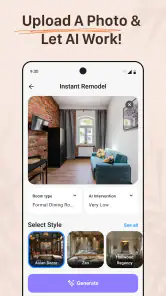
This app is packed with features that cater to both novice home decorators and seasoned pros. One of the standout features is the AI-powered design suggestions. Just snap a photo of your room, and the app will analyze it, suggesting styles, color palettes, and even furniture arrangements. It’s like having a personal design assistant on call 24/7.
Another cool feature is the extensive library of furniture and decor items. You can browse through an array of options, from modern minimalist to cozy bohemian, and see how they’d look in your space. The 3D visualization tool is especially impressive, allowing you to move items around and view your room from different angles. It brings your design dreams to life before you make any commitments.
Putting It to the Test: My Living Room Makeover
I decided to put the app to the test with my own living room. Armed with a photo and a vague idea of what I wanted, I let the app do its magic. Within seconds, I had a plethora of design suggestions tailored to my space. The AI worked wonders, offering ideas I’d never have thought of on my own.
After playing around with color schemes and furniture placements, I settled on a contemporary look with a touch of rustic charm. The app even helped me find the perfect rug to tie the room together, offering links to purchase directly from trusted retailers. It was like having a virtual shopping assistant guiding me every step of the way.
Why This App Stands Out
What really sets this app apart is its blend of advanced technology and user-friendly design. The AI algorithms are top-notch, providing personalized design solutions that feel anything but generic. Plus, the app’s accessibility is a huge win—you don’t need a degree in interior design to create a space you love.
I also appreciated the option to save and share designs. Whether you’re showing off your ideas to friends or collaborating with a partner, this feature makes it easy to get feedback and refine your vision.
Cost, compatibility, and my verdict
For a House & Home app, the appeal is straightforward: it helps turn an uncertain decorating idea into something visual. It is developed by Dmytro Bubela, is free to install, and has in-app purchases ranging from $5.99 to $49.99 per item. Its average rating is 4.4 from around 41,000 ratings, with over 1 million installs. Those figures suggest that many people have tried it, but I would still judge it by whether its design workflow suits the kind of decisions I need to make.
It is rated for Everyone, runs on Android 7.0 and later, and its current version is 1.19.0. The app was released on May 16, 2025. If you are on an older device, checking compatibility before planning a project around it is sensible. For iPhone users, I would verify availability and device requirements in the relevant store before assuming the Android details apply.
Compared with starting from a blank room-planning canvas, photo-led AI design is a more immediate way to spark ideas; compared with a professional designer or a detailed planning tool, it is a less dependable route to exact decisions. I would choose it for inspiration and early conversations, not for a measured renovation blueprint. That boundary is the key to getting satisfying value without expecting the app to do a job it is not meant to do.
Final Thoughts: A Must-Try for Design Enthusiasts
All in all, AI Remodel - Interior Design is a game-changer for anyone looking to refresh their living space. It’s packed with features that simplify the design process, making it accessible and enjoyable for everyone. Whether you’re planning a complete overhaul or just looking for a little inspiration, this app is definitely worth checking out.
So, if you’ve been dreaming of reimagining your home, why not give AI Remodel - Interior Design a try? It might just be the design companion you never knew you needed.
My recommendation is to start with a specific room and a modest question, then decide whether the free experience gives you enough direction before considering any paid item. I would skip it if I needed dependable construction measurements or a guaranteed match to purchasable furniture. For everyone else who wants a low-pressure way to explore a room’s possibilities, it is a reasonable place to begin—as long as the final decisions still happen in the real space.
AI Remodel - Interior Design Frequently Asked Questions
Can AI Remodel - Interior Design help me explore ideas before I start a renovation?
Yes. The app is intended to help users imagine home changes and plan a renovation with AI-assisted home design tools. It can be a useful place to explore possible looks before committing to a project. Treat its suggestions as inspiration and planning support, then check measurements, materials, building requirements, and costs before making real-world renovation decisions.
Can I use AI Remodel - Interior Design to plan more than one room?
The app focuses on home renovation and interior design, so it may be useful when thinking through changes in different parts of a home. Its store summary highlights a planner and home-decor tools. Before relying on it for a whole-home project, consider whether the available options fit the rooms and level of detail you want to plan.
Do I need interior design experience to get value from AI Remodel - Interior Design?
No particular design background is needed to explore an interior design app, and AI Remodel - Interior Design is aimed at people looking for help imagining changes to their spaces. Beginners can use it as a starting point for ideas, while more experienced users may use it to consider alternatives. For complex projects, professional advice can still be important.
Who makes AI Remodel - Interior Design, and how can I assess its reputation?
AI Remodel - Interior Design is made by Dmytro Bubela. It has a 4.4 average rating from around 41,000 ratings and more than one million installs, which gives prospective users a sense of its reach and reception. Ratings are only one part of the decision, so consider whether the app’s design-planning approach matches what you need.
Is AI Remodel - Interior Design free to download, and what should I know about optional purchases?
AI Remodel - Interior Design is free to download, so you can try the app without paying upfront. It also offers in-app purchases, with items priced from $5.99 to $49.99, which may unlock additional options. Consider whether those purchases suit your needs before buying, and check the purchase details in the app so you understand what each item provides.
Pros
- Intuitive interface for easy navigation.
- Wide variety of design templates available.
- High-quality rendering for realistic visuals.
- Customizable elements for personalized designs.
- Fast processing and quick results.
Cons
- Limited free features before subscription.
- Occasional crashes on older devices.
- Requires internet for full functionality.
- Some features are complex for beginners.
- Ads can be intrusive in free version.
- Category
- House & Home
- Version
- 1.19.0









