AI Hairstyle Try On & Color
- 83.00
- 4.8
- Installs
- 1.00M
- Price
- Free
Screenshots
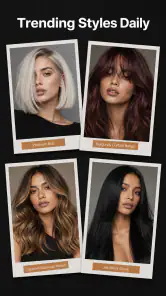
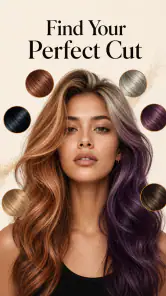
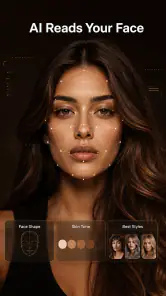
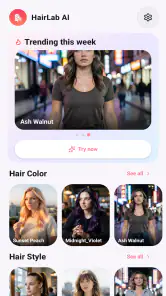
Analysis by Reviewed
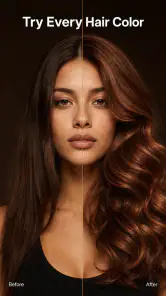
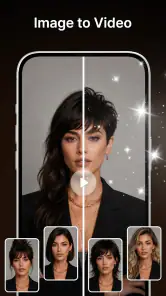
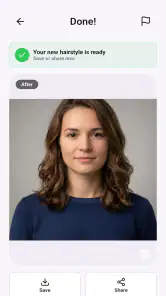
Choosing a new haircut from a picture can be surprisingly hard: a style that looks right on someone else may feel entirely different on you. AI Hairstyle Try On & Color is meant to make that decision less abstract by letting you preview hair looks on a photo of yourself. I see its main value as a low-pressure way to explore possibilities before showing a stylist a reference or making a change you cannot quickly undo.
It is an art and design app from Vit Corp., aimed at people who want a visual preview rather than a full photo-editing workspace. The app is free to install, rated for Everyone, and has a 4.8 average from around 3,700 ratings, with more than a million installs. Those figures suggest it has found an audience, but the important question is whether trying a style on a photo helps with your particular decision. In my view, it is most useful as a conversation starter—not as a promise of exactly how a cut or color will turn out in real life.
What to consider before trusting a hairstyle preview
A useful preview starts with a useful photo
The result depends heavily on the image you choose. For a fair comparison, use a clear, front-facing photo with your hair visible and your face evenly lit. A photo with a strong side angle, hair covering the forehead, or a busy background can make it harder to judge the shape of a proposed style. I would take a fresh picture in ordinary daylight rather than rely on a flattering but heavily filtered selfie.
Try to keep the camera distance and expression consistent across photos. If you are comparing several cuts, switching between a close-up selfie and a distant full-body shot can make the styles seem more different than they are. This small bit of preparation makes the app more useful without requiring any design skills.
Decide what question you want the image to answer
Before browsing, narrow your aim: are you weighing a shorter length, considering bangs, or deciding whether a warmer color suits you? Changing one broad feature at a time makes the comparison easier to interpret. If you alter both the cut and color in a single leap, you may like the overall image but still not know which change worked for you.
That is especially useful when you are making a real appointment. I would save a small set of contrasting ideas—perhaps one conservative option and one more adventurous one—rather than treating every attractive preview as a serious candidate. The point is to clarify your preferences, not to produce a final salon instruction from a single image.
Keep the preview in perspective
A digital try-on can help you notice whether you prefer a face-framing shape or a different shade, but it cannot reproduce every detail of a finished style. Hair texture, density, growth patterns, maintenance, and the way a stylist adapts a cut all matter. Use the image to explain the direction you like, then ask a professional whether that direction suits your hair and routine.
This distinction is where the app earns trust for me. It is a visual aid for imagining possibilities, not a substitute for a consultation or a guarantee that the result will match the picture. If you keep that boundary in mind, a less-than-perfect preview can still help you decide what to ask for.
Where this app is most useful
Quick visual exploration without editing know-how
Compared with general-purpose photo editors, a dedicated hairstyle app has a clearer job: help you think about hair changes on your own face. You do not need to build a composite manually or learn a complicated set of editing controls just to explore a new look. That focused purpose is a practical advantage when your goal is simply to compare possibilities.
The app’s store summary focuses on trying cuts, colors, and styles on a photo. That gives it a wider decision-making role than a color-only preview: you can use it to think about the overall impression of a change, not merely whether a shade appeals to you. I would still approach those dimensions separately when making a careful comparison, since a dramatic cut and a new color together can obscure what you actually prefer.
A realistic moment when it can help
Imagine you have a haircut booked after work and are unsure whether to keep your current length or go shorter. At home, take a clear photo, explore a few directions, and note what feels appealing: perhaps the outline, the amount of length around your face, or a lighter-looking color. Bring those observations to the appointment alongside the image. You arrive with a better sense of what you want, while leaving room for the stylist to adapt it to your hair.
It can also help when you are considering a color change but do not want to rely only on inspiration pictures featuring someone with a different complexion or face shape. Seeing a proposed direction on your own photo may reveal that you prefer a subtle shift over a dramatic one. Treat that reaction as a starting point, not a definitive color match.
Useful for narrowing choices, not choosing for you
One less obvious benefit of a try-on workflow is that it can expose what you do not like. You might start convinced that a short cut is the goal, then notice that you care more about keeping a particular shape near your face. That is valuable information to bring into a salon discussion even if you never use the exact look you previewed.
I would compare options in pairs and keep the photos easy to distinguish. For instance, first compare lengths while keeping color roughly consistent, then compare shades against the length you prefer. This reduces the risk of choosing a look because one polished image feels exciting when the underlying change is not what you wanted.
What the strong reception does—and does not—tell you
The 4.8 average and broad adoption are encouraging signs that many people find the concept worthwhile, but they do not tell you whether a particular rendering will suit your photo or your expectations. A hairstyle preview is personal: the quality of the image you start with and the kind of change you are considering both affect how useful it feels. I would judge the app by whether it helps you make a clearer decision, not by popularity alone.
The current version is 1.2.7, and the minimum operating system listed is 7.0. If you are checking compatibility before installing, those are the practical details to keep in mind. The app is free to start, while in-app purchases are listed from $19.99 to $38.99 per item, so it is sensible to explore the free experience first and decide whether paid options are worth it for your needs.
When another approach may be a better fit
For precise salon planning, use a professional consultation
If you need a confident answer about whether a certain cut will work with your hair’s texture, thickness, or daily styling routine, a photo preview is not enough. A stylist can look at your actual hair, discuss upkeep, and explain which parts of a reference are realistic. In that situation, use the app to gather ideas, but let the consultation guide the final choice.
It may also be the wrong tool if your decision depends on a highly accurate color result. Screen appearance, lighting, and the way a digital effect sits on a photo can all influence what you see. If you are choosing between subtle shades or making a major color commitment, ask a colorist about what is achievable and how much maintenance the result may involve.
For polished portraits, a general photo editor may suit you better
If your goal is to create a finished social-media image, rather than decide on a real haircut, a broader photo editor may offer more control over the whole picture. A dedicated try-on app is focused on hair decisions; it is not the first choice for retouching, composing a portrait, or designing a complete visual project. The right alternative depends on whether you want a decision aid or a finished piece of edited content.
Likewise, if you already know the exact cut you want and only need to communicate it, a trusted reference photo and a conversation with your stylist may be faster. The app makes more sense when seeing an idea on your own face could change your mind. It is less compelling when the decision is already settled.
Remember the effort involved in switching methods
Moving from an app preview to a salon decision is straightforward if you use the image as inspiration and describe what matters to you. It becomes less helpful if you expect a stylist to reproduce every edge of a simulated look exactly. I recommend explaining the feature you like—such as the length, outline, or general color direction—rather than presenting the preview as a rigid specification.
If you decide the app is not giving you a useful view, you do not need to keep generating alternatives. A few comparisons are often enough to identify a preference; beyond that, additional looks can create indecision. Switching to a consultation or a carefully chosen reference is a sensible next step, not a failure of the app.
Cost, audience, and my recommendation
Try before paying, and keep your goal narrow
Because the app is free to install but includes purchases priced from $19.99 to $38.99 per item, I would first see whether its basic experience answers your question before spending anything. Decide in advance what you want to compare and whether the results are clear enough to guide you. That helps prevent paying for more possibilities when what you really need is advice from a stylist.
The app is aimed at a broad audience: its content rating is Everyone, and its visual approach does not assume professional design experience. Still, it is especially relevant to people considering a change who want a quick way to test their reaction to different looks. It is less useful for someone who wants technical editing control, guaranteed color accuracy, or a replacement for hands-on hair advice.
Who I would recommend it to
I would recommend AI Hairstyle Try On & Color to a friend who is genuinely undecided and wants to turn vague inspiration into a few concrete options. It can make the early part of a haircut or color decision more engaging, especially when you use a clear photo and compare one change at a time. Its strengths are focus and accessibility; its main limitation is that a convincing preview should not be mistaken for a promise about real hair.
If you are choosing between several broad directions, give it a try and use the result to sharpen the conversation you will have with a stylist. If you already know your choice, need detailed advice about your hair, or want a polished photo-editing toolkit, another route will probably serve you better. For everyone in between, AI Hairstyle Try On & Color is a handy first step: useful for imagining a change, most valuable when paired with realistic expectations.
AI Hairstyle Try On & Color Frequently Asked Questions
What is AI Hairstyle Try On & Color?
AI Hairstyle Try On & Color is an app designed to help you preview different hairstyles and hair colors using a photo. Depending on the features available in your version, you can select or generate looks and see how they might suit your appearance before visiting a salon. Treat the results as visual inspiration rather than an exact prediction of how a cut or color will look in real life.
How do I get the best hairstyle preview?
For a clearer preview, use a well-lit, front-facing photo with your face unobstructed and your hair visible. Keep your expression neutral and avoid strong filters, hats, or shadows, since these can make it harder for the app to place a style convincingly. Results may vary with photo quality and the hairstyle selected, so trying several pictures or options can help you find a more useful reference.
Can I try different hair colors as well as hairstyles?
The app is intended to let users explore hairstyle and hair-color ideas, though the available choices and tools may depend on the current app version. A color preview can help you compare broad possibilities, but it may not reproduce salon results exactly. Your natural hair color, texture, lighting, and the coloring process can all affect the final outcome, so share your preferred preview with a stylist before making a change.
Is AI Hairstyle Try On & Color free to use?
Check the app’s store listing and in-app purchase details before downloading, because pricing, free features, subscriptions, and trial offers can change. Some versions of photo-editing apps provide basic previews at no cost while reserving additional styles or tools for paid access. Review renewal terms and cancellation instructions carefully if you start a subscription, and confirm that any purchase is through the official app store.
What happens to my photos and personal data?
A hairstyle app may need access to a photo or camera image to create a preview, but its specific storage and processing practices depend on the developer and current privacy policy. Before uploading a personal image, review the permissions requested, the app’s privacy information, and any account or deletion options. Avoid using photos of other people without their permission, and choose images you are comfortable sharing with the service.
Pros
- Lets you preview different hairstyles before committing to a real cut.
- Hair color options make it easy to compare potential new looks.
- Virtual previews are quick
- so you can test several styles in one session.
- Can help you communicate a preferred look to a hairstylist.
- Useful for exploring bold changes without altering your actual hair.
Cons
- Results may look less convincing when the photo is blurry or poorly lit.
- Hair overlays may not match your hairline or face shape precisely.
- Some styles or features may require a purchase or subscription.
- The app may request access to photos or the camera to create previews.
- A digital preview cannot show how a style will behave with your hair texture.

- Category
- Art & Design
- Version
- 1.2.7