MistyPix: AI Image Generator
- 10.00
- 4.5
- Installs
- 500.00K
- Price
- Free
Screenshots

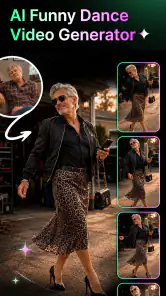

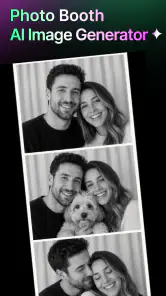
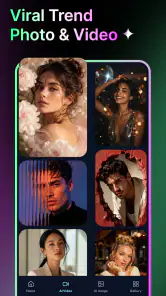
Analysis by Reviewed
I can see MistyPix: AI Image Generator making the most sense in a home where people like experimenting with pictures together, but don’t all want the same thing from a photo app. One person might be making a playful portrait, another might be looking for a short video idea, and someone else may simply want to browse visual styles. That kind of casual, shared-device use suits an app built around AI-generated imagery and templates better than a serious editing session does. My main advice is to treat it as a creative toy and starting point, not as a replacement for a careful photo editor.
Using MistyPix together without mixing up creative work
Good for quick, shared inspiration
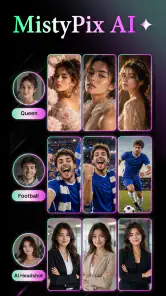
As a photography app, MistyPix is aimed at making images and videos with AI rather than managing a family photo library or refining every detail by hand. That distinction matters when a device passes between people. Its appeal is the chance to try a visual idea quickly: choose a template or use the generator, see what direction it takes, then decide whether the result is worth keeping or sharing.
For a realistic everyday example, imagine a quiet evening when one person wants a festive profile image and another wants a more imaginative look for a social post. Instead of both people working through the same detailed editing workflow, they can take turns testing different creative directions. I’d suggest agreeing first on whose photo or prompt is being used, and saving each person’s finished work in a clearly identified place outside the app if the device’s normal photo library is shared.
That last step is useful because shared-device convenience can also create confusion. A finished image may be easy to mistake for someone else’s work, especially if several people are trying templates in one sitting. A simple routine—one person creates, checks the result, and saves or shares it before handing over the device—keeps the process tidy without assuming the app has separate household profiles or collaboration tools.
Set expectations before passing the device around
I would not assume that “shared use” means separate accounts, private workspaces, or family controls. Those are decisions to make at the device and household level, not features I would attribute to MistyPix without evidence. If several people use one phone or tablet, decide together whether everyone is comfortable with the same app session and where generated pictures should go. For personal portraits or images of other people, ask before uploading or creating something on their behalf.
A useful boundary is to keep experimentation separate from a person’s final, public-facing content. AI results can be surprising, and a template that seems funny in the moment may not suit the person pictured. I’d review an image before sending it to a group chat or posting it, rather than letting a quick generation become an accidental public post. This is especially worth doing when a younger person is borrowing an adult’s device or creating images of friends.
There is also a practical difference between taking turns and sharing one account. If the app asks a household member to make choices, enter information, or consider a purchase, the device owner should handle that step. MistyPix is free to install, but it offers in-app purchases priced from $4.99 to $14.99 per item. I’d make that boundary clear before anyone starts exploring, so a creative session does not turn into an unexpected spending decision.
Coordinate around the result, not just the template
Trending templates can make it tempting to focus on the style and rush through the rest. My better workflow would be to choose the intended use first: a private joke, a profile picture, a birthday greeting, or an idea for a short video. Then pick a template or generator approach that fits that purpose. This reduces the chance of spending time on an eye-catching effect that produces the wrong mood or format for what the household actually needs.
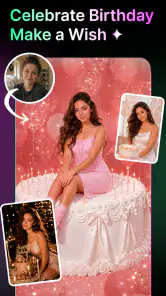
For a group project, such as making a birthday image together, decide who is supplying the photo and who has the final say before generating variations. That sounds small, but it avoids the familiar shared-device problem of several people editing toward different outcomes. I’d also keep an original copy of any important photograph before experimenting, so the creative version does not become the only version anyone can find.
One trade-off is that template-led creation prioritizes speed and recognizable styles over fine control. If you want to adjust every element, preserve a consistent look across a set of images, or prepare polished work with exact specifications, a conventional editor may be the better tool. MistyPix is more appealing when the goal is to explore an idea and get a visually distinctive result without building it from scratch.
Age context and a sensible trust check
MistyPix has an Everyone content rating, which makes it broadly accessible in store terms, but that does not remove the need for adult judgment around photos, sharing, and purchases. AI-generated imagery can be playful, yet the source photo and the final destination still matter. I would guide children toward using appropriate images, avoid creating or circulating embarrassing depictions of classmates, and talk through the difference between an edited image and an ordinary photograph.
For parents, the most useful question is not simply whether a child can open the app; it is whether the household has a clear rule for whose pictures can be used and where results may be shared. I’d keep any payment decisions with the adult who manages the device and review the app together before a child uses it independently. Those are sensible household habits, not claims about special controls inside MistyPix.
Trust also means being realistic about the creative process. An AI result is an interpretation, not a faithful retouch of the original person or scene. If accuracy matters—such as documenting an event, preserving a product’s exact appearance, or making a formal portrait—I would choose a standard camera or editing workflow instead. For playful concepts, the less predictable output can be part of the fun.
What the app’s standing suggests
Developed by Vit Corp., MistyPix has an average rating of 4.5 from around 1.3 thousand ratings, with 10 written reviews and over 500 thousand installs. I read that as a sign that the app has attracted a sizeable audience for this particular style of creative photo-making, not as a guarantee that every result will suit every user. The current version is 1.8.0, and it requires Android 8.0 or later; that makes compatibility worth checking before handing an older household device to someone for a shared session.
The app is free to download, so trying its general approach does not require paying upfront. The in-app purchase range is still important in a household setting, especially if children or guests use a device with payment details attached. I’d explore the free experience first, then decide whether any paid option is worthwhile for the way your household actually uses AI images. If you only need an occasional crop, color correction, or straightforward collage, a familiar basic editor may be simpler and more predictable.
Where it fits beside ordinary photo apps
Compared with a standard photo editor, MistyPix is better suited to transformation and novelty than precise correction. A conventional editor usually makes more sense when you need to straighten a horizon, remove a small distraction, tune exposure, or keep a set of photos consistent. MistyPix’s AI-and-template focus is more useful when you want a fresh concept without manually assembling every visual choice. I would keep both kinds of tools in mind rather than expecting one app to cover every photography task.
It also differs from a camera app: it is not the tool I’d reach for to capture a fleeting family moment. I’d take the original photo with the camera, then use MistyPix afterward if I wanted to turn that image into something more stylized. Keeping capture and creative experimentation as separate steps gives you a dependable original while leaving room to try bolder versions.
The key practical tip is to work from a copy when the source image matters. Another is to make one decision at a time: pick a purpose, test a style, inspect the output, then save or share. A third is to agree on ownership before a shared session begins. These habits make a template-based generator easier to use responsibly, even without assuming any built-in tools for household organization.
My household verdict
I’d recommend MistyPix to people who enjoy trying AI-driven looks and want an approachable way to make creative images or videos with templates. It can be a fun shared-device activity when everyone takes turns, respects the person in the photo, and knows who is responsible for saving or posting the result. Its free starting point helps make casual experimentation accessible, while the optional purchases are a reason to set a clear spending boundary.
I would skip it if your household needs detailed manual editing, strict separation between users, or a dependable archive of original photos. It is also not my first choice for children using a device without adult guidance, or for images where fidelity and privacy are more important than novelty. For those situations, a standard editor, the device’s camera, or simply keeping the image unaltered is the safer and more useful choice.
Overall, I see MistyPix as a playful creative corner rather than the center of a household’s photo workflow. Use it when the goal is to explore a look together, keep the original safe, and pause before sharing or spending. With those boundaries in place, it has a clear role: turning a shared moment of curiosity into a visual experiment, without asking it to do the jobs better handled by a conventional photo app.
MistyPix: AI Image Generator Frequently Asked Questions
What is MistyPix: AI Image Generator?
MistyPix is an AI image-generation app designed to turn written prompts into original visuals. You describe the subject, style, mood, or details you want, and the app uses AI to create an image based on that description. The results depend on how clearly you write your prompt and on the features available in your version of the app.
How do I create an image with MistyPix?
To generate an image, enter a text prompt describing what you want to see, then choose any available options such as an artistic style or image format before starting generation. More specific prompts can help guide the result—for example, include the subject, setting, lighting, and mood. AI outputs can vary, so you may need to revise your wording and generate again.
Is MistyPix free to use?
The app may offer free access with limits, while additional generations, styles, or other features could require a subscription or in-app purchase. Pricing and included allowances can change, so check the current listing and the app’s purchase screen before subscribing. Review renewal terms and cancellation instructions carefully, and confirm whether any trial converts automatically into a paid plan.
Can I use MistyPix images for commercial purposes?
Commercial use depends on the app’s current terms, the plan you use, and any applicable rules concerning AI-generated content. Do not assume that every generated image is automatically cleared for advertising, merchandise, or client work. Before publishing or selling an image, review MistyPix’s license and privacy terms, and consider checking that the output does not resemble protected characters, brands, or real people.
Do I need an internet connection, and what happens to my prompts?
AI image generation commonly requires an internet connection because prompts are processed using online services, so offline creation may not be available. Prompts or generated images may also be transmitted or stored to provide the service, depending on the app’s policies. Before uploading sensitive information or photographs, read the current privacy policy and check the app’s permissions and available data controls.
Pros
- Quickly turns text prompts into original images.
- Useful for brainstorming concepts and visual ideas.
- Offers a simple way to explore AI image generation.
- Can produce varied results from the same prompt.
- Generated artwork is easy to share.
Cons
- Image quality may vary depending on the prompt.
- Results may not precisely match what you imagined.
- Generating images can require an internet connection.
- Free usage may be limited or include paid features.
- AI-generated details can look inconsistent or distorted.
- Category
- Photography
- Version
- 1.8.0













