Fluza: AI Language Tutor
- 31.00
- 4.9
- Installs
- 1.00M
- Price
- Free

Screenshots




Analysis by Reviewed
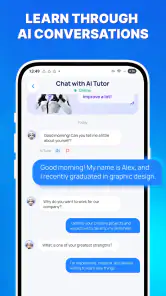
I look at a language-learning app differently when I’m using it in an ordinary moment rather than sitting down for a formal lesson. Can I make progress when I have only a few minutes, and can I follow what it asks of me without fighting the interface? Fluza: AI Language Tutor is an education app from Vit Corp. built around practice with an AI coach. Its appeal is the promise of immediate responses while learning, but that kind of interaction also makes clarity, pace, and personal comfort especially important.
My overall impression is that Fluza is worth considering if you want to practise producing language, not just review it. It may suit learners who appreciate a conversational format and feedback as they go. It is less obviously suited to someone who needs a fully self-paced, text-only course or a structured curriculum they can inspect in advance. That distinction matters: an AI coach can make practice feel responsive, but responsiveness is not the same as a carefully explained lesson or a universally accessible learning experience.
How the learning experience meets different needs
Readability and finding your way through practice
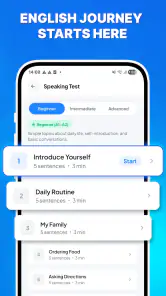
The central idea is straightforward: use the app to learn and practise a language, with an AI coach providing feedback. That gives a new user a clear reason to open it. Rather than treating language learning as a stack of disconnected exercises, Fluza frames it as a chance to try something and receive a response. For a learner who finds a blank notebook daunting, that conversational premise can make it easier to begin.
Still, a clear concept does not guarantee that every interaction will be easy to follow. AI feedback can be useful when it points out a mistake in context, but learners benefit most when they can tell what was incorrect, why it matters, and what to try next. I would approach each correction actively: compare it with the phrase you intended, then say or write a revised version instead of simply moving on. That small habit helps turn feedback into learning rather than a stream of answers.
One practical workflow is to keep a short personal list of phrases that repeatedly cause trouble. After a practice session, note the expression, the correction, and one example of your own. This is useful even when an app responds instantly, because a quick conversation can otherwise disappear from memory. Fluza’s coaching concept makes it a natural place to test those phrases, while a separate note can provide a stable record for later review.
The app has a 4.9 average from around 6.9 thousand ratings, and it has passed one million installs. Those figures suggest that many people have tried it and that user sentiment is strong, but they cannot tell me whether its interaction style will suit a particular learner. I would treat them as a reason to take a look, not as evidence that every correction or lesson will match your needs.
Motor and sensory considerations during practice
Any language app that asks for active practice can involve more than reading. Depending on how a learner interacts with it, they may need to tap through prompts, enter text, or engage with spoken language. I can’t assume that every mode of interaction is available or that every exercise works equally well for every ability, so it is sensible to try a short session and notice what the app actually asks you to do.
If typing is uncomfortable or tiring, keep the first session brief and check whether the interaction fits the way you prefer to practise. If listening is difficult in a noisy environment, choose a quieter moment rather than judging the coaching on a rushed attempt. And if you need larger text, high contrast, captions, or compatibility with a particular assistive tool, verify that the current app experience works for you before relying on it as your main course. I would not assume those needs are covered simply because the app uses AI.
A useful trade-off here is spontaneity versus control. An AI coach may feel less repetitive than drilling the same fixed prompt, but an open-ended exchange can also demand more attention and decision-making. Learners who do better with one instruction at a time may want to prepare a narrow goal before opening Fluza, such as practising a greeting or checking a sentence they plan to use. Keeping the task small reduces the mental load and makes it easier to judge whether the feedback is helpful.
I also recommend separating correction from fluency practice. During one short session, focus on getting an idea across; afterwards, revisit a phrase or two and work on accuracy. Trying to monitor every word while responding can interrupt confidence, particularly for beginners. This is not a special feature claim about Fluza; it is a way to make an AI-led practice session more manageable and less stressful.
When and where Fluza is most useful
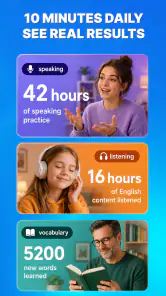
Fluza’s format seems most valuable in the gaps between more formal study. Imagine waiting for an appointment with ten quiet minutes available: you could use that time to practise a few everyday phrases, then save a difficult expression to revisit later. A brief, focused session is more realistic than expecting an app to replace a class, a textbook, or sustained conversation with another person.
For the same reason, I would be cautious about using it while walking through traffic, travelling in a crowded place, or multitasking at work. Language practice asks you to notice details and think about meaning. If the environment makes it hard to concentrate, the response may feel confusing even when the underlying issue is simply divided attention. A calm setting is especially helpful when you are trying to understand a correction rather than just keep a conversation moving.
It can also be useful as a low-pressure rehearsal space before a real interaction. Before travelling or speaking with a colleague, you might practise the core message you need to communicate, then check whether your wording is understandable. I would not treat an AI response as a guarantee that a phrase is culturally perfect or appropriate in every situation. For sensitive, formal, or high-stakes communication, a teacher or fluent speaker is a better final check.
Compared with flashcard apps, Fluza’s distinctive draw is active language use rather than simply recalling a stored word or phrase. Compared with a conventional course, an AI coach may feel more responsive, but a course with a defined sequence can be easier to follow when you want a clear path from beginner material to more advanced topics. And compared with a human tutor, Fluza may offer a convenient way to practise on your own, while a person can better interpret context, motivation, and subtle meaning. I see it as a practice companion, not a full substitute for those alternatives.
Costs, expectations, and remaining barriers
The app is free to download, with in-app purchases ranging from $3.49 to $69.99 per item. That broad span makes it worth checking the purchase details in the app before committing: consider whether a paid option matches how often you expect to practise and whether it addresses a need you actually have. I would start by seeing how the free experience fits your routine rather than treating a purchase as necessary for progress.
Fluza is rated for Everyone, and its current version is 1.6.0. It requires Android 8.0 or later. Those details help with basic eligibility, but age rating and operating-system compatibility do not establish that a learning interface is suitable for every age, reading level, sensory need, or assistive setup. If you are choosing it for a child or for someone who benefits from close guidance, I would sit with them through an initial session and see whether the prompts and responses are understandable.
The main limitation I would keep in mind is that an AI coach cannot automatically make practice accessible just by responding quickly. A learner may still need more explicit explanations, predictable lesson structure, or feedback from a person who understands their goals. Likewise, someone who prefers to study entirely offline, wants a fixed syllabus, or needs verified compatibility with a particular accessibility tool may be better served by a different resource. Those are not reasons to dismiss Fluza; they are reasons to match the app to the learner instead of asking the learner to fit the app.
Developed by Vit Corp., Fluza is a free education app with a strong average rating and more than a million installs, but I would choose it for its core use rather than its popularity: practising language actively with an AI coach. Its release date is May 27, 2026, a detail worth keeping in mind when comparing versions and support information. The app is a promising option for learners who want a convenient way to try phrases and receive feedback, provided they are comfortable with the interaction and verify that it meets their access needs.
My recommendation is to begin with one specific goal, try a short session in a quiet setting, and judge the quality of the feedback by whether you can understand and use it. Fluza: AI Language Tutor is most convincing as a flexible supplement between lessons or before everyday conversations. If you need a highly structured course, human nuance, or particular accessibility accommodations, compare it with those needs first. For everyone else, it offers a practical way to turn spare minutes into active language practice without pretending that an AI coach can do every part of learning for you.
Fluza: AI Language Tutor Frequently Asked Questions
What is Fluza: AI Language Tutor, and how does it help with language learning?
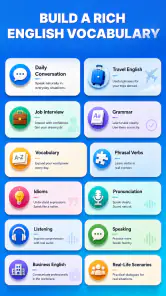
Fluza: AI Language Tutor is an app designed to help learners practice a language with AI-guided activities. Depending on the features available in your version, you may be able to work on conversation, vocabulary, grammar, or pronunciation at your own pace. It can complement a course or textbook, but AI feedback is not a substitute for a qualified teacher, and learners should verify important explanations when accuracy matters.
Which languages can I learn with Fluza?
The languages available can vary by app version, region, or subscription, so check the language-selection screen and the current store listing before downloading. Also confirm that the language you want is supported for the specific activity you plan to use: an app may offer lessons or vocabulary for a language without providing the same depth of AI conversation or speaking feedback across every language.
Is Fluza free to use, or does it require a subscription?
Fluza may provide some features at no cost while reserving additional practice, lesson access, or usage for a paid plan. Pricing, trial availability, and included features can change, so review the in-app purchase details in Google Play or the App Store before signing up. If you start a trial, check its renewal date and cancellation instructions to avoid an unexpected charge.
Does Fluza provide reliable feedback on speaking, grammar, and pronunciation?
AI feedback can be useful for regular practice, spotting common errors, and building confidence, but it may occasionally misunderstand a response or give an imperfect correction. Speech recognition can also be affected by background noise, accent, microphone quality, and internet connectivity. Treat suggestions as guidance rather than definitive rules, and compare uncertain explanations with a trusted dictionary, course, or teacher.
What should I check before downloading Fluza on Android or iOS?
Check that your device meets the app’s current operating-system requirements and that you have enough storage and a reliable connection, particularly if activities rely on online AI processing. Review the store listing for recent updates, supported languages, in-app purchases, and the developer’s privacy information. Because language practice may involve voice or text input, understand what data the app collects and how it is handled before sharing personal information.
Pros
- Offers AI-powered practice without requiring a scheduled tutor session.
- Can help learners build confidence by practicing in a low-pressure setting.
- Useful for fitting short language-learning sessions into a busy day.
- Provides a more interactive alternative to studying from word lists alone.
- May help learners spot gaps in their knowledge through conversational practice.
Cons
- AI feedback may miss context or give explanations that need double-checking.
- Conversation quality can vary depending on the language and topic.
- It may not fully prepare learners for the pace of real-world conversations.
- Progress depends on consistent use and self-directed practice.
- Some features or usage may require a subscription or in-app purchases.

- Category
- Education
- Version
- 1.6.0













