Госуслуги Дом
- 42.00
- 3.8
- Installs
- 5.00M
- Price
- Free

Screenshots

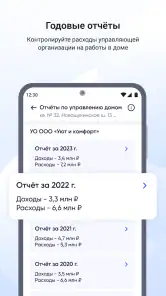


Analysis by Reviewed
I approach Госуслуги Дом as a practical home-and-housing app, not as a magic fix for every problem with a building or its services. That distinction matters: it can give residents a more organized place to handle housing-related tasks, but trust depends on what the app actually lets you do and on the choices you make while using it. I would treat it as a convenient channel, while still checking important submissions and payments through the relevant service when the stakes are high.
A focused role in housing matters
The app is free and is developed by Оператор информационной системы. It sits in the House & Home category, and its purpose is narrower than a general public-services portal: it is meant to help people deal with housing and communal-service issues. That focus is useful if your regular chores involve your home, but it also means I would not assume that every government task belongs here. The app is for a specific part of daily administration, rather than a replacement for every service you may use.
Its audience is broad: residents who want a single digital starting point for housing questions, people who help relatives keep track of household matters, and anyone who would rather begin on a phone than search through several separate channels. It has an Everyone content rating, so there is no age-based content barrier; in practice, the main question is whether the person using it is comfortable with an account and with handling housing information on a mobile device.
Trust starts with careful expectations
I would not judge a home-services app as trustworthy just because it looks polished or gathers tasks in one place. Housing information can be personal, and a payment or request may have consequences outside the screen. The responsible approach is to notice what the app asks you to do, read prompts before confirming, and avoid treating a convenient interface as proof that every issue has been resolved.
The current release is version 4.4.0, and the app has reached over five million installs. Its average rating is 3.8 from around fifty thousand ratings. Those figures suggest that many people have tried it, but they do not tell me whether a particular building, management arrangement, or request will work smoothly. I read the rating as a reason to form my own view, not as a guarantee of service quality.
Getting Started with Госуслуги Дом
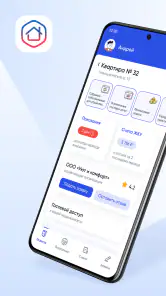
When I first downloaded Госуслуги Дом, I was a bit skeptical. I mean, how often do these apps actually deliver on their promises? But setting it up was a breeze. The user interface is pretty intuitive, and I didn't have to jump through hoops to get things running. Once you're logged in, you're greeted with a neat dashboard that displays all the services available, ranging from utility payments to scheduling appointments.
Checking account and device choices
Before adding personal details or using a service, I recommend taking a minute to review the account and device prompts shown during setup. I would only grant a permission when its purpose is clear in the moment, and I would revisit the phone’s app-permission settings if I later change how I use it. This is a useful habit for any app connected to home matters: it keeps the decision with you rather than turning every prompt into an automatic yes.
More From Our News Desk

Weather by Xiaomi Review: Clear at a Glance, Less Clear Up Close

X Under Pressure: Can It Recover When Posting Goes Wrong?

Clash of Clans Is Won Between the Battles

Android Auto Makes the Case for Quieter Car Software

MobiOffice: Transforming Mobile Productivity with Seamless Integration

EA SPORTS FC™ Mobile Soccer: Redefining Mobile Sports Gaming
I also separate account access from the phone itself. Use a screen lock you are comfortable with, avoid leaving an active session open on a shared device, and sign out when that is the sensible choice for your situation. These are ordinary precautions, not a claim about any special security feature. They matter because a housing app may be opened while someone else is nearby, or on a device used by more than one person.
If a relative asks me to help, I would let them remain in control of their own account and confirm each important action with them. It is tempting to handle everything quickly on another person’s behalf, but requests and payments can affect the household, and the account holder should understand what is being submitted. For a caregiver or family member, the app is most useful as a shared point of reference, not as a reason to blur who has authority to act.
Handling sensitive steps without rushing
Housing tasks often bring together names, addresses, account details, and decisions about money or maintenance. I would pause before submitting anything that includes those details and check that I have selected the right home and service. A small verification routine—read the address, review the amount or request, then confirm—can prevent the kind of avoidable mistake that is difficult to unwind later.
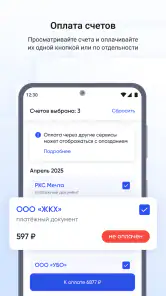
For payments, I would keep the confirmation or other useful record in whatever way the app and service make available, and compare it with the relevant account if something looks wrong. I would not rely on a memory of tapping a button as proof that a bill was settled. If a payment is time-sensitive, the safest workflow is to act early enough to investigate a delay rather than waiting until the last moment.
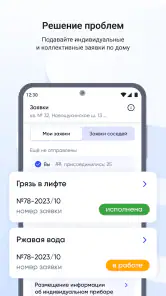
For a maintenance issue, I would describe the problem plainly and keep the wording factual: where it is, what is happening, and when I noticed it. If the issue changes, I would note that separately rather than sending repeated, slightly different messages in a hurry. This gives the person handling the request clearer information and gives me a more coherent record of what I reported.
There are limits to what a phone-based process can do. A serious leak, electrical danger, or urgent safety concern should not wait for an app interaction; I would use the appropriate emergency or direct contact route first. The app can be helpful for routine administration, but convenience should never replace an immediate response when a person or property may be at risk.
Features That Stand Out
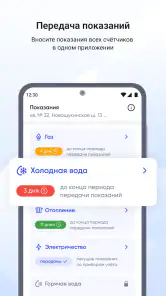
One of the features that caught my eye was the ability to manage multiple services in one place. Whether it's paying your electricity bill or booking a doctor's appointment, Госуслуги Дом has got you covered. What’s more, the app sends timely reminders for upcoming deadlines, ensuring you never miss a payment or an appointment. It's like having a personal assistant who’s always on top of things.
Another cool feature is the document storage option. You can upload and store important documents securely within the app. This means no more scrambling to find that one elusive file when you need it the most. Plus, the app's security measures are pretty robust, so you can rest easy knowing your information is safe.
For me, the useful habit is to treat reminders as prompts to check, not as a substitute for checking. If an alert appears, I would open the relevant item, verify the household and due information, and then decide what action makes sense. That extra glance is especially worthwhile when a household has several recurring obligations or when someone else also manages bills. It reduces the chance of acting on an old assumption.
Documents need the same restraint. A digital copy can save time when a form or reference is needed, but I would store only material that has a clear purpose there and avoid uploading extras just because there is space. I would also keep an independent copy of anything essential if losing access to the phone or account would create a problem. A convenient repository is helpful, but it should not become the only place a household can find a critical document.
What the app can and cannot replace
Compared with calling a management company or visiting an office, an app can make routine tasks easier to start and can help keep information together. It is also more structured than a personal notes app, because notes alone do not connect a reminder to the service or request you need to handle. But a direct call can still be better when you need an immediate answer, have an unusual situation, or cannot tell whether a digital request has reached the right person.
Compared with using separate websites or payment channels, a single app may reduce the effort of remembering where to go. The trade-off is that a single interface can become a bottleneck if your particular issue is not represented clearly or if you need a detailed conversation. I would use the app for straightforward tasks and switch to the relevant provider or official contact route when the issue needs explanation, negotiation, or urgent attention.
A realistic example is a resident who notices a communal-area problem while also remembering that a household bill is due. I would first handle any immediate danger by contacting the proper urgent service. For the ordinary maintenance concern, I would record the location and what I observed, then use the available housing channel and retain the details of the request. Separately, I would check the bill rather than assuming that a reminder itself means payment is complete. This division keeps urgent action, reporting, and routine account work from getting mixed together.
User Experience and Performance
Using Госуслуги Дом has been a smooth experience for the most part. The app is responsive, and I haven't faced any annoying lags or crashes. It’s clear that a lot of thought has gone into making the user experience as seamless as possible. Navigating through the various services is straightforward, and the app’s design is clean and modern.
However, there were a few times when the app took a bit longer to load, especially during peak hours. But hey, no app is perfect, right? As long as these hiccups are few and far between, I'm willing to overlook them.
That occasional wait changes how I would plan around it. I would not leave a deadline-sensitive task until the final minutes, and I would avoid repeatedly tapping a confirmation button if the screen is slow to respond. Instead, I would give the app time to finish, check whether the action appears to have completed, and only retry after I understand the status. Repeated attempts can create uncertainty about whether a request or payment went through.
If a screen does not load or a task is unclear, I would first check the connection and reopen the relevant section once, rather than assuming the whole service is unavailable. If the problem persists, I would use the appropriate direct contact channel for the housing matter. This is where a little patience and a fallback plan make the app more useful: it can be the first route without being the only route.
Who will get the most from it
I think the app makes the most sense for someone who handles recurring housing chores on a phone and values having a clear place to begin. It can also help a household member who wants to stay organized without keeping every due date or document in their head. The benefit is less about dramatic automation and more about reducing scattered effort: knowing where to look, checking what needs attention, and taking the next step deliberately.
It may be less suitable for someone who rarely uses smartphone accounts, prefers to resolve every issue by speaking to a person, or has a situation that needs negotiation rather than a standard digital task. A person who cannot reliably access the account or device should not depend on the app as their only route. In those cases, direct contact with the relevant housing organization or service is a better primary option, with the app reserved for tasks that feel clear and manageable.
New users may reasonably wonder whether they need to understand every section before starting. I would not try to set up or explore everything at once. Begin with the specific housing task you came to handle, read each prompt, and learn the route that applies to your own home. That makes it easier to notice whether the app is actually helping, and avoids adding information or permissions without a practical reason.
Final Thoughts
All in all, I’d say Госуслуги Дом is a solid app that delivers on its promises. It's incredibly handy for anyone looking to streamline their interactions with public services. The convenience of having everything in one place cannot be overstated. If you're someone who values efficiency and hates dealing with bureaucratic red tape, this app is definitely worth checking out. Just make sure you have a stable internet connection, and you’re good to go!
So, if you haven't already, go ahead and give Госуслуги Дом a try. It might just make managing your daily tasks a whole lot easier.
A cautious recommendation
My recommendation is positive, with a practical boundary: use the app for routine housing administration, but keep control of your account, read confirmations, and preserve another way to reach the people responsible for a problem. The combination of a free price and a focused role makes it easy to try without turning it into the household’s only source of truth. I would keep it if it genuinely saves me time, and reassess if its workflow does not fit the way my building handles issues.
The 3.8 average rating is a mixed signal rather than a verdict. Experiences with a housing service can depend on the issue, the building, and how quickly the responsible party responds, so I would not expect the app alone to solve every dispute or delay. My test for whether it belongs in your routine is simple: can you identify the right task, understand what you are confirming, and find a sensible next step if the app is slow or the result is unclear? If yes, it can be a useful tool. If not, a direct channel is the wiser choice.
Госуслуги Дом Frequently Asked Questions
Is Госуслуги Дом suitable for someone who only wants help understanding housing and utility issues?
Yes. Госуслуги Дом is presented as a guide for resolving housing and communal services issues, so it may be useful even if you are first looking for direction rather than a particular transaction. It is a House & Home app aimed at residents dealing with those topics. The app is free and has an Everyone content rating.
Will Госуслуги Дом work on my phone, and what should I check before downloading?
Before downloading, check that your device meets the app’s operating-system requirements and that you are using the appropriate app store for your platform. Android users need Android 9 or later. The app is available for Android and iOS, so prospective users can look for Госуслуги Дом in the store used by their device.
Who is Госуслуги Дом intended for, and what kind of app is it?
Госуслуги Дом is a House & Home app for people looking for a convenient way to deal with housing and communal services matters. Its description presents it as a guide for resolving those issues, so it is aimed at residents who want to handle relevant tasks from a phone rather than search for help in several places. The app is free and has an Everyone content rating.
What is Госуслуги Дом and what can I do with it?
Госуслуги Дом is a comprehensive app designed to streamline and simplify access to government services for residents. With this app, users can manage utility payments, access housing services, and receive notifications about important updates from local authorities. It serves as a one-stop solution for handling various civic services efficiently and conveniently from your smartphone.
Is the Госуслуги Дом app free to use or are there any hidden charges?
The Госуслуги Дом app is free to download and use. There are no hidden charges associated with accessing the core services offered by the app. However, users may incur standard charges from their service providers for any payments or transactions made using the app. It’s advisable to check with your service provider for any specific transaction fees.
Pros
- User-friendly interface
- Comprehensive service options
- Secure data handling
- Real-time updates
- Multilingual support
Cons
- Limited offline features
- Occasional login issues
- Requires stable internet
- Frequent app updates
- Device compatibility issues
- Category
- House & Home
- Version
- 4.4.0