Real Guitar: acoustic electric
- 7.39K
- 4.3
- Installs
- 50.00M
- Price
- Free

Screenshots
Analysis by Reviewed
I use Real Guitar: acoustic electric less as a replacement for a physical instrument and more as a quick way to explore guitar parts when I have a phone but no guitar nearby. That distinction matters: its strongest idea is putting playable strings and guitar sounds on a touchscreen, so I can try a chord shape, hear how a progression might feel, and keep a musical thought from slipping away. It is a music game from Kolb Apps, and its appeal is immediate, hands-on experimentation rather than a promise that a screen alone will teach every part of guitar playing.
When a phone can stand in for a guitar sketchbook
The most useful way to think about the app is as a portable guitar sketchpad. A physical guitar is better for building technique, but it is not always beside me when an idea turns up. A touchscreen lets me test whether a chord change sounds promising, try a simple strum, and keep the idea moving without having to wait until I get home. That is a modest role, but it is a real one: it turns spare moments into opportunities to explore rather than asking the app to replace a whole instrument.
This distinction also helps set expectations before downloading. If I want to understand how a progression might sound, the virtual strings can give me a useful first impression. If I need to know whether my fingers can reach a chord cleanly on a real neck, or whether I can keep a steady rhythm while changing shapes, the phone cannot answer that. I find the app most satisfying when I treat it as a place to start an idea, not as proof that I have mastered it.
Getting Started with Your Virtual Strumming
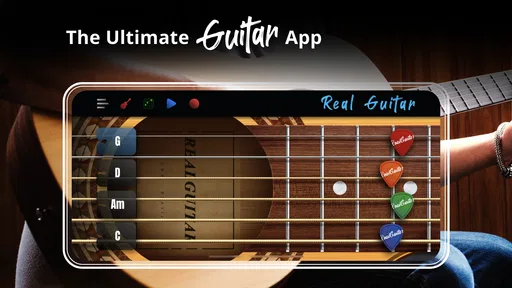
When I first opened Real Guitar: acoustic electric, I was immediately impressed by its sleek and intuitive interface. The app has a user-friendly design that makes it easy to navigate, even for those who might be new to guitar-playing apps. The initial setup is a breeze – you can choose between an acoustic or electric guitar mode, depending on your mood or style preference for the day.
Features that Rock
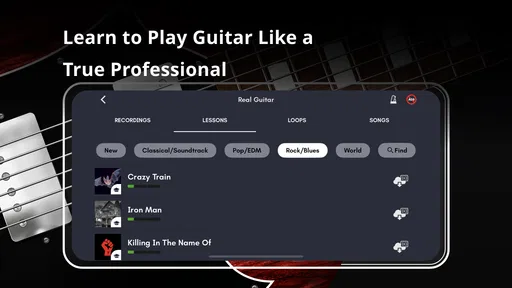
What sets this app apart is its wide array of features that cater to both novices and experts. For starters, the app boasts a large collection of chords and tabs, making it a fantastic resource for learning new songs. I found the chord library particularly helpful when I was trying to master some tricky finger placements. Plus, the sound quality is top-notch, providing a realistic strumming experience that feels almost like the real deal.
Another cool feature is the multi-touch support, which allows you to play several strings at once. This is super handy when you’re working on complex pieces that require a lot of finger work. Additionally, the app includes a handy metronome and loops, which are great tools for practicing timing and rhythm – crucial skills for any budding guitarist.
Turning Screen Practice into a Useful Routine
The best way I’ve found to use the on-screen strings is to give practice a narrow goal. Rather than tapping at random, I’ll pick a chord change I already know or a short rhythm I’m trying to remember, then repeat it slowly. The metronome can help me keep that repetition even; once the movement feels settled, I can try changing the strum pattern. This makes a short break on the bus or between tasks feel more purposeful than simply browsing through sounds.
More From Our News Desk

Weather by Xiaomi Review: Clear at a Glance, Less Clear Up Close

X Under Pressure: Can It Recover When Posting Goes Wrong?

Clash of Clans Is Won Between the Battles

Android Auto Makes the Case for Quieter Car Software

MobiOffice: Transforming Mobile Productivity with Seamless Integration

EA SPORTS FC™ Mobile Soccer: Redefining Mobile Sports Gaming
There is a useful distinction between remembering music and building guitar technique. A touchscreen can help me recall a chord sequence, hear whether a progression feels right, and experiment with rhythm, but it does not reproduce the pressure, reach, or calluses involved in fretting a real instrument. I wouldn’t use it as my only practice if my goal were to improve clean changes on a physical guitar. For that, I’d treat it as a companion: work out the idea here, then check it on the strings of a real guitar when one is available.
A quick routine for making the screen useful
For a short session, I would start with one question rather than browsing every available sound. For example: does this chord change feel settled, or does the rhythm need a pause before the next shape? I can play the same small idea several times, use the metronome to keep the timing from drifting, and then try a different strum. That makes the session easier to judge; I can leave knowing whether I found a musical direction, even if I have not practiced the physical movement needed to perform it.
There is also a practical trade-off in how I use the chord and tab references. They are useful when I need a prompt, but trying to learn a whole song by jumping between reference material and the virtual strings can interrupt the flow. I get more from choosing one small section, keeping the relevant shape in mind, and repeating it before moving on. This is especially helpful for beginners who can feel overwhelmed by a long list of chords: a single transition gives the ear and attention something clear to focus on.
Why You'll Love It
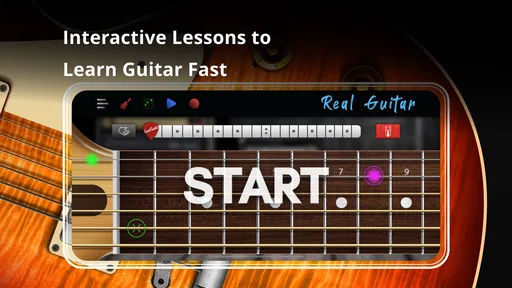
Now, I know what you're thinking – can an app really help me learn guitar? The answer is a resounding yes! With its interactive lessons and easy-to-follow tutorials, Real Guitar makes learning fun and engaging. I found myself eagerly coming back to the app day after day, keen to improve my skills and try out new songs.
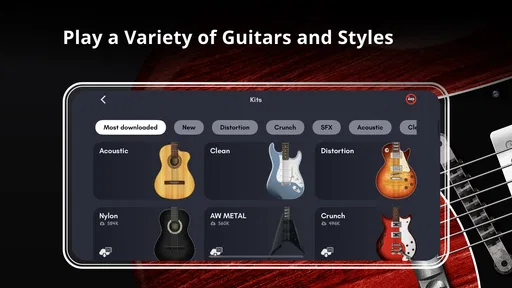
One of the standout aspects of this app is its ability to simulate both acoustic and electric guitar sounds with stunning accuracy. Whether you’re into rock, jazz, or classical, you’ll find that the app’s versatility allows you to explore a wide range of musical genres. Plus, the option to record your sessions is a nice touch, letting you track your progress and share your tunes with friends.
A small idea, captured in an everyday moment
Imagine waiting for a friend at a café and remembering a progression you were humming on the way there. I can open the app, try a few chord changes, and record a rough version while the idea is still fresh. That is a more convincing use than trying to turn a noisy wait into a full practice session. I would treat the recording as a reminder of the shape and feel I was aiming for, then revisit it later with a real guitar or another instrument if I want to develop it properly.
Recording is most helpful when I give the take a simple purpose: preserve the order of the chords, compare two possible rhythms, or make a note of a melodic idea. It is less useful to expect a quick phone performance to be a finished demo. Touching a screen is not the same as controlling pick attack or string dynamics, so the recording can capture the outline without representing how the idea will sound in a polished arrangement. Keeping that distinction in mind makes the feature practical rather than disappointing.
A Handy Fit, with a Few Boundaries
A realistic use for me is getting a melody or chord idea while waiting for someone, then recording a rough version before I forget it. That quick capture is where a virtual instrument can beat carrying a guitar: it is ready on the phone and doesn’t need a quiet room. I’d still listen back with a critical ear, because a touch performance is a sketch, not a reliable test of how the same passage will sound or feel when played with a pick and fretting hand.
Compared with guitar-learning apps centered on guided courses, this one is more appealing when I want to play directly instead of follow a structured lesson path. A dedicated tuner or a full music-production app is a better choice when the task is tuning a real guitar or building a polished recording. The trade-off is focus: Real Guitar gives me a convenient virtual playing surface, while those alternatives do their narrower jobs more thoroughly. If I’m learning a song, I also find it helps to keep the chord or tab reference nearby and work on one change at a time rather than expect the app to teach every detail automatically.
What it can and cannot tell you
The biggest limitation is not a missing button; it is the difference between tapping and playing. On-screen strings can make a chord progression audible, but they do not teach the physical pressure, finger placement, or coordination involved in producing clean notes on a guitar. A player who is struggling with buzzing strings or uncomfortable posture needs feedback from the real instrument, and often from a teacher or technique-focused lesson. The app can help them think through a musical idea, but it cannot diagnose why a physical chord sounds wrong.
It is also worth choosing the right alternative for the job. A structured course is a better starting point if I want a planned sequence of lessons and technique guidance. A tuner is the straightforward choice when I need to tune a guitar, while recording or production software makes more sense for arranging and refining a track. The advantage here is immediacy: I can get to a playable guitar surface quickly. The limitation is that this convenience should not be confused with the depth of a dedicated learning or recording tool.
One useful way to avoid that mismatch is to pair the app with a specific next step. I might use the virtual instrument to settle on a progression, write down or remember the chord order, and then test the same sequence on a real guitar. If I do not own one yet, I can still explore whether I enjoy experimenting with chords and rhythm, but I would not treat screen practice as a complete substitute for learning physical technique. That boundary is especially important for anyone deciding whether the app alone will prepare them to perform.
Who Gets the Most from It
I’d recommend it most to curious beginners, casual players who want to rehearse chord ideas away from their instrument, and songwriters who need a low-friction way to test a progression. It can also be a relaxed introduction for someone who wants to explore guitar sounds before deciding whether to pursue lessons or buy an instrument. It is less suitable for anyone who needs detailed feedback on hand posture, precise fret accuracy, or the physical feel of strings; a teacher, a real guitar, or a course designed around technique is a better fit for those needs.
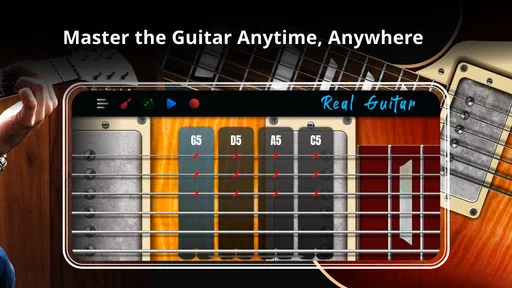
It also suits people who enjoy experimenting without needing every session to have a formal learning target. Switching between acoustic and electric sounds can make a progression feel different enough to prompt new ideas, and multi-touch supports playing several strings together rather than limiting the experience to isolated notes. But if someone mainly wants to follow a curriculum, measure technique, or prepare for a performance on a physical guitar, I would steer them toward a course or regular instrument practice instead. The right choice depends on whether their priority is exploration or instruction.
The app is free to start, with optional in-app purchases priced from $1.99 to $18.99 per item, so I’d try the basic experience before spending. It is rated for Everyone, has a 4.3 average from around 366,000 ratings, and has passed 50 million installs. Version 8.35.11 supports Android 7.0 and later. Those figures point to a widely used app, but they don’t change the practical question I’d ask myself: do I want an instant touchscreen instrument, or a structured course for learning guitar technique? Kolb Apps’ game is strongest in the first role.
Before making it part of your routine
If you are wondering whether you need a guitar to get started, the app’s virtual strings let you explore without one, which makes it a low-commitment way to see whether playing with chord shapes and rhythm interests you. If you already own a guitar, I would use the app between physical practice sessions rather than instead of them. The two approaches answer different questions: the screen is convenient for trying an idea, while the instrument tells you whether your hands can actually play it.
It is free to try, but optional purchases mean I would spend time with the basic experience first and only consider paying if a particular addition genuinely improves how I use it. I would also check that the Android device meets the stated minimum system requirement before installing. Those are simple checks, but they prevent a casual music break from turning into an unnecessary purchase or a compatibility surprise.
Final Thoughts
In conclusion, Real Guitar: acoustic electric is a fantastic app for anyone looking to learn guitar or enhance their existing skills. Its combination of user-friendly design, comprehensive features, and high-quality sound make it a standout choice among music apps. So, if you’ve ever wanted to unleash your inner rockstar or simply enjoy a musical hobby, this app is definitely worth checking out. Grab your phone, download the app, and start strumming your way to musical greatness!
Real Guitar: acoustic electric Frequently Asked Questions
What kind of app is Real Guitar: Acoustic Electric?
Real Guitar: Acoustic Electric is a music game by Kolb Apps that turns your mobile device into a virtual guitar. It is intended for playing and exploring guitar sounds on the go, and its store summary presents it as an app for learning and playing guitar anytime, anywhere. It may appeal to people who want a musical activity they can try directly on a phone or tablet.
How popular is Real Guitar: Acoustic Electric?
Real Guitar: Acoustic Electric has attracted a large audience, with more than 50 million installs. It has an average rating of 4.3 from around 366,000 ratings, alongside roughly 7,500 written reviews. These figures suggest that many users have tried it, though individual experiences can still vary depending on the device, expectations, and how someone prefers to learn or play guitar.
What age group is Real Guitar: Acoustic Electric intended for?
Real Guitar: Acoustic Electric is rated Everyone, so it is intended for a broad audience. Its focus is music and virtual guitar playing, which can make it an appealing option for younger users as well as adults interested in trying a guitar-themed game. Parents may still want to look at the app with a child and discuss optional purchases before letting them play.
Is Real Guitar: Acoustic Electric free to download, and are there optional purchases?
Real Guitar: Acoustic Electric is free to download, so you can try the guitar-playing experience without paying upfront. Optional in-app purchases are available for users who want to spend more, with listed items ranging from $1.99 to $18.99. You can decide whether to make a purchase as you explore the app; downloading it does not mean you need to buy anything.
Will Real Guitar: Acoustic Electric work on my phone or tablet?
The app requires Android 7.0 or later, so check your device’s operating system before downloading. It is a music game by Kolb Apps, built around playing a virtual guitar on a mobile device. If your device meets the minimum requirement, you can install it and see how the controls and sound experience feel on your particular screen and speakers.
Pros
- Realistic guitar sounds
- Wide variety of songs
- Easy to use interface
- Customizable settings
- Supports multiple playing modes
Cons
- Requires in-app purchases
- Limited free song selection
- Ads can be intrusive
- Some features need internet
- Battery drain on long use













