Real Percussion: drum set
- 267.00
- 4.4
- Installs
- 5.00M
- Price
- Free
Screenshots
Analysis by Reviewed
I approached Real Percussion as a quick way to turn a phone or tablet into a playable drum set, not as a replacement for sitting behind an acoustic kit. That distinction matters. The game, made by Kolb Apps, is built around percussion and guided learning, so its strongest quality is the way it lets me practise basic timing and hand coordination without needing a room, a full instrument, or a quiet moment long enough for a lesson at a real drum kit.
After using it, I found the most useful capability is the combination of a touch-based percussion setup with lessons. Tapping a virtual drum is easy; developing a steady pattern is harder. The lessons give that tapping a purpose, while the playable kit makes the exercise feel more immediate than reading a rhythm on a page. It is free to start, rated for Everyone, and available for Android devices running version 7.0 or later. That makes it approachable for children, curious beginners, and anyone who wants a casual music game that still teaches something practical.
The app has been around since December 2013, and its current version is 6.51.1. Its average rating is 4.4 from roughly twenty-four thousand ratings, with more than five million installs. Those figures suggest that it has found a durable audience, but they do not change my main advice: use it for accessible practice and musical play, not for a complete drum curriculum.
Why the lesson-focused percussion setup matters
I’ll focus on why a lesson-led percussion game offers a different kind of first step from an open-ended tapping app. The key is not simply having sounds at your fingertips; it is having a manageable reason to return and practise. That distinction helps explain what the setup is designed to make easier.
A playable kit that turns spare minutes into rhythm practice
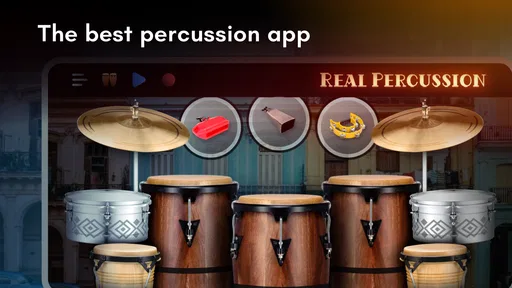
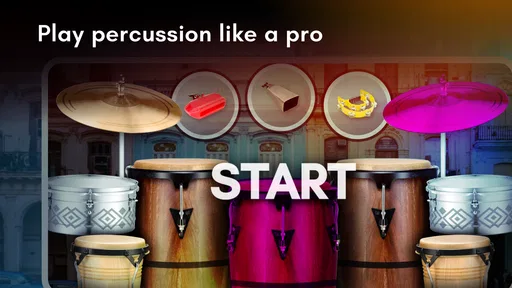
The central idea is simple: the screen presents percussion instruments that I can strike with my fingers. That sounds like a novelty until I use it to repeat a pattern several times. The phone becomes a small practice surface, and the distance between hearing a beat and trying to reproduce it is very short. I do not need to assemble hardware or remember a complicated setup. I open the game, choose a lesson or playing area, and start tapping.
That immediacy is especially valuable for beginners who are still deciding whether drumming interests them. A physical drum kit can be expensive, loud, and intimidating. Here, the first experiment is low-risk because the game is free. The optional in-app purchases range from $1.99 to $18.99 per item, so I would still check the purchase prompts before handing the device to a child, but the basic decision to try the app does not require buying a kit.
The screen format also changes how I think about coordination. On a real kit, I would distribute movement between hands and feet and learn how the instruments respond to different strokes. On a touchscreen, I mainly work with finger placement, timing, and the visual layout. That is a narrower skill set, but it is not useless. It helps me notice whether I rush a beat, hesitate before a change, or lose the pulse when a pattern becomes less familiar.
More From Our News Desk

Weather by Xiaomi Review: Clear at a Glance, Less Clear Up Close

X Under Pressure: Can It Recover When Posting Goes Wrong?

Clash of Clans Is Won Between the Battles

Android Auto Makes the Case for Quieter Car Software

MobiOffice: Transforming Mobile Productivity with Seamless Integration

EA SPORTS FC™ Mobile Soccer: Redefining Mobile Sports Gaming
The important benefit is feedback through repetition, not virtual realism. The app is most convincing when I treat each exercise as a short rhythm drill. If I simply tap randomly, it becomes a toy. If I repeat a pattern while listening carefully, it becomes a compact way to build timing awareness.
What the lessons add beyond free tapping
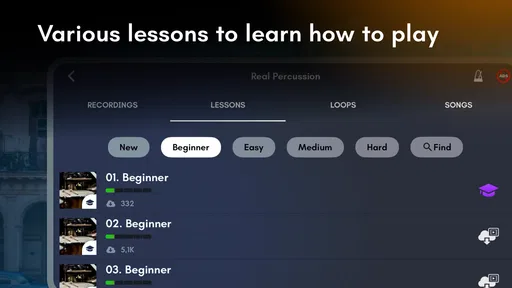
A virtual drum surface by itself can entertain me for a few minutes, but lessons give the experience direction. They encourage a progression from copying simple rhythms toward handling more involved patterns. I found this more useful than jumping straight into free play because it exposes small weaknesses that are easy to ignore when I am improvising.
For example, I might feel comfortable with a repeated beat but stumble when the pattern includes a pause or a change of emphasis. A lesson makes that moment obvious. I can slow down mentally, repeat the section, and concentrate on keeping the pulse rather than trying to play loudly or quickly. This is a good habit for a beginner: accuracy first, speed later.
Another practical advantage is that lessons create a stopping point. Many music apps leave me wandering between sounds, while a guided exercise gives me a clear reason to practise for a few minutes and then stop. That works well on a commute, during a break, or while waiting for an appointment. I do not need to reserve a full hour to get value from it.
How I use the touch controls without building bad habits
I recommend starting with the device placed on a stable surface rather than holding it in both hands. Holding it makes accidental movement more likely and encourages frantic tapping. With the screen supported, I can focus on consistent finger placement and listen for the rhythm. A larger tablet is easier to read and gives the virtual kit more breathing room, while a phone is more convenient for quick sessions.
I also avoid trying to imitate a fast performance immediately. Touchscreens reward short, direct taps, but rushing can make every beat blur together. I begin with a deliberately comfortable tempo, repeat the same exercise, and only increase the challenge when the pattern feels predictable. This approach makes the game more useful as practice and less frustrating as a reaction test.
Headphones can help when I am in a noisy place, although I would not use them at an unsafe volume. Listening closely matters because the sound is part of the lesson. Watching the screen alone can make the activity feel like a visual tapping game, while listening helps me judge whether the rhythm is actually steady.
How Real Percussion works in everyday use
I’ll look at how a short session can fit around ordinary routines, from choosing a small practice goal to deciding when to stop. Thinking about that workflow also makes it easier to judge whether the game suits quick, repeated visits or whether you would rather have a more immersive instrument experience.
A short session from opening the app to finishing a drill
My typical session begins with a simple question: do I want to learn a pattern or just play? If I am in learning mode, I choose a lesson and treat the first attempt as an assessment rather than a performance. I expect mistakes, especially when the rhythm changes. Then I repeat the exercise with less attention on the screen and more attention on the pulse.
When I have only a few minutes, I choose one small target instead of trying to complete everything available. That target might be keeping the basic beat without speeding up, placing a transition correctly, or finishing a pattern without stopping. This makes progress easier to notice. It also prevents the common mistake of tapping through several lessons without remembering what each one taught.
Free play has a different role. It is useful after a lesson because it gives me space to test the pattern in a less controlled setting. I can combine a familiar beat with small variations and see whether I still maintain the underlying pulse. If I jump into free play first, I tend to repeat comfortable movements and avoid the parts that need work.
A realistic use case: a beginner building a daily rhythm habit
Imagine a teenager who has become interested in drums but cannot practise loudly at home. A short session with this game can introduce basic rhythm without disturbing other people. The teenager can work through a lesson after school, then spend another minute in free play. The next day, repeating the same exercise provides continuity without requiring a teacher or a full kit.
I would not tell that learner that the app teaches every physical skill needed for drumming. It does not recreate pedal technique, stick rebound, posture, or the sound pressure of a real instrument. But it can answer an important early question: do I enjoy repeating rhythms enough to keep learning? If the answer is yes, the app has done something valuable before any larger purchase is made.
It also works for an adult who already understands music but wants a discreet way to keep timing active. During a break, I can practise a short pattern rather than scrolling through unrelated content. The session is small, but repeated small sessions can be easier to maintain than an ambitious practice plan that never fits the day.
What the app teaches well, and what it cannot reproduce
The strongest learning area is coordination between visual instruction, finger movement, and a steady beat. I can practise responding at the right moment and notice when I lose consistency. The app is also helpful for identifying whether I am more comfortable copying a pattern than creating one, which is a useful distinction for a beginner.
The limitations become clear when I compare the experience with an acoustic or electronic drum kit. A real kit gives each instrument a different physical response, and the player learns to control volume, rebound, and body movement. A touchscreen compresses those sensations into taps. It is therefore better understood as an introduction to rhythm and percussion than as complete technical training.
There is another trade-off: the phone screen can make me focus on hitting the correct visual area rather than listening to the musical phrase. To counter that, I occasionally look away for part of a familiar exercise and rely on the sound. I still need the screen for accuracy, but this small change keeps the practice from becoming purely visual.
Where it fits among music games and drum alternatives
I’ll compare its role as a guided music game with the looser feel of a soundboard and the physical depth of a drum kit. Those alternatives serve different goals, so I’ll consider which trade-offs matter most when you are deciding whether to try a screen-based approach or move directly to another way of learning percussion.
Why it is more useful than a basic soundboard
A simple drum soundboard is fine for making noises, but it usually gives me little reason to improve. This game has more value because its lesson structure turns individual taps into repeatable tasks. I can approach it as a music game when I want immediate fun, then use the same interface for focused rhythm practice.
That dual purpose is its main advantage over a purely decorative percussion app. I do not have to choose between entertainment and learning at the start. The same virtual kit supports both, although the quality of the experience depends on whether I bring a little discipline to the session.
Why a real kit or specialist course may be better
If my goal is to perform with a band, develop proper drumming technique, or understand advanced rhythm notation, I would choose a teacher, a structured course, or an electronic kit before relying on this game. Those alternatives provide physical feedback and a broader learning path. They also make it easier to correct posture and movement, which a touchscreen cannot show me.
A real kit is also better for anyone who cares about dynamics. The difference between a light and forceful stroke is central to expressive drumming, while a phone-based experience naturally limits that physical range. For serious learners, this app makes more sense as a supplement for rhythm repetition than as the main instrument.
On the other hand, the usual alternatives can be excessive for someone who only wants to explore percussion. Buying equipment before knowing whether I enjoy practice is a poor trade. This game lowers that barrier and lets me test my interest first. If I keep returning to it and start wanting more physical control, that is a sensible signal to move to better equipment.
Trade-offs I noticed before recommending it
I’ll weigh convenience against the limits that come with playing on a touchscreen, including how expectations can affect whether the experience feels rewarding. My recommendation depends on what you want from it: a low-pressure way to explore rhythm is a different proposition from learning the physical technique needed for serious drumming.
The screen is convenient but physically restrictive
The same compact design that makes the game portable also limits accuracy. On a small phone, my fingers can cover nearby areas, especially when a pattern asks for quick changes. A tablet improves the layout, but it is less convenient to carry. I would choose the largest screen I already own for learning and keep the phone for casual sessions.
Touch input can also feel less satisfying than striking a surface. There is no stick rebound and little sense of impact, so players seeking the physical enjoyment of drumming may lose interest. This is not a flaw that an update can completely solve; it is a consequence of using a touchscreen as the instrument.
Free access does not mean every part of the experience is cost-free
The game is free, which makes trying it easy, but optional purchases are present. I would approach those carefully, particularly on a shared family device. The Everyone rating makes it suitable for a broad audience, yet parents should still consider whether purchase controls are configured before allowing independent play.
I also think the app works best when I set my own practice boundaries. A lesson can encourage repetition, but it cannot replace a teacher who hears subtle timing issues or adapts an exercise to my level. Users expecting a complete course with personal correction may find the experience too limited.
It is easy to mistake successful tapping for musical progress
This is the most important limitation in my view. Completing a pattern on a screen can feel like mastery, even when the same rhythm would fall apart on a physical instrument. I avoid that trap by using the lessons to improve consistency, then testing myself with the screen less often and listening more carefully.
Another useful check is to stop after a short session and try to tap the rhythm on a table without looking at the device. If I can remember the pulse and reproduce it away from the interface, the exercise has probably taught me something beyond hand movement. If I cannot, I may have been following visual prompts without internalising the beat.
Who will get the most from this percussion game?
I would recommend it first to complete beginners, casual music fans, and parents looking for an approachable way to introduce rhythm. It is also a good fit for people who want a free starting point before considering lessons or equipment. The Everyone age rating and broad device compatibility make it easy to share within a household, while the guided exercises provide more substance than random tapping.
It suits users who enjoy short, repeatable challenges. If I like improving one pattern at a time, the app gives me a clear routine: select a lesson, practise slowly, listen for consistency, and finish with a little free play. That workflow is more effective than opening the app only when I feel like making noise.
I would be more cautious recommending it to experienced drummers. They may enjoy it as a quick rhythm toy, but the touchscreen will not provide the physical response they expect. It is also not the right primary choice for someone preparing for formal performance, studying advanced percussion, or needing detailed instruction on technique.
For me, the best way to judge it is to use it for several short sessions rather than one long first impression. The initial novelty of a virtual drum set fades quickly, but the lesson capability remains useful if I am willing to repeat patterns and pay attention to timing. That is where the game separates itself from a basic novelty app.
Overall, Real Percussion is a practical entry point into percussion, especially when space, noise, money, or confidence makes a real kit unrealistic. Kolb Apps has made something that is easy to begin but still rewards a thoughtful approach. I like it most as a bridge: it can turn curiosity into a rhythm habit, and that habit can later lead to proper equipment or instruction.
My final recommendation is straightforward. Try it if you want to explore drumming, practise simple timing, or fill a few spare minutes with a musical activity. Skip it if you need realistic physical technique, advanced tuition, or the expressive control of a real instrument. Used within its limits, it is a convincing little practice companion rather than a substitute for the whole drumming experience.
Real Percussion: drum set Frequently Asked Questions
How much storage space should I have before downloading Real Percussion: drum set?
It is sensible to leave some free space on your device before installing Real Percussion: drum set, as with any app, and to keep a little room for updates. The game focuses on virtual percussion and lessons, so you can decide whether that experience suits you before making space for it. Check the app’s download size in your device’s store just before installing.
Is Real Percussion: drum set suitable for children?
The game has an Everyone content rating, and its focus is playing percussion and learning through lessons. Children who enjoy music may find tapping out rhythms an approachable way to explore drumming. Parents should still consider the child’s comfort with touchscreen play and review the app’s store details and device settings, especially where advertising or optional purchases are concerned.
Who makes Real Percussion: drum set, and what kind of app is it?
Real Percussion: drum set is a music game developed by Kolb Apps. It centers on percussion instruments and gives players a touch-based way to explore drumming. If you are looking for a music-focused app that combines playing with learning, its emphasis on percussion and lessons may be a good fit.
What is Real Percussion: drum set?
Real Percussion: drum set is a virtual drumming app that turns your Android or iOS device into a touch-based drum kit. It normally includes realistic pads for instruments such as kick drum, snare, toms, hi-hat, and cymbals. After testing the layout, the app feels designed for casual practice, rhythm exercises, and entertainment rather than replacing a professional electronic drum set.
Is Real Percussion: drum set suitable for beginners?
Yes, the app is generally accessible to beginners because the controls are straightforward: tap the virtual drum pieces to produce sounds and build simple rhythms. New users can start by practicing individual beats before attempting faster patterns. However, beginners should remember that playing on a phone or tablet has less physical feedback than using real sticks, pedals, or a full electronic drum kit.
Pros
- Responsive touch controls make drum hits feel natural and satisfying.
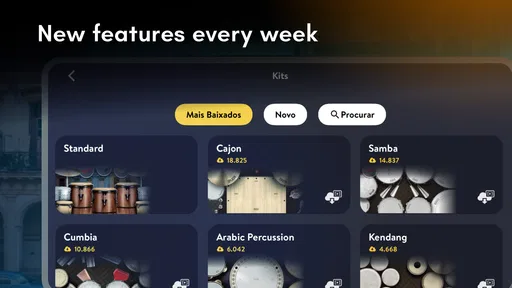
- Includes multiple drum kits for experimenting with different sounds.
- Useful for practicing basic rhythms without needing a physical drum set.
- Simple layout is friendly for beginners and casual players.
- Works well for short practice sessions or spontaneous beat-making.
Cons
- Some advanced drummers may find the available sounds and controls limited.
- Fast rhythms can be difficult because screen space restricts finger placement.
- Audio quality depends heavily on the phone or tablet speakers.
- Ads may interrupt the experience or reduce the sense of immersion.
- Long sessions can become uncomfortable on smaller smartphone screens.













