Xiaomi Home
- 5.64K
- 4.5
- Installs
- 50.00M
- Price
- Free

Screenshots
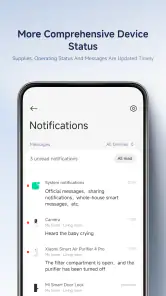
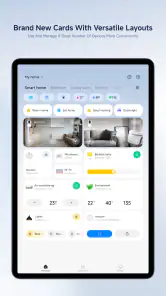
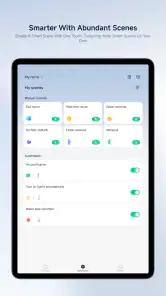
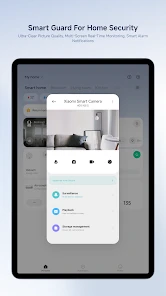
Analysis by Reviewed
I found that the most useful way to judge a smart-home app is not by how many controls it can display, but by what happens when setup does not go smoothly. Xiaomi Home is Xiaomi’s free lifestyle app, developed by Beijing Xiaomi Mobile Software Co.,Ltd, and it puts supported home devices together in one place. Its 4.5 average from around 1.5 million ratings and more than 50 million installs suggest broad appeal, but the day-to-day experience still depends on having compatible devices and a little patience during setup.
Where setup can snag
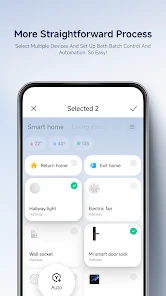
Pairing can feel straightforward when a device is ready to connect, but a failed attempt is where I would slow down rather than repeat the same steps quickly. Check that the device is powered on and in its intended pairing state, then follow the prompts shown in the app. If it does not appear, restarting the pairing process after checking those basics is more useful than assuming the device is faulty. With several products to add, doing them one at a time also makes it easier to spot which step is causing trouble.
Region and account choices are worth treating carefully. Smart-home products can have compatibility limits, so I would check that the device is supported in the app and that the selected region matches the product’s setup instructions before investing time in a long pairing session. That small check can prevent a frustrating loop of searching, restarting, and trying again.
Make the first setup easier
I would prepare before pairing rather than discover compatibility issues after unpacking several products. Check the exact device model and its instructions, make sure you can access the account you plan to use, and add one device at a time. This gives you a clear way to tell whether a problem belongs to a single product or to a setup choice shared by the whole home. It is a little slower at the start, but much easier to troubleshoot than adding everything in one rushed session.
If a product does not show up, I would avoid repeatedly switching account or region settings as a first reaction. Recheck the device’s intended pairing state and the instructions for that model, then try the app’s setup flow again. A region choice can affect which products appear, so changing it casually may create a different problem instead of solving the original one. I find it more useful to make one change at a time and note what happened.
Getting Started with Ease
First things first, setting up the Xiaomi Home app was a breeze! I downloaded it from the app store, and within minutes, I was pairing it with my devices. The user interface is clean and intuitive. It feels like the app holds your hand through the setup process, which is fantastic for someone who’s not super tech-savvy, like myself. You just follow the on-screen instructions, and voila! Your smart devices are ready to dance to your tune.
A Universe of Devices
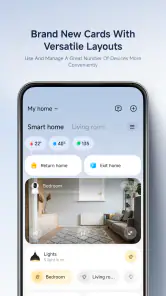
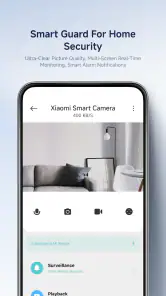
One of the coolest things about this app is the sheer variety of devices it supports. From smart bulbs and cameras to air purifiers and robot vacuums, you name it, and Xiaomi probably has a smart version of it. I was particularly impressed with how seamlessly the app integrates with these devices. You can easily switch between controlling your lights, adjusting your thermostat, or even checking your security camera feeds all from one place.
More From Our News Desk

Weather by Xiaomi Review: Clear at a Glance, Less Clear Up Close

X Under Pressure: Can It Recover When Posting Goes Wrong?

Clash of Clans Is Won Between the Battles

Android Auto Makes the Case for Quieter Car Software

MobiOffice: Transforming Mobile Productivity with Seamless Integration

EA SPORTS FC™ Mobile Soccer: Redefining Mobile Sports Gaming
That range is most valuable when it reduces small daily hassles, rather than simply adding more controls to a screen. For example, if I were leaving home in a hurry, having lights and a vacuum managed from one place could be more convenient than opening a separate app for each product. I would still check that the exact devices I own are supported before building a routine around them; a broad device family does not guarantee that every model behaves the same way.
Automation and Control
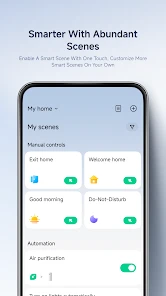
Now, let’s talk about automation. This is where things get exciting. The app allows you to set up custom automations based on your daily routines. For instance, I set my lights to turn on automatically when I get home from work, and let me tell you, it feels like magic every single time. Plus, the app’s ability to create scenes is a game-changer. You can customize your environment with just a tap, whether you want a cozy movie night setting or a bright, energizing morning vibe.
A practical tip is to begin with one simple routine and test it under ordinary conditions before relying on it. A scene you start manually is easier to understand than a chain of automated actions, and it gives you a useful baseline if something later behaves unexpectedly. For a weekday evening, for instance, a single lighting scene can make arriving home easier; adding more devices only makes sense once that first action is dependable. This is a sensible trade-off: automation saves repeated taps, but it also asks you to spend time setting up and checking the behavior.
Connectivity and Compatibility
Another thing worth mentioning is how well the Xiaomi Home app plays with other smart ecosystems. It’s not just limited to Xiaomi devices. It can integrate with Google Assistant and Alexa, making voice control a piece of cake. I love being able to just say, "Hey Google, turn off the lights," and watch it happen without lifting a finger.
For troubleshooting, I would separate an app problem from a device or network problem before changing several settings at once. If a control is unresponsive, first see whether the device itself is powered and reachable, then reopen the app and try the control again. If only one product is affected, focus on that device’s connection and setup; if several are, check the shared connection and try again later. This approach keeps the diagnosis simple and avoids rebuilding working automations unnecessarily.
Voice control is convenient for quick commands, but I would not make it the only way to operate important equipment. Keeping the app available gives you a direct alternative when a spoken command is misunderstood or a voice assistant is not convenient. People who mainly want a single brand’s products managed together may appreciate this setup; those who already rely on another home-control app, or who own devices outside the supported range, may prefer to keep using their existing system rather than duplicate controls.
However, it’s important to note that while the app is incredibly versatile, the initial setup might require some patience, especially if you have a lot of devices. But once you’re over that hurdle, it’s smooth sailing.
When a control stops responding
If one device appears offline or ignores a command, I would first check whether it is powered and whether the issue is limited to that product. Then I would reopen the app and try again, rather than immediately removing the device or recreating a routine. If several devices stop responding together, the shared connection is a more sensible place to investigate than each product separately. This simple distinction can save time and help preserve settings that are otherwise working.
There is also a useful difference between a control that fails once and a routine that repeatedly behaves differently from what you expect. For the first, retrying after checking the device is a reasonable starting point. For the second, simplify the routine and test its parts separately before adding more actions. A smaller setup is easier to understand, especially when more than one person in the household uses it.
Who will get the most from it
I see the strongest fit for someone gradually adding compatible Xiaomi home products and wanting one place for everyday controls, scenes, and routines. It can also suit a household where different device types serve different needs, such as lighting, cleaning, and air care. If you only have one smart device and rarely change its settings, a simpler manufacturer-specific control may be enough. Likewise, people who need a particular device to work with an ecosystem should verify that match before choosing the app as their main hub.
A realistic use case is getting home after work and wanting the room lit without opening multiple controls, then starting a cleaning task from the same general home-management setup. I would keep the first routine modest: choose one action that genuinely saves effort, try it in the conditions where you expect to use it, and only then decide whether more automation is worthwhile. That approach helps reveal whether the app fits your habits instead of turning setup into a project of its own.
Compared with using a separate manufacturer app for each product, a single place for compatible devices can make routine control feel less scattered. The trade-off is that the app’s convenience depends on the devices being supported and on how well they suit the same setup. A home already organized around another ecosystem may be easier to manage there, especially if changing systems would mean maintaining duplicate controls. I would choose the option that matches the equipment already in the home rather than chasing one app for its own sake.
The app is free to download, rated for Everyone, and its current version is 10.9.708, with Android 6.0 as the minimum operating system. It also offers in-app purchases, with listed item prices ranging from $0.99 to $599.99, so I would distinguish the free app itself from any optional purchases before spending. That is especially useful for families or shared households: decide which controls need to be easy for everyone to find, and keep routines simple enough that another person can understand what they do.
When the app may not be the cause
It is tempting to blame the app whenever a smart device fails to respond, but the symptom alone does not tell you where the fault lies. A product that is not powered cannot carry out an app command, and a problem affecting several products at once points toward something they share rather than a single control. I would check the device and connection first, then retry the action in the app. If only one function or product is affected, concentrate on that part of the setup instead of resetting everything.
This matters most when an automation seems unreliable. Before depending on it for a daily task, test the action manually and then test the routine on its own. If manual control works but the routine does not, simplify the routine and check its setup. If manual control also fails, there is little value in rebuilding the automation until the device itself responds. Keeping those steps separate makes it easier to recover without losing a configuration that was already working.
Final Thoughts
In conclusion, the Xiaomi Home app is a powerhouse for anyone looking to dive into the world of home automation. Its user-friendly interface, wide range of compatible devices, and seamless integration with other platforms make it a top contender in the smart home arena. Whether you’re a tech enthusiast or a newbie, this app offers something for everyone. So, if you’re ready to transform your home into a smart haven, give the Xiaomi Home app a try. Trust me, you won’t regret it.
My recommendation comes with one practical condition: check compatibility first, add devices in manageable steps, and test each routine before depending on it. For someone building a connected home around supported products, that modest setup effort can pay off in a more convenient daily workflow. For someone who wants a completely hands-off setup or expects every smart device to work together automatically, a narrower system that already matches their equipment may be the better choice.
Xiaomi Home Frequently Asked Questions
Does Xiaomi Home have an age restriction?
Xiaomi Home is rated for Everyone, so its content rating does not set an age restriction for general audiences. It is a lifestyle app for managing Xiaomi Home, and the devices or features you use with it may shape the experience. If the app will be used by a child, an adult should help with account setup, connected devices, and any purchase prompts.
How popular is Xiaomi Home?
Xiaomi Home has reached over 50 million installs and has an average rating of 4.5 from around 1.5 million ratings. Those figures suggest that many people use the app, but ratings reflect individual experiences and do not guarantee that it will work equally well with every phone or device. Check that your intended devices are supported before relying on it.
What is the latest version of Xiaomi Home, and when was it released?
Xiaomi Home was released on February 28, 2016, and its current version is 10.9.708. The app may receive updates over time, so it is sensible to check the version available for your phone before installing. Keeping apps updated can help you get current changes and maintain compatibility with your operating system and connected devices.
Is Xiaomi Home free to download, and are there optional purchases?
Xiaomi Home is free to download and is listed for everyone. The app also includes in-app purchases, so some optional items may cost money. You can install it to explore its basic experience, but check the purchase details shown in the app before confirming any payment. This helps you understand what is included and avoid buying something unintentionally.
Who makes Xiaomi Home, and is it the official app?
Xiaomi Home is the official Android app for Xiaomi Home, developed by Beijing Xiaomi Mobile Software Co.,Ltd. It is a lifestyle app intended for people who want to use Xiaomi Home with compatible devices. When downloading, check the developer name so you select the official app rather than an unrelated application with a similar title.
Pros
- Easy-to-use interface
- Extensive device compatibility
- Customizable automation options
- Real-time monitoring feature
- Secure and private data handling
Cons
- Occasional connectivity issues
- Requires Xiaomi account
- Limited third-party integrations
- Can be power-intensive
- In-app purchases for some features
- Category
- Lifestyle
- Version
- 10.9.708